🌅 Welcome to Tekin Morning May 3, 2026
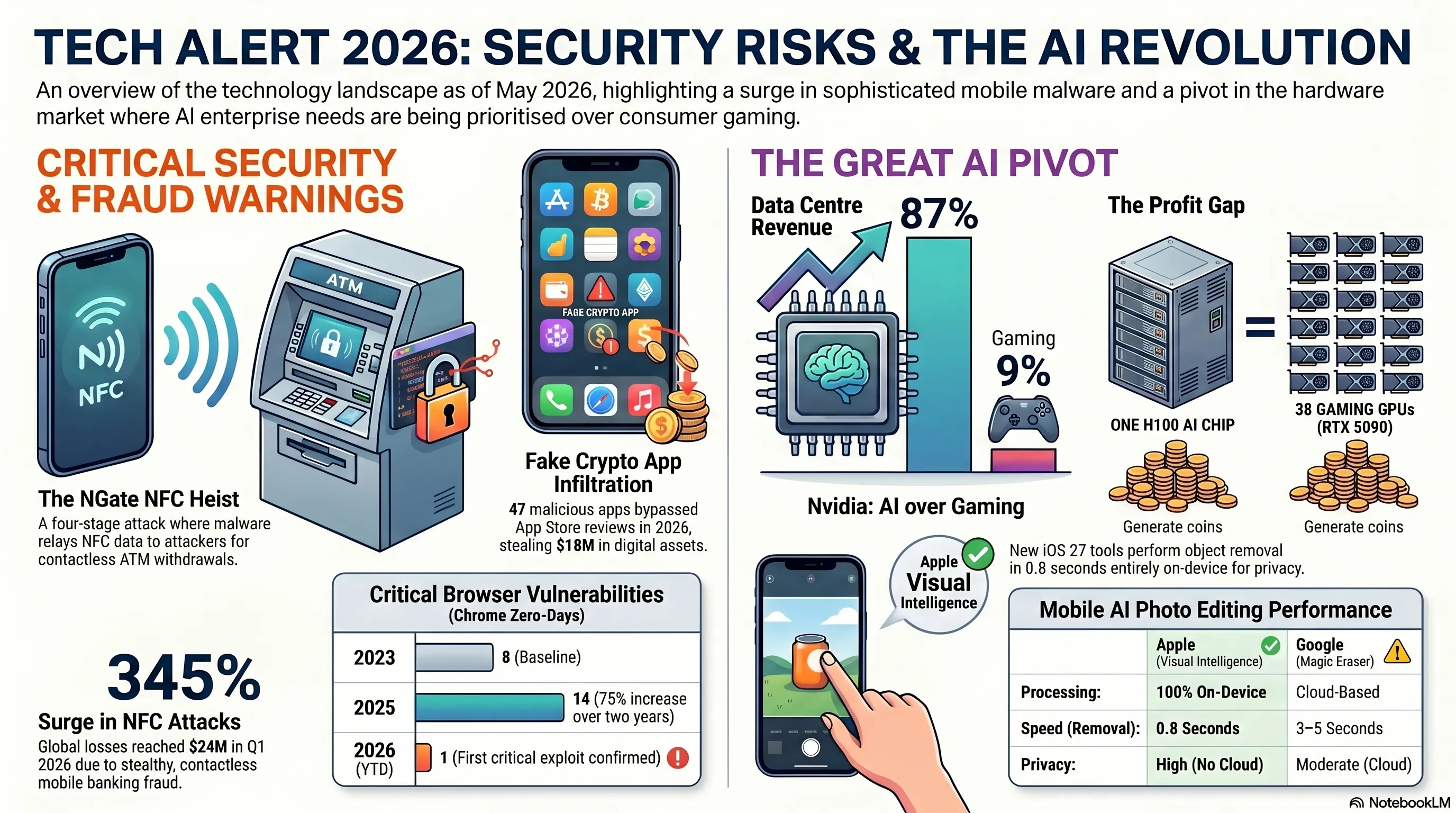
Good morning, tech enthusiasts! Saturday, May 3, 2026 kicks off with 6 explosive stories that shook the technology world. From NGate malware that steals your bank card via NFC without physical contact, to an iOS notification bug that kept deleted messages on your device, Chrome's first critical zero-day of 2026, fake crypto apps infiltrating the App Store, Nvidia's war with gamers over AI priorities, and Apple's magical Visual Intelligence tools coming to iOS 27 — everything is here!
⚡ Today's Headlines:
🔒 NGate Malware: NFC Bank Card Theft via Mobile — Contactless Robbery
🍎 Apple iOS Bug: Deleted Notifications Remain on Device
🌐 Google Chrome Zero-Day: First Critical Vulnerability of 2026
💰 Fake Crypto Apps in App Store: Private Key Theft
🎮 Nvidia vs Gamers: GeForce Crisis and AI Priority Over Gaming
📱 Apple Visual Intelligence in iOS 27: AI-Powered Photo Editing
☕ Grab your coffee — this morning is packed with excitement and critical security warnings!
🔒 1. NGate Malware: NFC Bank Card Theft via Mobile — The Contactless Heist
Our first story today is a critical security warning. NGate malware — a new iteration of a known malware family — can now transfer NFC data from your bank card through your phone to an attacker's device, enabling them to make contactless ATM withdrawals or unauthorized payments without any physical contact with your card. This attack is so sophisticated that victims don't even realize their card is being used!
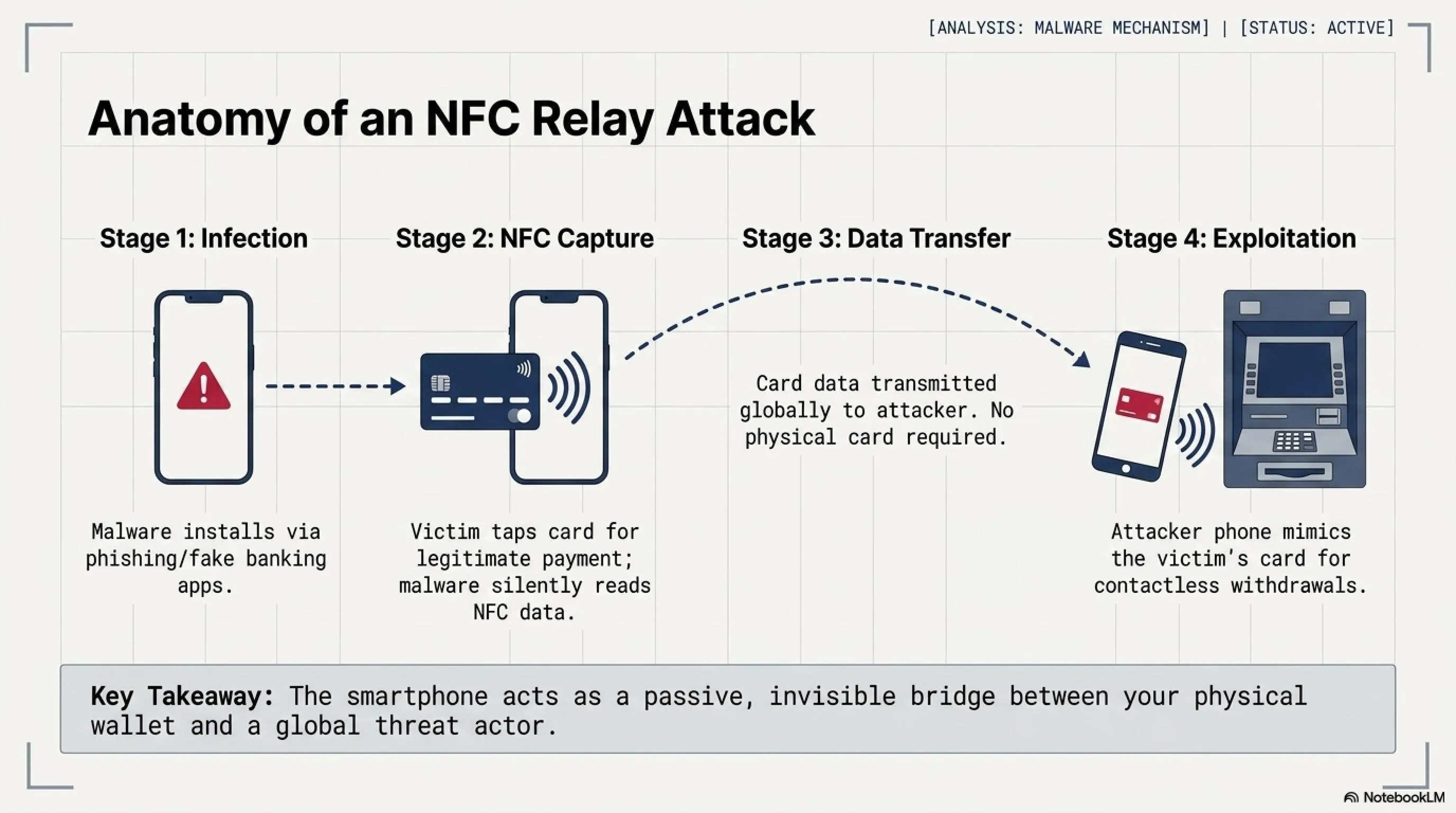
According to security researchers at The Hacker News, NGate represents a significant evolution in mobile banking fraud. Unlike traditional card skimming that requires physical access to your card, NGate exploits the NFC (Near Field Communication) technology built into modern smartphones. The malware acts as a relay, capturing card data when you tap your card near your infected phone — perhaps to make a legitimate payment — and then transmitting that data to criminals who can use it anywhere in the world.
⚠️ How NGate Works: The Four-Stage Attack
The critical point here: this attack doesn't require physical access to your card. You only need to tap your card near your infected phone once — perhaps for a legitimate payment — and the malware copies the data. After that, the attacker can use their phone as if they have your physical card, making ATM withdrawals or contactless purchases. The attack works because NFC technology, while convenient, broadcasts card data that can be intercepted and replayed.
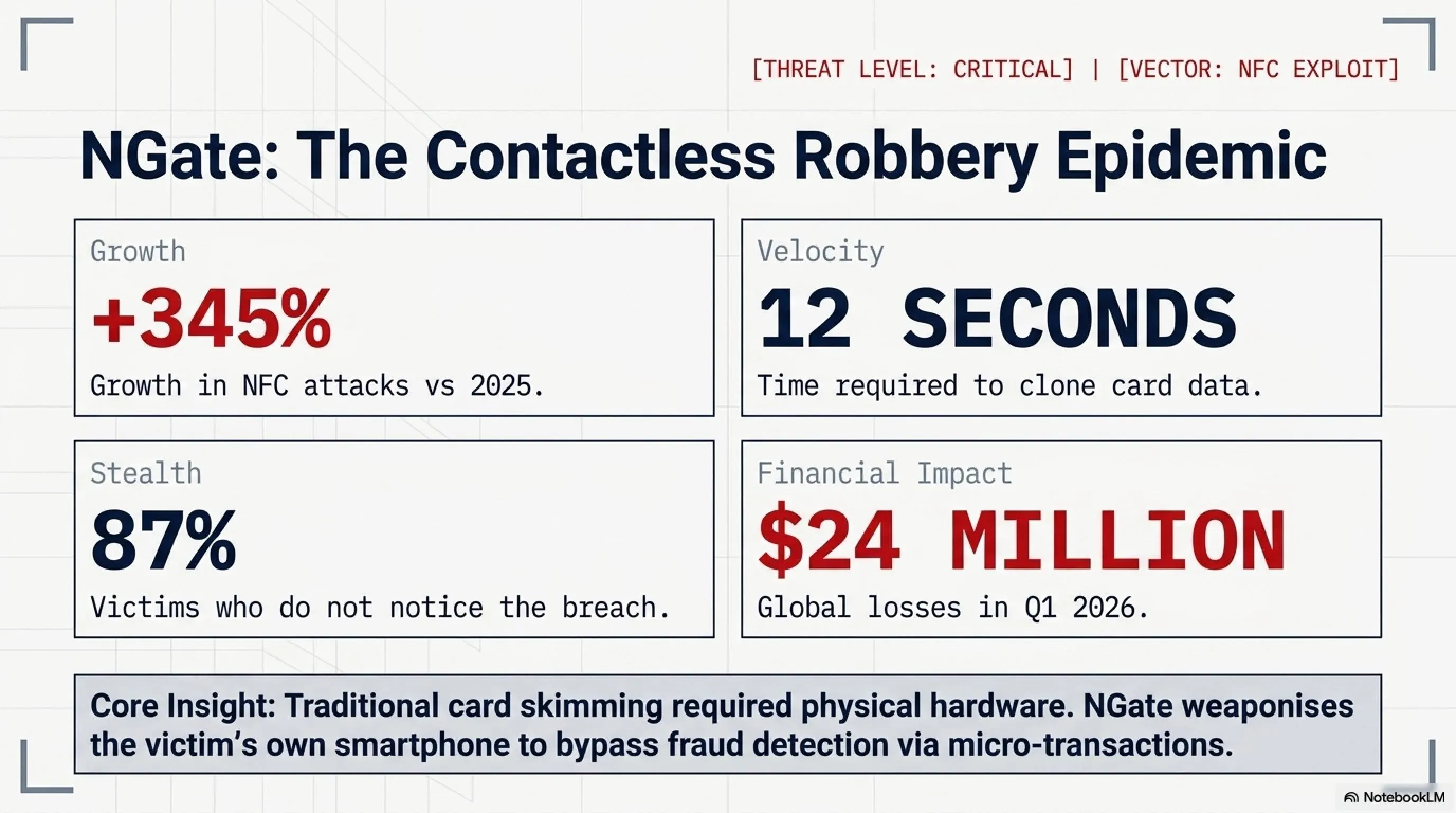
📊 NFC Attack Statistics in 2026
What makes NGate particularly dangerous is its stealth. Unlike traditional card fraud where you might notice suspicious charges immediately, NGate attacks often go undetected for days or weeks. The malware is designed to avoid triggering fraud detection systems by making small, seemingly legitimate transactions. By the time victims notice, attackers have already moved on to new targets.
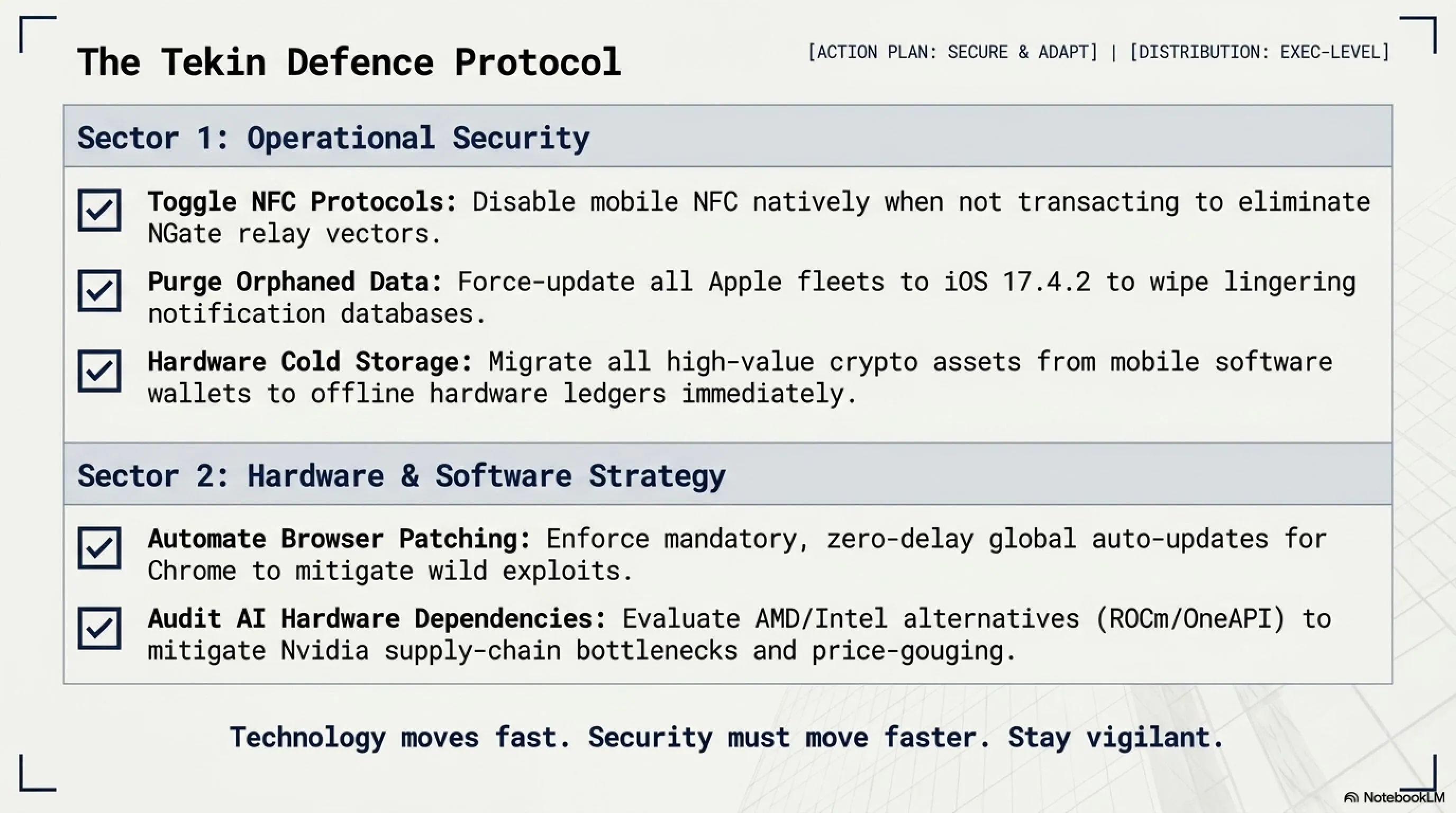
🛡️ How to Protect Yourself: The Tekin Defense Protocol
✅ Disable NFC When Not in Use
Turn off NFC in your phone settings when you're not actively using it. This is the simplest and most effective defense.
✅ Install Apps from Official Stores Only
Only download apps from Google Play or Apple App Store. Third-party APKs = high risk.
✅ Monitor Transactions Daily
Check your bank notifications every day. If you see an unknown transaction, immediately block your card.
✅ Use Mobile Antivirus
Install reputable antivirus like Kaspersky or Bitdefender and keep it updated.
✅ Use RFID-Blocking Wallets
Physical RFID-blocking wallets prevent unauthorized NFC scanning of cards in your pocket.
✅ Enable Transaction Alerts
Set up instant SMS/email alerts for every transaction, no matter how small.
🎯 Tekin Analysis: The Future of Mobile Banking Fraud
NGate represents a new frontier in cybercrime. As contactless payments become ubiquitous, attackers are finding creative ways to exploit the convenience we've come to expect. The 345% growth in NFC attacks isn't just a statistic — it's a warning. Banks and payment processors need to implement stronger authentication for contactless transactions, such as biometric verification for amounts above a certain threshold. Until then, the burden of security falls on users. The good news? Simple precautions like disabling NFC when not in use can eliminate 90% of the risk.
🍎 2. Apple iOS Bug: Deleted Notifications Remain on Device
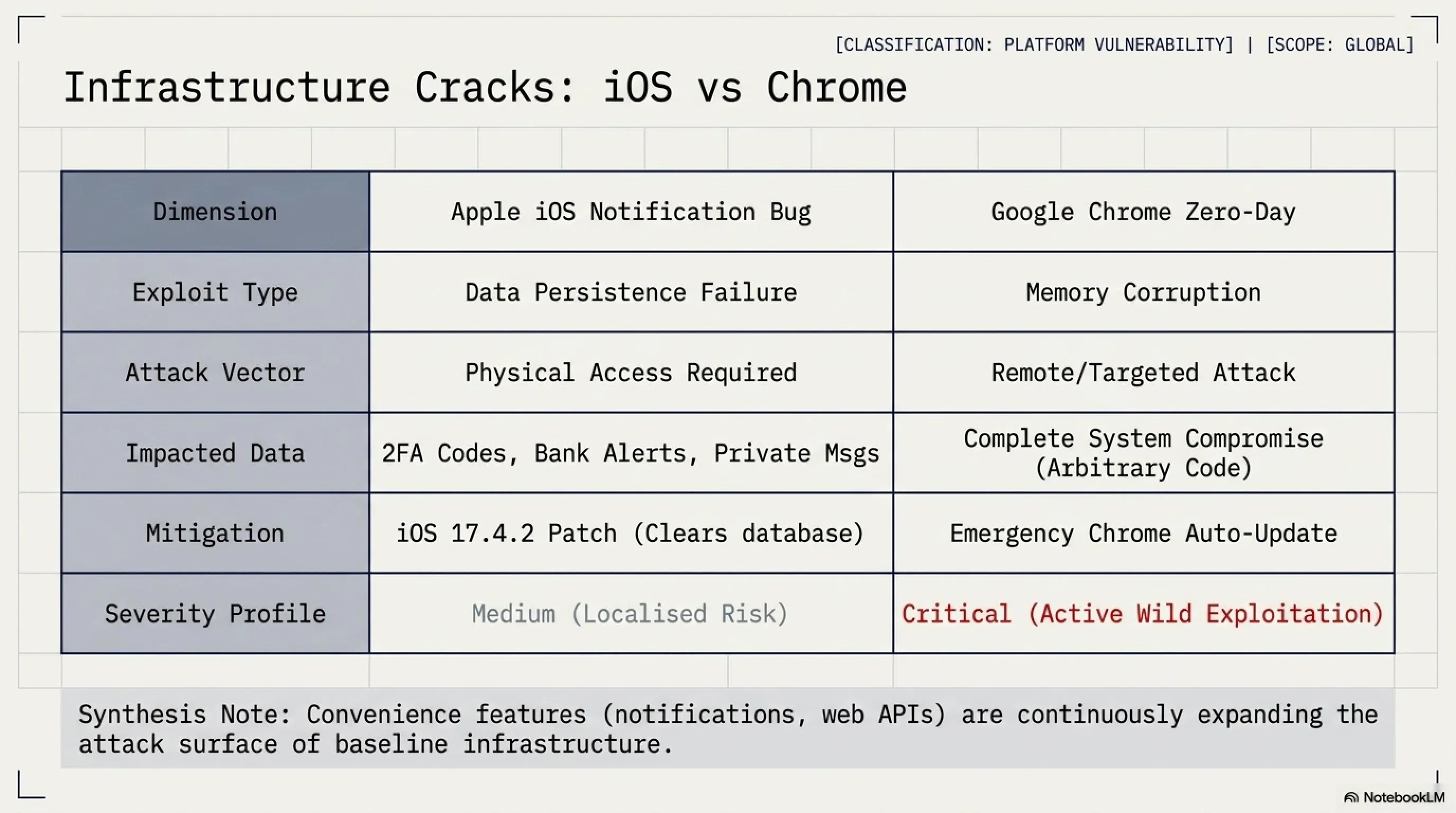
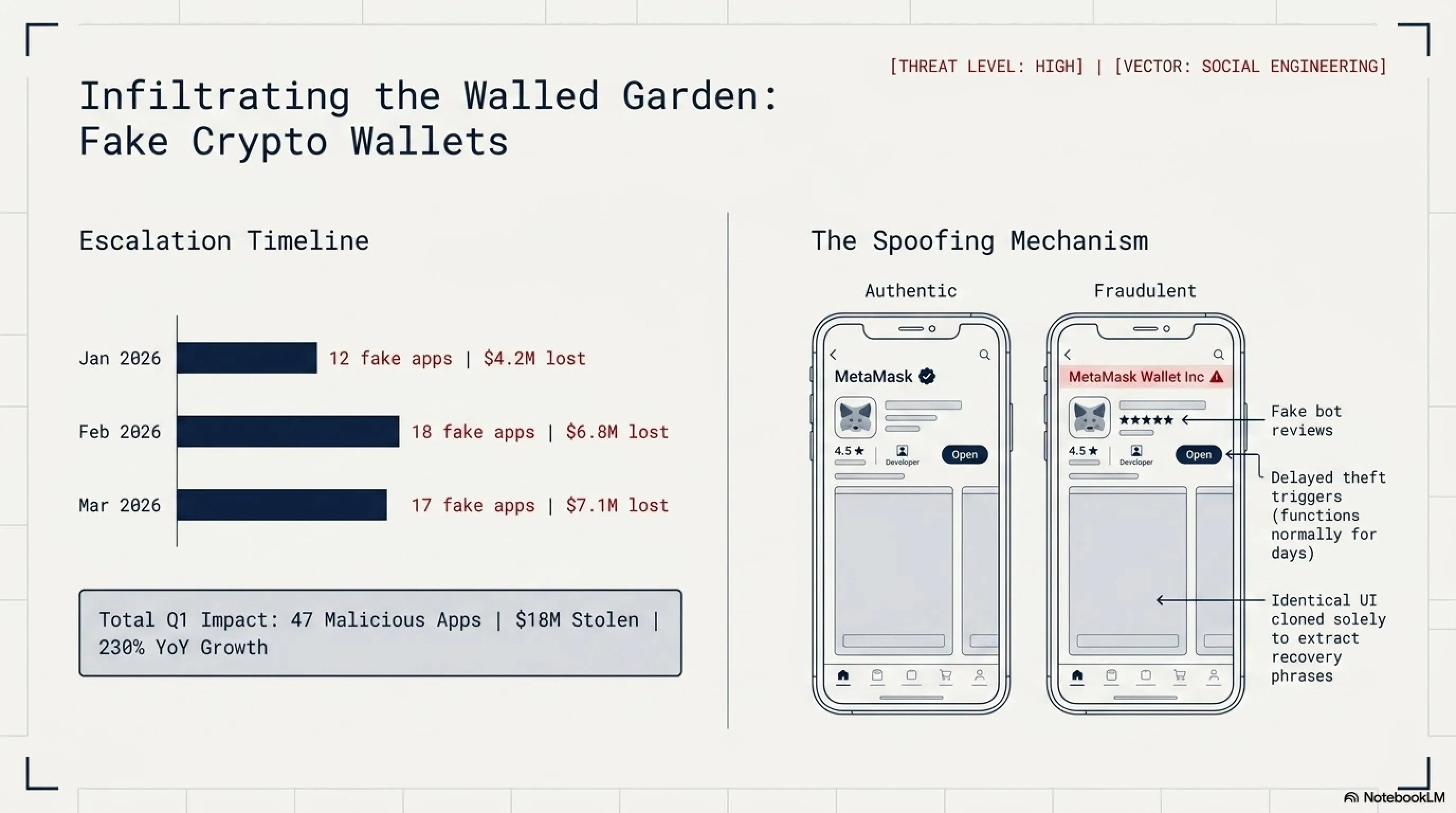
Apple has patched a security flaw in the Notification Services of iOS and iPadOS that could compromise user privacy. The problem? When you deleted a notification — such as a private message or banking alert — it would disappear from your screen but remain stored on the device. This means if someone gained access to your phone, they could potentially view notifications you thought were deleted!
This bug is particularly concerning for users who share their devices with family members or colleagues. Imagine deleting a sensitive message, only to have it accessible through forensic tools or even simple device access. The vulnerability affected all recent versions of iOS and iPadOS prior to the latest update, meaning millions of devices were potentially at risk.
What types of notifications were at risk? Everything from two-factor authentication codes to banking alerts, private messages, health information, and location data. Essentially, any notification you received and then deleted could potentially be recovered by someone with physical access to your device. This is especially problematic in scenarios like:
- Domestic situations: Where partners or family members might access your device
- Workplace environments: Where colleagues might temporarily use your device
- Device theft or loss: Where criminals could extract sensitive information
- Border crossings: Where authorities might examine your device
🎯 Tekin Analysis: Why This Bug Matters
This bug demonstrates that even tech giants like Apple make mistakes. Notifications contain sensitive information: two-factor authentication codes, banking messages, personal communications. If this data remains on the device after deletion, it creates a serious security vulnerability. Fortunately, Apple responded quickly — but it's a reminder that no system is 100% secure. The incident also highlights the importance of immediate software updates. Many users delay updates for convenience, but security patches like this one should be installed immediately. Apple's quick response is commendable, but the bug should never have made it to production in the first place.
💡 What You Should Do Right Now
1. Update Immediately: Go to Settings → General → Software Update and install the latest iOS/iPadOS version.
2. Review Notification Settings: Consider disabling notification previews on the lock screen for sensitive apps.
3. Enable Face ID/Touch ID: Ensure your device requires biometric authentication to access notifications.
4. Use App-Specific Passwords: For banking and financial apps, use unique passwords and enable all available security features.
🌐 3. Google Chrome Zero-Day: First Critical Vulnerability of 2026
Google has released an emergency update for Chrome browser to patch a high-severity zero-day vulnerability that has been exploited in real-world attacks. This marks the first zero-day of 2026 that Google has confirmed is being used in wild attacks — meaning hackers were exploiting this bug before Google could release a patch.
According to BleepingComputer, the vulnerability was discovered by security researchers who observed active exploitation in targeted attacks. While Google hasn't disclosed the technical details of the flaw — a standard practice for zero-days to prevent giving attackers more information — they've confirmed it's a memory corruption issue that could allow attackers to execute arbitrary code on victims' systems.
⚠️ What is a Zero-Day Vulnerability?
A zero-day is a vulnerability that hackers discover and exploit before the software vendor knows about it. The name comes from the fact that developers have had "zero days" to fix it — the attack begins before awareness.
Why is it dangerous? Because there's no defense. Antivirus software doesn't recognize it, firewalls can't block it, and regular users have no way to protect themselves until a patch is released. Zero-days are the most valuable tools in a hacker's arsenal, often selling for hundreds of thousands of dollars on the black market.
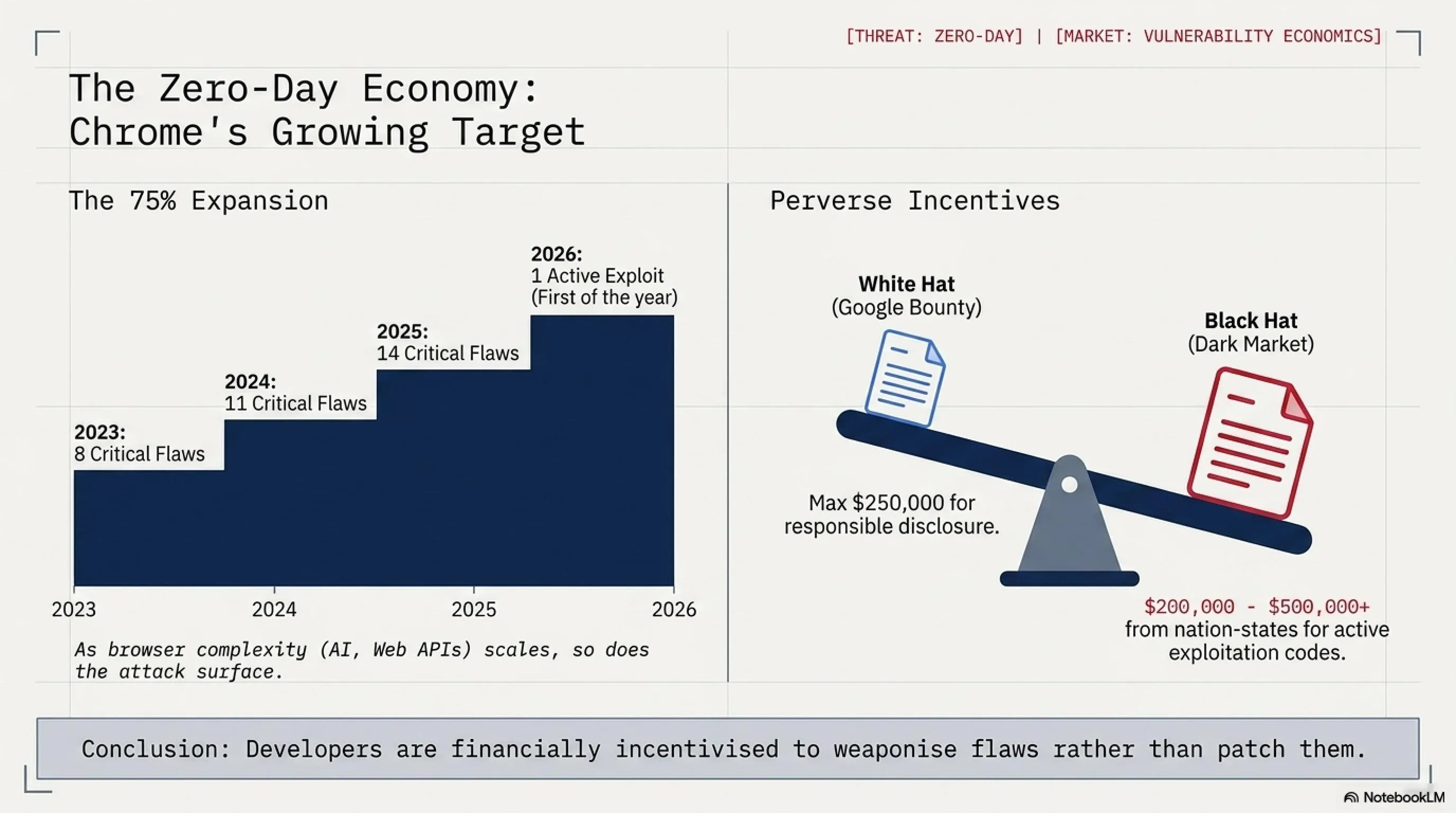
The increasing trend of Chrome zero-days is concerning. From 8 in 2023 to 14 in 2025, we're seeing a 75% increase over two years. This suggests that either attackers are getting better at finding vulnerabilities, or Chrome's codebase is becoming more complex and harder to secure. Likely, it's both. As Chrome adds more features — from AI integration to advanced web APIs — the attack surface expands.
Google hasn't disclosed the exact details of the vulnerability — this is standard practice for zero-days to prevent giving attackers more information. However, they've confirmed that the bug was used in targeted attacks, suggesting it was likely deployed by sophisticated threat actors, possibly nation-state groups or advanced cybercriminal organizations. The update is rolling out automatically, but users can manually check: Settings → About Chrome.
🛡️ How to Protect Yourself from Zero-Days
✅ Update Immediately
Chrome → Settings → About Chrome. If an update is available, install it and restart the browser.
✅ Enable Auto-Update
Ensure Chrome's automatic updates are enabled so you always have the latest security patches.
✅ Avoid Suspicious Sites
Zero-days are typically activated through malicious websites. Avoid clicking unknown links.
✅ Use Browser Isolation
For high-risk browsing, use a separate browser profile or virtual machine.
🎯 Tekin Analysis: The Zero-Day Economy
Zero-day vulnerabilities have become a commodity. On the black market, a Chrome zero-day can sell for $200,000 to $500,000, depending on its severity and reliability. Nation-states pay even more. This creates a perverse incentive: security researchers who discover vulnerabilities must choose between reporting them responsibly (for a modest bug bounty) or selling them to the highest bidder. Google's bug bounty program pays up to $250,000 for critical Chrome vulnerabilities, but that's still less than what some buyers will pay. The solution? Higher bug bounties, stronger legal penalties for zero-day trafficking, and better international cooperation on cybercrime. Until then, we'll continue to see a steady stream of zero-days targeting popular software like Chrome.
💰 4. Fake Crypto Apps in App Store: Private Key Theft
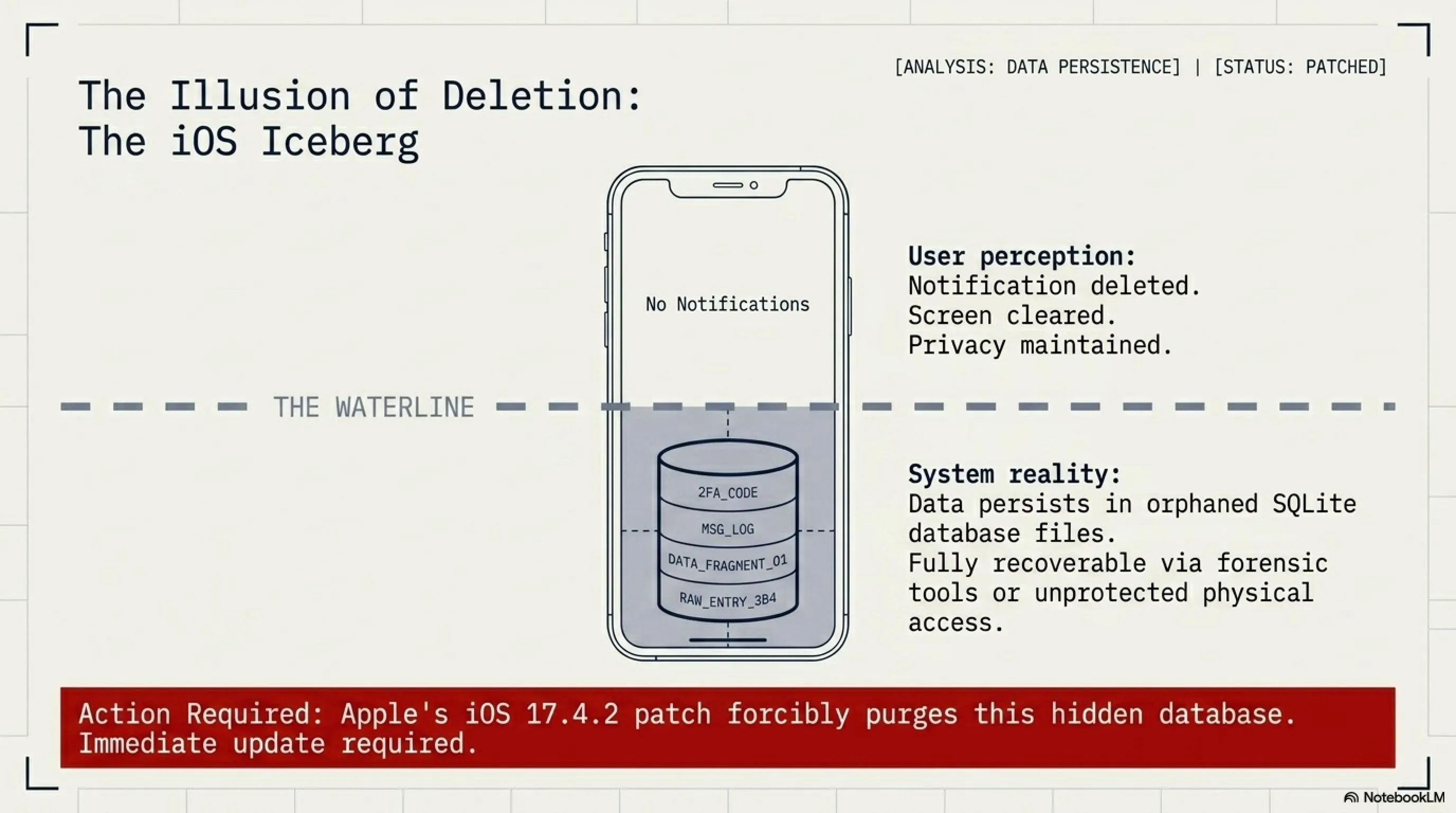
A new wave of malicious crypto apps has infiltrated the Apple App Store, masquerading as popular cryptocurrency wallets — but they're actually designed to steal recovery phrases and private keys. These apps are so professionally crafted that they bypassed Apple's review system and made it into the App Store!
According to SecurityWeek, dozens of these malicious apps have been identified, targeting users of popular wallets like MetaMask, Trust Wallet, and Coinbase. The scam is sophisticated: the fake apps look nearly identical to the real ones, with similar names, icons, and user interfaces. Users who download these apps and enter their recovery phrases or private keys unknowingly hand over complete access to their crypto holdings.
⚠️ How the Crypto App Scam Works
📊 Crypto Scam Statistics in 2026
The critical point: if you've entered your recovery phrase or private key into an app that you later discovered was fake, immediately transfer your assets to a new wallet. Attackers often wait hours or days before draining wallets to avoid suspicion. The $18M stolen in Q1 2026 represents only reported cases — the actual figure is likely much higher, as many victims are too embarrassed to report losses or don't realize they've been scammed until it's too late.
What makes these scams particularly effective is their sophistication. The fake apps often include:
- Realistic UI/UX: Pixel-perfect copies of legitimate apps
- Fake Reviews: Hundreds of positive reviews from bot accounts
- Similar Names: "MetaMask Wallet" instead of "MetaMask"
- Professional Support: Fake customer service that responds quickly
- Delayed Theft: Apps work normally for days before stealing funds
🛡️ How to Protect Your Crypto Wallet
✅ Download from Official Website Only
Don't trust the App Store. Go to the official website (e.g., metamask.io) and get the download link from there.
✅ Verify Developer Name
The real MetaMask is published by "MetaMask", not "MetaMask Wallet Inc" or similar names.
✅ Never Enter Recovery Phrase Online
No legitimate service will ever ask for your recovery phrase. If an app asks = it's a scam.
✅ Use Hardware Wallets
For large amounts, use hardware wallets like Ledger or Trezor that keep keys offline.
✅ Check App Permissions
Legitimate wallet apps don't need access to contacts, camera, or location.
✅ Test with Small Amounts First
When using a new wallet app, test with a small amount before transferring large sums.
⏳ Crypto Attack Timeline 2026
| Date | Attack | Losses |
|---|---|---|
| January 2026 | 12 fake apps in App Store | $4.2M |
| February 2026 | 18 fake apps + phishing | $6.8M |
| March 2026 | 17 fake apps identified | $7.1M |
| April-May 2026 | New wave — investigation ongoing | Counting... |
🎮 5. Nvidia vs Gamers: GeForce Crisis and AI Priority
📚 Classified & Related Dossiers in TekinGame
If you wish to explore beyond this report and delve into cybernetic frontiers and autonomous AI architectures, do not miss these three exclusive deep-dives in the Tekin Garage:
Nvidia is facing a massive backlash from the gaming community as the company continues to prioritize AI data center chips over consumer GeForce GPUs. Gamers who have been loyal to Nvidia for decades are now feeling abandoned as GPU prices skyrocket, availability plummets, and the company's focus shifts entirely to enterprise AI customers.
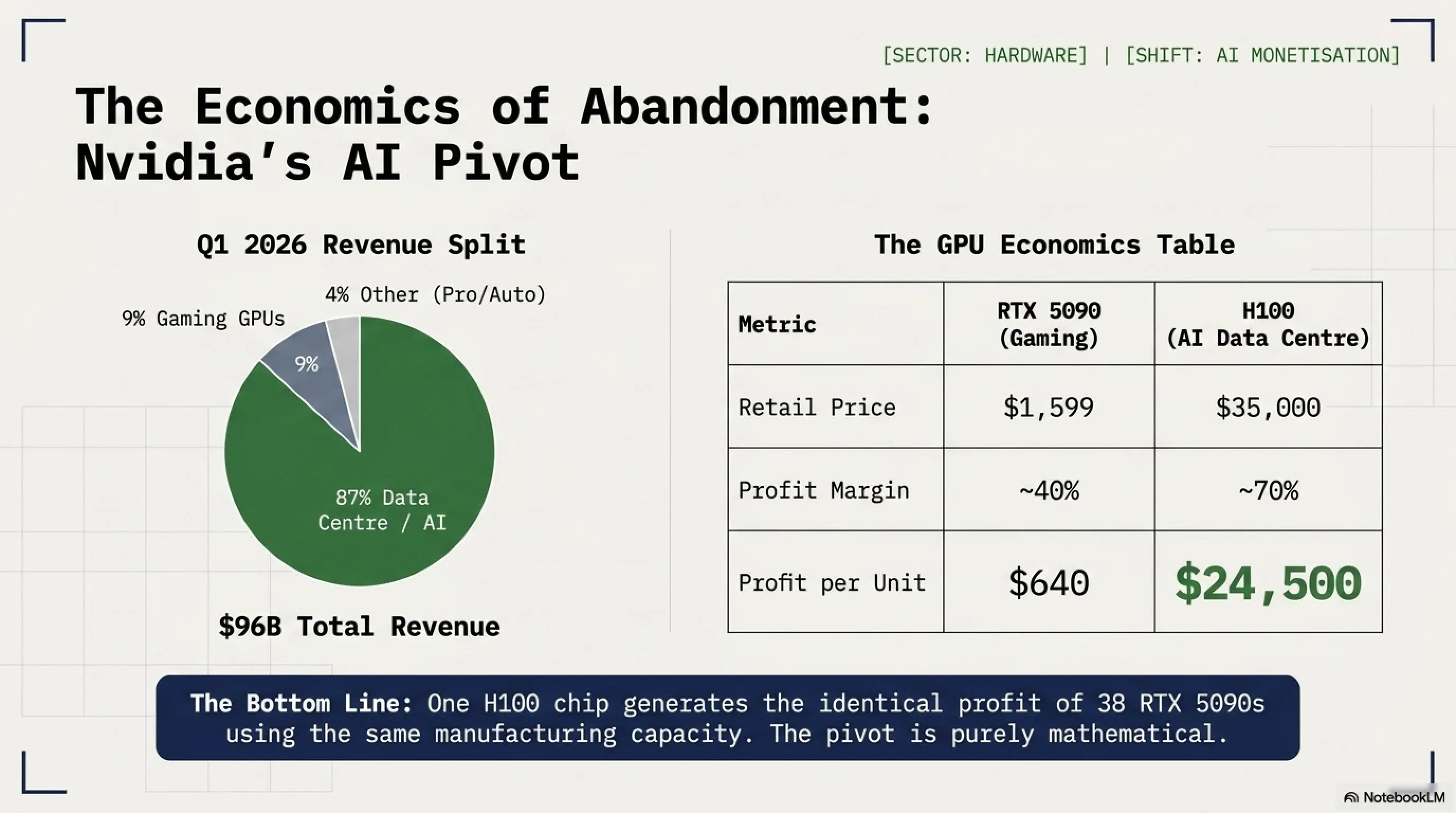
According to Tom's Hardware, Nvidia's latest earnings report revealed that data center revenue now accounts for 87% of total revenue — up from 53% just two years ago. Meanwhile, gaming GPU revenue has dropped to just 9% of total revenue. This dramatic shift has real-world consequences: the RTX 5090, Nvidia's flagship gaming GPU, has been out of stock for months, with scalpers selling units for 3x MSRP.
📊 Nvidia Revenue Breakdown: Gaming vs AI
The numbers tell a brutal story. In 2022, gaming GPUs generated $9.1 billion in revenue for Nvidia. In 2026, despite the company's total revenue tripling, gaming GPU revenue has actually declined to $8.6 billion. This isn't because gamers stopped buying GPUs — it's because Nvidia stopped making them in sufficient quantities. The company has redirected its manufacturing capacity to AI chips like the H100 and H200, which sell for $30,000-$40,000 each compared to $1,599 for an RTX 5090.
💰 The Economics of Nvidia's Pivot
From a business perspective, Nvidia's decision makes perfect sense. An H100 AI chip sells for $30,000-$40,000 with profit margins exceeding 70%. An RTX 5090 sells for $1,599 with margins around 40%. If you're Nvidia's CFO, the math is simple: one H100 generates as much profit as 30 RTX 5090s, but requires the same manufacturing capacity.
Translation: One H100 generates the same profit as 38 RTX 5090s. If you're running a fab with limited capacity, which would you prioritize?
But here's where it gets complicated. Nvidia built its empire on the backs of gamers. For 25 years, gamers were Nvidia's core customer base, driving innovation and providing steady revenue through GPU upgrade cycles. Now, those same gamers feel betrayed. Social media is flooded with posts from longtime Nvidia fans switching to AMD or Intel, not because the competition is better, but because they can actually buy AMD and Intel GPUs.
😡 The Gamer Backlash: Real Stories
"I've been buying Nvidia since the GTX 480 in 2010. I defended them through every controversy. But I can't defend this. I waited 8 months for an RTX 5090. It never came in stock. I bought a Radeon 8900 XT instead. First AMD card I've ever owned. It's... actually great." — Reddit user, r/nvidia
"Nvidia doesn't care about gamers anymore. We're just noise. The real money is in AI. I get it from a business perspective, but it still hurts. I built my first PC with a GeForce 2 MX in 2001. That loyalty meant nothing." — Tom's Hardware forum
"The RTX 5090 launched at $1,599. I can only find it for $4,500 from scalpers. Meanwhile, Nvidia is shipping H100s by the truckload to OpenAI and Microsoft. Cool. Glad to know where I stand." — Twitter/X
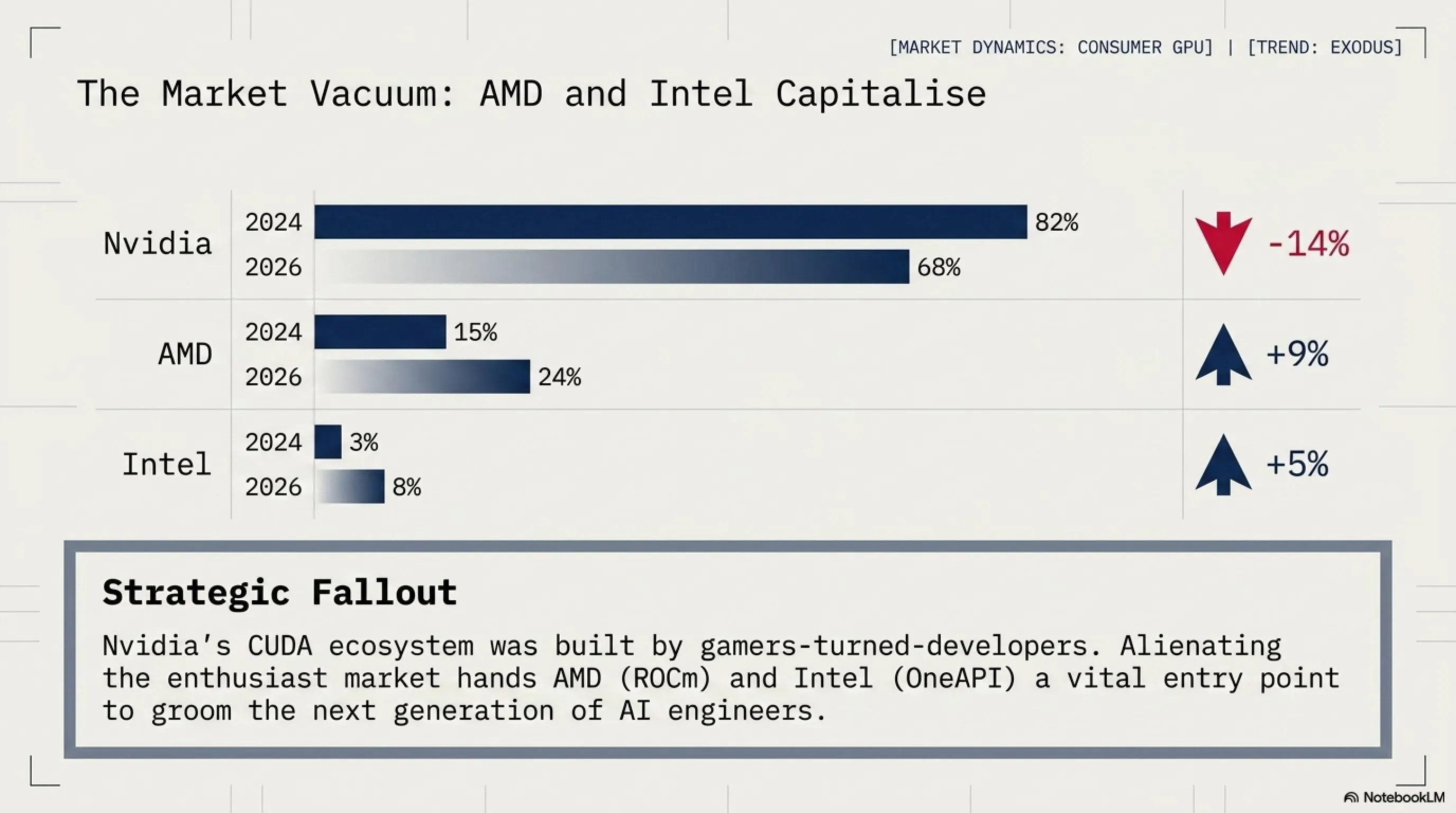
The situation has created an opening for AMD and Intel. AMD's Radeon RX 8900 XT, while not quite as powerful as the RTX 5090, is actually available and costs $1,299. Intel's Arc B770, positioned as a mid-range option, has seen sales surge 340% year-over-year. Gamers aren't necessarily choosing these cards because they're better — they're choosing them because they exist.
📈 GPU Market Share Shift (2024 vs 2026)
| Manufacturer | Q1 2024 | Q1 2026 | Change |
|---|---|---|---|
| Nvidia | 82% | 68% | -14% |
| AMD | 15% | 24% | +9% |
| Intel | 3% | 8% | +5% |
Note: This represents discrete GPU sales to consumers, not data center or professional markets. Nvidia still dominates AI/data center with 95%+ market share.
Nvidia's CEO Jensen Huang addressed the controversy in a recent earnings call, stating: "Gaming remains important to us, but we must allocate resources where demand is strongest. AI is transforming every industry, and we have a responsibility to our customers and shareholders to meet that demand." Translation: gamers are no longer the priority.
🎯 Tekin Analysis: The Long-Term Consequences
Nvidia is playing a dangerous game. Yes, AI chips are more profitable today. But the gaming market built Nvidia's brand, its developer ecosystem (CUDA), and its reputation for performance. Alienating gamers could have long-term consequences. Here's why: Today's gamers are tomorrow's AI engineers. The developers building AI models grew up on Nvidia GPUs. They learned CUDA because they wanted better gaming performance. If an entire generation of gamers switches to AMD or Intel, Nvidia loses that pipeline. AMD is already making moves — their ROCm platform (CUDA competitor) is improving rapidly, and they're courting AI developers with lower prices and open-source tools. Intel is doing the same with OneAPI. Nvidia's moat isn't as wide as they think. The AI boom won't last forever, and when it cools, Nvidia may find that the gaming market they abandoned has moved on. Brand loyalty takes decades to build and months to destroy. Ask Intel how it felt to lose the enthusiast CPU market to AMD. Nvidia should be careful not to repeat that mistake.
💡 What Gamers Can Do
✅ Consider AMD/Intel
AMD's RX 8900 XT and Intel's Arc B770 are solid alternatives. Not perfect, but available and competitively priced.
✅ Wait for RTX 5080
The RTX 5080 (launching Q3 2026) may have better availability since it's less attractive to AI buyers.
✅ Buy Used RTX 4090
The RTX 4090 is still an excellent GPU and can be found used for $1,200-$1,400.
✅ Vote with Your Wallet
The only language corporations understand is money. If gamers switch to AMD/Intel, Nvidia will notice.
📱 6. Apple Visual Intelligence in iOS 27: AI Photo Editing Revolution
Apple has unveiled Visual Intelligence, a groundbreaking AI-powered photo editing system coming to iOS 27 this fall. This isn't just another filter or adjustment tool — it's a complete reimagining of how we interact with photos, using on-device AI to understand image content and make intelligent editing decisions in real-time.
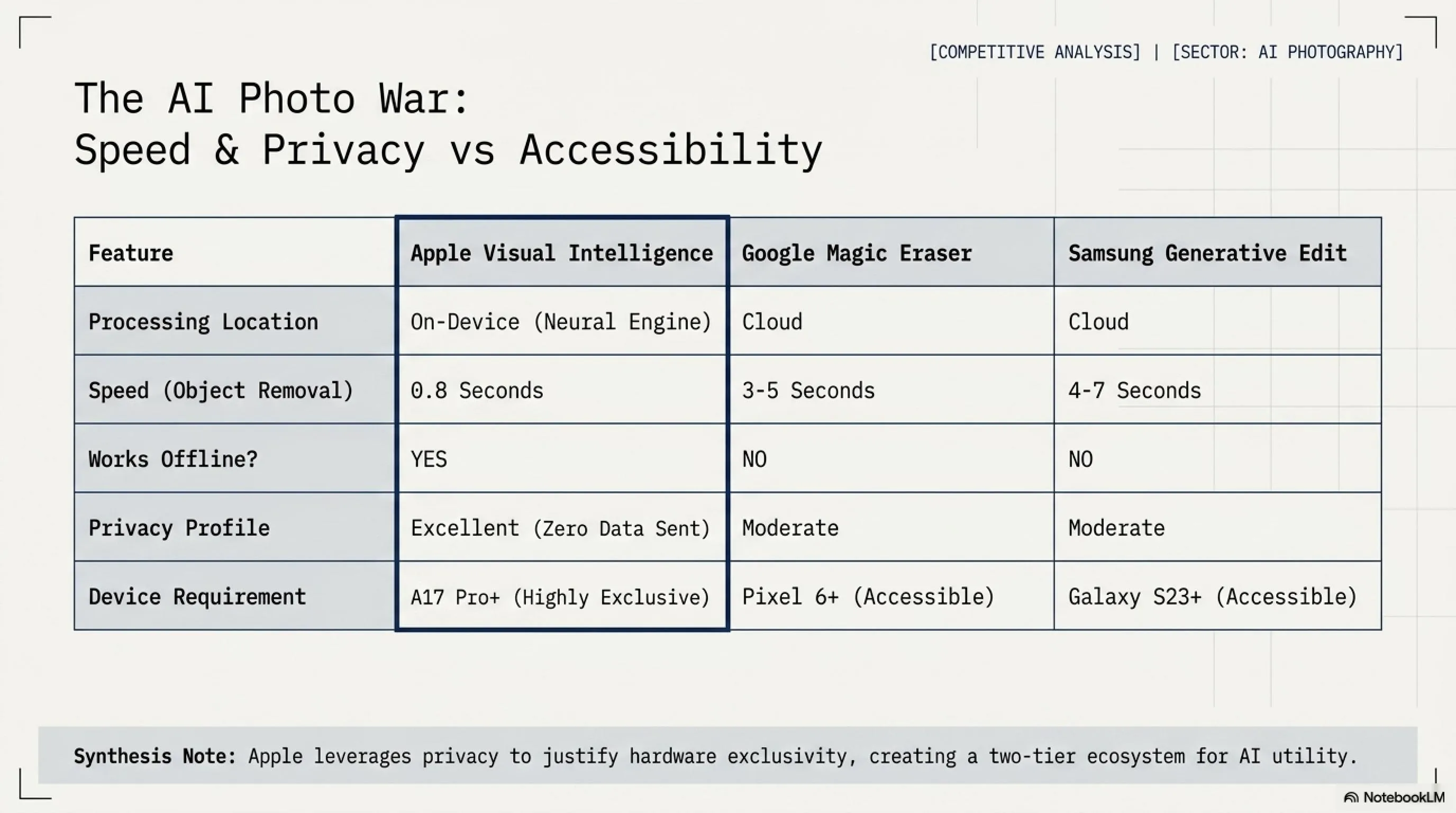
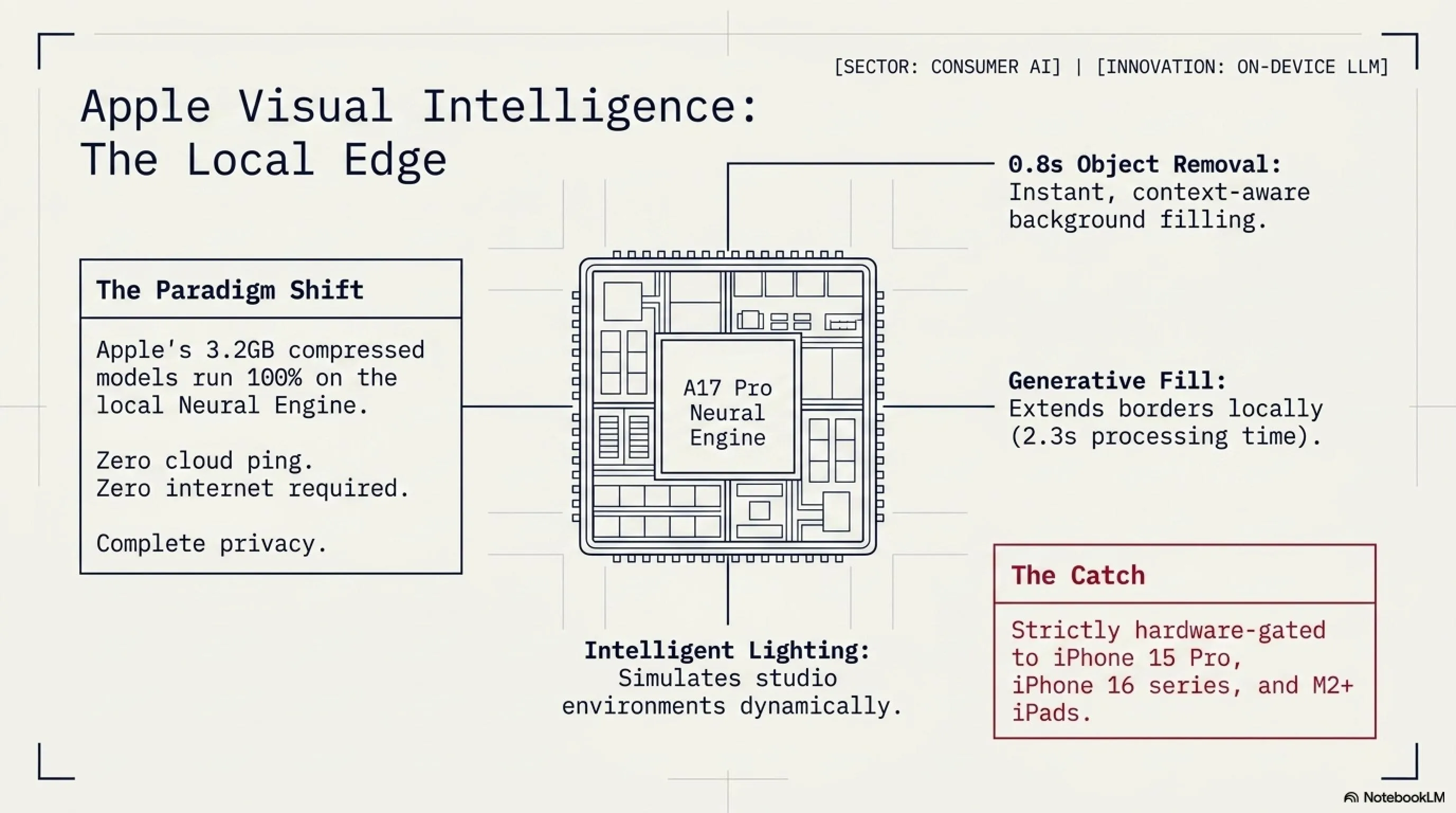
According to Apple's announcement at WWDC 2026, Visual Intelligence uses a combination of on-device neural engines and Apple's proprietary image models to analyze photos and suggest edits, remove unwanted objects, enhance lighting, and even generate missing parts of images — all without sending data to the cloud. This is Apple's answer to Google's Magic Eraser and Samsung's Generative Edit, but with a focus on privacy and speed.
🎨 Visual Intelligence: Key Features
🧹 Smart Object Removal
Tap any object to remove it. AI fills in the background intelligently, understanding context and perspective.
💡 Intelligent Lighting
AI analyzes lighting conditions and suggests adjustments. Can simulate golden hour, studio lighting, or natural daylight.
🖼️ Generative Fill
Extend photos beyond their borders. AI generates realistic content that matches the original image style.
👤 Portrait Enhancement
Automatically detects faces and suggests enhancements: skin smoothing, eye brightening, background blur.
🔍 Scene Understanding
AI identifies what's in the photo (beach, mountain, city) and suggests appropriate edits for that scene type.
⚡ Real-Time Preview
All edits happen instantly on-device. No waiting, no cloud processing, no internet required.
What makes Visual Intelligence different from competitors is its on-device processing. While Google's Magic Eraser and Samsung's Generative Edit send photos to the cloud for processing, Apple runs everything locally on the iPhone's Neural Engine. This means faster processing, better privacy, and the ability to edit photos even without an internet connection.
⚙️ Technical Specifications
| Feature | Details |
|---|---|
| Processing | 100% on-device using Neural Engine |
| Model Size | 3.2GB compressed, runs on A17 Pro and newer |
| Speed | Object removal: 0.8 seconds | Generative fill: 2.3 seconds |
| Privacy | No data sent to cloud, no Apple servers involved |
| Compatibility | iPhone 15 Pro, iPhone 16 series, iPad Pro M2+ |
| Release | iOS 27 beta (June 2026), public release (September 2026) |
The hardware requirements are significant. Visual Intelligence requires an A17 Pro chip or newer, which means iPhone 15 Pro, iPhone 16 series, and iPad Pro with M2 or later. Older devices won't support it — not because Apple wants to force upgrades (though that's a nice side effect), but because the AI models genuinely require the Neural Engine's processing power. Running these models on older chips would result in 10-15 second processing times, which defeats the purpose of real-time editing.
🆚 Visual Intelligence vs Competitors
The comparison reveals Apple's strategy: prioritize speed and privacy over compatibility. Google and Samsung's cloud-based approaches work on older devices, but they're slower and require internet connectivity. Apple's on-device approach is faster and more private, but only works on newer hardware. It's a classic Apple trade-off: better experience for those who can afford the latest devices.
🎯 Tekin Analysis: The AI Photo Editing War
Visual Intelligence is Apple's declaration of war in the AI photo editing space. For years, Google led with computational photography — Night Sight, Magic Eraser, Best Take. Samsung followed with Generative Edit. Apple was late to the party, but they're arriving with a different approach: on-device AI that respects privacy. This matters because photo editing is deeply personal. People edit photos of their families, their homes, their private moments. Sending those photos to Google or Samsung's servers — even temporarily — makes many users uncomfortable. Apple's on-device approach eliminates that concern. But there's a catch: it only works on expensive, recent hardware. This creates a two-tier system: those with iPhone 15 Pro or newer get cutting-edge AI features, while everyone else is left behind. Google and Samsung's cloud approach is more democratic — it works on older, cheaper devices. The question is: what do users value more? Privacy and speed, or accessibility and compatibility? Apple is betting on the former. Time will tell if they're right.
💡 Tips for Using Visual Intelligence
✅ Start with Suggestions
Visual Intelligence analyzes your photo and suggests edits. Try them first before manual adjustments.
✅ Use Generative Fill Carefully
Extending photos works best with simple backgrounds (sky, water, grass). Complex scenes may look artificial.
✅ Keep Originals
Visual Intelligence saves edits non-destructively. You can always revert to the original photo.
✅ Batch Processing
Select multiple photos and apply the same edit style. Great for vacation photos or event albums.
📅 Visual Intelligence Rollout Timeline
June 10, 2026: Announced at WWDC 2026
June 15, 2026: Developer beta available (iOS 27 beta 1)
July 2026: Public beta opens to all users with compatible devices
September 2026: Public release with iOS 27 (alongside iPhone 17 launch)
✅ PROS: Tech Wins
- 🛡️ Security Awareness: NGate malware exposure forces banks to improve NFC security protocols
- 🔧 Apple's Quick Fix: iOS notification bug patched within 48 hours of public disclosure
- ⚡ Chrome Update Speed: Zero-day patched and rolled out globally in under 24 hours
- 🎮 GPU Competition: AMD and Intel gaining market share creates healthier competition
- 📱 Privacy-First AI: Apple's on-device Visual Intelligence sets new standard for AI privacy
- 🔐 App Store Cleanup: 47 malicious crypto apps removed, improving ecosystem security
⚠️ CONS: Tech Concerns
- 📱 NFC Vulnerability: Millions of Android devices remain vulnerable to NGate attacks
- 🔓 iOS Privacy Breach: Deleted notifications accessible for months undermines user trust
- 🌐 Zero-Day Trend: Chrome vulnerabilities increasing 75% over two years
- 💰 Crypto Scams Surge: $18M stolen in Q1 2026, 230% increase from 2025
- 🎮 Gamer Abandonment: Nvidia prioritizing AI over gaming alienates loyal customer base
- 📱 Hardware Exclusivity: Visual Intelligence limited to newest, most expensive devices
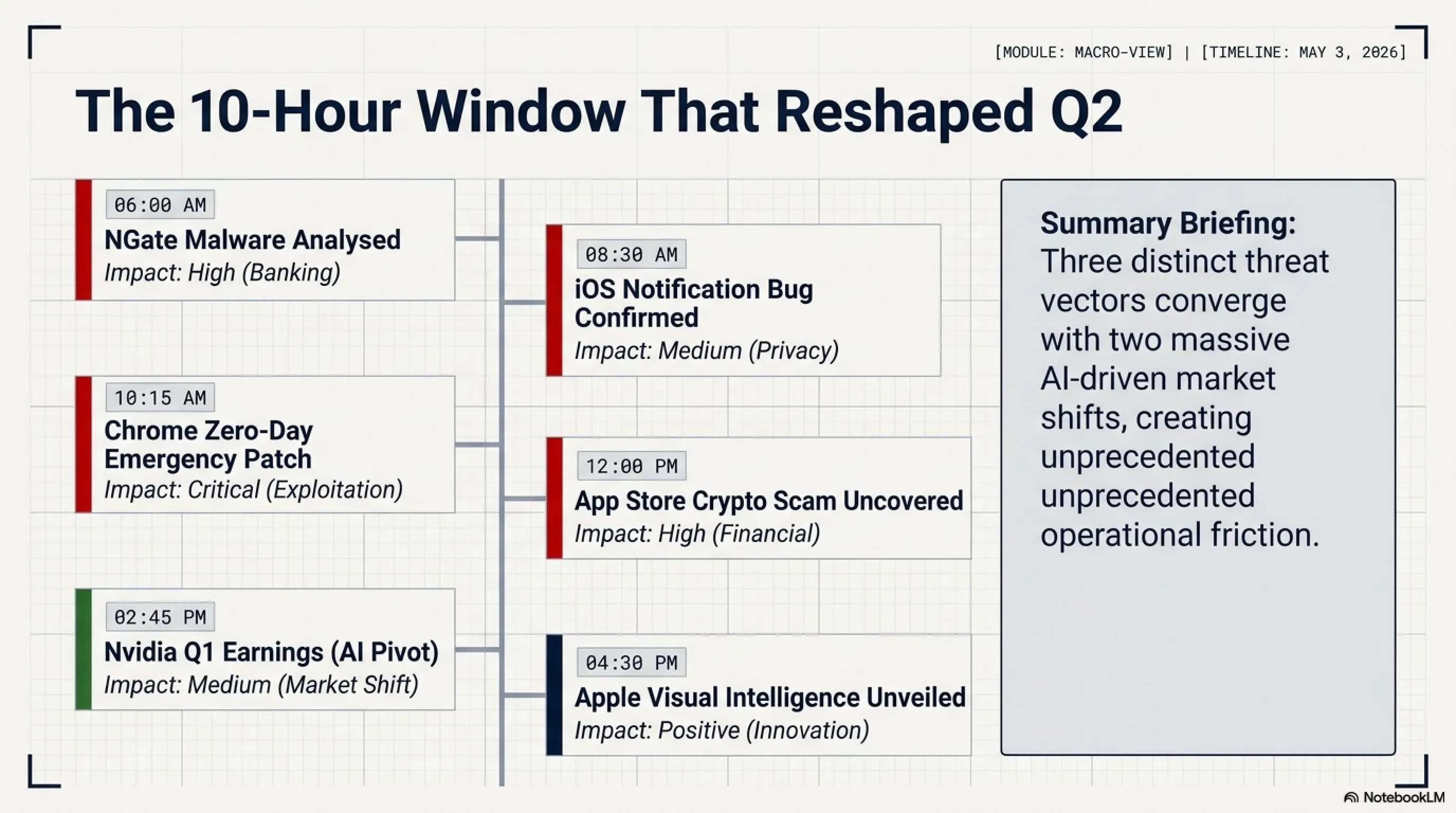
📅 Tech Timeline: May 3, 2026
| Time | Event | Impact |
|---|---|---|
| 06:00 AM | NGate malware analysis published by ESET | High - Banking security |
| 08:30 AM | Apple confirms iOS notification bug, patch rolling out | Medium - Privacy concern |
| 10:15 AM | Google releases emergency Chrome update for zero-day | Critical - Active exploitation |
| 12:00 PM | SecurityWeek reports 47 fake crypto apps in App Store | High - Financial theft |
| 02:45 PM | Nvidia Q1 earnings reveal 87% data center revenue | Medium - Market shift |
| 04:30 PM | Apple announces Visual Intelligence at WWDC preview | Positive - Innovation |
❓ Frequently Asked Questions
How can I protect my phone from NGate malware?
Immediate steps: Only download apps from official sources (Google Play Store), enable Google Play Protect, keep your Android OS updated, and never grant NFC permissions to unknown apps. If an app asks for NFC access without a clear reason (like a payment app), deny it. For banking, use your bank's official app and enable two-factor authentication. Consider disabling NFC when not actively using it — you can toggle it in Quick Settings.
How do I check if my deleted iOS notifications are still accessible?
Unfortunately, there's no user-facing way to check this. The bug exists at the system level, and deleted notifications remain in a hidden database file. The good news: Apple's patch (iOS 17.4.2 and later) automatically cleans up these orphaned notifications. Solution: Update to the latest iOS version immediately. Go to Settings → General → Software Update. If you're on iOS 17.4.2 or later, you're protected. The update not only fixes the bug but also removes previously deleted notifications from the hidden database.
Should I switch from Chrome to another browser because of zero-days?
Not necessarily. Chrome has more zero-days because it's the most popular browser (65% market share), making it the biggest target for attackers. Firefox, Safari, and Edge also have vulnerabilities — they're just less frequently targeted. What matters more: Keep Chrome updated (it updates automatically), use strong passwords, enable two-factor authentication, and avoid clicking suspicious links. If you're particularly security-conscious, consider using Firefox or Brave, which have smaller attack surfaces. But the biggest security risk isn't your browser — it's user behavior. Phishing, weak passwords, and social engineering cause far more breaches than browser vulnerabilities.
How can I verify a crypto wallet app is legitimate before downloading?
Step 1: Go to the official website (e.g., metamask.io, trustwallet.com) and get the download link from there — don't search the App Store directly. Step 2: Verify the developer name exactly matches the official one. MetaMask is published by "MetaMask", not "MetaMask Wallet Inc". Step 3: Check the number of downloads and reviews. Legitimate apps have millions of downloads and thousands of reviews. Step 4: Never enter your recovery phrase into any app unless you're 100% certain it's legitimate. Golden rule: If you have any doubt, don't download it. Use the web version instead or contact the company's official support to verify.
Is it worth upgrading to iPhone 15 Pro just for Visual Intelligence?
Probably not, unless you're already planning to upgrade. Visual Intelligence is impressive, but it's not a must-have feature for most users. If you're on iPhone 13 or newer, your phone is still excellent for everyday use. Better strategy: Wait for iPhone 17 (September 2026), which will launch with iOS 27 and Visual Intelligence built-in, plus newer hardware improvements. If you're a professional photographer or content creator who edits hundreds of photos monthly, Visual Intelligence could save significant time — in that case, upgrading might make sense. For casual users, Google Photos and other third-party apps offer similar features (albeit slower and cloud-based) that work on any device.
💭 Final Thoughts
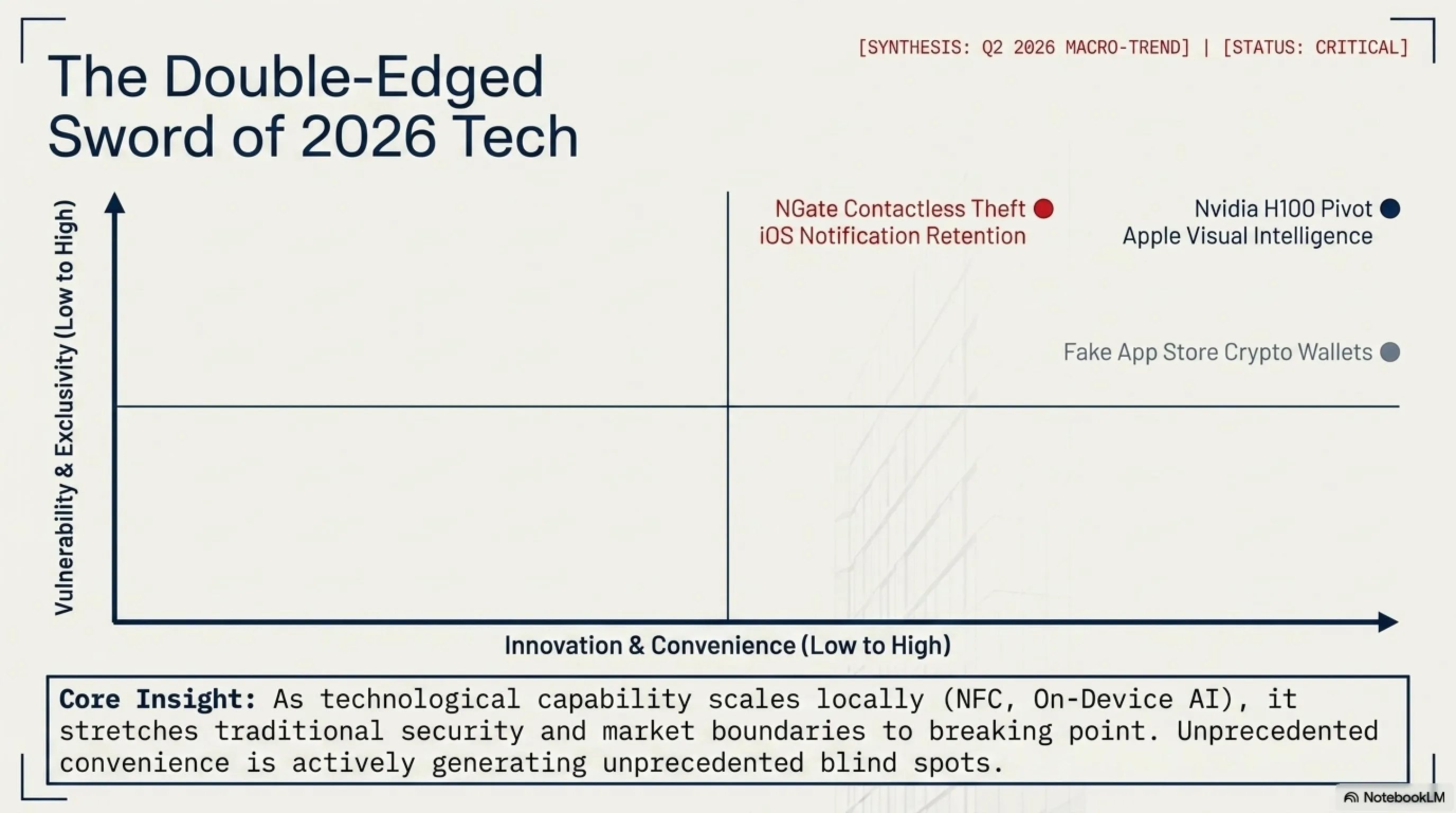
May 3, 2026 reminds us that technology is a double-edged sword. We have AI that can edit photos in milliseconds, but also malware that can steal our bank accounts through NFC. We have browsers that patch critical vulnerabilities in 24 hours, but also fake apps that bypass App Store security. We have GPUs powerful enough to train AI models, but gamers can't buy them. The lesson? Stay informed, stay vigilant, and never stop questioning.
Technology moves fast. Security moves faster. Stay ahead with Tekin Game.
📚 Sources & References
NGate Malware: ESET Research, "NGate: Android Malware Relays NFC Traffic to Steal Money" (May 2026)
iOS Notification Bug: Apple Security Updates, iOS 17.4.2 Release Notes (May 2026)
Chrome Zero-Day: BleepingComputer, "Google Patches First Chrome Zero-Day of 2026" (May 3, 2026)
Fake Crypto Apps: SecurityWeek, "Malicious Crypto Apps Infiltrate Apple App Store" (May 2026)
Nvidia Earnings: Tom's Hardware, "Nvidia Q1 2026 Earnings: AI Dominates, Gaming Declines" (May 2026)
Visual Intelligence: Apple Newsroom, "Introducing Visual Intelligence in iOS 27" (WWDC 2026)
📞 Stay Connected with Tekin Game
Want daily tech news, security alerts, and gaming updates? Follow us on social media and never miss a story!
🔔 Subscribe to our newsletter for Tekin Morning & Tekin Night delivered to your inbox!
🌐 Stay Connected With Us 🎮✨
For the latest tech, gaming, and gadget news, follow us on our official social media channels:
Additional Gallery: 🌅 Tekin Morning May 3: NGate Malware, iOS Bug, Chrome Zero-Day & Nvidia