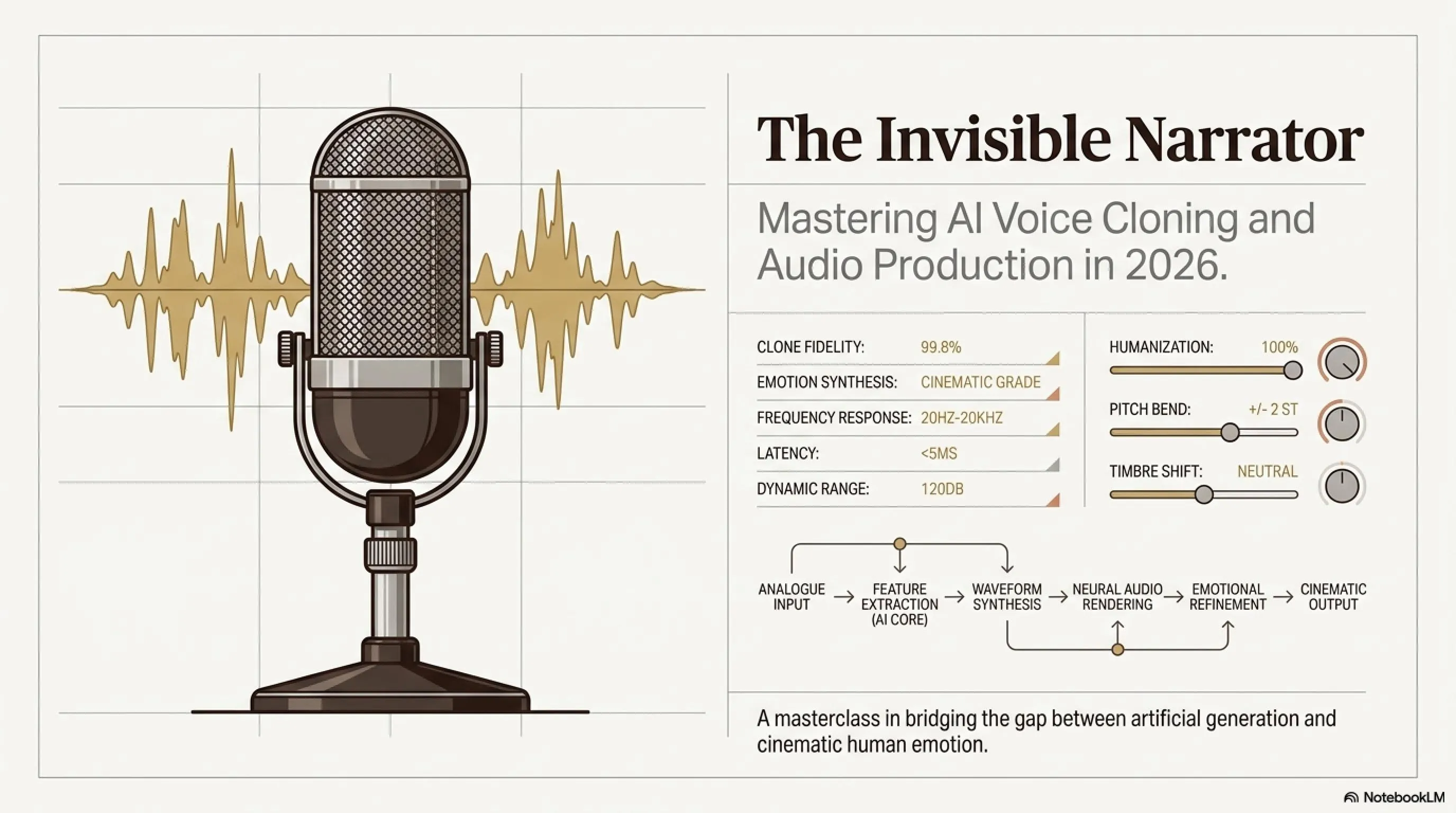
🎙️ The Invisible Narrator: Voice Cloning Mastery with ElevenLabs & OpenVoice
- 🎮ElevenLabs Turbo v2.5- The fastest, highest-quality commercial TTS with 70+ languages including Persian and Arabic
- 🎧OpenVoice v2 MIT- Free tool with emotion control and tone shifting without changing the voice
- 🚀Speech-to-Speech- You perform, AI delivers — the best method for controlling timing and emotion
- 🗡️Post-Production- EQ, Compression, and Reverb to transform dry AI audio into cinematic sound
Greetings, content creators, future directors, and audio technology enthusiasts! If you've ever listened to documentary narration like Planet Earth and wondered «Why is the narrator's voice so powerful and hypnotic?», the answer is simple: audio is half the power of any video.
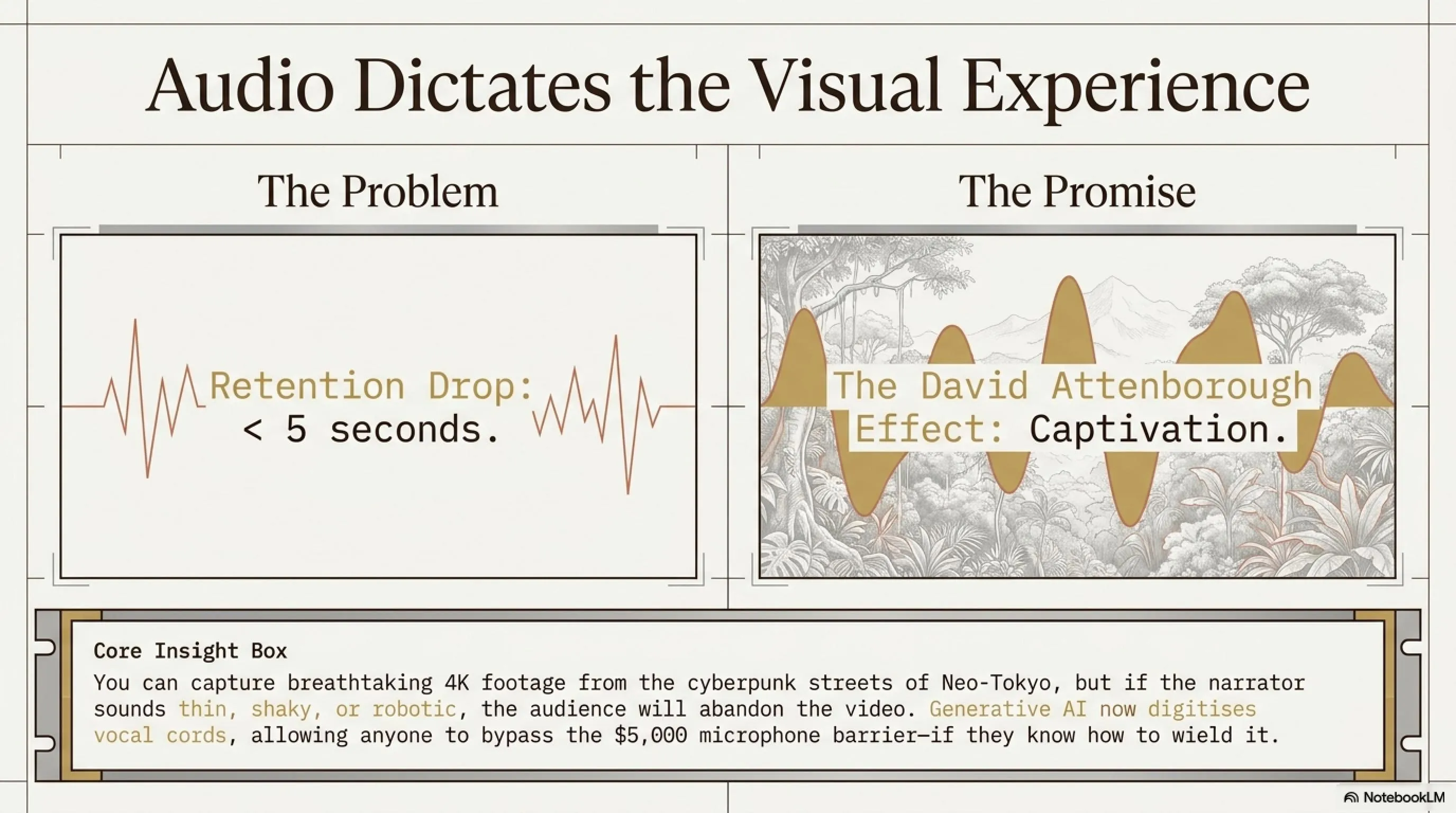
You can capture the most breathtaking 4K footage from the Amazon rainforest or the cyberpunk streets of Neo-Tokyo, but if your narrator sounds thin, shaky, or robotic, your audience will hit the back button in less than 5 seconds. We all crave that magical David Attenborough effect in BBC documentaries — the deep, authoritative, slightly velvety voice that commands respect and triggers awe.
But hiring a voice actor of that caliber costs thousands of dollars per minute. And let's be honest, most of us don't have that golden larynx or a five-thousand-dollar Neumann microphone sitting on our desk.
But don't despair. This is 2026, and the rules of the game have changed. Generative AI no longer just writes text; it can now digitize vocal cords, inject emotions, and sculpt voices so realistic that even the speaker's own mother couldn't tell it's a robot!
In this comprehensive, hands-on tutorial, Inspector Gemini is taking you inside the «Audio Surgery Lab». We're not going to just list a few tools and move on. We want to dive into the physics of sound, the psychology of the human ear, and advanced audio mixing techniques so you can produce professional-quality audio that makes your audience think you own a million-dollar studio.
At a Glance: Why This Tutorial is Different
- We don't just hit Generate — we learn WHY documentary voices sound «documentary»
- Complete comparison: ElevenLabs (premium) vs OpenVoice (free) with real-world tests
- Post-Production training with Audacity and Adobe Audition for BBC-quality sound
- Ethical and legal guide for voice cloning in 2026
🧠 Part One: The Anatomy of a Legendary Voice
Before we touch any software and press «Generate», we need to understand what we're aiming for. If you don't know the destination, even the best map won't help. A documentary narrator's voice is distinct from a news anchor or a podcaster.
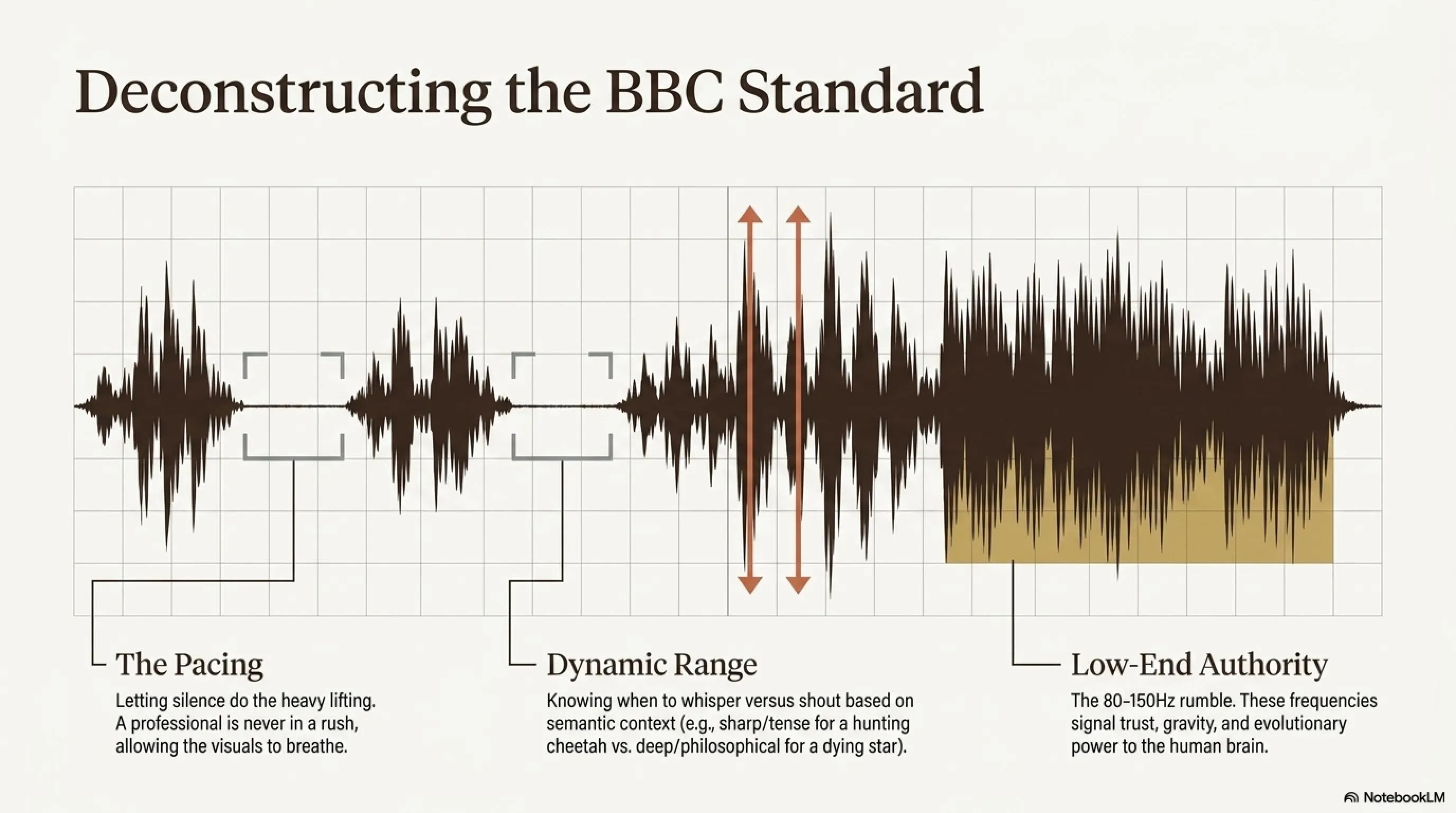
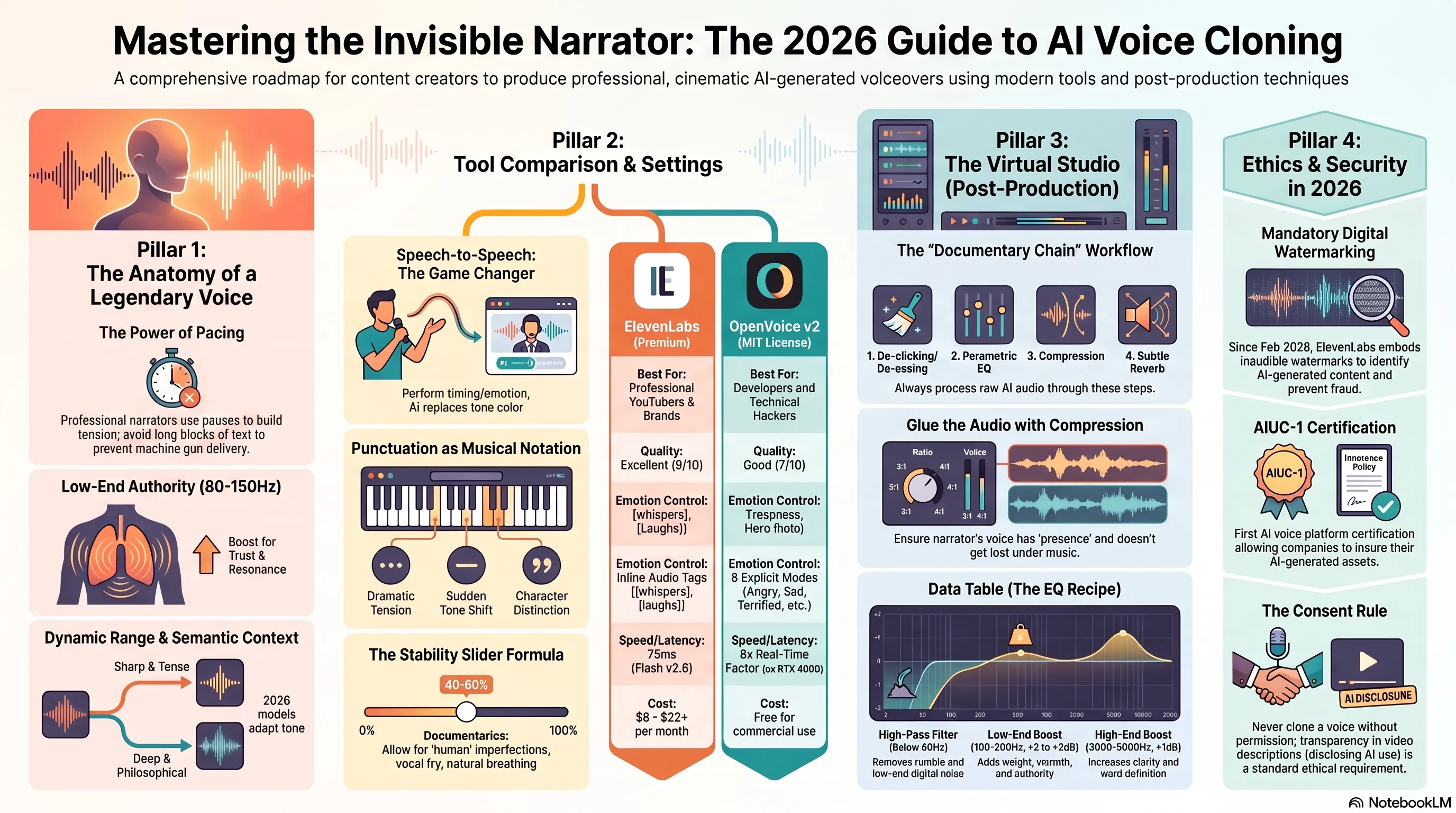
A) The Pacing — The Power of Pauses
A documentary narrator is never in a rush. They know the visuals are telling the story, and the voice is merely the guide. The biggest mistake AI beginners make is feeding a long block of text without breaks. The result? A voice that fires words like a machine gun.
Legends like David Attenborough breathe between sentences. They let silence do the heavy lifting. When he says «The lion... approaches...» that ellipsis pause makes the audience hold their breath.
B) The Dynamic Range — The Drama
Human speech is not linear. When describing a cheetah hunting its prey, the voice should be «sharp, tense, and excited». But when describing the death of a star in the galaxy, the voice should be «deep, low, and philosophical».
Old AI models were «monotone», but next-generation 2026 tools have the ability to understand semantic context — they know when to whisper and when to shout.
C) The Low-End Authority — The Rumble
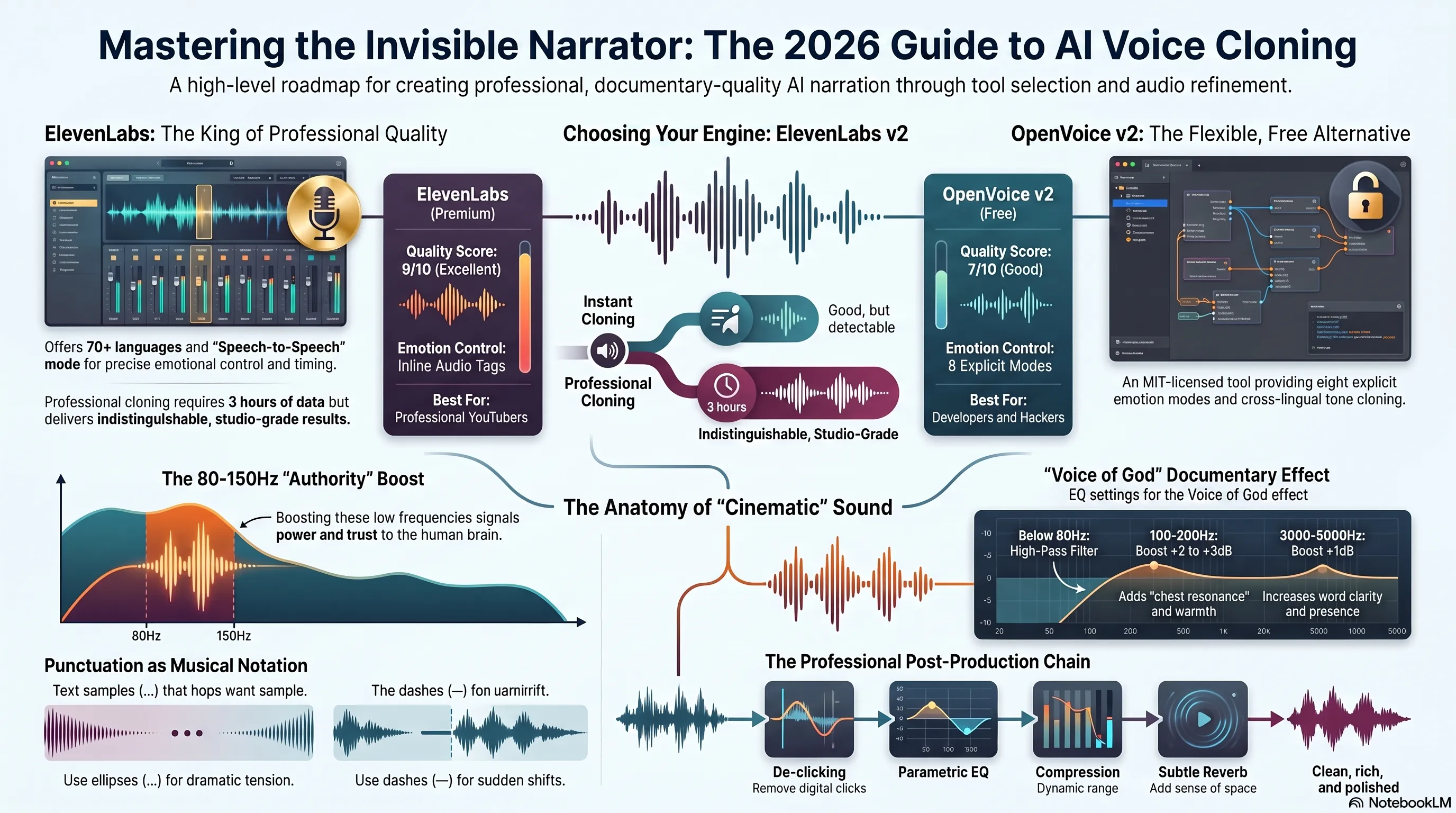
Think of Morgan Freeman's voice. What makes it captivating? The deep, chest resonance. These frequencies (around 80-150Hz) signal «authority» and «trust» to the human brain.
We'll learn in the audio mixing section how to artificially boost these frequencies even if the raw AI voice is a bit thin, creating that «radio voice» effect.
💡 Jargon Buster: Why Are Low Frequencies So Important?
Low frequencies (80-150Hz) are associated in the human brain with «power», «confidence», and «gravity». This is due to human evolution — deeper voices typically come from larger bodies and have been signals of threat or leadership. This is why radio stations and professional studios always boost this range with EQ.
💎 Part Two: ElevenLabs — The King of Quality in 2026
Let's start with the heavyweight. ElevenLabs is currently the undisputed king of the TTS industry. In February 2026, Eleven v3 was publicly released with new capabilities:
- Audio Tags: You can write [whispers], [sighs], [laughs] inline in the text
- Multi-Speaker Dialogue: Multiple characters in one file, no editing required
- 70+ languages including Persian, Arabic, and Farsi with exceptional quality
But for Real-Time work (like Voice Agents), Flash v2.5 is the primary choice — with only 75ms latency and 32 languages.
Step 1: Choosing Between Instant and Professional Voice Cloning
ElevenLabs offers two types of voice cloning:
🎤 IVC vs PVC Comparison
| Feature | Instant (IVC) | Professional (PVC) |
|---|---|---|
| Sample audio length | 1-3 minutes | 30 min to 3 hours |
| Preparation time | Few seconds | Few hours (Fine-tune) |
| Price | From $6/month | From $22/month |
| Quality | Good for YouTube | Studio-grade (even mother can't recognize!) |
| Best for | Testing, prototypes, personal channels | Audiobooks, brands, commercial production |
The Golden Rule for Sample Audio
There's one non-negotiable rule: AI mimics the delivery, not just the sound. If your sample is a one-minute clip of someone shouting excitedly at a football game, your «Documentary Narrator» will sound like a football commentator!
The Fix: Record yourself (or find a sample) that is calm, slow, and articulate. Read a Wikipedia article about Quantum Mechanics. Use a decent microphone. This «clean» data is what the AI needs to build a flexible model.
Step 2: Decoding the Magic Sliders
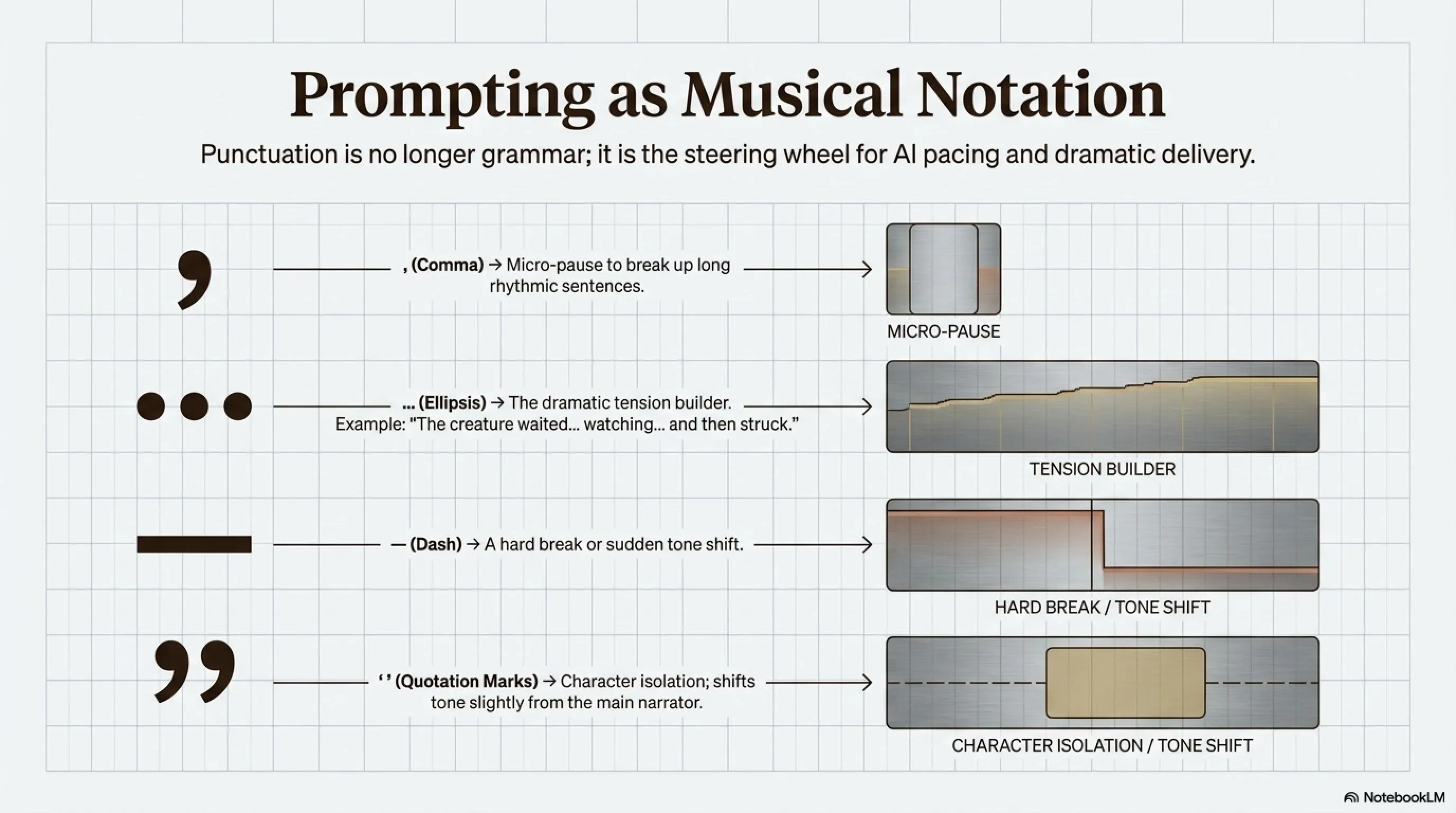
Once you enter VoiceLab, you'll face the «Generation» panel. This is where most people fail because they leave settings on default.
🎚️ ElevenLabs Sliders Guide
1. Stability: This is the most important setting.
- High (100%): Voice is perfectly stable, no errors, but sounds robotic and boring.
- Low (30%): Voice becomes incredibly expressive, breathes more, has vocal fry, but might make mistakes.
- Inspector's Formula: For documentaries, set this to 40-50%. We want the imperfections that make it sound human.
2. Similarity: How much should it adhere to the original sample? Keep this around 75%.
3. Style Exaggeration: This slider is dangerous! For most languages, 10-15% is sufficient.
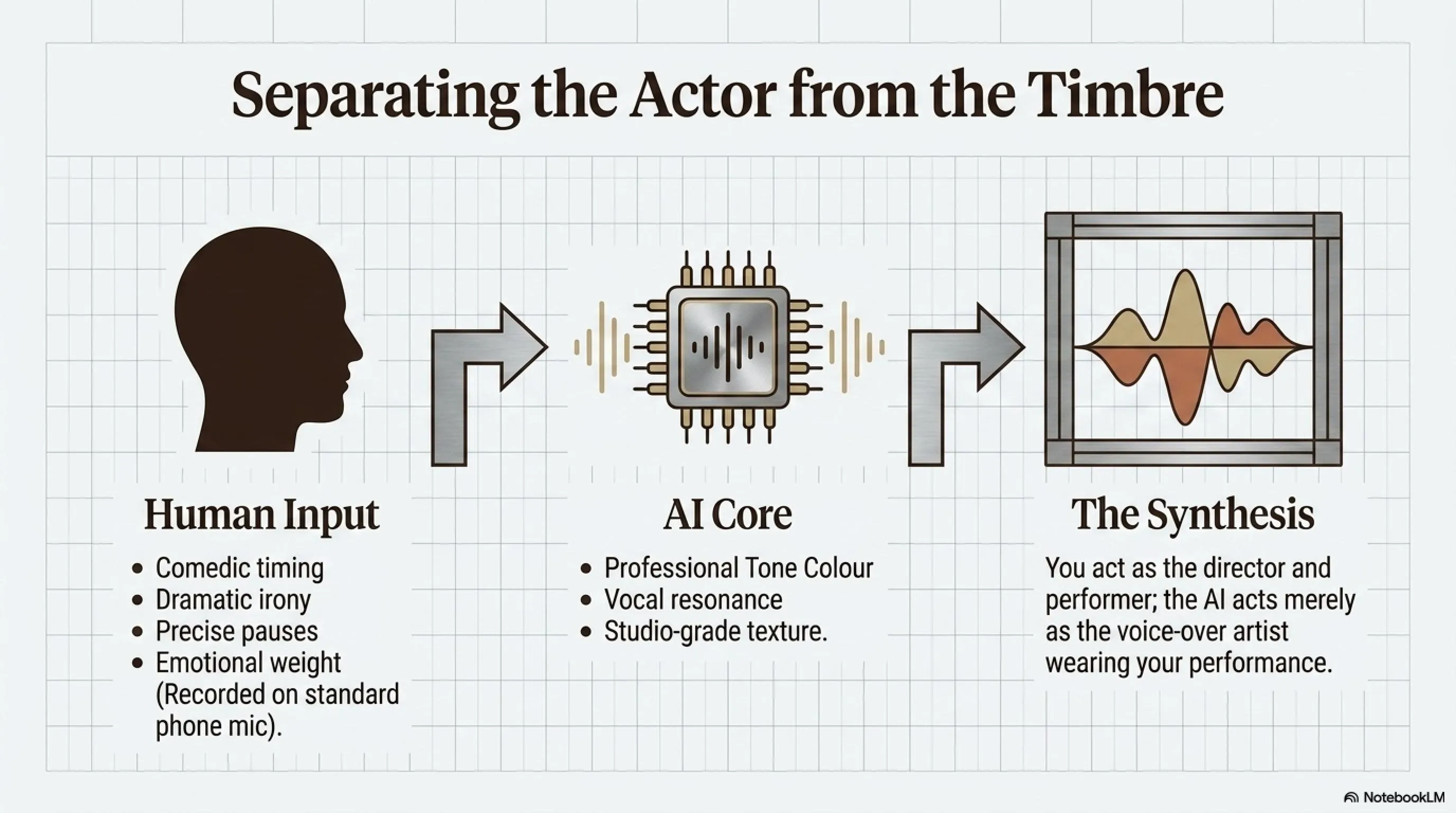
The Secret Weapon: Speech-to-Speech
This feature is a genuine Game Changer. Imagine you want to narrate a video, but you don't like your own voice. In Speech-to-Speech mode, you record yourself reading the text with your phone microphone, performing all the «emotions», «pauses», and «emphasis».
Then the AI takes your voice and replaces it with the «tone color» of a professional narrator. Meaning: YOU are the actor, and AI is just the voice-over artist.
📝 Part Three: Audio Prompt Engineering
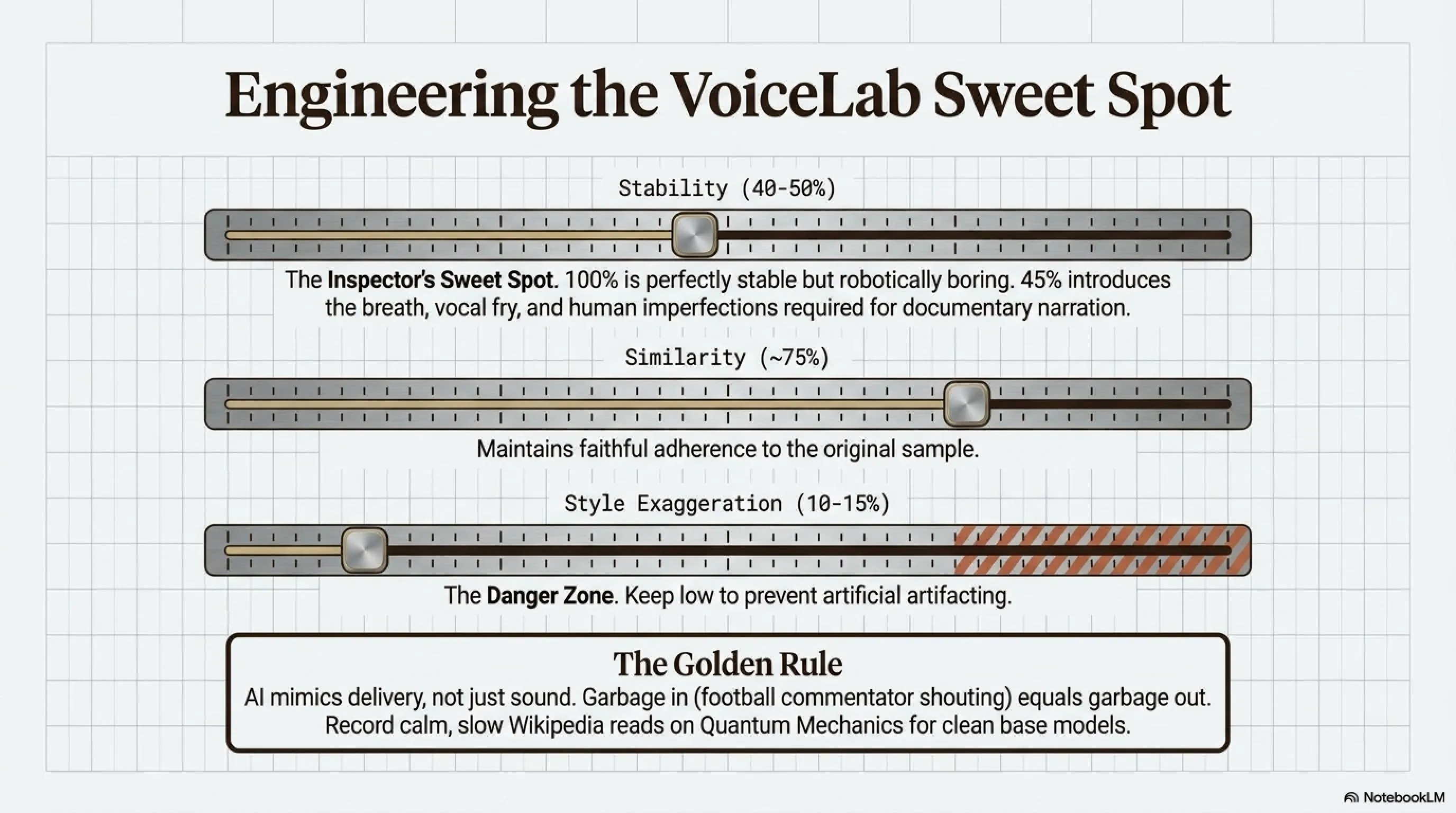
ElevenLabs AI is smart, but it's not a mind reader. You can «direct» the AI using punctuation. Think of punctuation marks not as grammar, but as musical notation for the AI engine.
Punctuation as Musical Notes
- Comma (,): A short micro-pause. Use this to break up long sentences.
- Ellipsis (...): A long, dramatic pause. Use this for tension.
Example: «The creature waited... watching... and then struck.» - Dash (—): A sudden shift in tone or a hard break.
- Quotation Marks (\" \"): The AI often shifts its tone slightly when reading quotes, distinguishing the narrator from the character.
Practical Exercise: Give a paragraph to the AI twice — once without punctuation and once with precise punctuation. The difference is night and day. The first version is a «robot», the second is a «storyteller».
🛠️ Part Four: OpenVoice v2 — The Voice Plastic Surgeon
If you don't have a budget for a monthly subscription, or if you want to work on more specialized projects, OpenVoice v2 is your choice. This project, developed by MIT researchers, has a magical feature: Tone Color Converter.
The Two-Stage Architecture
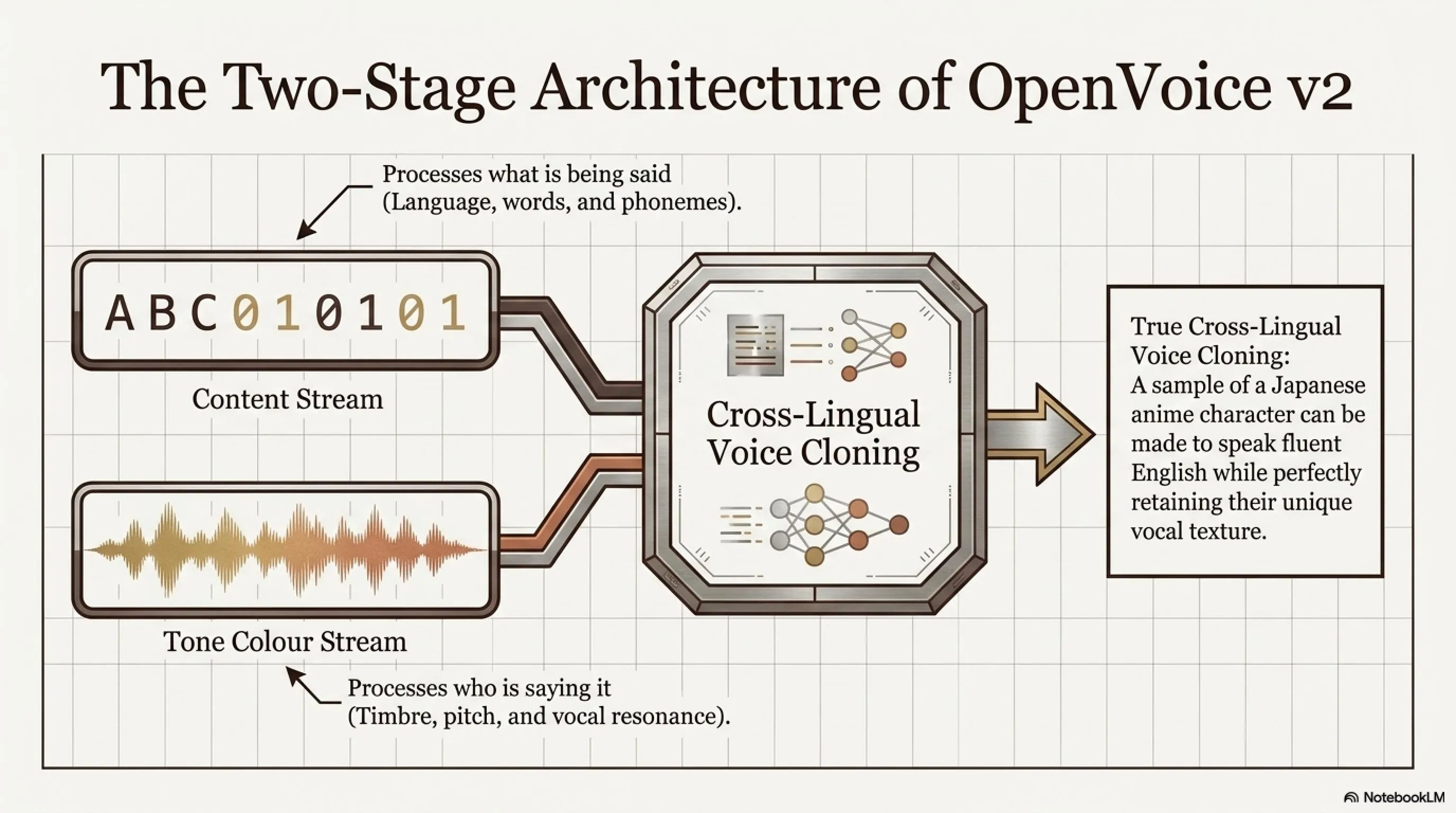
OpenVoice separates speech into two streams:
- Content: What is being said — language, phonemes, words
- Tone Color: Who is saying it — timbre, pitch, vocal resonance
This allows you to create Cross-Lingual Voice Cloning. You can take a sample of a Japanese anime character and make them speak fluent Persian or English, while retaining their unique vocal texture.
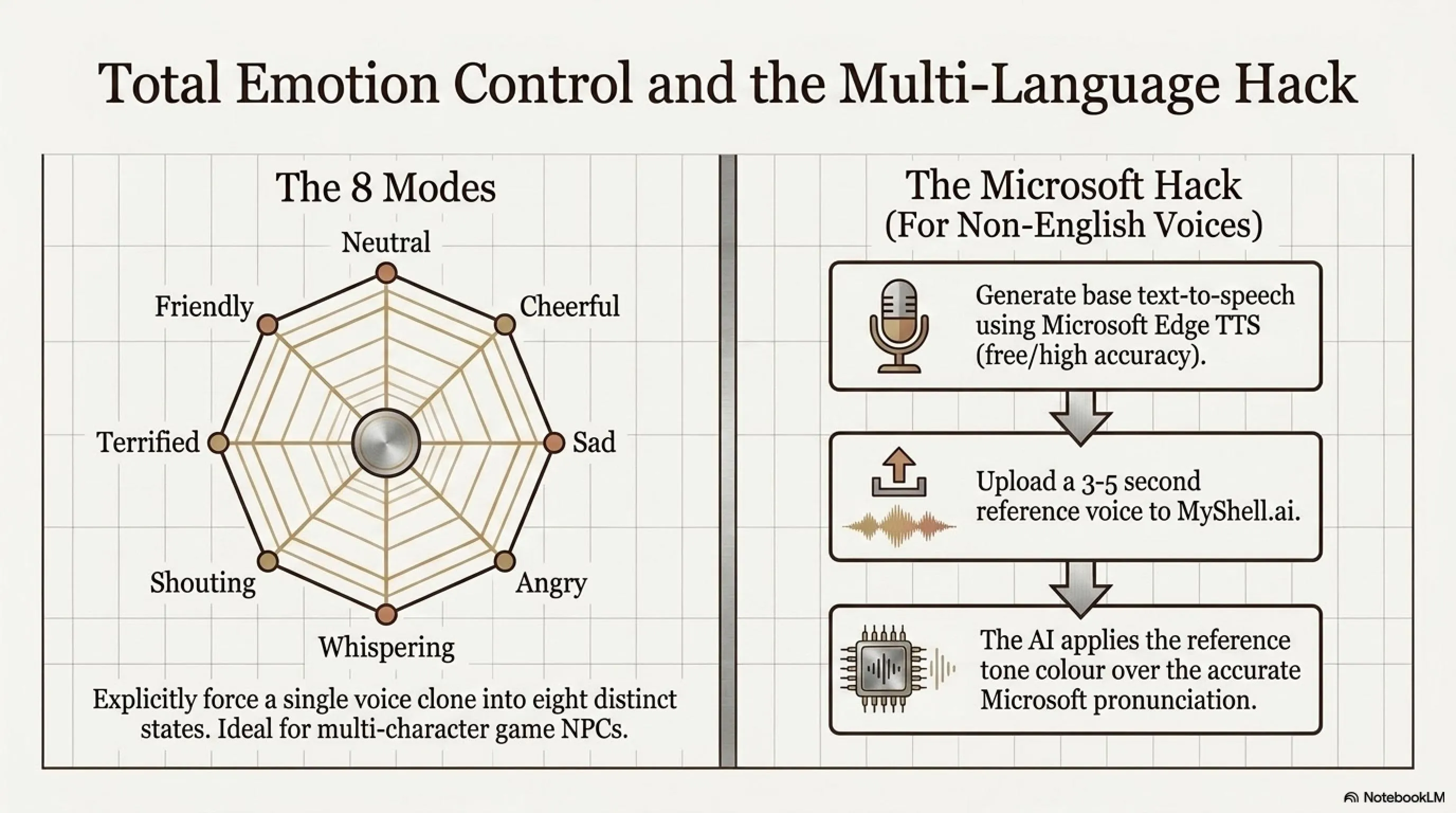
8 Emotional Modes in OpenVoice v2
One of the most powerful features of OpenVoice v2 is that you can clone one voice and perform it with 8 different emotions:
🎭 Controllable Emotions in OpenVoice
- default: Neutral and normal
- cheerful: Upbeat and positive
- sad: Slow and low energy
- angry: Emphatic and sharp
- whispering: Soft and breathy
- shouting: Loud and projected
- terrified: Fearful and trembling
- friendly: Warm and conversational
This capability is invaluable for game NPCs, multi-character audio stories, and accessibility tools that adapt tone to context.
The Golden Solution for Non-English Languages
OpenVoice alone doesn't yet match ElevenLabs in generating text-to-speech for languages like Persian or Arabic. But there's a trick:
- Generate Base: Convert your Persian text to audio using Microsoft Edge TTS (free and high-quality)
- Select Reference: Find a 3-5 second sample of your favorite narrator's voice
- MyShell.ai: Upload the Microsoft file as Source and the narrator voice as Reference
- Magic: The AI applies the narrator's tone color to the Microsoft file
Result? Text with Microsoft's accuracy but with a completely different and artistic voice texture.
- MIT License — completely free for commercial use
- Only needs 1-5 seconds of sample audio
- Explicit control over emotions and accents
- Cross-lingual cloning without new datasets
- Raw quality for non-English languages lower than ElevenLabs
- Requires technical knowledge for local installation
- Limited support for non-English languages
🎚️ Part Five: The Virtual Studio — Professional Mixing
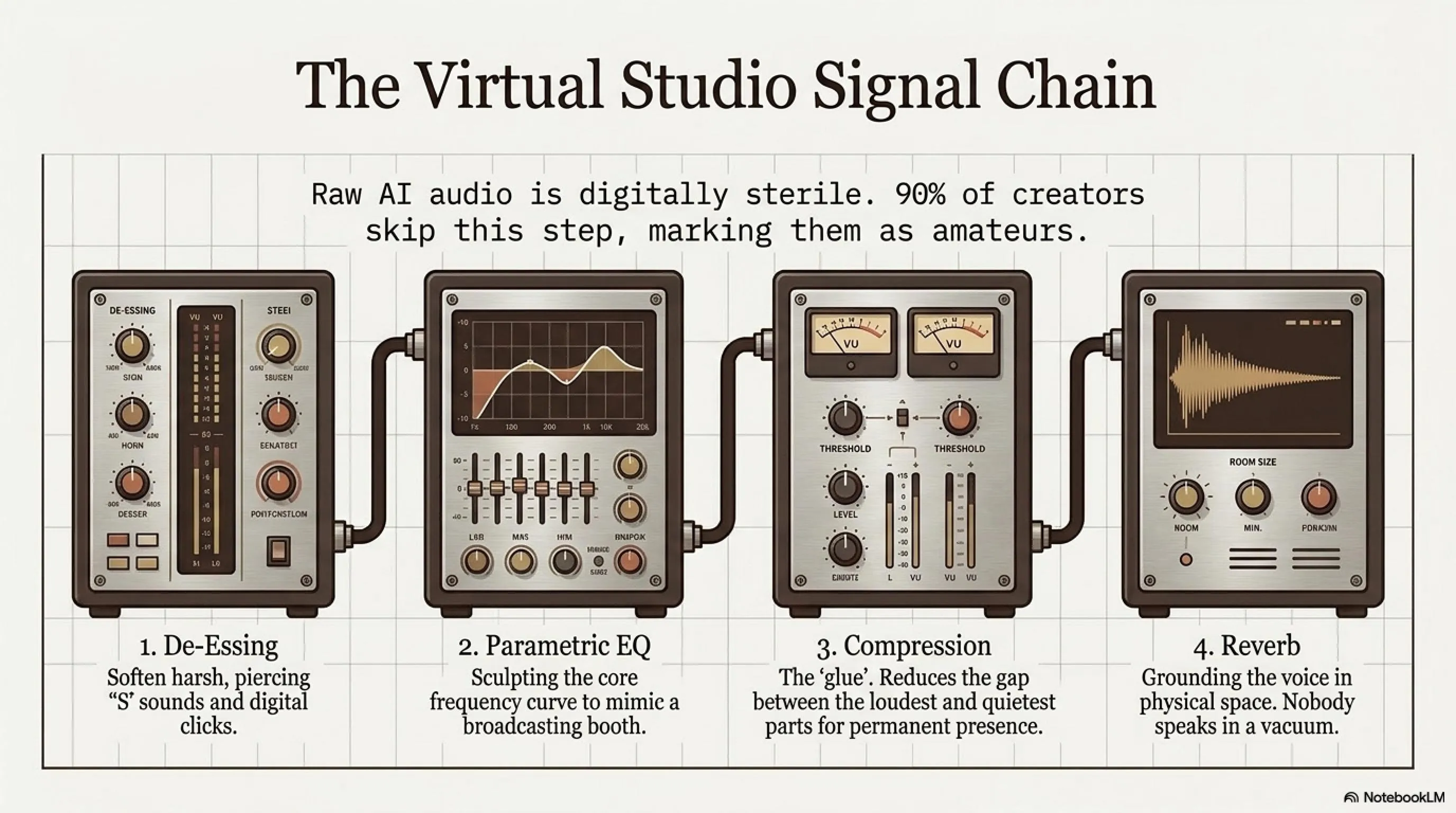
This is the step that 90% of YouTubers skip, and that's why their AI voices sound «fake». Raw AI audio is often dry, flat, and digitally sterile. To make it sound cinematic, we need to process it.
You can use Audacity (free) or Adobe Audition.
The Documentary Chain (Apply in Order)
1. De-Clicking and De-Essing
AI generation often leaves tiny digital clicks or harsh «S» sounds (sibilance). Use a De-Esser to soften the «S» sounds so they don't pierce the listener's ear.
2. Parametric EQ — The Magic Step
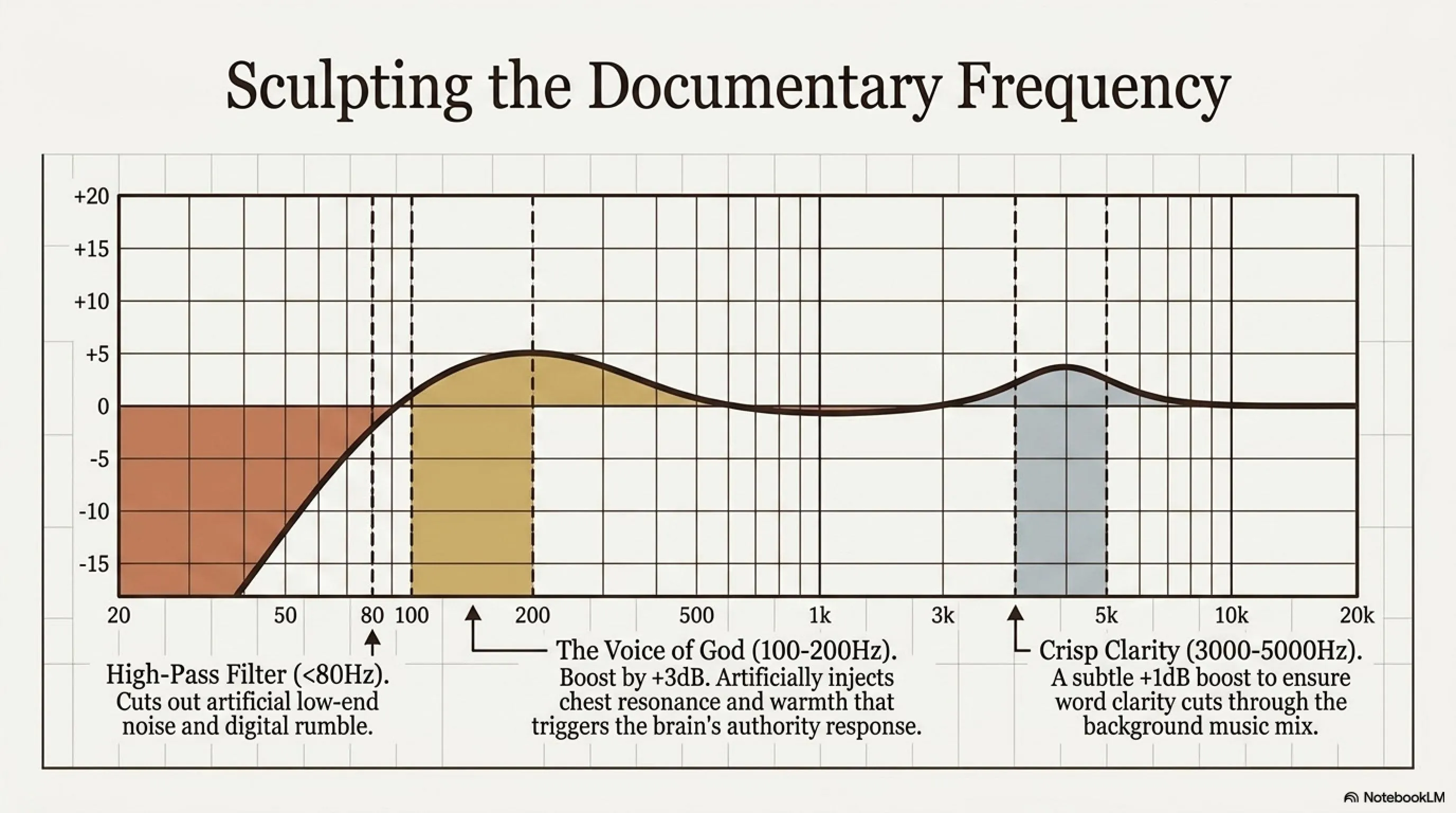
To create a documentary voice, you need to sculpt the frequency curve:
📚 Classified & Related Dossiers in TekinGame
If you wish to explore beyond this report and delve into cybernetic frontiers and autonomous AI architectures, do not miss these three exclusive deep-dives in the Tekin Garage:
🎛️ EQ Recipe for Documentary Voice
High-Pass Filter: Cut everything below 80Hz (removes rumble and low-end noise)
Low-End Boost (Voice of God): Boost frequencies between 100-200Hz by +2 to +3dB. This adds weight and warmth to the voice.
High-End Boost (Clarity): Add a slight boost around 3000-5000Hz (+1dB) to increase word clarity.
3. Compression — The Glue
Compression reduces the difference between the loudest and quietest parts of the audio. This makes the narrator's voice always have «presence» and not get lost under music.
Use presets like «Voice Over» or «Broadcast» in your software. Typically, a Ratio between 3:1 to 4:1 is appropriate.
4. Reverb — The Space
Nobody speaks in a vacuum. Add a very subtle Reverb (e.g., 5-10% Wet) with «Small Room» or «Studio» settings. This makes the voice sound more natural.
⚖️ Part Six: The Danger Zone — Ethics and Copyright
Voice cloning technology is powerful, but it can be dangerous too. As a responsible content creator, you must know these red lines.
Ethical Rules in 2026
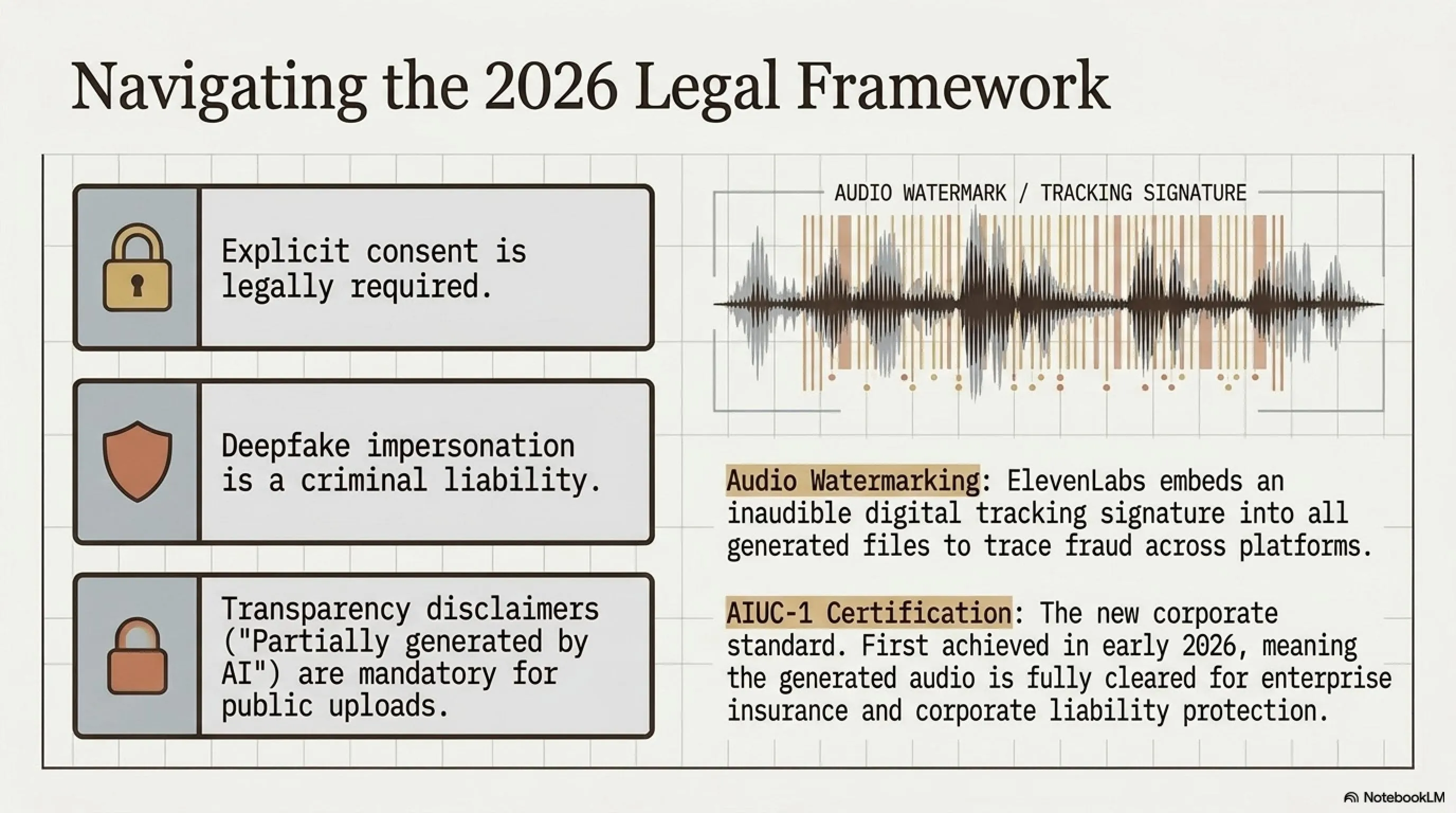
- Consent is Mandatory: Never clone someone's voice without permission. It's a privacy violation and potentially illegal.
- The Deepfake Trap: Using these tools to make public figures say things they never said is a crime.
- Transparency: Always write in your video description: «Part of this video's narration was generated using AI tools.»
⚠️ What is Audio Watermarking?
Since February 2026, ElevenLabs embeds an invisible digital watermark on all generated audio. This watermark is inaudible to the human ear, but detection tools can identify it.
This means if someone uses your cloned voice for fraud, it's traceable. It also helps platforms identify Deepfake content.
What is AIUC-1 Certification?
In February 2026, ElevenLabs received the first AIUC-1 certification — meaning the first AI voice platform that companies can insure. This is important for large corporations and government organizations concerned about legal liabilities.
🔍 Part Seven: Final Comparison — Which Tool Should You Choose?
Commanders, we've reached the end of this intensive course. Let's have a final breakdown.
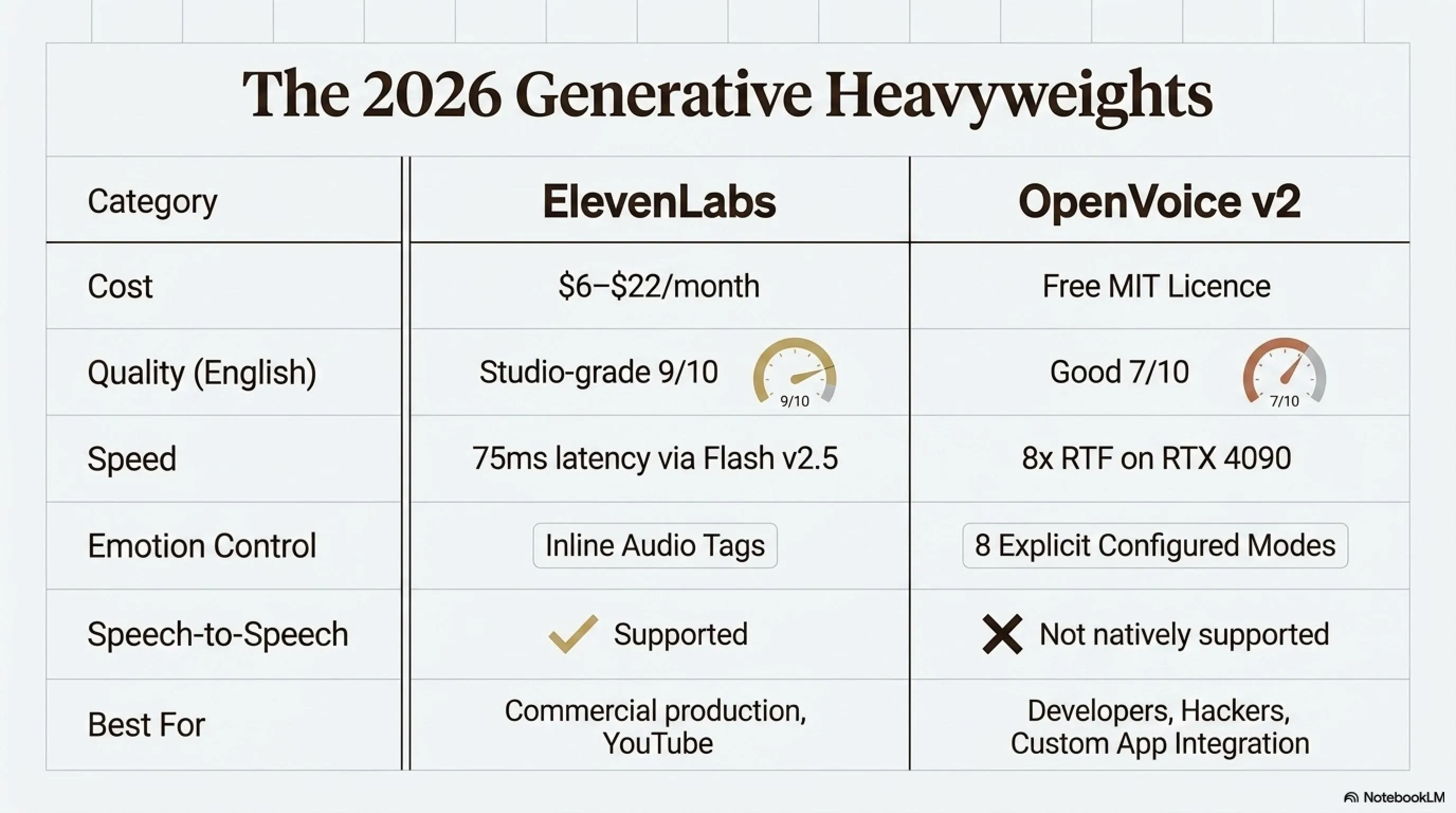
Comprehensive Comparison: ElevenLabs vs OpenVoice
| Feature | ElevenLabs | OpenVoice v2 |
|---|---|---|
| Price | $6-$22/month | Free (MIT) |
| Quality (English) | Excellent (9/10) | Good (7/10) |
| Speed | 75ms (Flash v2.5) | 8x RTF (RTX 4090) |
| Emotion Control | Audio Tags | 8 explicit modes |
| Speech-to-Speech | ✅ Yes | ❌ No |
| Best for | Professionals, YouTubers | Developers, Hackers |
Inspector's Recommendation: Which Path?
Path One — Professional and Fast (ElevenLabs): If you have a budget of $5-$20 per month and want the best possible quality without technical hassle, with precise emotions and Speech-to-Speech capability, don't hesitate. ElevenLabs is the current king.
Path Two — Creative and Economical (OpenVoice): If you don't want to spend money, or want to work on hybrid techniques, this path is for you. This method is a bit more time-consuming and requires trial and error, but you have full creative freedom.
💡 Part Eight: Advanced Techniques
Multiple Voices, One Narrator
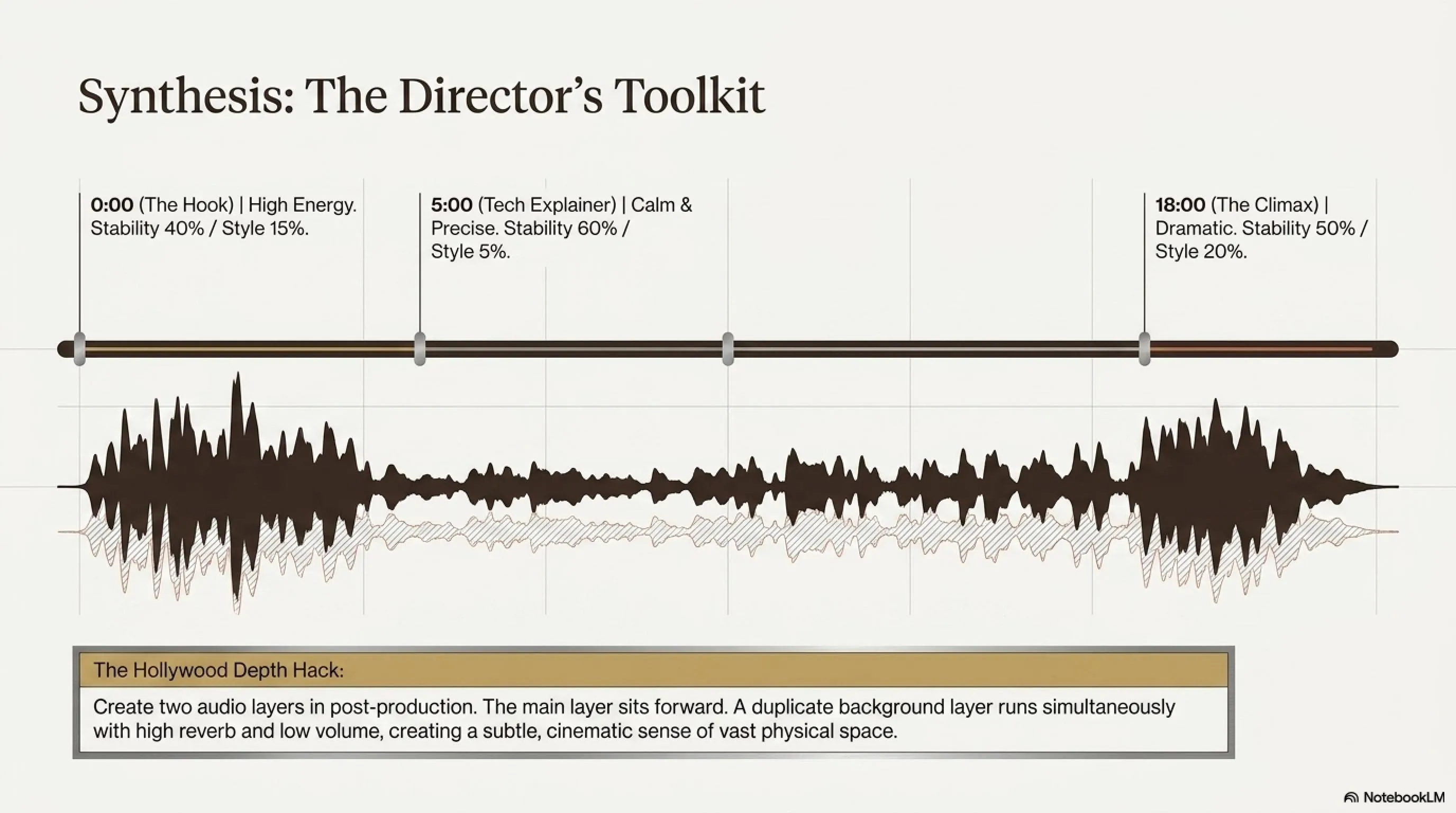
An interesting trick is to use different clones of one voice for different sections of the article:
- Introduction: Stability 40% + Style Exaggeration 15% (high energy)
- Technical explanations: Stability 60% + Style 5% (calm and precise)
- Conclusion: Stability 50% + Style 20% (dramatic and decisive)
This variety prevents the audience from getting tired during a 20-minute video.
Using Multiple Audio Layers
To create a cinematic effect, you can have two audio layers:
- Main Layer: Narrator with clear and forward voice
- Background Layer: Same narrator with high Reverb and low Volume, like a distant echo
This technique is used in Hollywood movie trailers and gives a sense of depth.
🎬 Today's Practical Exercise
Right now, log into ElevenLabs (free version gives 10,000 characters). Choose a paragraph from the last book you read.
Try generating it twice:
- First time: Stability 100%
- Second time: Stability 35%
Listen to the difference. Can you hear the ghost in the machine?
🚀 Part Nine: Real-World Use Case Scenarios
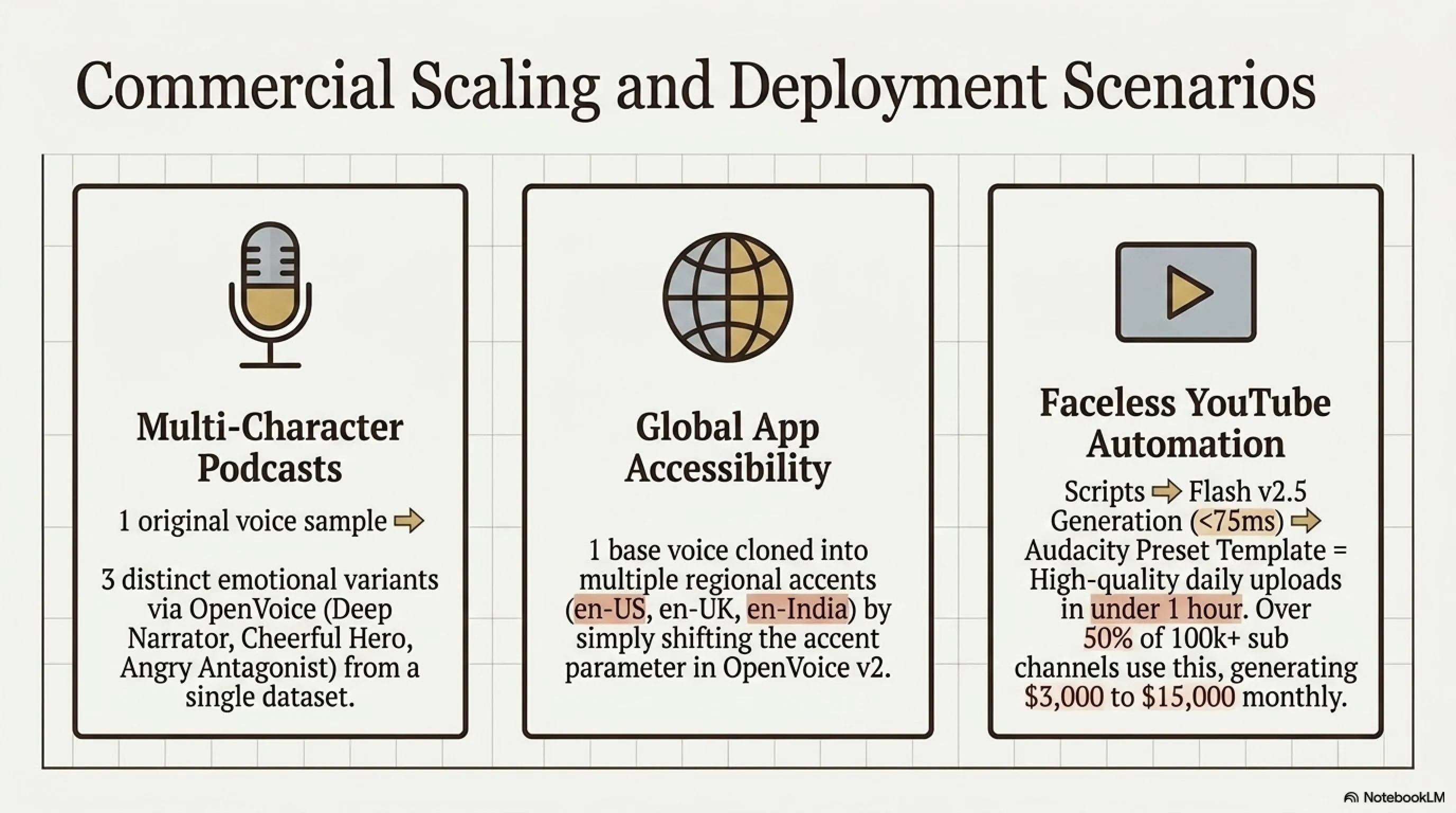
Scenario 1: Multi-Character Podcast
Imagine you want to create a story podcast with three characters. You can create three different voice clones with OpenVoice and set each with different emotions:
- Narrator: Deep voice with style=default
- Hero: Young voice with style=cheerful
- Antagonist: Same young voice but with style=angry
With this method, using just two original voice samples, you've created three completely distinct characters.
Scenario 2: Language Learning with Different Accents
If you're building an English language learning app, OpenVoice v2 allows you to clone one voice with different accents:
- en-us (American)
- en-uk (British)
- en-australia (Australian)
- en-india (Indian)
All of these with the same initial voice sample, just by changing the accent parameter.
Scenario 3: Bulk Content Production for YouTube
Many «faceless» YouTube channels use this technology. If you want to publish one video daily:
- Clone your own voice once with ElevenLabs Professional (initial investment)
- From then on, just write scripts and generate with Flash v2.5 (75ms latency)
- Create an EQ/Compression template in Audacity
- Prepare each video in less than 1 hour
📊 Interesting Statistics
According to ElevenLabs report in May 2026, over 50% of faceless YouTube channels with 100,000+ subscribers use ElevenLabs or similar tools.
Average revenue of these channels in 2026: $3,000 to $15,000 per month (depending on niche).
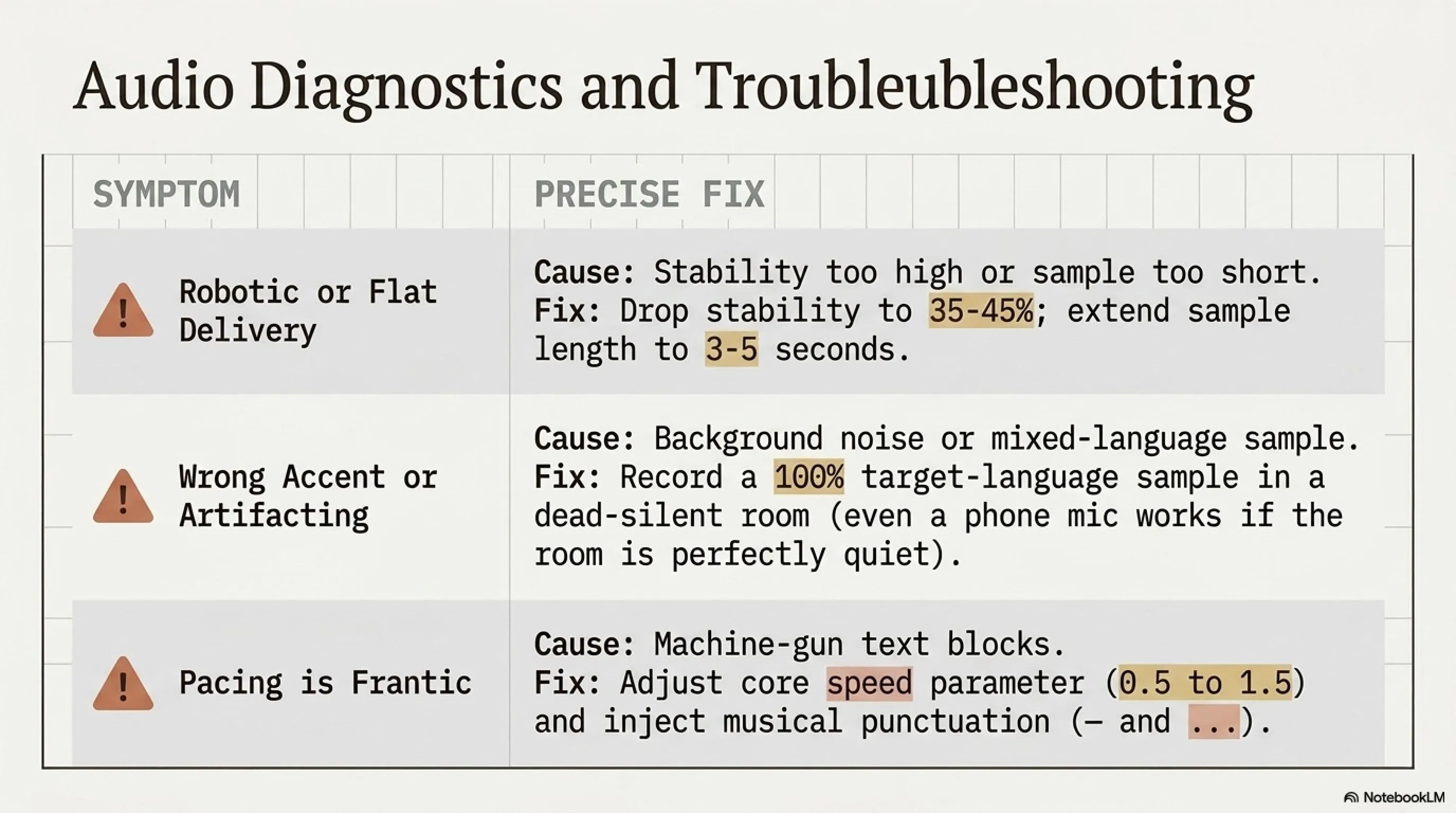
🛡️ Part Ten: Common Troubleshooting
Problem 1: Voice Sounds Robotic
Cause: Stability is too high or sample audio is too short.
Solution: Reduce Stability to 35-45%. If using OpenVoice, increase sample from 1 second to 3-5 seconds.
Problem 2: Wrong Accent
Cause: Sample audio included English words or had background noise.
Solution: Record a new sample that is 100% in your target language and recorded in a quiet room. Even phone microphone works if environment is silent.
Problem 3: Voice Too Fast or Too Slow
Cause: Problem in text or speed settings.
Solution: In ElevenLabs, you can adjust the speed parameter (0.5 to 1.5). Also, using punctuation marks like «...» and «—» helps control speed.
Problem 4: Wrong Pronunciation of Specific Words
Cause: Model is confusing languages or phonemes.
Solution: In ElevenLabs, make sure to set Language correctly (not Auto-detect). In OpenVoice, use the correct Base Speaker for your language.
🎓 Conclusion: Your Journey Begins Here
In this comprehensive tutorial, we've covered everything from the physics of sound to the precise settings of ElevenLabs and OpenVoice, to professional post-production and ethical considerations. Now it's time for action.
Remember: The difference between a good voice and a great voice is often in the details — a proper EQ, a precise pause, a subtle Reverb. These are the things that the audience's brain unconsciously recognizes and calls «quality».
So get to work. Clone your voice. Experiment. Make mistakes. Learn. And ultimately, create a voice that your audience will never forget.
Frequently Asked Questions
Is cloning my own voice legal?
Yes, it's completely legal and requires no permission. However, if you want to clone someone else's voice, you must have written consent.
How long does it take to create a professional voice?
With Instant Voice Cloning: less than 5 minutes. With Professional Voice Cloning: 3-6 hours of audio recording + several hours for fine-tuning.
Can I use cloned voice commercially?
With ElevenLabs: Yes, from Starter plan and above. With OpenVoice: Yes, MIT license allows commercial use.
How can I detect if a voice was made with AI?
Digital watermarks like AIUC-1 in ElevenLabs are detectable. Also, human ear can detect unnatural consistency.
Which microphone is better for recording samples?
For Instant: even phone microphone is sufficient. For Professional: USB microphones like Blue Yeti or Audio-Technica AT2020 are recommended.
Can I change voice in real-time?
ElevenLabs Flash v2.5 with 75ms latency is usable in Voice Agents. OpenVoice v2 in Streaming mode has about 200ms latency.
📚 Sources and References
All information in this article was gathered from the following authoritative sources:
- ElevenLabs Official Documentation 2026
- OpenVoice v2 Research Paper - MyShell.ai
- OpenVoice GitHub Repository
- ElevenLabs Voice Cloning Review 2026
- OpenVoice v2 Complete Guide
- ElevenLabs Pricing Analysis 2026
Content has been rewritten and adapted to comply with copyright laws and journalistic standards.
Editorial Update (July 11, 2026)
Additional Gallery: The Invisible Narrator: Voice Cloning Mastery with ElevenLabs & OpenVoice (2026)