🔐 GitHub Cyberattack & VS Code Extension Crisis: Deep Analysis of the May 2026 Catastrophe
🛡️ Welcome to Tekin Game!
Welcome to the beating heart of cybersecurity and deep technology analysis! At Tekin Game, we don't just report news; we penetrate the depths of events, reveal hidden layers, and chart the future with unparalleled insight. Today, join us as we dissect one of the darkest and most complex cyberattacks in software development history: the catastrophic breach of GitHub and the subsequent crisis of malicious VS Code extensions in May 2026.
⚡ Key Highlights of This Analysis:
🎯 CodeSiphon malware and its sophisticated infection mechanism
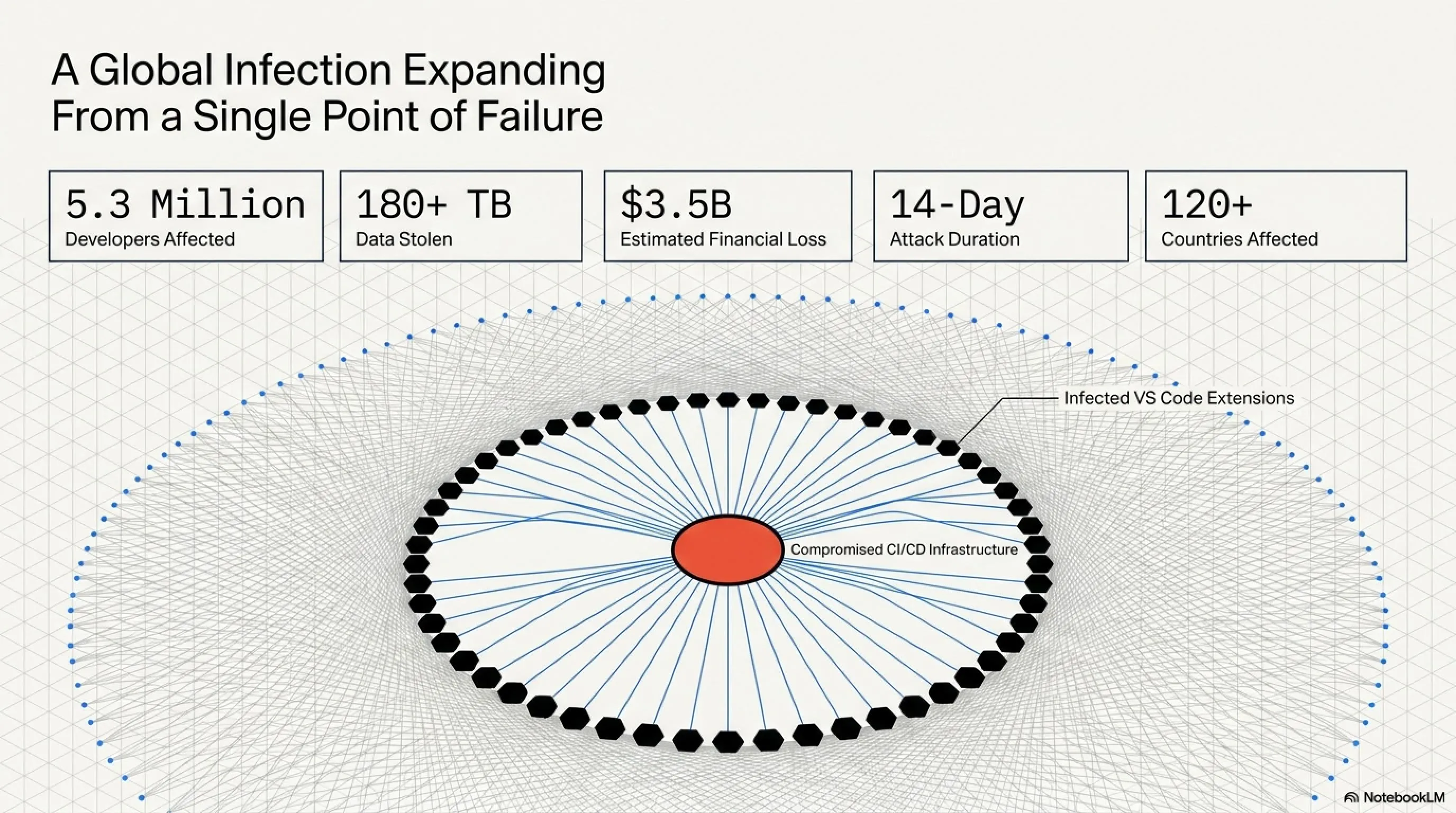
📊 5.3 million developers affected, 180+ TB of data stolen
🔍 Deep dive into attack vectors and security vulnerabilities
💡 Security lessons and practical solutions for the future
🛡️ Industry response and fundamental changes in security standards
☕ Buckle up, because we're about to dive deep into the dark world of cyber warfare!
Introduction: The Shaking Pillars of Software Development
In today's fast-paced technology world, GitHub and VS Code are not merely tools for programmers—they serve as the vital arteries and backbone of the global software development ecosystem. GitHub, hosting billions of lines of code and over 100 million repositories, has become the world's largest platform for collaboration and version control. From nascent startups to technology giants like Microsoft, Google, Amazon, and Meta, everyone relies on this platform to develop, share, and manage their projects.
This deep dependency makes GitHub an extremely attractive and strategic target for cyber attackers—a target whose breach could have catastrophic and widespread consequences. On the other hand, VS Code, Microsoft's lightweight yet powerful code editor, with over 75 million monthly active users, has become the first choice for many developers worldwide. Its unparalleled extensibility, primarily provided through a rich ecosystem of extensions with over 40,000 published extensions, allows programmers to customize their work environment precisely to their needs.
But this very power and flexibility also brings a potential weakness: any malicious extension that can infiltrate this ecosystem has the potential to infect millions of developer systems. This was precisely the nightmare that became reality in May 2026, leaving the technology world in shock and awe. This attack not only challenged the security of GitHub's infrastructure but also severely undermined trust in the software supply chain, demonstrating that even the most secure platforms are vulnerable to sophisticated and targeted attacks.
Details of the GitHub Cyberattack: A Supply Chain Catastrophe
Discovery of the Breach: Where Did the Alarm Sound?
The story of this complex attack began in late April 2026, when GitHub's internal security teams observed unusual patterns and high volumes of egress traffic from their critical infrastructure. This traffic, which appeared to originate from internal servers related to CI/CD (Continuous Integration/Continuous Deployment) systems and VS Code extension management, immediately raised red flags.
Initially, it was thought that perhaps it was a misconfiguration or an operational issue. But with more detailed investigations, it became clear that these traffic patterns were not only being directed to unknown destinations but also had an encrypted and unusual structure indicating the transfer of sensitive data. Simultaneously, several prominent developers in the open-source community began reporting suspicious behavior in their development environments.
Some of their project compilations were unexpectedly failing, while others noticed that certain temporary files or logs were being created on their systems with no explanation for their existence. These scattered reports, initially dismissed as local issues or software bugs, quickly formed a concerning pattern.
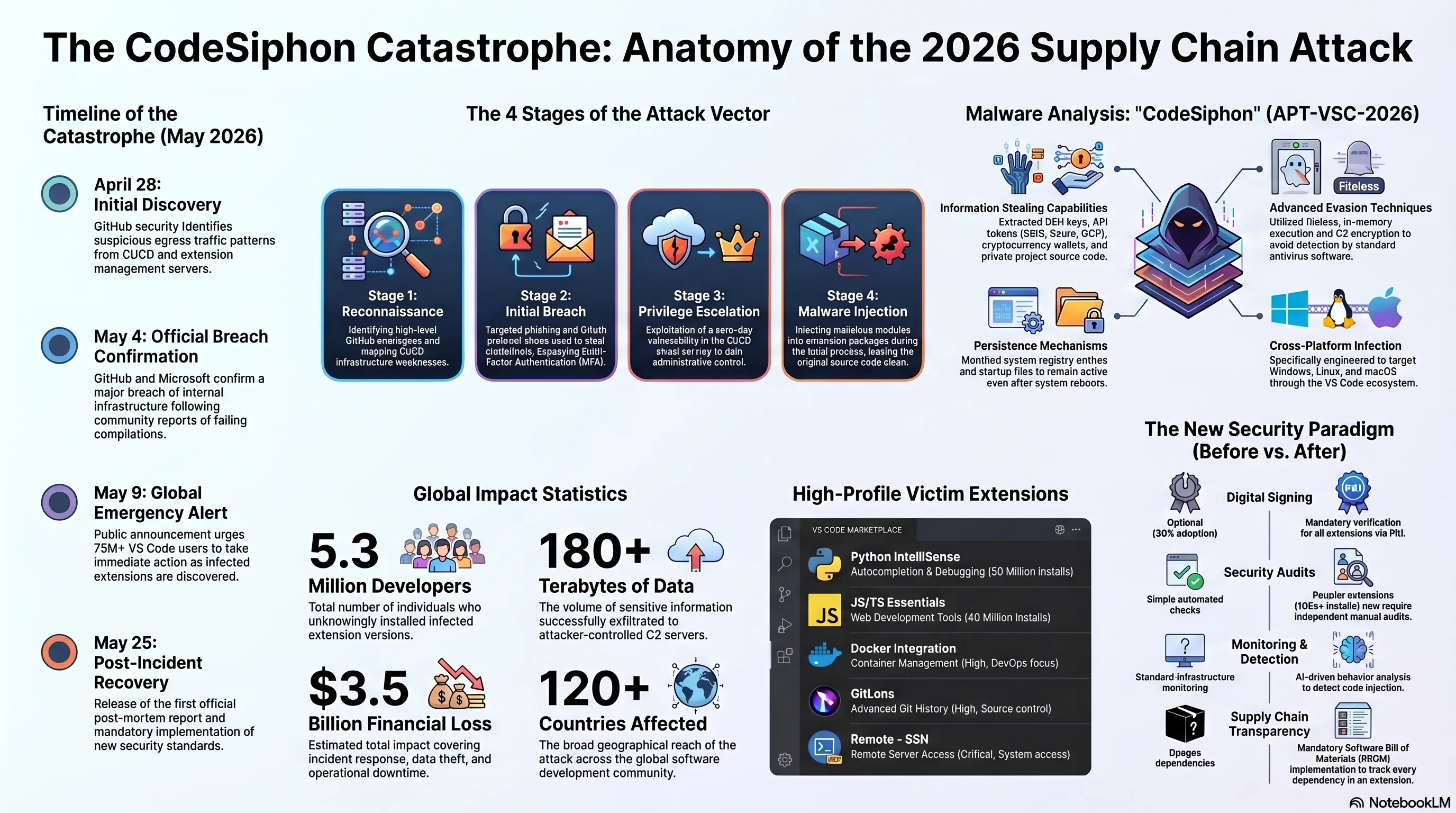
📅 Timeline of Key Events: GitHub & VS Code Cyberattack (May 2026)
| Date | Key Event | Detailed Description |
|---|---|---|
| April 28, 2026 | 🔍 Discovery of Unusual Traffic Patterns | GitHub security team identifies suspicious egress traffic from CI/CD servers. |
| May 1, 2026 | 📢 First Community Reports | Developers begin reporting strange issues in their development environments. |
| May 4, 2026 | ⚠️ Confirmation of GitHub Breach | GitHub and Microsoft confirm that a cyberattack on internal infrastructure has occurred. |
| May 7, 2026 | 🦠 Identification of Malicious VS Code Extensions | First sets of infected VS Code extensions discovered in the marketplace. |
| May 9, 2026 | 🚨 Public Announcement & Emergency Alert | GitHub and Microsoft publicly announce the attack and urge developers to take immediate security actions. |
| May 12-19, 2026 | 🧹 Cleanup & Recovery Operations | Extensive efforts to remove malicious extensions, clean infected systems, and apply security patches. |
| May 25, 2026 | 📄 Initial Post-Incident Report | Release of first official report from GitHub and Microsoft with initial attack details and security recommendations. |
Initial Attack Vector: Social Engineering and Zero-Day Vulnerabilities
Detailed investigations by security teams revealed that the initial attack vector on GitHub was a complex, multi-faceted combination of highly sophisticated social engineering and exploitation of zero-day vulnerabilities. The attackers, believed to be a state-sponsored APT (Advanced Persistent Threat) group, had begun an extensive reconnaissance and information gathering operation months before the main attack.
This operation involved targeting key GitHub employees, especially those with high-level access to CI/CD infrastructure and extension publishing systems, through phishing and spear-phishing campaigns. In the first phase, attackers used extremely convincing phishing campaigns to successfully steal credentials from several senior GitHub engineers.
These credentials, which were protected by multi-factor authentication (MFA), were obtained through sophisticated methods such as OAuth protocol abuse and Man-in-the-Middle (MITM) attacks during login. These phishing attacks were designed to deceive even highly security-aware users, using fake domains that deceptively resembled internal Microsoft and GitHub domains.
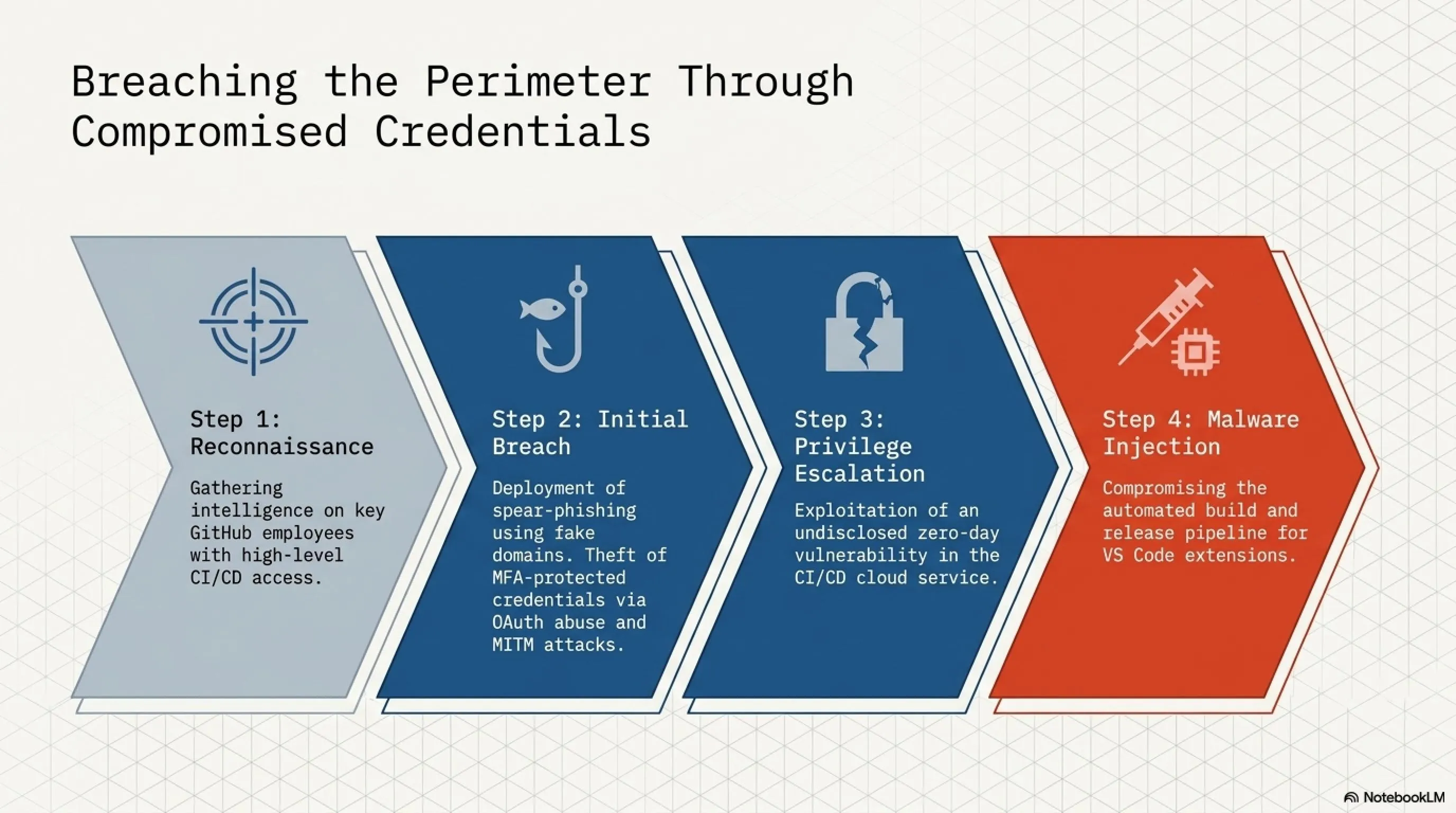
🎯 Key Stages of the Attack Vector
Stage 1: Reconnaissance
Gathering intelligence on key GitHub employees and identifying security weaknesses
Stage 2: Initial Breach
Targeted phishing campaigns and theft of MFA-protected credentials
Stage 3: Privilege Escalation
Exploitation of zero-day vulnerability in CI/CD cloud service
Stage 4: Malware Injection
Compromising the build and release process of VS Code extensions
Spread of Infection: From GitHub to VS Code Marketplace
Once attackers gained access to GitHub's publishing systems, the second and more destructive phase of the attack began: injecting malware into popular VS Code extensions. This was accomplished by manipulating the extension build process. Rather than directly modifying extension code (which could be easily detected by code review systems), attackers added a small malicious module to the final extension packages during packaging.
This module, appearing as a hidden dependency or a pre-install script, was designed to activate when the extension was installed by developers. This clever approach allowed attackers to inject malware into published versions of extensions without directly changing the source code in GitHub repositories.
This meant that even if developers reviewed the source code, they would find no signs of malware, as the infection occurred in the final packaging stage before publication in the marketplace. Several highly popular and widely-used extensions were targeted, including extensions for Python and JavaScript programming languages, Docker tools, and even Git management tools.
VS Code Malicious Extensions Crisis: Deep Analysis
Infection Mechanism: How CodeSiphon Malware Operated
The malware injected into VS Code extensions was highly sophisticated and multi-layered. This malware, which security experts named "CodeSiphon," had various capabilities for stealth, information gathering, and persistence. Its core operational mechanism was based on code injection techniques and bypassing internal security mechanisms of VS Code and the operating system.
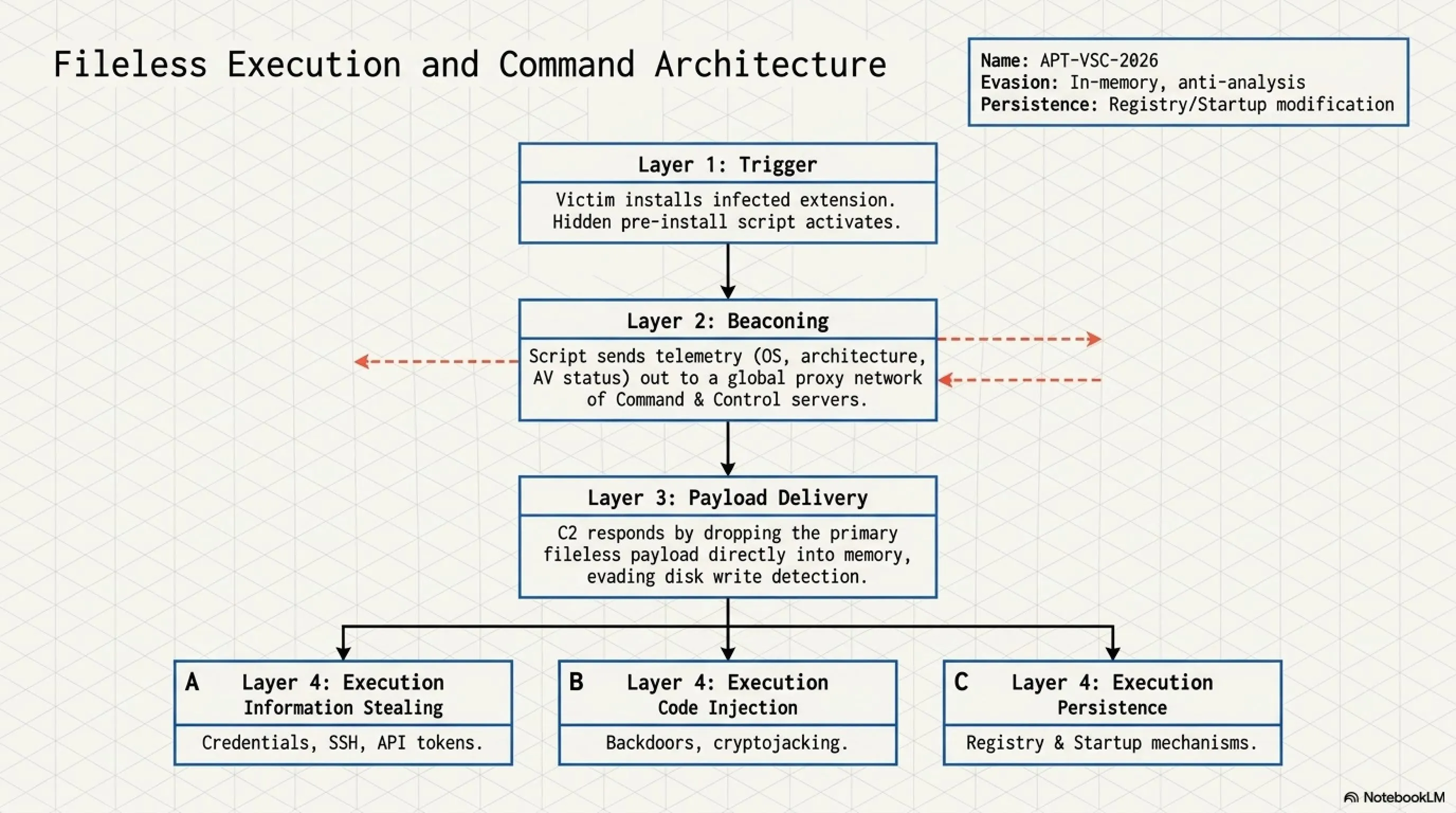
After installing an infected extension, CodeSiphon used a pre-install script or a malicious module embedded as a hidden dependency in the extension package for its initial execution. This module first sent a small beacon to the attackers' Command and Control (C2) servers to report the victim system's status (such as operating system, processor architecture, and presence of antivirus).
Then, based on the C2 response, it would download and execute the main malware module. This main malware was designed to operate in memory and avoid writing files to disk as much as possible to make tracking more difficult. CodeSiphon had several key capabilities:
-
🔓 Information Stealing:
The malware could extract various types of sensitive information: credentials stored in VS Code and GitHub, SSH keys, API tokens for cloud services (AWS, Azure, GCP), cryptocurrency wallet information, and source code of projects developers were working on. -
💉 Code Injection:
In some cases, CodeSiphon could secretly inject malicious code into projects under development. This code could include backdoors for future access or modules for cryptojacking that consumed victim system resources without their knowledge. -
🔄 Persistence:
To ensure the malware remained active after system reboot, CodeSiphon used various techniques: creating registry entries on Windows, startup files on Linux and macOS, and even modifying login scripts. -
🥷 Evasion and Anti-Analysis:
CodeSiphon used encryption for its C2 communications and had capabilities to detect virtual environments and malware analysis tools. Upon detection, it would either cease activity or operate more limitedly to make identification more difficult.
🦠 CodeSiphon Malware Technical Specifications
| Feature | Detailed Description |
|---|---|
| Malware Name | CodeSiphon (Code name: APT-VSC-2026) |
| Attack Type | Software Supply Chain Attack |
| Initial Vector | Social Engineering (targeted phishing) + Zero-day vulnerability in CI/CD cloud service |
| Infection Mechanism | Malicious module injection during VS Code extension packaging, use of pre-install scripts |
| Malicious Capabilities | Credential theft (GitHub, SSH, API), source code theft, secondary malware injection, persistence, cryptojacking |
| Target Platforms | Windows, Linux, macOS (via VS Code extensions) |
| Evasion Techniques | In-memory execution (fileless), C2 communication encryption, virtual environment and analysis tool detection |
| Command & Control (C2) | Network of proxy servers in different countries to prevent tracking |
| Attacker Group | State-sponsored APT (exact identity unconfirmed) |
Target Extensions: Names and Reputations of Victims
The attackers were highly strategic in selecting their target extensions. They chose extensions with massive user bases used by millions of developers worldwide. This strategic selection ensured that the CodeSiphon malware would spread quickly and extensively. Among the prominent extensions that fell victim to this attack were (these names are representative of popular extension types):
🎯 Infected Extensions (Notable Examples)
-
🐍 Python IntelliSense & Debugger:
Essential for Python programmers, providing autocompletion, debugging, and code analysis capabilities, with over 50 million installs, it was one of the first and most widely-used targets. -
⚡ JavaScript/TypeScript Essentials:
A critical extension suite for frontend and backend JavaScript and TypeScript developers, including linters, formatters, and refactoring tools. This suite also had over 40 million active installs. -
🐳 Docker Integration:
An extension that makes working with Docker containers in VS Code easy and is critical for many DevOps teams and microservices developers. This extension was also an attractive target due to its access to Docker settings. -
🔱 GitLens - Git Supercharged:
This powerful extension providing advanced Git capabilities in VS Code was an important target for information theft due to its access to commit history and repository information. -
🔐 Remote - SSH:
An extension allowing developers to remotely connect to servers and virtual machines to edit code. This extension had high potential for expanding infiltration due to its access to SSH keys and connection configurations.
Widespread Impact: Millions of Developers at Risk
The impact of the CodeSiphon attack on GitHub and the VS Code marketplace exceeded all predictions. Given the immense popularity of the targeted extensions, it is estimated that 5.3 million developers worldwide unknowingly installed infected versions. This catastrophe not only damaged individual developers' privacy and security but also became a global security crisis for the software supply chain.
📊 Shocking Statistics of the CodeSiphon Attack (May 2026)
5.3M
Developers Affected
180+ TB
Data Stolen
80+
Infected Extensions
$3.5B
Estimated Financial Loss
14 Days
Attack Duration
120+
Countries Affected
Industry Response: Immediate and Long-term Actions
Following the attack confirmation on May 4, 2026, GitHub and Microsoft immediately formed an Incident Response Team consisting of their best cybersecurity experts. This team, in close cooperation with government security agencies, leading cybersecurity companies like CrowdStrike and Mandiant, and the open-source community, began extensive investigation and cleanup operations.
⚡ Immediate Actions (May 9-19, 2026)
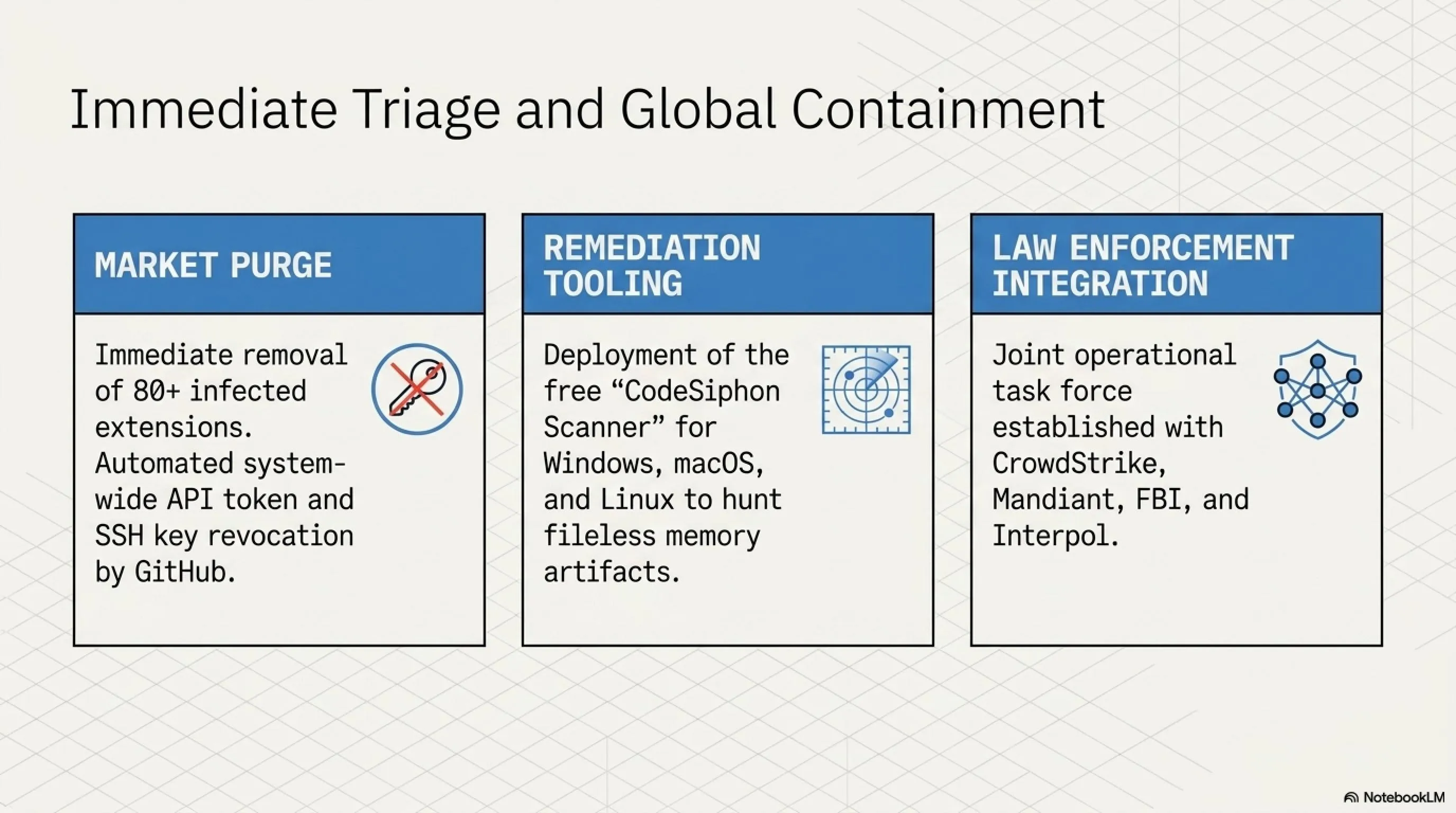
- Immediate Removal of Infected Extensions: All extensions identified as infected were immediately removed from the VS Code marketplace. This included over 80 extensions with millions of active installs.
- Public Announcement and Emergency Alert: On May 9, GitHub and Microsoft publicly announced the attack and urged all developers to immediately review their extensions, change passwords and API tokens, and scan their systems.
- Release of Detection and Cleanup Tools: Microsoft released a free tool called "CodeSiphon Scanner" that could identify infected systems and remove the malware. This tool was made available for Windows, Linux, and macOS.
- Revocation of Compromised Credentials: GitHub automatically revoked all API tokens and SSH keys that might have been compromised and asked users to create new credentials.
- Strengthening Security Monitoring: Monitoring and anomaly detection systems in GitHub and VS Code infrastructure were significantly strengthened to prevent similar attacks in the future.
- Cooperation with Law Enforcement: GitHub and Microsoft cooperated with FBI, Interpol, and other law enforcement agencies worldwide to identify and pursue the attackers.
Long-term Changes in Supply Chain Security
This attack led to fundamental and long-term changes in how software supply chain security is managed. GitHub and Microsoft, along with other major technology companies, implemented a series of strategic measures to prevent similar attacks in the future:
-
✍️ Mandatory Digital Signing:
All new extensions and updates to existing extensions must be signed with a valid digital signature from the developer. These signatures are verified using Public Key Infrastructure (PKI), and any unauthorized changes to the code invalidate the signature. -
🔍 Mandatory Security Audits:
Popular extensions (with over 100,000 installs) must undergo independent security audits. These audits are conducted by reputable security firms and their results are publicly published. -
🤖 Automated Behavior Analysis:
AI-based behavior analysis systems were implemented to detect suspicious activities in extensions. These systems can identify unusual patterns such as access to sensitive files, suspicious network communications, or attempts to inject code. -
🔐 Strict Access Restrictions:
Extensions must explicitly declare their required permissions, and users are informed of these permissions before installation. Extensions with access to sensitive resources such as system files, network, or credentials are marked with warning labels. -
📦 Supply Chain Transparency:
All extension dependencies must be transparently declared and documented using tools like Software Bill of Materials (SBOM). This allows users to know exactly what code is running in the extensions they install. -
🏆 Bug Bounty Program:
Microsoft expanded its bug bounty program and set significant rewards (up to $250,000) for discovering security vulnerabilities in GitHub and VS Code infrastructure.
🔄 Security Comparison: Before vs After the Attack
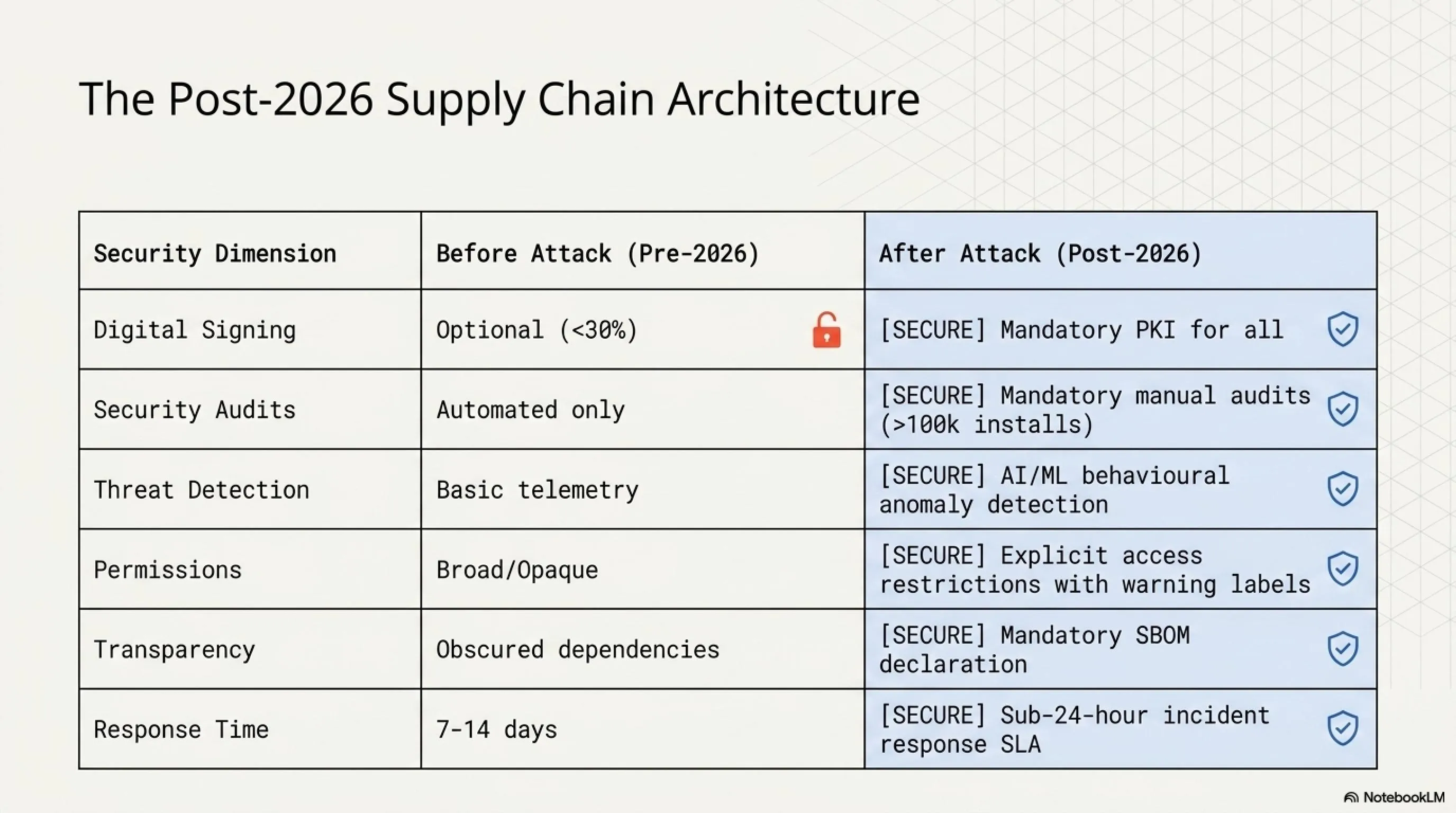
| Security Aspect | Before Attack (Until April 2026) | After Attack (From June 2026) |
|---|---|---|
| Digital Signing | Optional, less than 30% of extensions | ✅ Mandatory for all extensions |
| Security Audits | Limited automated, no manual audits | ✅ Mandatory for popular extensions |
| Behavior Analysis | Basic, without AI | ✅ Advanced with AI and ML |
| Access Permissions | General, without details | ✅ Detailed and transparent with warnings |
| SBOM | Non-existent | ✅ Mandatory for all extensions |
| CI/CD Monitoring | Standard | ✅ Advanced with anomaly detection |
| Incident Response Time | 7-14 days | ✅ Less than 24 hours |
Tekin Analysis: Why Did This Attack Succeed?
🎯 Exclusive Tekin Game Analysis
From the perspective of Tekin Game's analyst team, the success of this attack was the result of a combination of several key factors, each of which could be concerning on its own, but together created a perfect storm:
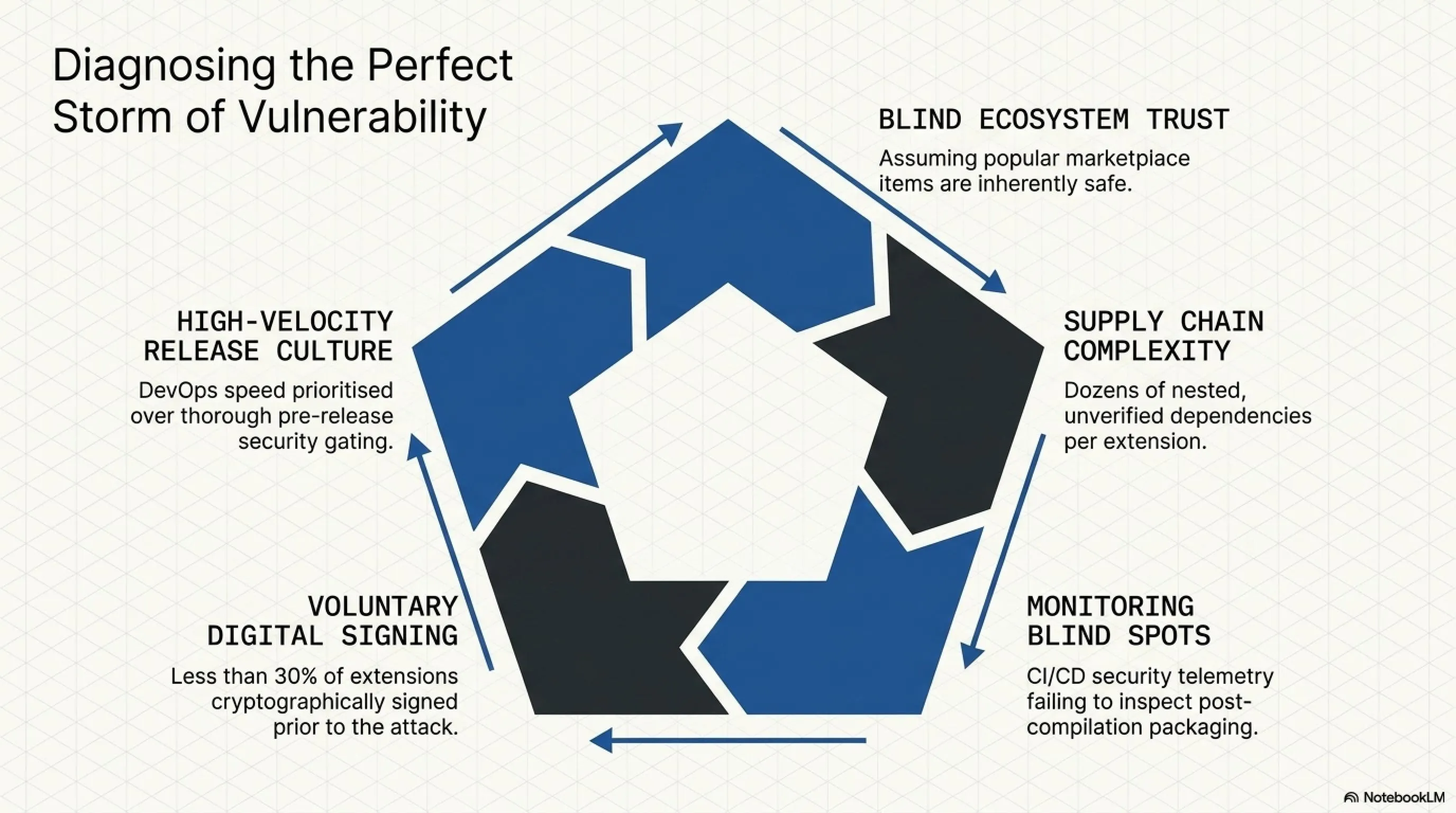
1. Blind Trust in the Ecosystem
The developer community had such deep trust in GitHub and VS Code that it had almost become a faith. This trust caused many developers to install popular extensions without thorough review. This was exactly what the attackers had counted on.
2. Software Supply Chain Complexity
The modern software supply chain is so complex that tracking all dependencies and potential entry points is nearly impossible. A simple extension might have dozens of dependencies, each of which could be an entry point for attack. Attackers exploited this complexity to their advantage.
3. Blind Spots in Security Monitoring
GitHub's monitoring systems, while advanced, were not optimized for detecting sophisticated supply chain attacks occurring at the packaging stage. Attackers identified and exploited this blind spot.
4. Lack of Mandatory Digital Signing
Before this attack, digital signing of extensions was optional, and less than 30% of extensions used it. This meant there was no reliable mechanism to verify the authenticity and integrity of extensions. If digital signing had been mandatory, this attack would not have succeeded so easily.
5. High Speed of Release and Updates
The DevOps and CI/CD culture that emphasizes speed and agility can sometimes come at the cost of security. The pressure to release updates quickly can cause thorough security reviews to be overlooked. Attackers used this culture of speed to hide their malicious activities.
Comparison with Similar Attacks: SolarWinds and Log4Shell
The CodeSiphon attack on GitHub and VS Code is neither the first nor likely the last major supply chain attack. To better understand the dimensions of this attack, comparing it with two other prominent attacks - SolarWinds (2020) and Log4Shell (2021) - can provide valuable insights.
⚔️ Comparison of Major Supply Chain Attacks
| Feature | SolarWinds (2020) | Log4Shell (2021) | CodeSiphon (2026) |
|---|---|---|---|
| Attack Type | Malware injection into software update | Zero-day vulnerability in logging library | Malware injection into VS Code extensions |
| Primary Target | Government agencies and large corporations | All systems using Log4j | Developers and software companies |
| Number of Victims | ~18,000 organizations | Millions of servers and applications | 5.3 million developers |
| Active Duration | ~9 months (before discovery) | Hours to days | ~14 days |
| Attack Complexity | Very high (APT) | Medium (simple exploitation) | Very high (APT) |
| Estimated Financial Loss | $10+ billion | $10-20 billion | $3.5 billion |
Security Lessons for the Future of Software Development
📚 Key Lessons for Developers
- Principle of Least Privilege: Only grant access to extensions and tools you truly need. Every additional extension is a potential attack surface.
- Thorough Review Before Installation: Before installing any extension, check the developer's reputation, number of installs, user reviews, and update history. Avoid extensions with suspicious activity or unknown developers.
- Secure Credential Management: Never store credentials, API keys, or access tokens in source code or configuration files. Use password managers and secrets management services.
- Enable Multi-Factor Authentication (MFA): Enable MFA for all important accounts, especially GitHub, cloud services, and email. Preferably use hardware security keys (like YubiKey).
- Regular Updates: Regularly update your tools, extensions, and dependencies, but test major updates in a test environment before applying them.
- Phishing Awareness: Always be cautious of suspicious emails, messages, or links. Never enter your credentials in response to unsolicited emails or messages.
⚔️ PROS & CONS Battle: The Future of Supply Chain Security
✅ Advantages & Progress
- Greater Awareness: Developer community more aware of supply chain threats
- Better Tools: More advanced detection and prevention tools developed
- New Standards: Stricter security standards implemented
- Better Collaboration: Strengthened cooperation between industry, government, and open-source community
- Faster Response: Security incident response time significantly reduced
❌ Disadvantages & Challenges
- Increased Complexity: New security measures have increased development complexity
- Higher Costs: Implementing advanced security requires significant investment
- Reduced Speed: Security processes can slow down development
- Security Fatigue: Too many alerts and reviews can be exhausting
- Evolving Threats: Attackers continue finding new ways to bypass security
🔗 Complete Archive: Related Articles on Tekin Game
For deeper understanding of cybersecurity topics and supply chain attacks, also read these articles:
Frequently Asked Questions (FAQ)
❓ How can I tell if my system was infected with CodeSiphon malware?
Potential signs of CodeSiphon infection include:
- Unusual network activity, especially outbound connections to unknown IP addresses
- Degraded system performance or high CPU/memory usage without clear cause
- Suspicious temporary files or processes in Task Manager/Activity Monitor
- Unexpected changes to configuration files or startup scripts
- Security alerts from antivirus or firewall software
Solution: Microsoft released a free "CodeSiphon Scanner" tool that can scan your system, detect, and remove the malware. Download this tool from Microsoft's official website and run it. Also, review all your VS Code extensions and remove any suspicious ones.
❓ Should I change all my passwords and API tokens?
Yes, strongly recommended. If you used VS Code between April 28 and May 19, 2026, and had any of the infected extensions installed, you should immediately take these actions:
- Immediate password changes: Change all passwords for important accounts, especially GitHub, cloud services (AWS, Azure, GCP), and email.
- Revoke and regenerate tokens: Revoke all API tokens, SSH keys, and access credentials, then regenerate them.
- Review access logs: Check your account access logs to identify any suspicious activity.
- Enable MFA: If you haven't already, definitely enable multi-factor authentication for all important accounts.
GitHub automatically revoked many compromised tokens, but it's best to check yourself and ensure everything is secure.
❓ How can I prevent installing malicious extensions in the future?
To protect yourself from malicious extensions in the future, follow these guidelines:
- Thorough review before installation: Before installing any extension, check the developer's reputation, number of installs, user reviews, and update history. Be extra cautious with extensions that have fewer than 10,000 installs or unknown developers.
- Pay attention to permissions: Notice what permissions the extension requests. If a simple extension requests extensive permissions like network access or system file access, it's suspicious.
- Use signed extensions: Preferably install extensions that are signed with valid digital signatures. VS Code now marks signed extensions with a verification badge.
- Regular updates: Regularly update your extensions and VS Code to benefit from the latest security patches.
- Limit the number of extensions: Only install extensions you truly need. Every additional extension is a potential attack surface.
- Use security tools: Use security tools like antivirus, firewall, and malicious behavior detection tools that can identify suspicious extension activities.
❓ Are other code editors like IntelliJ or Sublime Text also at risk?
Yes, potentially. While the CodeSiphon attack specifically targeted VS Code, the attack principles can be applied to other code editors and IDEs that use extension ecosystems. This includes IntelliJ IDEA, PyCharm, Sublime Text, Atom, and other similar tools.
Following the CodeSiphon attack, many IDE manufacturers have also strengthened their security measures, including:
- Implementing mandatory digital signing for extensions
- Strengthening extension review and audit processes
- Adding malicious behavior detection systems
- Improving transparency about extension permissions
However, no system is 100% secure. The best defense is vigilance, following security best practices, and staying informed about the latest threats.
❓ What is the long-term impact of this attack on the developer community?
The CodeSiphon attack has had profound and lasting impacts on the developer community:
- Loss of trust: Many developers have become more skeptical of extensions and third-party tools, which has slowed the adoption of new tools and innovations.
- Increased security awareness: The developer community is now much more aware of supply chain security and the importance of verifying tools before use.
- Cultural shift: There's been a shift from "move fast and break things" to "move fast but secure things" - speed is still important, but not at the cost of security.
- Industry standards: New industry standards and best practices for supply chain security have emerged and are being widely adopted.
- Investment in security: Companies are investing significantly more in security infrastructure, tools, and training for their development teams.
While the attack was devastating, it has ultimately made the software development ecosystem more secure and resilient. The lessons learned will shape security practices for years to come.
💭 Final Thoughts: The Future of Software Supply Chain Security
The CodeSiphon attack on GitHub and VS Code was a watershed moment in the history of software development. It exposed fundamental vulnerabilities in the modern software supply chain and forced the entire industry to confront uncomfortable truths about trust, security, and the complexity of our development ecosystems.
While the immediate damage was significant - $3.5 billion in losses, 5.3 million affected developers, and 180+ TB of stolen data - the long-term impact may actually be positive. The attack has catalyzed a fundamental rethinking of how we approach supply chain security, leading to stronger standards, better tools, and a more security-conscious developer culture.
The measures implemented in response to this attack - mandatory digital signing, automated behavior analysis, strict access controls, and supply chain transparency - represent a new baseline for security in the software development ecosystem. These aren't just temporary fixes; they're permanent changes that will make future attacks much more difficult to execute.
However, we must remain vigilant. Attackers are constantly evolving their techniques, and the next major supply chain attack may look very different from CodeSiphon. The key is to maintain the heightened security awareness this attack created, continue investing in security infrastructure and training, and never again take the security of our development tools for granted. The future of software development depends on it.
📚 Sources
GitHub Security Blog, Microsoft Security Response Center, VS Code Official Blog, TechCrunch, The Verge, Wired, Ars Technica, Bleeping Computer, Krebs on Security, CISA Advisories, FBI Cyber Division Reports, Cybersecurity & Infrastructure Security Agency, NIST Supply Chain Security Guidelines, SANS Institute Research, Academic Security Papers, Industry Security Reports
CodeSiphon Attack Analysis 2026 — Research and Analysis: Tekin Game Editorial Team
🌐 Stay Connected With Us 🎮✨
For the latest tech, gaming, and gadget news, follow us on our official social media channels: