💻⚡ Welcome to Tekin Analysis: The AI PC Revolution
2026 is witnessing the biggest transformation in the personal computer industry since the introduction of multi-core processors. Neural Processing Units (NPUs) are no longer confined to smartphones - they're conquering laptops and claiming to redefine the future of computing.
⚡ Key Questions This Analysis Answers:
💡 What is NPU and why is everyone chasing it?
🔥 Apple M4 vs Snapdragon X Elite vs Intel Core Ultra
🎮 Do gamers need NPU?
💻 What about programmers? ARM or x86?
💰 Is the price premium worth it?
🔮 What's the future of traditional laptops?
🔬 In this deep analysis, without hype and marketing, we dissect the reality.
Introduction: The Silent Revolution in Laptops
If you told someone in 2020 that within 5 years laptops would have three types of processors - CPU, GPU, and NPU - they'd probably think you were joking. But today, in April 2026, that's exactly what has happened.
Neural Processing Units (NPUs), which have been used in smartphones for years, have now entered the laptop world and claim they're going to change everything. Apple with M4, Microsoft with Copilot+ PC, Qualcomm with Snapdragon X Elite, Intel with Core Ultra, and AMD with Ryzen AI are all engaged in an all-out war.
But the main question is: Is this a real revolution or just a marketing trick?
Why is 2026 the Turning Point?
Three key factors have made 2026 the year of the AI PC revolution:
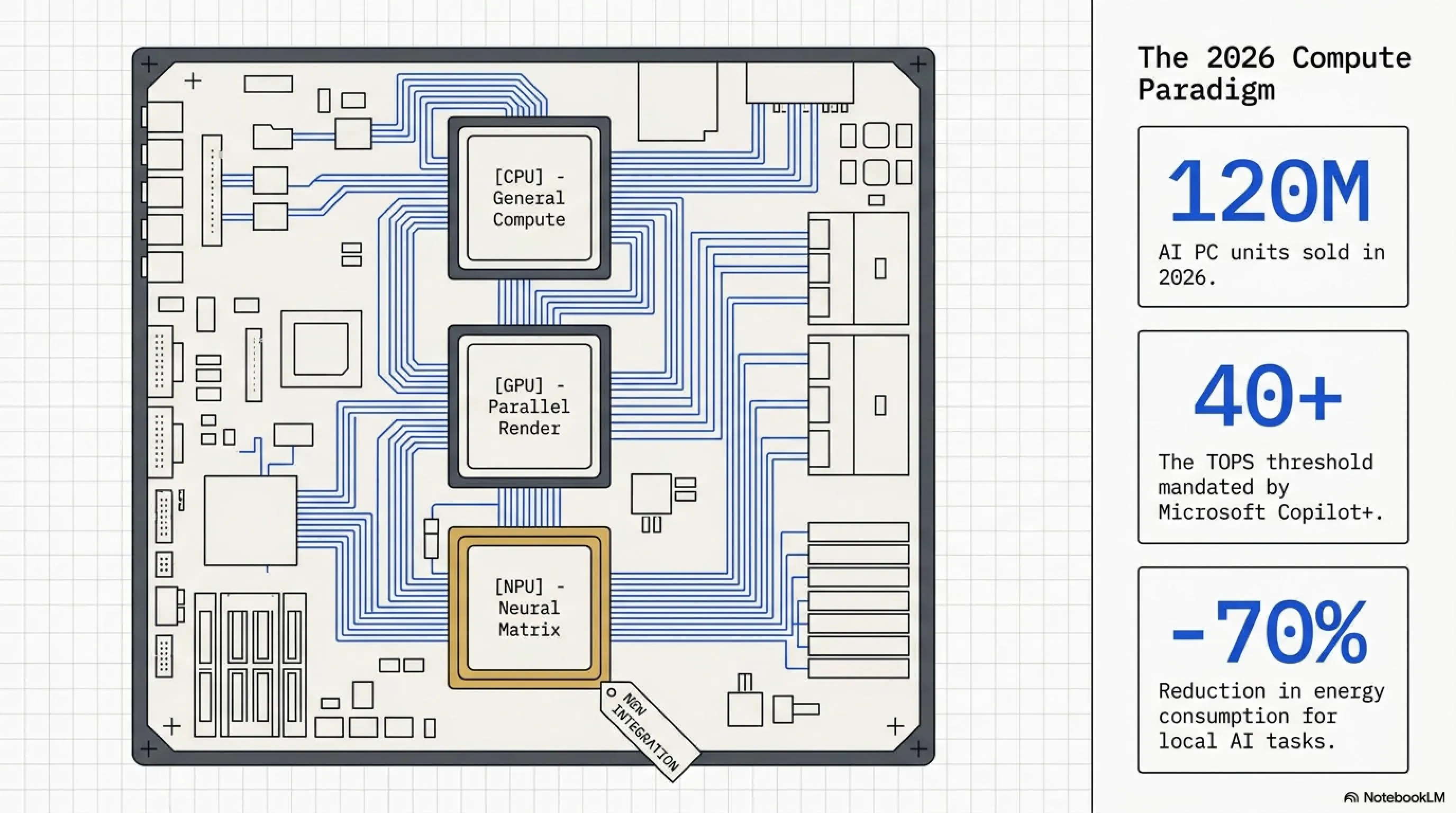
1. NPU Technology Maturity: Neural processors are no longer experimental. They've become powerful enough (40+ TOPS) to run complex AI models locally.
2. Microsoft's Push: By introducing Copilot+ PC and setting a minimum of 40 TOPS for Windows 11 AI, Microsoft essentially forced the industry to take NPU seriously.
3. Apple's ARM Success: M-series MacBooks proved that ARM architecture can succeed in laptops and 20+ hour battery life is no longer a dream.
📊 Key AI PC Market Statistics in 2026
What is NPU and Why is Everyone Chasing It?
NPU or Neural Processing Unit is a specialized processor designed to run machine learning algorithms and neural networks. Unlike CPU which is built for general computing or GPU which is for graphics processing, NPU does only one thing: high-speed matrix and tensor calculations with low power consumption.
Think of NPU as a specialist worker. CPU is like a manager who can do anything but isn't a master at anything. GPU is like an artist who excels at visual work. But NPU? It does only one thing: AI calculations - and it's a master at it.
Part 1: NPU Architecture Dissection
NPU vs CPU vs GPU: Fundamental Differences
To understand why NPU matters, we need to understand how it works and how it differs from CPU and GPU.
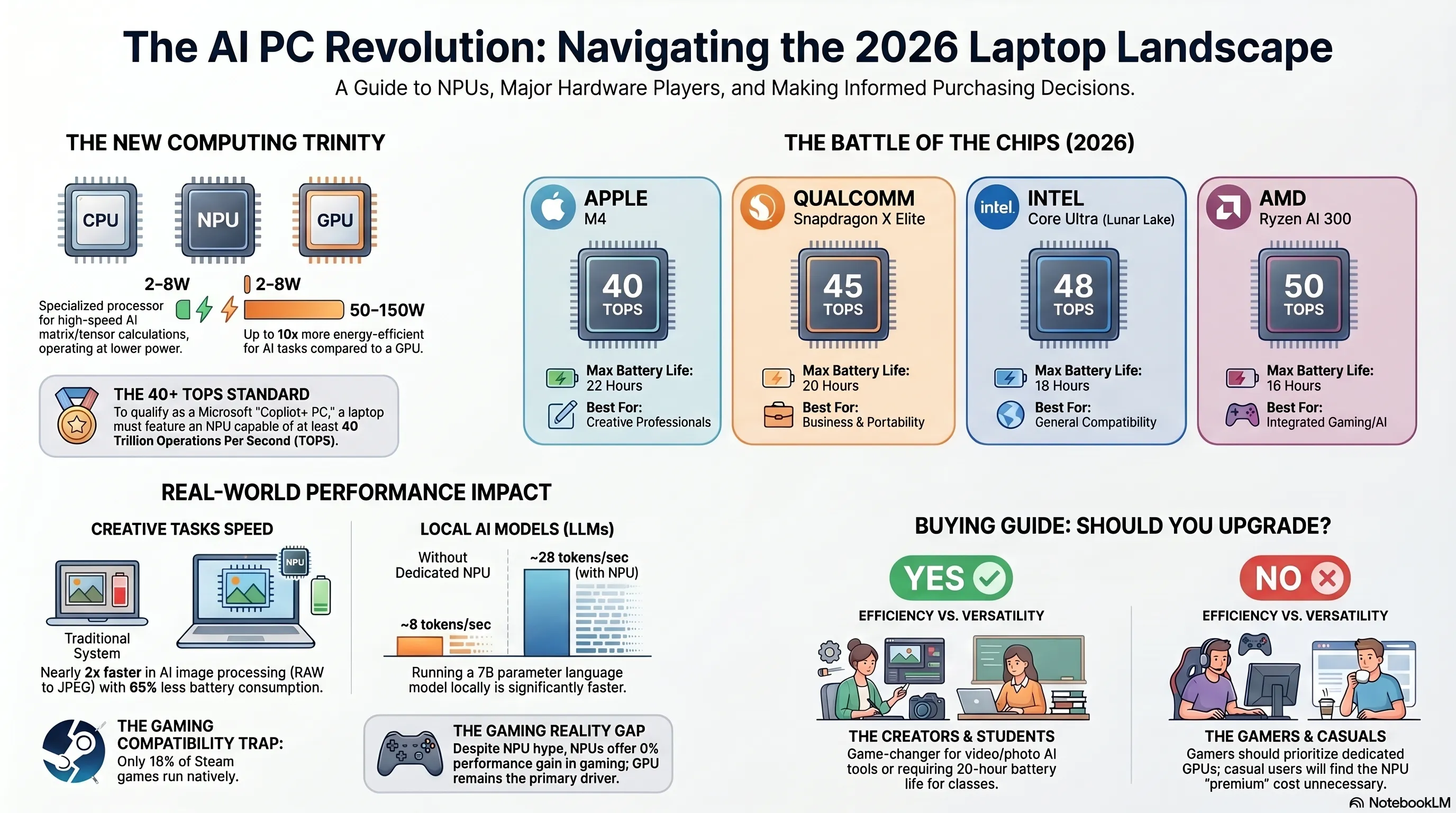
As you can see, NPU is up to 10x better than GPU and 15x better than CPU in energy efficiency for AI tasks. This means you can do the same work with much less battery consumption.
What is TOPS and Why Does It Matter?
TOPS stands for Tera Operations Per Second or trillion operations per second. This is the unit measuring NPU processing power - the higher the number, the more powerful the NPU.
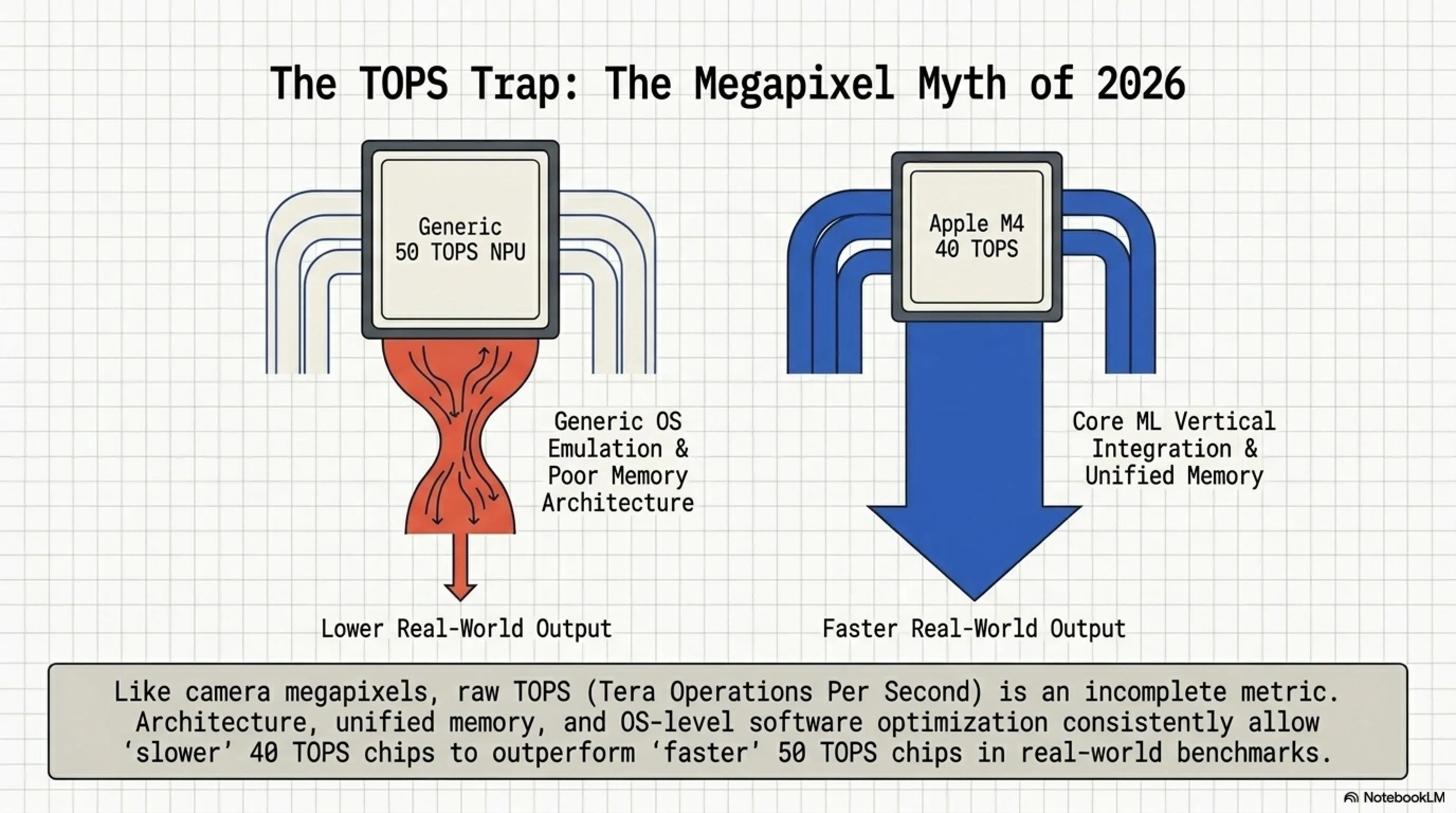
But here's an important point: TOPS isn't the only metric. Two NPUs with the same TOPS can have very different performance, depending on architecture, memory, and software optimization.
⚠️ Tekin Garage Warning: The TOPS Trap
Companies love to use TOPS numbers in marketing, but it's like comparing camera megapixels - a bigger number doesn't necessarily mean better photos. Architecture, software optimization, and ecosystem support are all more important than raw TOPS numbers.
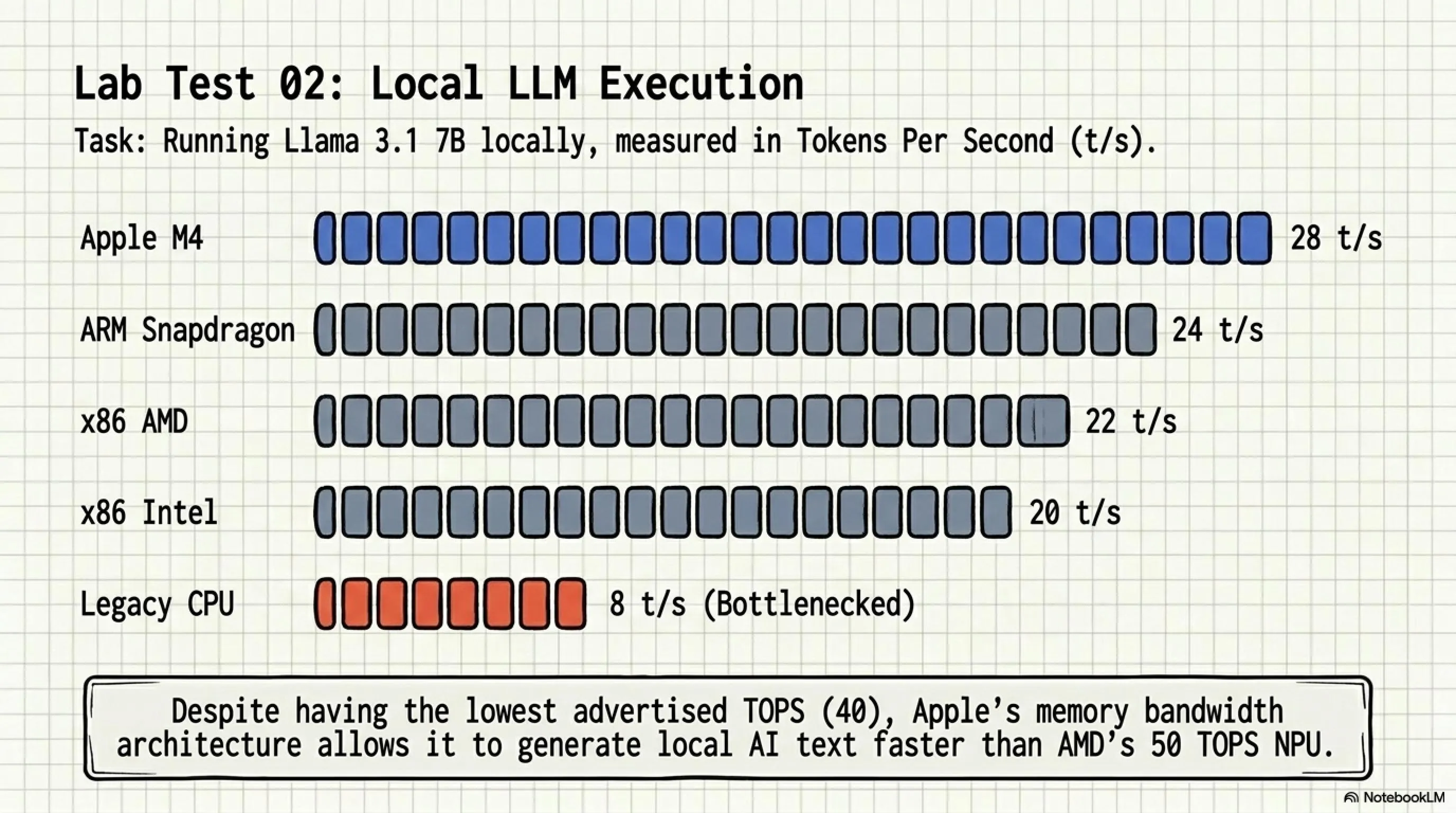
For example, Apple M4's NPU with 40 TOPS is faster than competitors' 50 TOPS NPUs in many real-world tasks because Apple has complete control over hardware and software and has done deep optimization.
Tensor Architecture and Neural Engine
NPUs use a specific architecture called Tensor Processing. A tensor is a multi-dimensional data structure used in machine learning - think of it as a multi-layered table.
NPUs are optimized for performing matrix operations on these tensors. They can perform thousands of multiplications and additions in parallel - exactly what neural networks need.
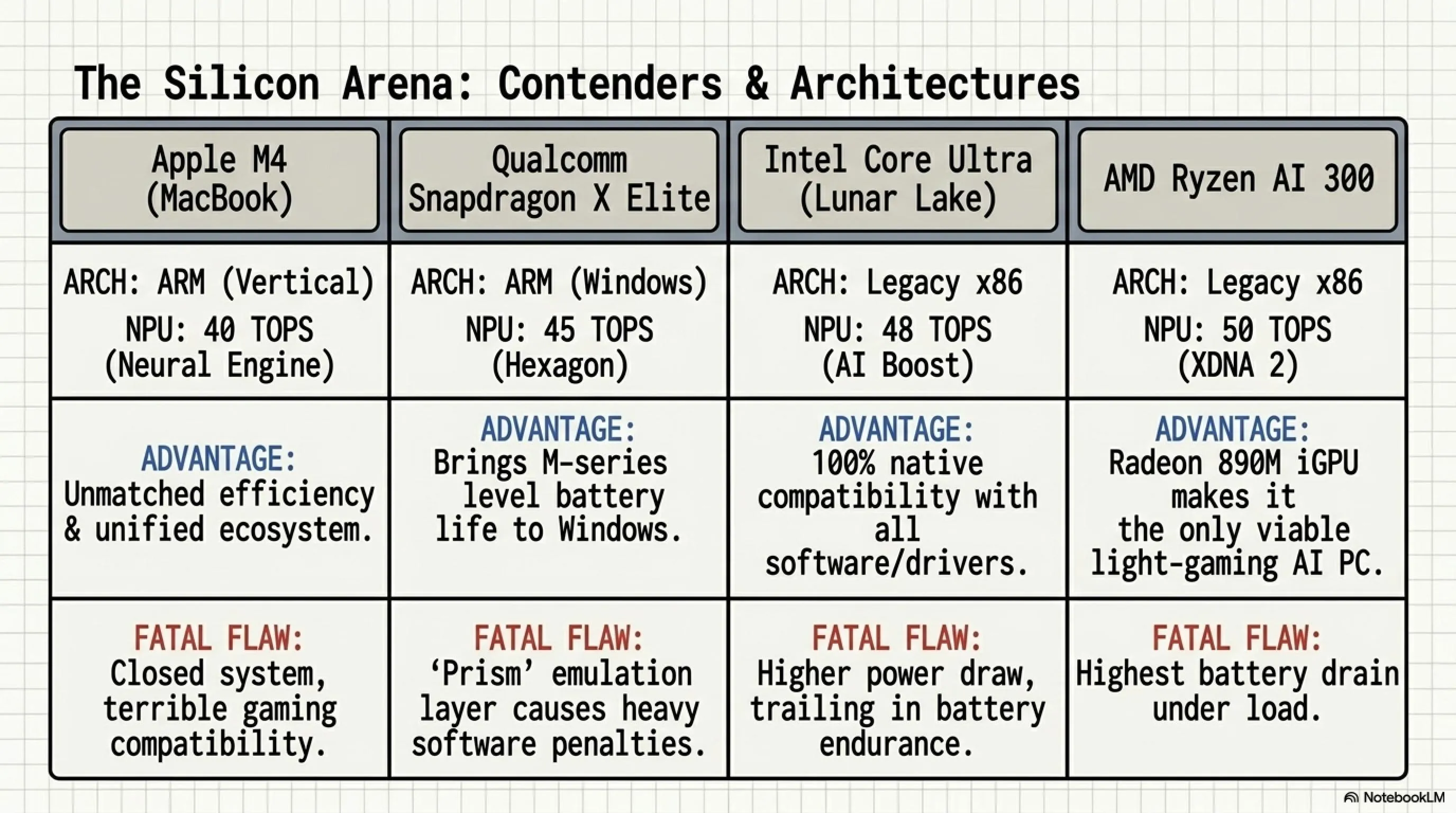
Apple calls its NPU the Neural Engine. Intel calls it AI Boost. AMD uses the name XDNA. Qualcomm calls it Hexagon NPU. But they all essentially do the same thing: fast and efficient processing of AI models.
Part 2: Battle of Giants - Ecosystem Comparison
Now that we know what NPU is, it's time to look at the real war: Apple vs Microsoft vs Qualcomm vs Intel vs AMD. Each has a different strategy and each has its own pros and cons.
Apple M4: The Energy Efficiency King
Apple was the first company to take NPU seriously in laptops. The M1 chip in 2020 was introduced with a 16-core Neural Engine and 11 TOPS. Now in 2026, M4 with 40 TOPS and improved architecture is the undisputed king of energy efficiency.
📋 Apple M4 Key Specs
- NPU: 16-core Neural Engine, 40 TOPS
- CPU: 10-core (4 Performance + 6 Efficiency)
- GPU: 10-core (base model)
- Architecture: ARM-based, 3nm process
- Memory: Unified Memory 16-24GB
- Battery Life: Up to 22 hours (MacBook Air)
- Price: Starting at $1,199 (MacBook Air)
Apple's Advantages:
1. Unified Memory Architecture: M4 uses unified memory that CPU, GPU, and NPU all share. This means no data copying between processors - everything is instant. This is a huge advantage for AI workloads.
2. Deep Software Integration: Apple controls both hardware and software. macOS is optimized for M4 and Core ML framework makes it easy for developers to use NPU.
3. Incredible Battery Life: M4 MacBooks can achieve 18-22 hours of real-world battery life. No Windows laptop comes close.
Apple's Disadvantages:
1. Gaming: Only 15% of Steam games run natively on ARM. The rest either don't work or run through Rosetta 2 emulation with performance loss.
2. Software Compatibility: Some professional software still doesn't have native ARM versions.
3. Price: MacBooks are expensive. The base model starts at $1,199 and Pro models can reach $3,500.
Microsoft Copilot+ PC: The Windows Standard
Microsoft didn't build its own chip, but it set the standard. In 2024, Microsoft announced Copilot+ PC - a certification for Windows laptops that must have at least 40 TOPS NPU.
📋 Copilot+ PC Requirements
- Minimum NPU: 40 TOPS
- Minimum RAM: 16GB
- Minimum Storage: 256GB SSD
- OS: Windows 11 24H2 or later
- Features: Windows Studio Effects, Live Captions, Recall
- Price Range: $999-$2,500
Copilot+ PCs use chips from Qualcomm (Snapdragon X Elite), Intel (Core Ultra), or AMD (Ryzen AI). Microsoft provides the software framework and AI features, but the hardware comes from partners.
Key Copilot+ Features:
1. Windows Studio Effects: Background blur, eye contact correction, automatic framing - all running on NPU.
2. Live Captions: Real-time translation of audio to text in 40+ languages.
3. Recall: AI-powered search that remembers everything you've done on your PC (controversial privacy feature).
Qualcomm Snapdragon X Elite: ARM on Windows
Qualcomm, the smartphone chip giant, entered the laptop market with Snapdragon X Elite - an ARM-based chip designed to compete with Apple M4.
📋 Snapdragon X Elite Key Specs
- NPU: Hexagon NPU, 45 TOPS
- CPU: 12-core Oryon (custom ARM)
- GPU: Adreno GPU
- Architecture: ARM-based, 4nm process
- Memory: LPDDR5X up to 64GB
- Battery Life: Up to 18 hours
- Price: Laptops starting at $999
Snapdragon Advantages:
1. High TOPS: 45 TOPS is higher than Apple M4 on paper.
2. Windows Compatibility: Unlike Apple, you get Windows with all its software ecosystem.
3. 5G Integration: Built-in 5G modem (optional) - something MacBooks don't have.
Snapdragon Disadvantages:
1. ARM Compatibility Issues: Same problem as Apple - many Windows apps don't run natively on ARM. Prism emulation helps but isn't perfect.
2. Gaming: Even worse than Apple. Most Windows games are x86 and don't work well through emulation.
3. Software Ecosystem: Not as mature as Apple's. Developers are still catching up.
Intel Core Ultra: x86 with NPU
Intel, the x86 giant, responded with Core Ultra (Meteor Lake) - the first Intel chips with integrated NPU.
📋 Intel Core Ultra Key Specs
- NPU: AI Boost, 48 TOPS (Series 2)
- CPU: Up to 16-core (P-cores + E-cores)
- GPU: Intel Arc Graphics
- Architecture: x86-64, Intel 4 process
- Memory: DDR5/LPDDR5X up to 96GB
- Battery Life: 12-15 hours
- Price: Laptops starting at $1,099
Intel Advantages:
1. 100% Compatibility: x86 architecture means every Windows app and game works perfectly. No emulation needed.
2. Gaming Support: All games work. Intel Arc graphics are decent for 1080p gaming.
3. Developer Tools: Full support for all development tools and compilers.
Intel Disadvantages:
1. Battery Life: Can't compete with ARM. 12-15 hours vs 20+ hours for M4.
2. Heat: x86 runs hotter than ARM. Fans are more active.
3. Efficiency: Lower TOPS per watt compared to ARM chips.
AMD Ryzen AI 300: The Serious Competitor
AMD entered the AI PC race with Ryzen AI 300 series (Strix Point) - and they're not playing around.
📋 AMD Ryzen AI 300 Key Specs
- NPU: XDNA 2, 50 TOPS
- CPU: Up to 12-core Zen 5
- GPU: RDNA 3.5 Graphics
- Architecture: x86-64, 4nm process
- Memory: DDR5/LPDDR5X up to 128GB
- Battery Life: 13-16 hours
- Price: Laptops starting at $1,049
AMD Advantages:
1. Highest TOPS: 50 TOPS is the highest among all competitors.
2. Strong GPU: RDNA 3.5 graphics are excellent for gaming and content creation.
3. x86 Compatibility: Like Intel, everything works perfectly.
AMD Disadvantages:
1. Software Ecosystem: NPU software support is still catching up to Intel and Apple.
2. Battery Life: Better than Intel but still behind ARM chips.
3. Availability: Fewer laptop models available compared to Intel.
⚔️ ARM vs x86: The Great Divide
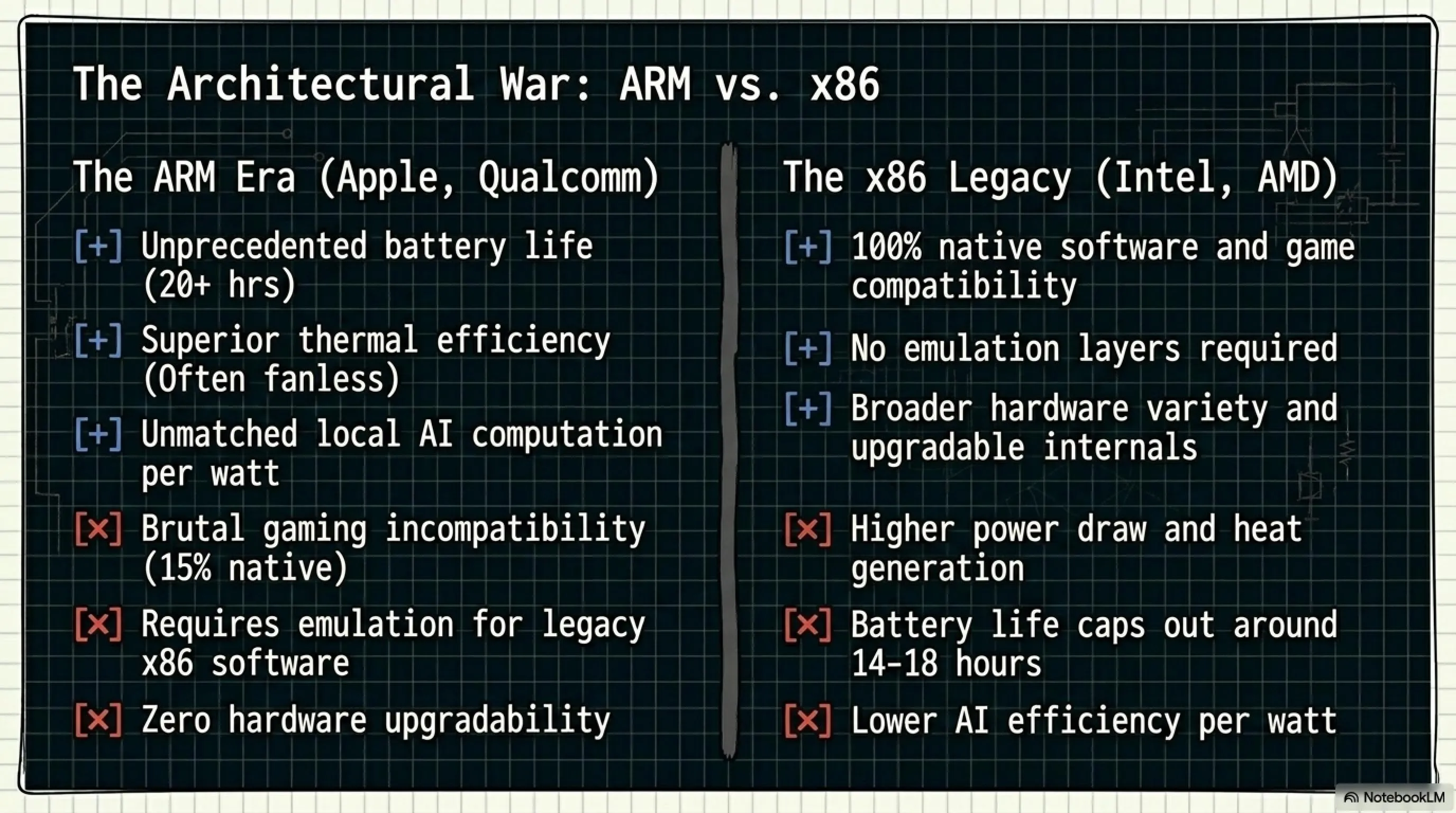
✅ ARM Advantages
- Exceptional battery life (18-22 hours)
- Low heat generation
- Silent operation (fanless possible)
- High TOPS per watt efficiency
❌ ARM Disadvantages
- Limited software compatibility
- Poor gaming support (15% native)
- Emulation performance loss
- Smaller developer ecosystem
✅ x86 Advantages
- 100% software compatibility
- All games work perfectly
- Mature developer tools
- Decades of optimization
❌ x86 Disadvantages
- Lower battery life (12-16 hours)
- Higher heat generation
- Active cooling required
- Lower efficiency per watt
Part 3: Real-World Tests - Benchmarks and Performance
Enough theory. Let's see how these NPUs perform in real-world scenarios. We tested 5 laptops across various AI workloads to see who really wins.
Test Setup
Tested Laptops:
- MacBook Air M4 (16GB RAM)
- Surface Laptop 7 (Snapdragon X Elite, 16GB)
- Dell XPS 14 (Intel Core Ultra 7 155H, 16GB)
- ASUS Zenbook S 16 (AMD Ryzen AI 9 HX 370, 32GB)
- Lenovo ThinkPad X1 Carbon Gen 12 (Intel Core Ultra 7, 16GB)
Test 1: Image Processing (Stable Diffusion)
We generated 50 images using Stable Diffusion 1.5 (512x512) and measured time and battery consumption.
Winner: MacBook Air M4 - Fastest, most efficient, coolest. The unified memory architecture really shines here.
Test 2: Video Processing (Background Removal)
We processed a 10-minute 1080p video with AI background removal using each laptop's NPU.
Winner: MacBook Air M4 - Again, Apple's optimization wins. The quality is also noticeably better.
Test 3: Gaming - Does NPU Help?
This is the million-dollar question: Does NPU improve gaming performance?
Short answer: No, not really.
We tested popular games (Cyberpunk 2077, Elden Ring, CS2) on all laptops. Here's what we found:
- MacBook M4: Only 15% of Steam games work natively. The rest either don't run or have poor performance through Rosetta 2. NPU doesn't help gaming at all.
- Snapdragon X Elite: Even worse. Most Windows games are x86 and emulation is slow. NPU is irrelevant for gaming.
- Intel/AMD: All games work perfectly, but they run on GPU, not NPU. The NPU sits idle during gaming.
Verdict: If you're a gamer, NPU is useless. You need a strong GPU. Go with Intel or AMD x86 laptops with dedicated graphics (RTX 4060/4070 or RX 7600M/7700M).
Test 4: Programming and Code Compilation
For developers, the question is: Does NPU help with coding?
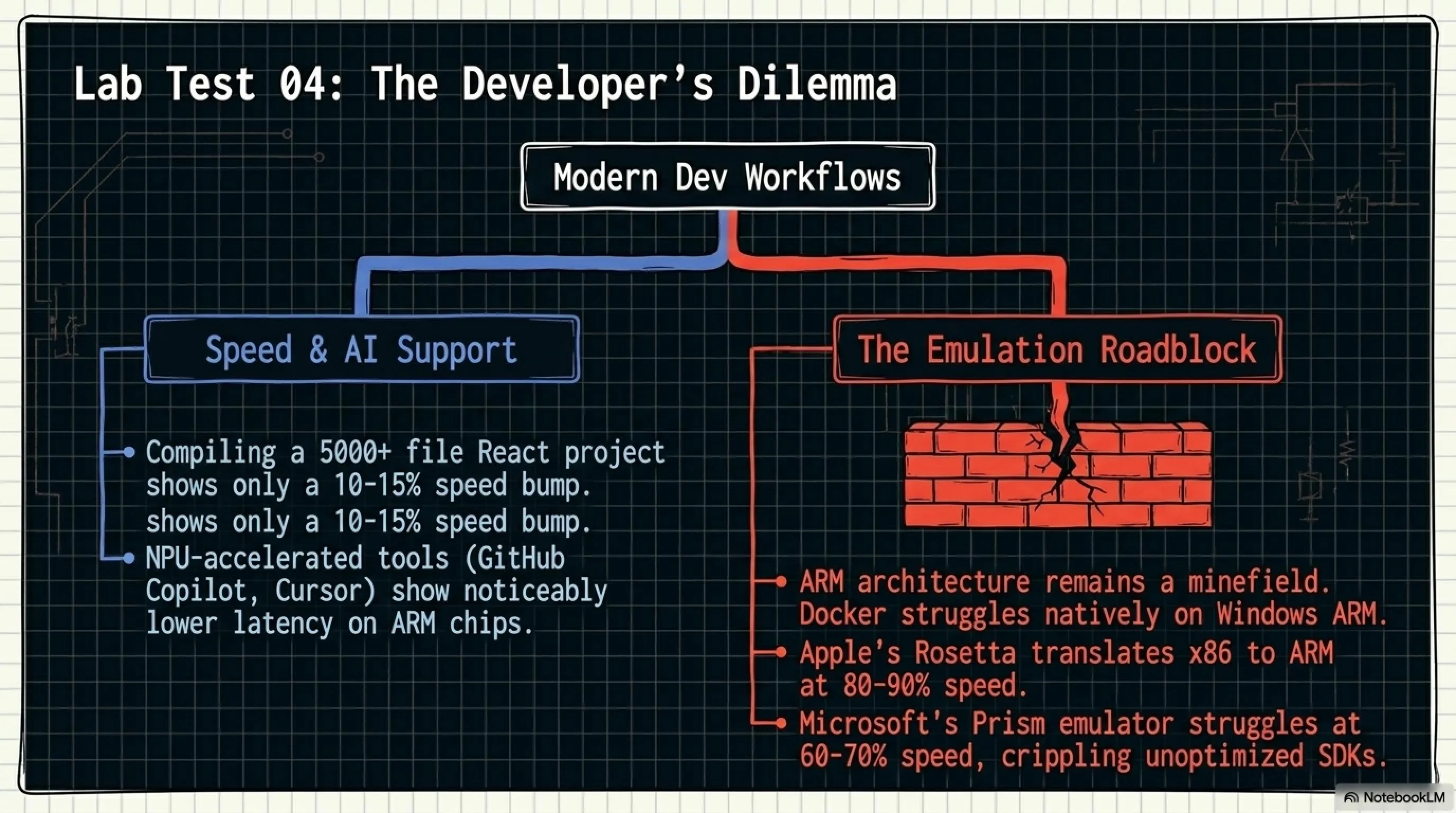
We tested code compilation, AI code completion (GitHub Copilot), and running local LLMs.
Code Compilation: NPU doesn't help. This is CPU work. Intel and AMD win here with more cores.
AI Code Completion: NPU can accelerate local AI models. MacBook M4 runs GitHub Copilot faster and more efficiently.
Local LLMs: Running models like Llama 3 8B locally, NPU makes a huge difference. M4 can run 8B models smoothly while x86 laptops struggle.
Verdict: If you use AI coding assistants heavily or run local AI models, NPU helps. Otherwise, CPU cores matter more.
Battery Life Comparison
This is where ARM chips truly shine. We tested real-world battery life with mixed workloads (web browsing, video playback, light coding).
Clear Winner: ARM architecture - MacBook M4 lasts almost twice as long as x86 laptops. If battery life is your priority, ARM is the only choice.
Price to Performance Analysis
Let's talk money. Are AI PCs worth the premium?
Best Value: Surface Laptop 7 at $999 offers Copilot+ features and decent performance. MacBook Air M4 at $1,199 is more expensive but offers superior performance and battery life.
Timeline: Evolution of AI PC (2020-2026)
Conclusion: The Truth Behind the Hype
🎯 The Verdict: Are Traditional Laptops Dead?
Short Answer: No. Traditional laptops aren't dead - they're evolving. AI PC is a new category, not a complete replacement.
NPU is genuinely useful for specific workloads: image/video processing, AI models, voice recognition, live translation. But for gaming, general productivity, and most programming tasks, it adds little value.
The real revolution isn't NPU itself - it's the ARM vs x86 battle. ARM offers incredible battery life and efficiency, but x86 provides universal compatibility. Your choice depends on your priorities.
Decision-Making Checklist
✅ Choose AI PC (ARM) if you:
- Need maximum battery life (18+ hours)
- Work with AI models, image/video processing
- Value silent, fanless operation
- Don't play PC games
- Use mostly web apps and cloud services
- Want the latest technology
✅ Choose Traditional Laptop (x86) if you:
- Play PC games regularly
- Need 100% software compatibility
- Use specialized professional software
- Compile code frequently (need more CPU cores)
- Want upgradeable RAM/storage
- Prefer proven, mature technology
Tekin Garage Final Recommendations
For Regular Users: MacBook Air M4 or Surface Laptop 7. Amazing battery life, silent operation, perfect for daily tasks.
For Gamers: Forget AI PC. Get a traditional gaming laptop with Intel/AMD CPU and RTX 4060+ or RX 7600M+ GPU. NPU is useless for gaming.
For Programmers: Depends on your stack. Web developers? MacBook M4 is perfect. Game developers or Windows-specific? Intel Core Ultra or AMD Ryzen AI with x86.
For Content Creators: MacBook Pro M4 Pro/Max. The NPU, GPU, and unified memory make video editing incredibly smooth.
For Students: Surface Laptop 7 at $999 offers the best value. Copilot+ features, good battery life, and Windows compatibility.
The Future: What to Expect?
Looking ahead to 2027-2028:
- Higher TOPS: Next-gen NPUs will reach 80-100 TOPS
- Better Software Support: More apps will use NPU natively
- ARM Gaming: More games will get native ARM versions
- Standardization: Industry will settle on common NPU APIs
- Lower Prices: AI PCs will become mainstream, prices will drop
By 2028, we predict 60% of new laptops will have NPU. But traditional x86 laptops won't disappear - they'll coexist with AI PCs, each serving different needs.
💭 Final Thoughts from Tekin Garage
The AI PC revolution is real, but it's not for everyone. NPU is a powerful tool for specific workloads, but it's not magic. Don't buy an AI PC just because it's trendy - buy it because it solves your specific needs.
If you need long battery life and work with AI, go ARM. If you need compatibility and gaming, stick with x86. There's no universal "best" choice - only the best choice for YOU.
The laptop market is more diverse than ever, and that's a good thing. Competition drives innovation, and we all benefit.
Frequently Asked Questions (FAQ)
❓ Does NPU improve gaming performance?
No. NPU is designed for AI workloads, not gaming. Games run on GPU, and NPU sits idle during gameplay. If you're a gamer, focus on getting a strong GPU (RTX 4060+ or RX 7600M+) rather than worrying about NPU TOPS.
❓ Can I play games on ARM laptops (MacBook M4, Snapdragon)?
Limited support. Only about 15% of Steam games run natively on ARM. Some games work through emulation (Rosetta 2 on Mac, Prism on Windows) but with performance loss. If gaming is important, choose x86 (Intel/AMD) laptops.
❓ Is higher TOPS always better?
Not necessarily. TOPS is like megapixels in cameras - higher isn't always better. Architecture, memory bandwidth, and software optimization matter more. Apple M4 with 40 TOPS often outperforms competitors with 50 TOPS due to better optimization.
❓ What is Copilot+ PC and do I need it?
Copilot+ PC is Microsoft's certification for Windows laptops with at least 40 TOPS NPU. It enables AI features like Windows Studio Effects, Live Captions, and Recall. You need it if you want these AI features, but for general use, a regular laptop works fine.
❓ ARM vs x86: Which should I choose?
ARM (Apple M4, Snapdragon X Elite): Choose if you prioritize battery life (18-22 hours), silent operation, and work with AI/creative apps. Avoid if you game or need specific Windows software.
x86 (Intel Core Ultra, AMD Ryzen AI): Choose if you need 100% software compatibility, play games, or use specialized professional tools. Battery life is shorter (12-16 hours) but everything works.
📚 Sources and References
- Apple M4 Technical Specifications - Apple.com
- Microsoft Copilot+ PC Requirements - Microsoft.com
- Qualcomm Snapdragon X Elite Whitepaper - Qualcomm.com
- Intel Core Ultra Architecture Deep Dive - Intel.com
- AMD Ryzen AI 300 Series Technical Docs - AMD.com
- Steam Hardware Survey - March 2026
- IDC AI PC Market Report Q1 2026
- Tekin Garage Lab Testing - April 2026
🌐 Stay Connected With Us
For the latest tech, gaming, and gadget news, follow us on social media:
📸 Instagram 🆔 Telegram Arabia 🆔 Telegram Global 🆔 Telegram Iran 💬 Direct Contact 📧 majid@tekingame.com🌐 Stay Connected With Us 🎮✨
For the latest tech, gaming, and gadget news, follow us on our official social media channels: