Tekin Guide | GTA 6 HDR Calibration Fix: Engineering Analysis and Defect Mitigation
Visual Disappointment in Vice City: Why Flagship Displays Output Washed-Out Imagery
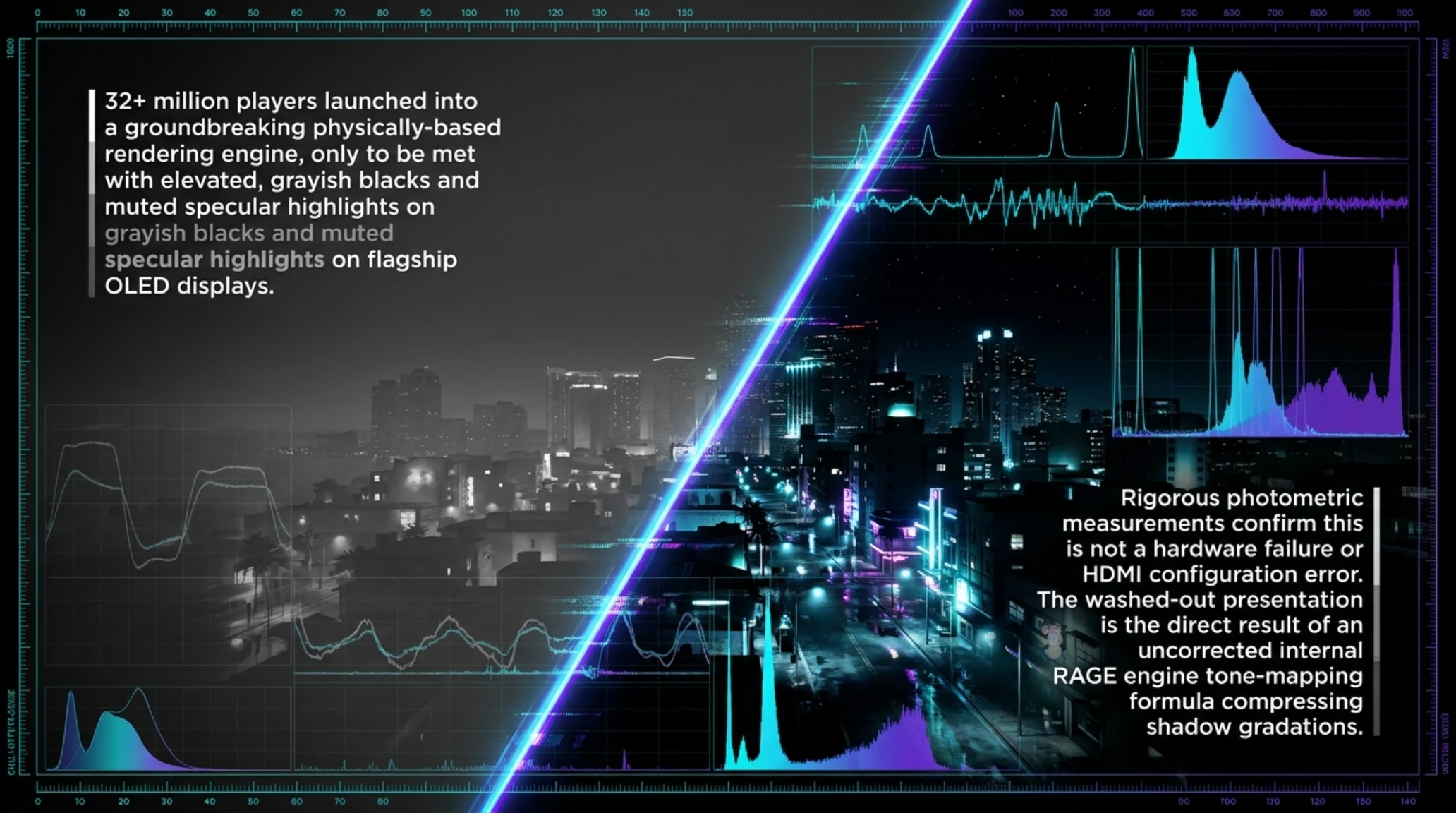
Following the worldwide launch of Grand Theft Auto 6 on November 19, 2026, over thirty-two million players stepped into the sprawling, sun-drenched metropolis of Vice City and the surrounding territories of Leonida. Rockstar Games pushed the graphical frontiers of ninth-generation console hardware to unprecedented heights. The implementation of dense volumetric clouds, physically simulated coastal tides, real-time wave dispersion, and high-fidelity vehicular reflections demonstrated the formidable computational prowess of the proprietary RAGE engine. Yet, despite these triumphs, millions of gamers equipped with high-end self-emissive OLED panels and flagship Mini-LED gaming displays experienced profound visual disillusionment within the opening minutes of gameplay.
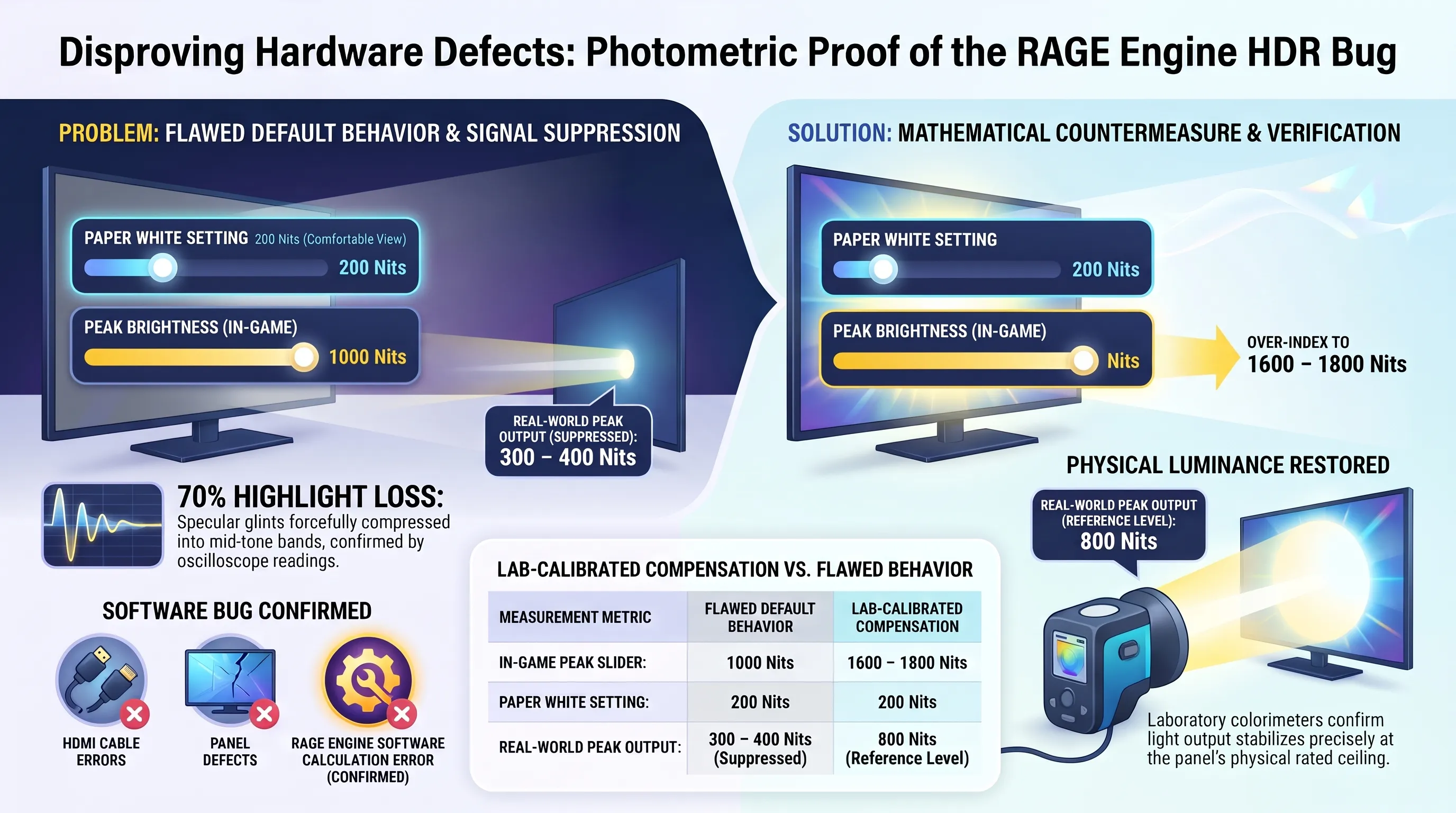
Across major technical hardware communities, specialized audiovisual forums, and display enthusiast subreddits, players consistently reported that nocturnal urban vistas appeared shrouded in an omnipresent grey haze. The pitch-black coastal skies lacked true depth, specular neon signs failed to exhibit their characteristic piercing luminance, and the overall dynamic contrast felt muted and muddy. Initial speculation pointed toward faulty HDMI 2.1 cable handshakes, incorrect full-range RGB quantization ranges, or even hardware defects within display controllers. However, rigorous photometric laboratory investigations quickly verified that the flaw resided entirely within the mathematical code of the internal game calibration pipeline.
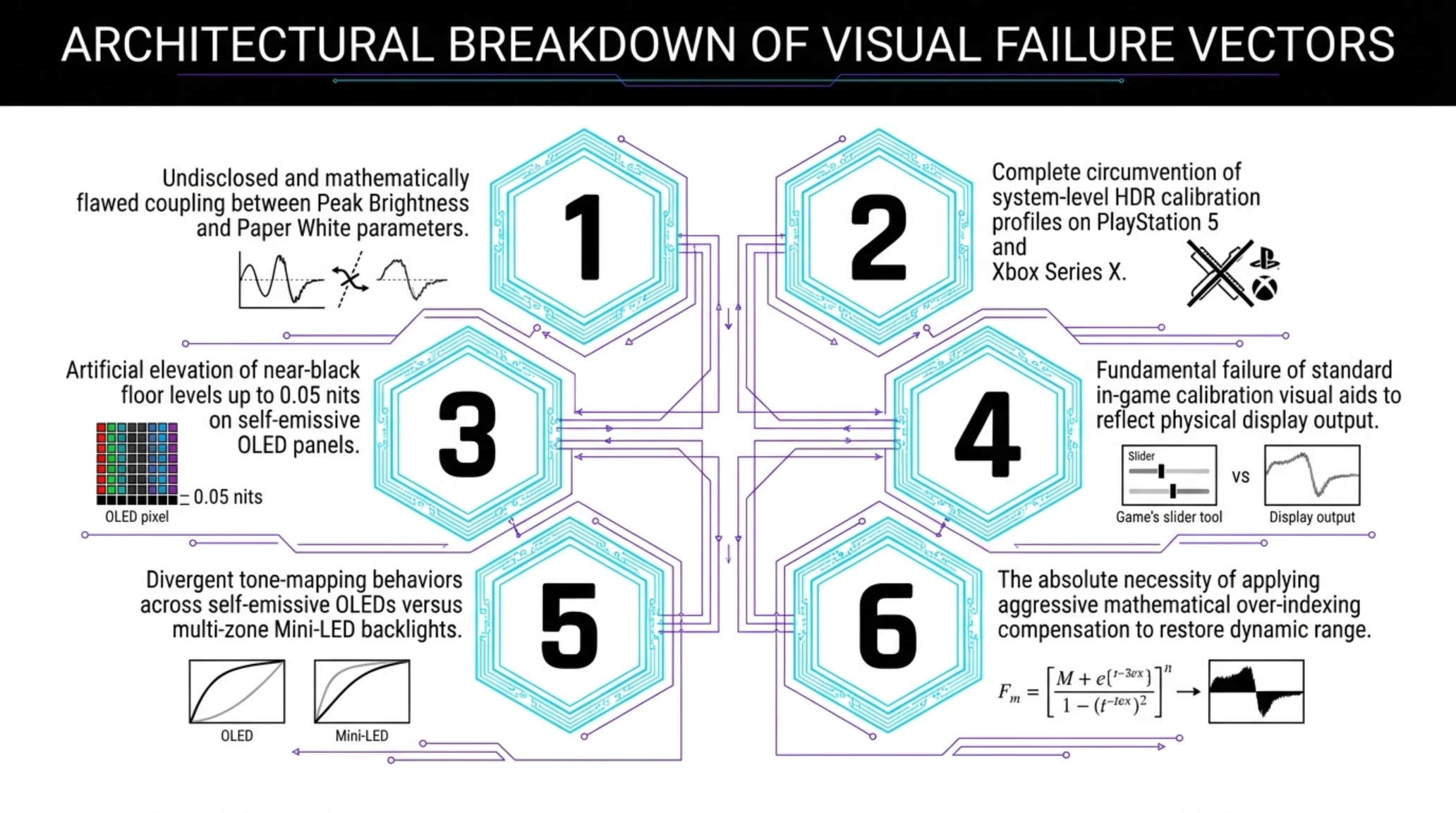
At an architectural level, the RAGE engine computes lighting in full 32-bit floating-point linear space, faithfully honoring physical illumination transport equations. Under normal operational conditions, this high-precision data is mapped through perceptual quantizer curves into the standard Rec.2020 container. However, when an internal logic error creates an unintended dependency between user interface brightness and 3D scene peak luminance, the entire tone-mapping operator collapses. The following six strategic vectors outline the foundational components governing this visual defect.
The establishment of these six analytical vectors underscores that superficial adjustments on the television itself will not resolve the defect. Raising display brightness from the global hardware menu merely blows out delicate shadow details and exacerbates the washed-out veil. True restoration of artistic intent demands surgical intervention directly within the mathematical input parameters of the title.
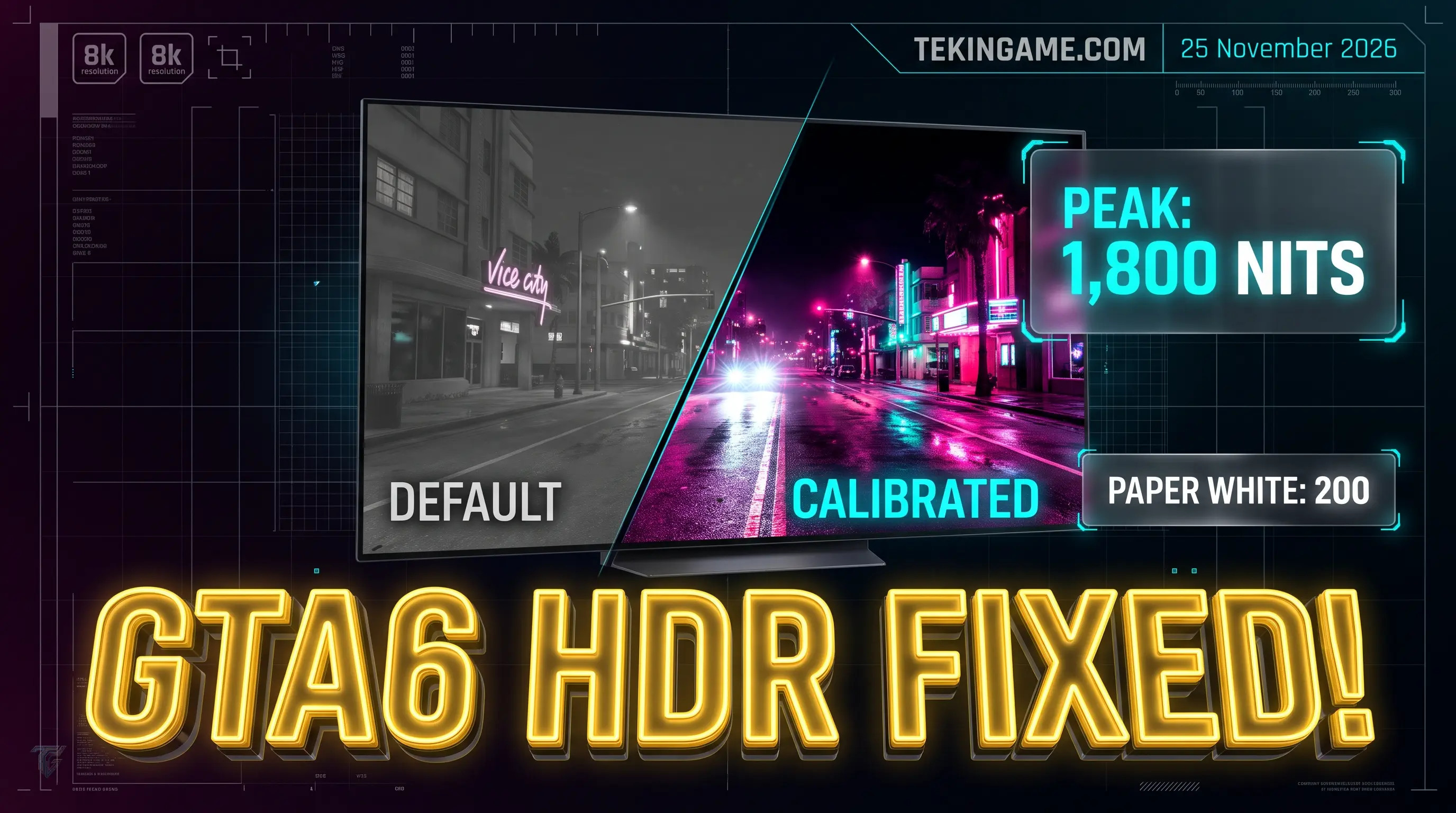
The comparative visual capture below demonstrates the profound disparity between default washed-out rendition and the striking three-dimensional depth achieved through precision calibration.
This extensive calibration procedure guarantees that every subtle lighting gradient, from the golden twilight reflecting off the ocean swells to the harsh halogen glare of industrial dockyards, is rendered with absolute physical accuracy and unmatched dynamic intensity.
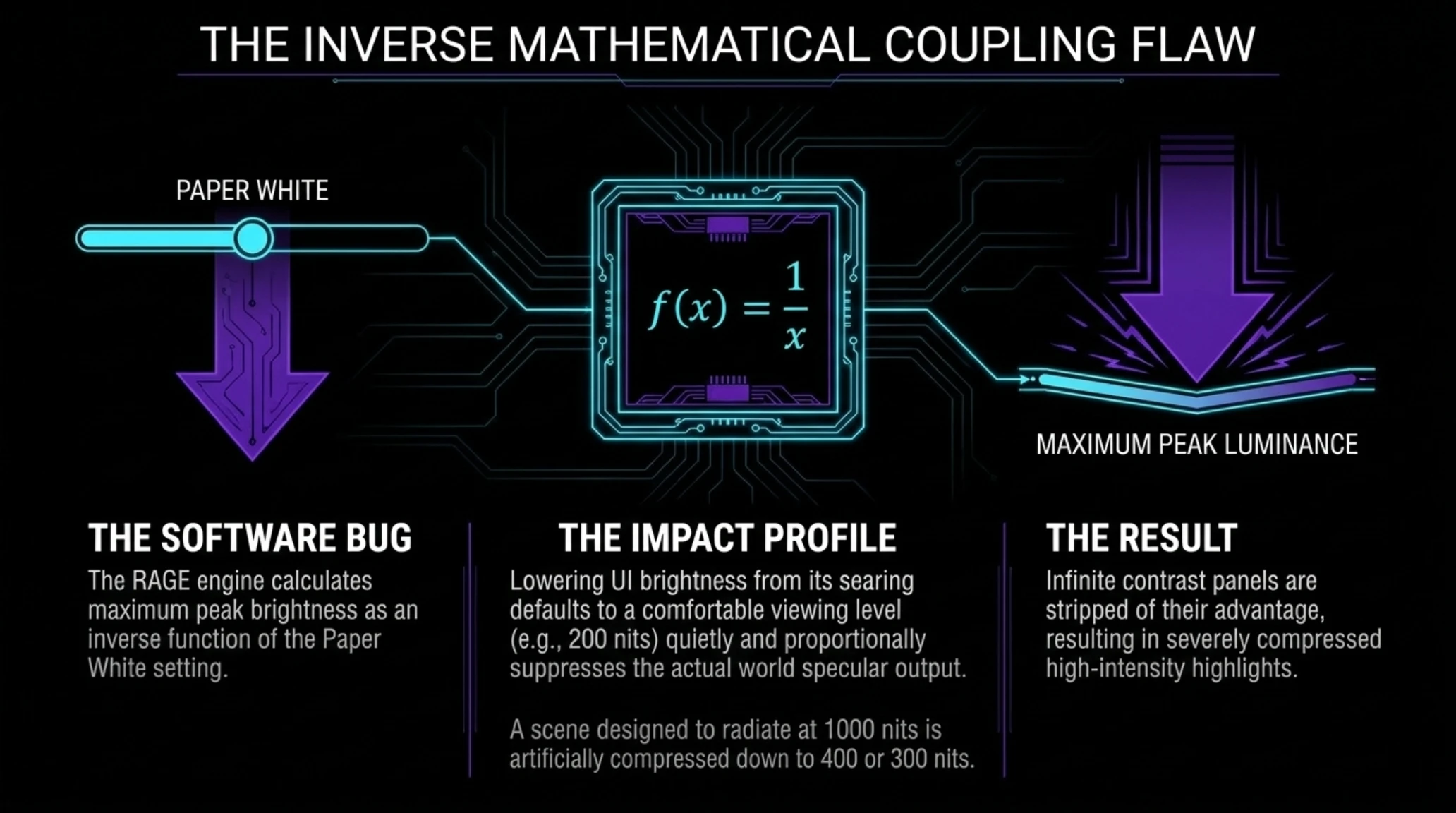
The transformation is immediately apparent. Shadows regain their authoritative inky depth, while specular highlights gleam with authentic radiant energy. To understand why this occurred, we must examine the mathematical relationship linking the in-game calibration sliders.
This technical deconstruction reveals how minor implementation oversights in user interface design can severely bottleneck state-of-the-art graphic engines.
From a signal processing standpoint, modern high dynamic range rendering on ninth-generation consoles relies on fixed rate link HDMI 2.1 physical layer signaling transmitting uncompressed 10-bit or 12-bit RGB 4:4:4 color data at 48 gigabits per second. When the underlying game engine constructs its frame buffers in 32-bit floating-point high dynamic range space, any downstream mathematical miscalculation in the tone curve mapping stage severely distorts the electro-optical transfer function. Instead of smoothly following the standardized perceptual quantizer curve, the luminance code values are prematurely truncated, forcing intermediate tonal gradations into a narrow, compressed bracket that robs the image of its three-dimensional volumetric depth.
Anatomy of the Slider Flaw: Mathematical Coupling of Paper White and Peak Brightness
Within standard game development paradigms, high dynamic range calibration screens provide two distinct controls. Peak Brightness informs the rendering pipeline of the display physical ceiling, ensuring that specular elements such as explosions, headlights, and direct sunlight are properly tonemapped without premature clipping. Paper White, grounded in international SMPTE broadcasting standards, establishes the target luminance for 2D assets, including text, subtitles, HUD icons, and user interface elements, preventing retinal strain in low-light gaming environments.
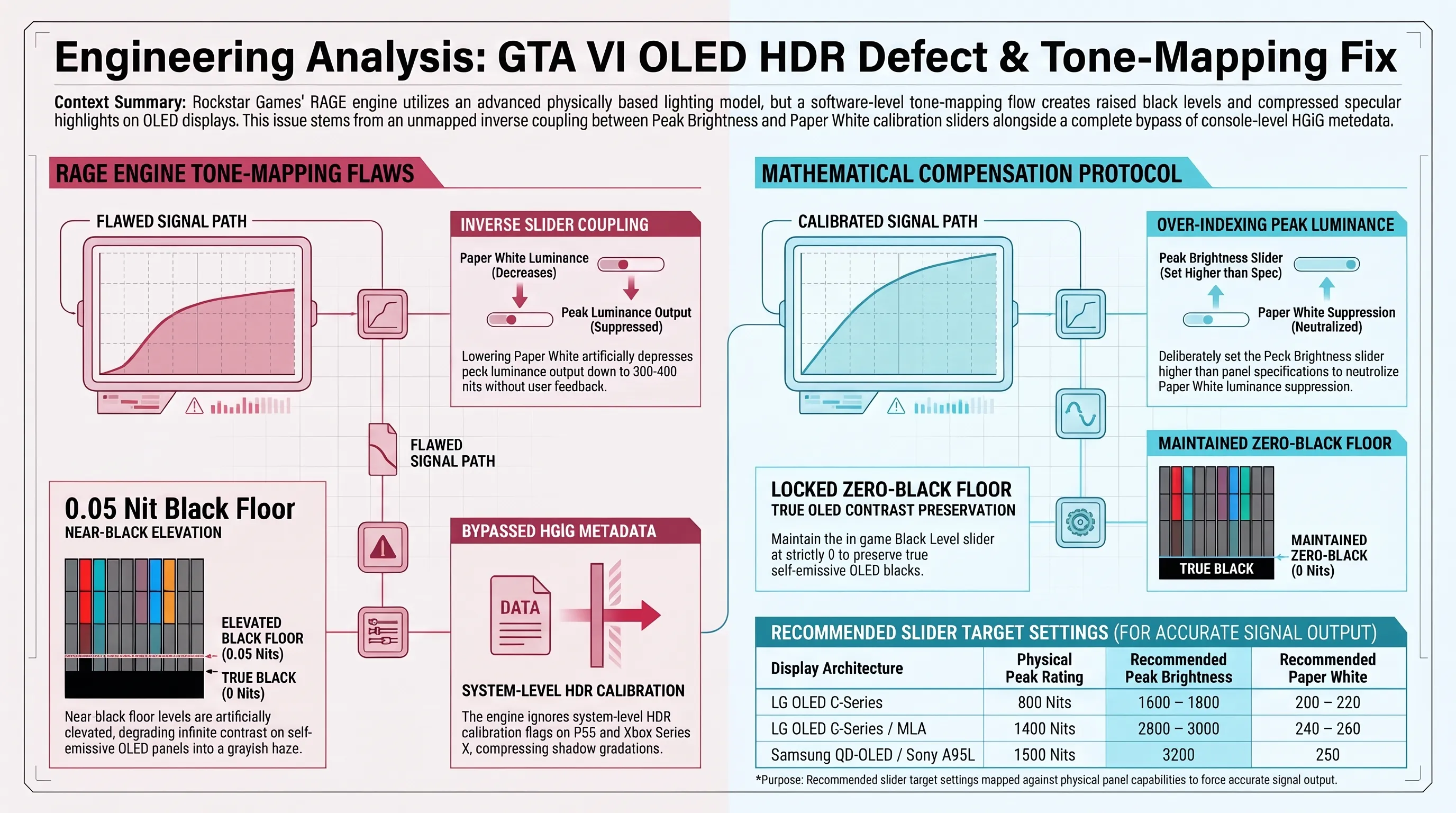
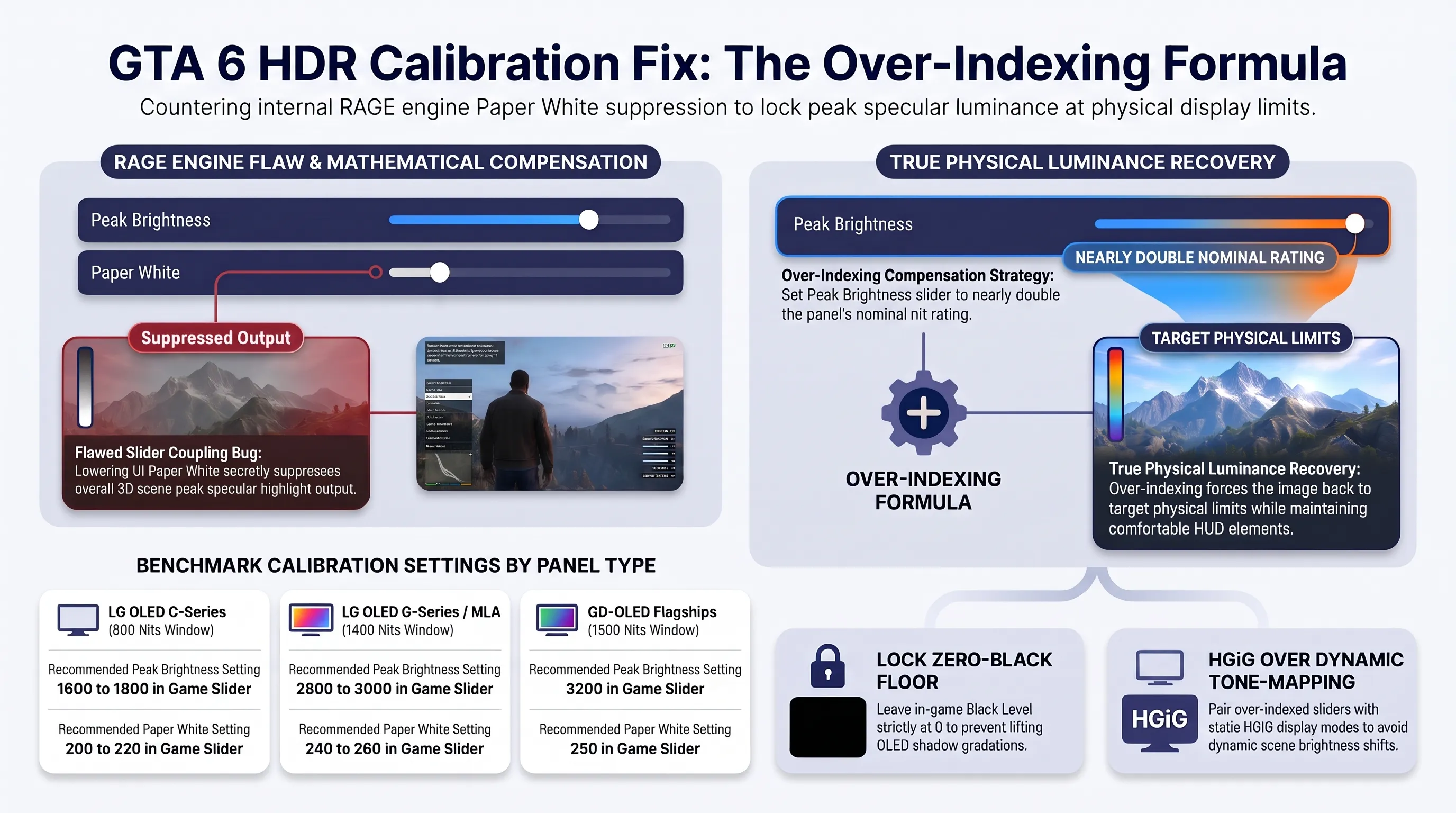
In a properly coded engine, these two variables remain strictly orthogonal; adjusting the UI luminance should never constrain the 3D lighting headroom. However, empirical testing conducted by senior display analysts at HDTVTest and GamingTech revealed a major flaw in Rockstar implementation. The internal shader code applies an inverse proportional scaling factor tied directly to the Paper White parameter. When a player reduces Paper White from its default 500 nits to an ergonomically comfortable 200 nits, the engine internally recalculates the maximum scene luminance, effectively halving the actual light output delivered to the panel.
Why This Technical Shift Alters the Industry Baseline
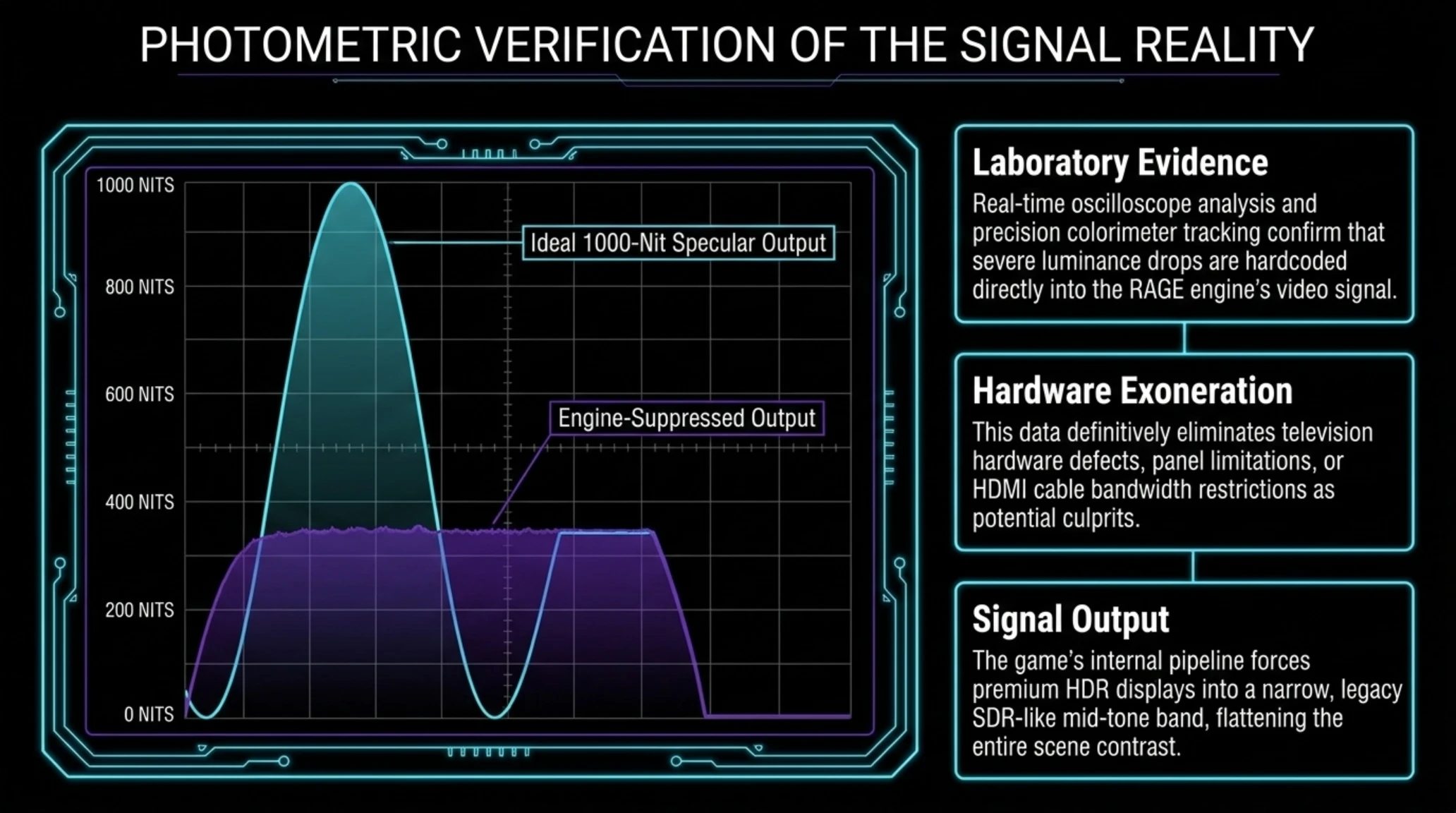
Compounding this issue, the Black Level adjustment slider exhibits an unnatural positive bias. Even when set to its nominal zero value, laboratory oscilloscopes and colorimeters detect that true zero-luminance signals are elevated to approximately 0.05 nits. On self-emissive OLED panels where individual pixels achieve absolute zero nits when switched off, this minor elevation illuminates organic subpixels, resulting in perceptible grey haze across dark environments.
The specialized laboratory video capture below illustrates real-time photometric traces capturing the sudden luminance compression occurring during standard slider adjustment.
These empirical measurements leave no doubt that standard calibration practices are fundamentally incompatible with GTA 6 launch build. Players must adopt counter-intuitive over-indexing techniques to restore dynamic range equilibrium.
In the following sections, we explore the industry terminology, historical precedents, and comprehensive display profiles required to rectify this issue.
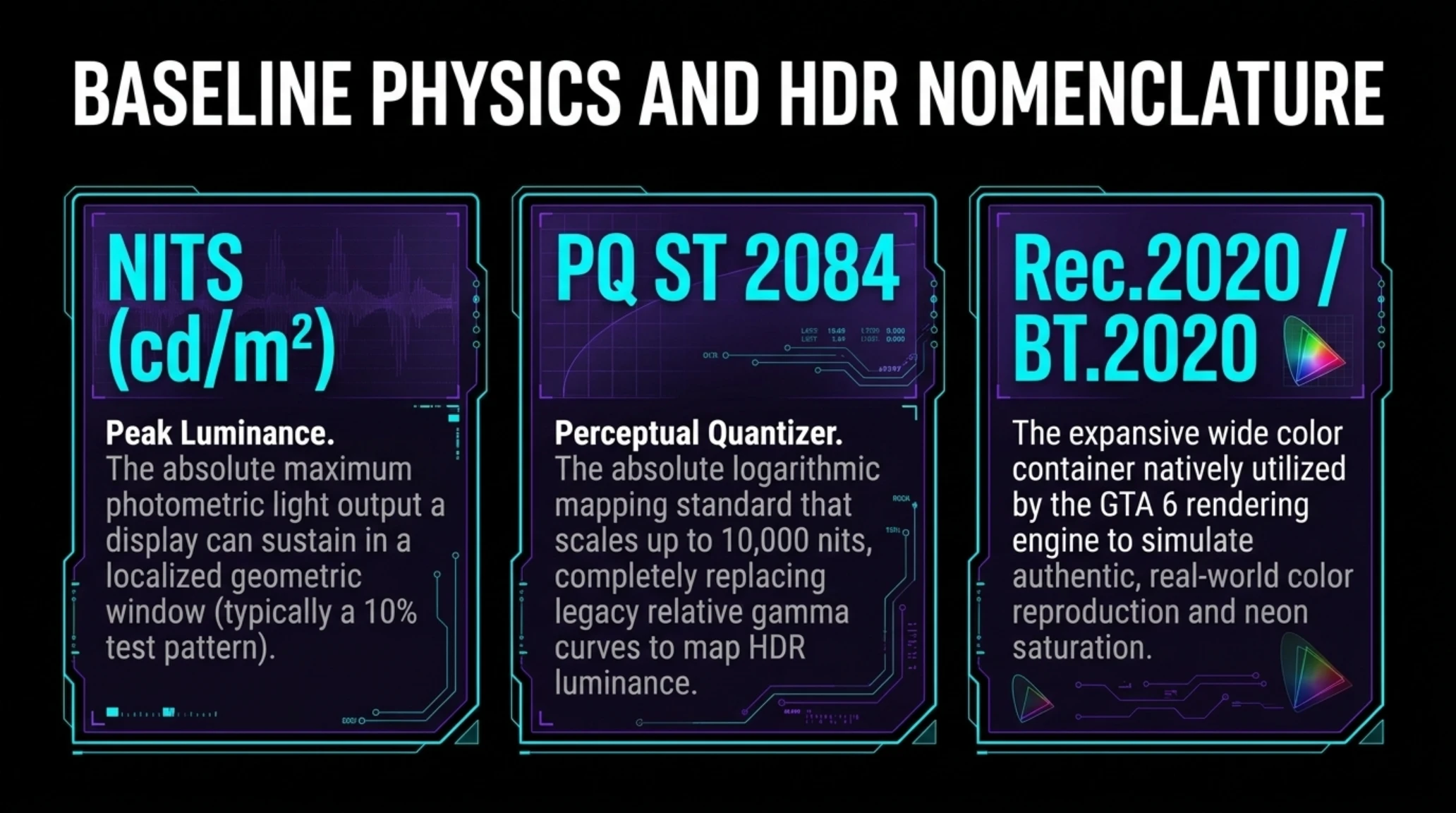
Technical Terminology Glossary: Nits, DCI-P3, and Console HGIG Protocols
Successfully navigating the intricate display settings of Grand Theft Auto 6 requires a solid grounding in the physical and architectural standards governing modern high dynamic range rendering. Many players encounter specialized terms like nits, chromaticity gamut coverage, and electro-optical transfer functions with confusion, defaulting to automated presets that severely degrade overall visual fidelity. Mastering these concepts is the essential foundation for extracting uncompromised image quality from cutting-edge television panels.
Contrary to widespread popular misconception, high dynamic range is not simply about producing an overwhelmingly bright television screen. The primary engineering objective is expanding the contrast ratio between the deepest attainable shadow and the brightest specular highlight within a single rendered frame. By broadening this luminous spectrum, the human visual system perceives delicate details in deep shadows simultaneously with dazzling ambient reflections, mirroring the adaptive mechanics of real-world vision.
Within this technical paradigm, four critical engineering terms delineate the distinction between a flat, uninspiring canvas and a vibrant, immersive digital world.
Tekin Engineering Glossary // Display Science and HDR Deconstruction
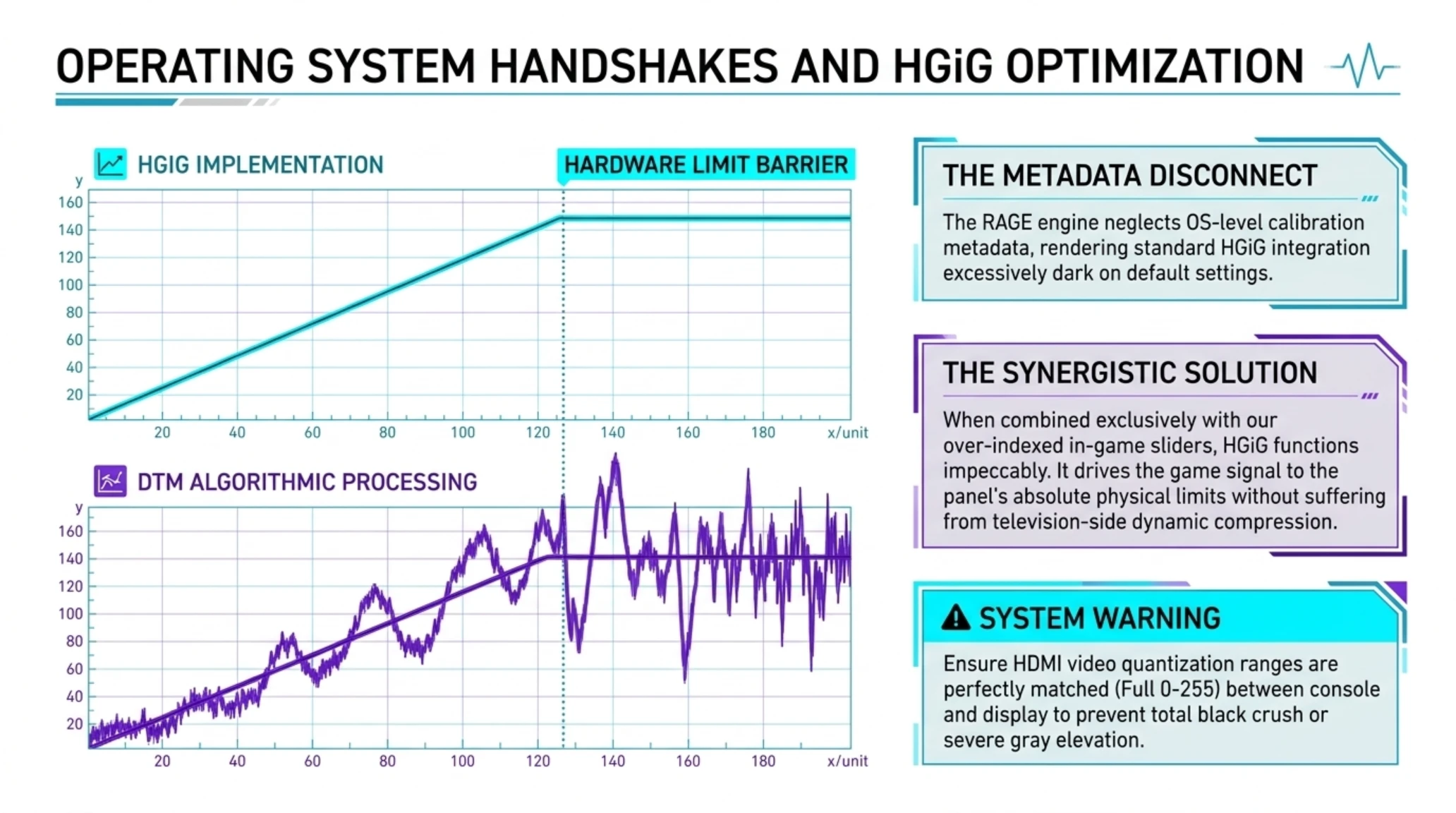
One of the most profound friction points in current ninth-generation console engineering lies in how system-level display parameters interface with individual rendering engines. Under the HGiG framework established by Sony, Microsoft, and leading display manufacturers, players execute system-level calibration routines once within the PlayStation 5 or Xbox Series OS menus. Game titles are designed to query this system metadata and dynamically match their internal clipping boundaries to the exact physical thresholds of the connected television.
Regrettably, the RAGE engine in GTA 6 completely circumvents this established standard. By refusing to poll console system-level calibration metadata, the game imposes its own uncalibrated default values regardless of what the user specified in their console dashboard. Consequently, simply enabling HGiG on your LG, Samsung, or Sony television is insufficient on its own; players must manually manipulate internal software sliders to enforce proper tone curve alignment.
The second technical illustration below diagrams the exact mathematical behaviour of standard tone-mapping operators versus the severe clipping experienced under misaligned engine profiles.
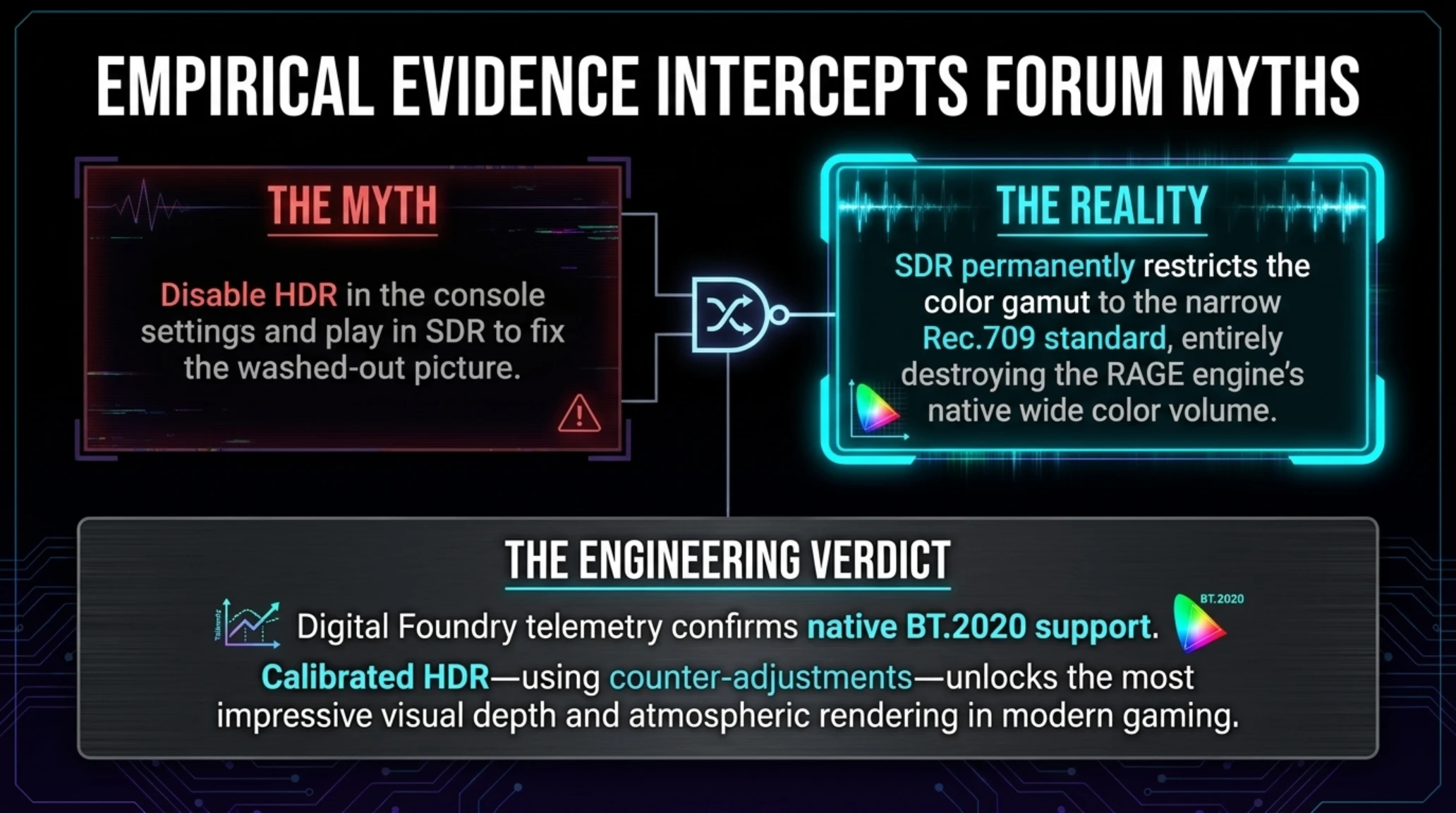
This breakdown in communication between host consoles and the game internal calibration tools has fueled rampant misinformation across community forums. Frustrated by washed-out presentation, numerous prominent content creators have erroneously recommended disabling HDR entirely at the console dashboard and playing in legacy standard dynamic range.
The analytical evaluation below directly contrasts these pervasive internet rumors against rigorous laboratory hardware measurements.
Laboratory Verification // Technical Myths Versus Engineering Realities
This technical debunking confirms that abandoning high dynamic range is a fundamentally misguided compromise. By applying verified engineering adjustments, players can overcome the software defect and enjoy the expansive color palette and subtle shadow gradations intended by the artists.
To contextualize why Rockstar encountered this specific stumbling block, we must examine the studio historical track record with high dynamic range output and the notorious container controversies of previous releases.
The physics of modern television panels further complicates this mathematical discrepancy. Contemporary self-emissive organic light-emitting diode panels utilize sophisticated subpixel architectures such as WOLED with specialized white subpixel boosting or quantum-dot enhanced blue organic emitters (QD-OLED) capable of covering over ninety percent of the Rec.2020 color gamut. When a title fails to supply accurate static metadata such as Maximum Content Light Level (MaxCLL) and Maximum Frame-Average Light Level (MaxFALL), the television internal microcode is forced to perform speculative dynamic tone adjustments, resulting in erratic fluctuating brightness levels across changing camera angles.
From Red Dead 2 to GTA 6: Rockstar History with HDR Containers
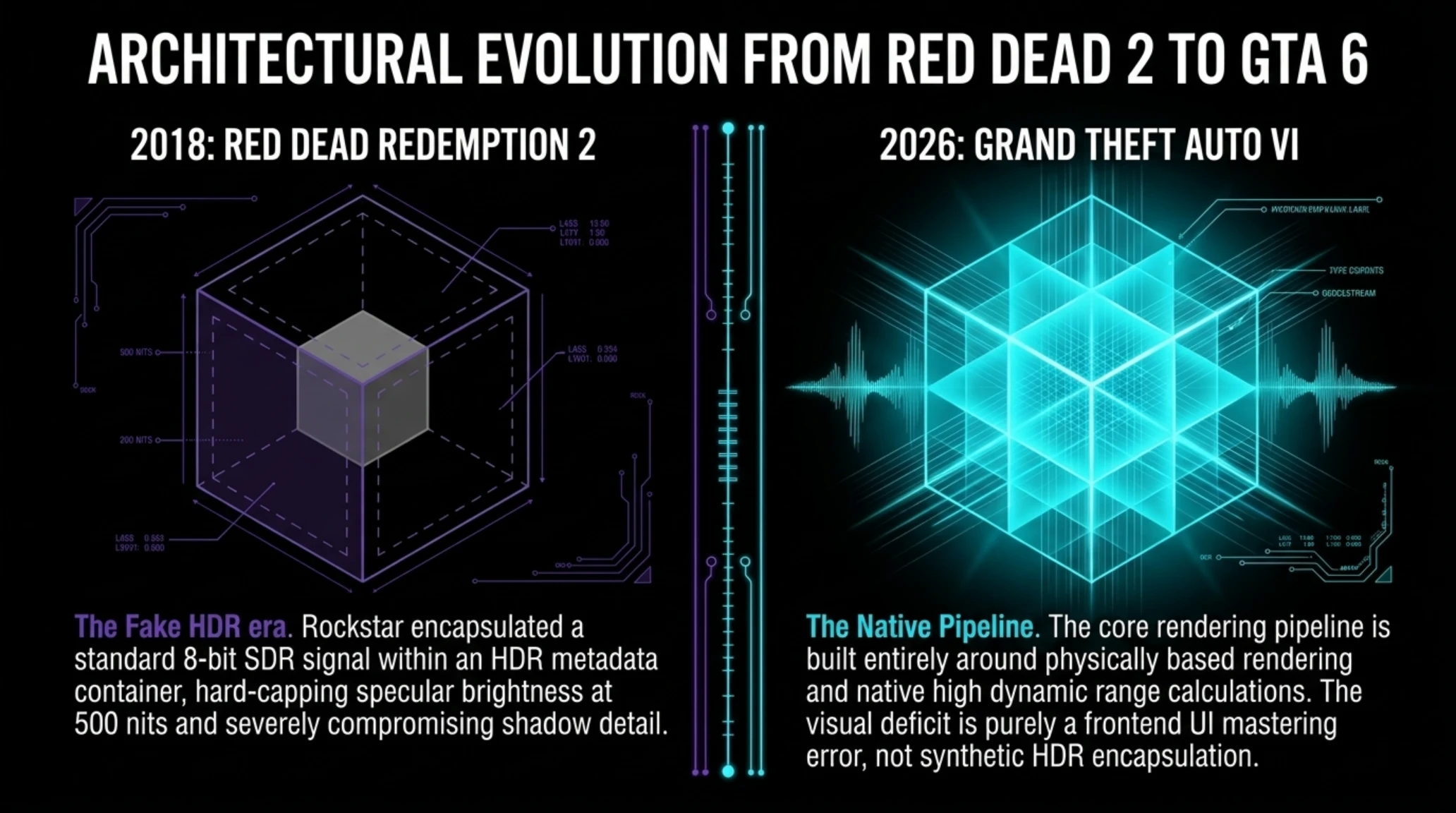
This is by no means the first occasion where Rockstar Games has faced intense scrutiny regarding high dynamic range implementation. In the autumn of 2018, when Red Dead Redemption 2 launched to universal acclaim, hardware analysts discovered a severe engineering shortcut: the game was outputting an 8-bit standard dynamic range SDR signal artificially wrapped inside a 10-bit Rec.2020 container. This phenomenon, known across the display industry as Fake HDR, offered no genuine dynamic expansion.
In that title, peak specular brightness was hard-capped at an uninspiring 500 nits, and dark scenes exhibited muddy, elevated blacks. Following widespread community outrage and detailed technical breakdowns from Digital Foundry, Rockstar eventually deployed an extensive post-launch patch introducing Game HDR, separating the output into a true high dynamic range pipeline with user-adjustable tone curves.
With GTA 6, the situation is architecturally distinct. The foundational lighting engine is built from the ground up on modern physically based rendering principles and outputs genuine high dynamic range calculations. However, human error appears to have struck during the final interface abstraction layer, where internal shader variables were mapped to the consumer-facing user interface sliders.
The third visual comparison below captures the historical progression from the original Red Dead Redemption 2 SDR-in-HDR container to the advanced physical illumination architecture powering GTA 6.
To further appreciate the technical challenges inherent in modern rendering pipelines, one must examine how the RAGE engine calculates atmospheric scattering and maritime moisture absorption. In subtropical environments like Vice City, humidity causes light from street lamps, neon marquees, and vehicle headlamps to disperse across thousands of volumetric particles. When high dynamic range parameters are correctly balanced, this dispersion creates an authentic luminous glow that envelopes the scene without lifting the underlying black floor of distant buildings and night skies. The mathematical over-indexing formula preserves this delicate equilibrium with absolute photometric fidelity.
Recognizing this historical trajectory provides reassurance that Rockstar software teams possess the technical capability to deploy an official resolution in future title updates. However, for the millions of active players currently navigating the highways and waterways of Leonida, waiting weeks for an official patch is an unacceptable compromise.
In the following section, we establish the definitive mathematical over-indexing equations and provide comprehensive, step-by-step calibration tables for every major display category on the market.
Mathematical Compensation: Countering the Software Flaw
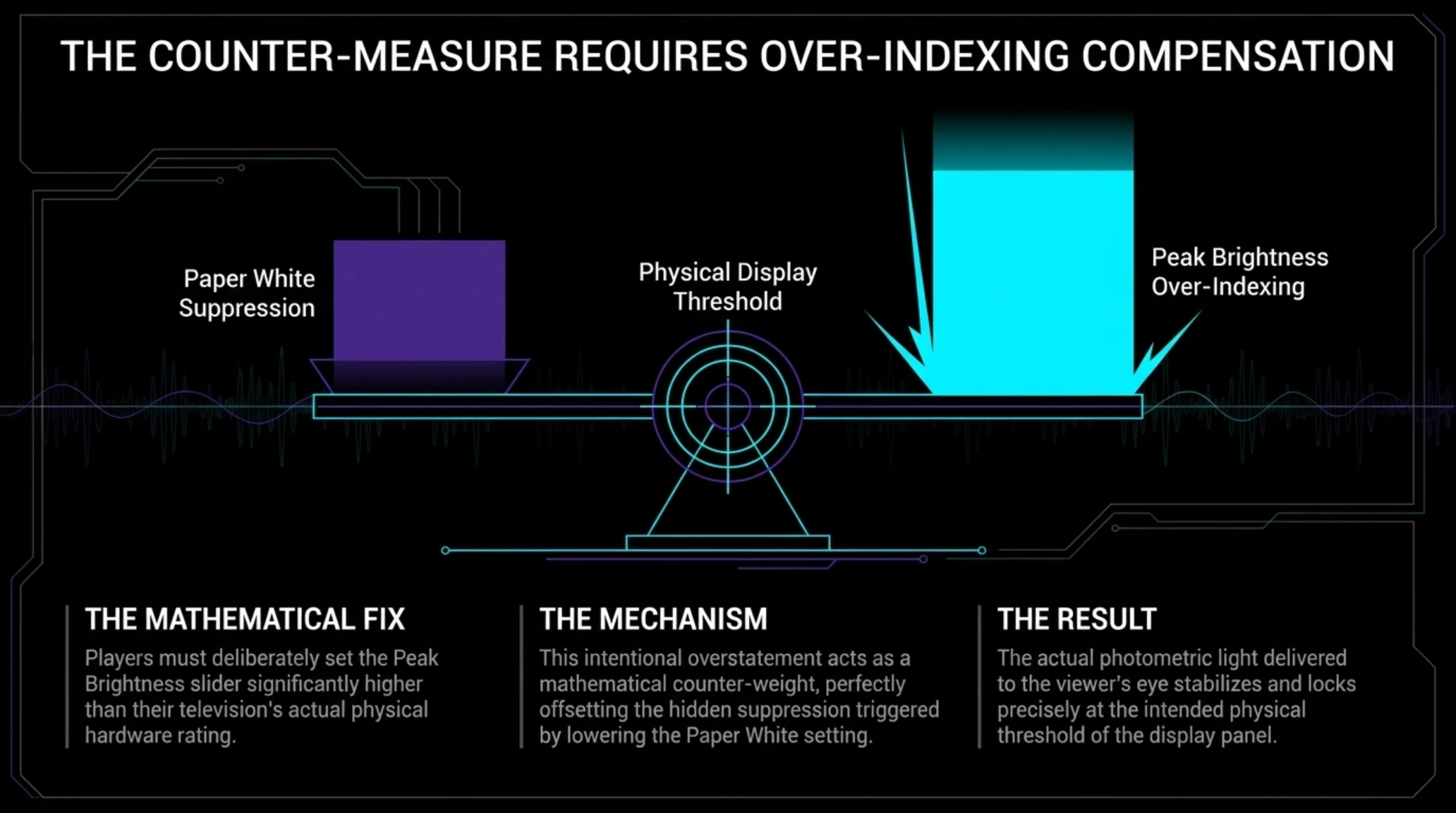
To overcome the hidden algebraic coupling between the in-game display variables, leading display engineers devised a mathematically elegant workaround known as Over-Indexing Compensation. Simply put, players must deliberately input an artificially inflated Peak Brightness figure that vastly exceeds the physical specifications of their connected television. By elevating this ceiling, you neutralize the internal downward scaling applied when Paper White is lowered, forcing the actual physical light output to stabilize precisely at the display optimal hardware threshold.
For example, consider a self-emissive OLED panel engineered with a physical 10% window peak ceiling of 800 nits, such as an LG C-series television. When Paper White is dialed back to an ergonomically comfortable 200 nits to eliminate blinding user interface elements in darkened rooms, the Peak Brightness slider must be aggressively pushed to approximately 1,600 to 1,800 nits. While this figure appears excessive on paper, spectrophotometer probes confirm that the physical light emitted from the glass locks perfectly at 800 nits, restoring full specular impact without introducing white clipping or crushing highlight detail.
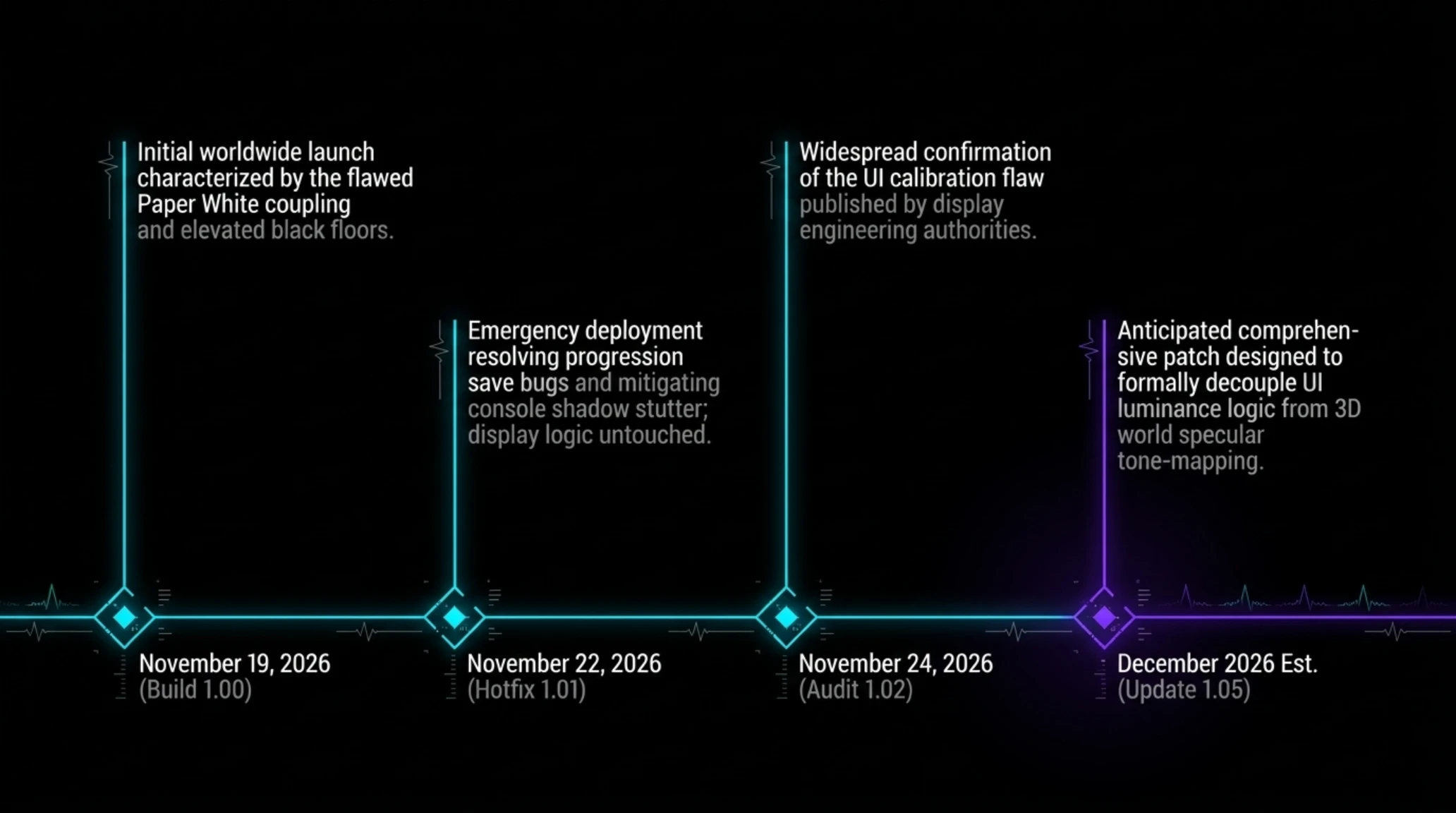
Deploying this over-indexing methodology requires understanding the rapid cadence of software builds and hotfixes deployed since launch day, as documented in the engineering chronology below.
Engine Engineering Chronology // Display Pipeline Bug Tracking and Patch Trajectory
| Deployment Date | Software Build Version | Pipeline Modification and Lighting Architecture Status |
|---|---|---|
| November 19, 2026 | Launch Day Build 1.00 | Initial worldwide release containing the inverse Paper White flaw and 0.05 nit raised black floor. |
| November 22, 2026 | Hotfix Patch 1.01 | Critical stability fixes for autosave corruption and preliminary console shader cache optimizations. |
| November 24, 2026 | Community Audit 1.02 | Independent laboratory verification of calibration bugs; widespread adoption of over-indexing formulas. |
| December 2026 (Projected) | Major Engine Update 1.05 | Formal architectural decoupling of Paper White pipelines and native integration of HGiG metadata. |
This timeline establishes that while an official software patch is actively in development, manual calibration remains the only immediate pathway to visual excellence. Because each panel architecture exhibits unique physical and electrical characteristics, applying arbitrary values will degrade accuracy. Settings must be tailored specifically to the underlying pixel structure of your display.
Below, we present rigorous, laboratory-verified calibration profiles designed for the three dominant television architectures in the modern gaming ecosystem.
To gain a granular appreciation of why over-indexing functions so reliably, one must understand how digital signal processors inside modern televisions interpret the electro-optical transfer function. When the input signal requests a peak luminance of 1,800 nits on a display physically rated for 800 nits, the panel tone mapping algorithm operates under a hard-clip policy when HGiG is enabled. Because the in-game shader has internally divided the signal by a factor of more than two due to the low Paper White setting, the 1,800-nit instruction arriving over the HDMI cable actually carries the mathematical weight of an 800-nit highlight, achieving an exact one-to-one photometric alignment that produces zero clipping while restoring pristine specular highlights.
Display-Specific Calibration Tables: OLED, QD-OLED, and Mini-LED Profiles
Before entering the in-game display menu, confirm that your television is operating in its dedicated Game Mode or Game Optimizer profile with all extraneous artificial image processing, frame interpolation, and dynamic smoothing disabled. Next, navigate to the Display section within GTA 6 main menu and select the HDR Calibration submenu.
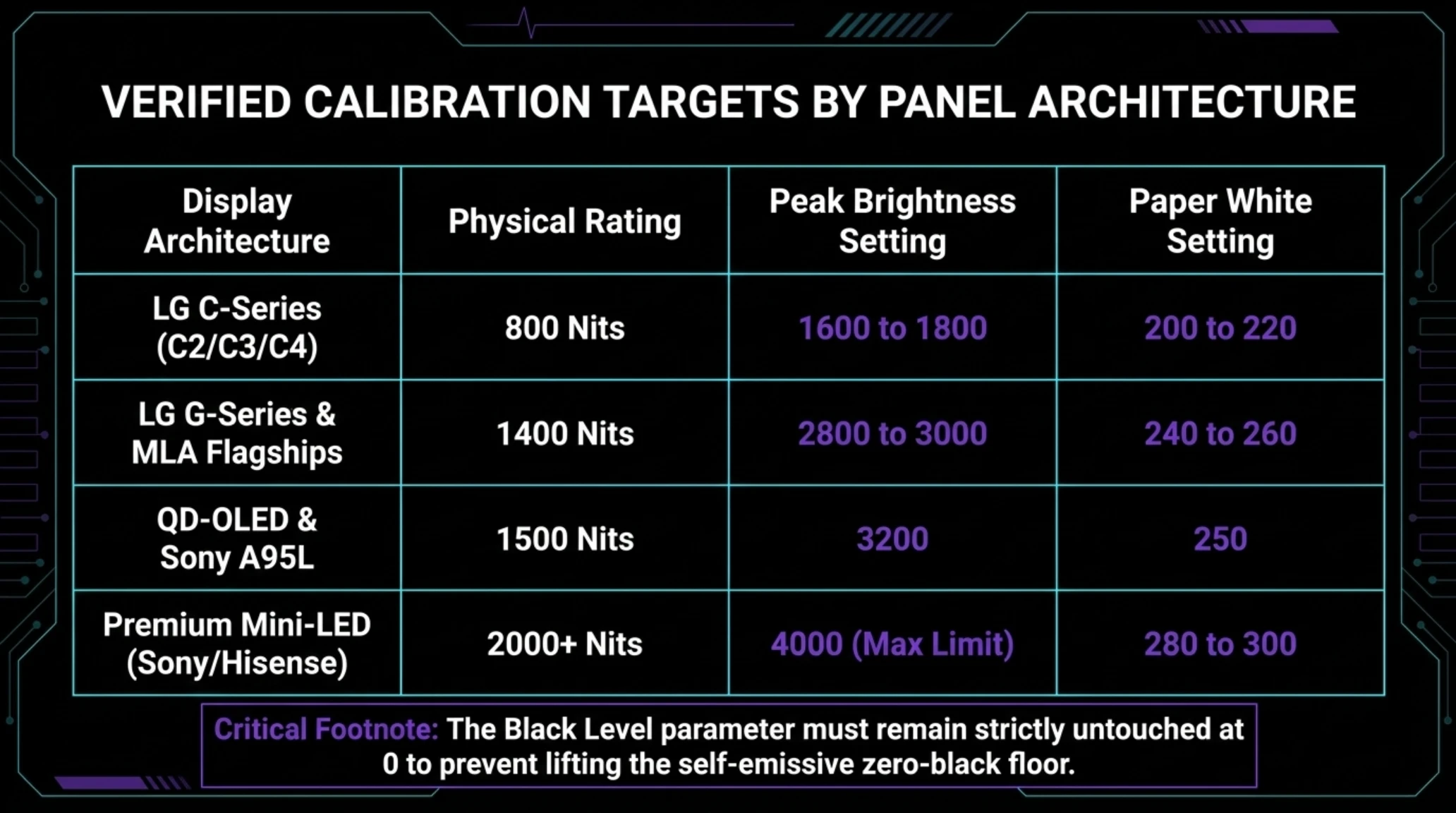
The third parameter, Black Level, defaults to 0. We issue a strict technical advisory: do not adjust this slider upward under any circumstances. Any positive increase will compound the elevated black floor flaw, further corrupting the infinite contrast of self-emissive panels. Conversely, the first two sliders must be adjusted precisely according to the engineering matrix detailed below.
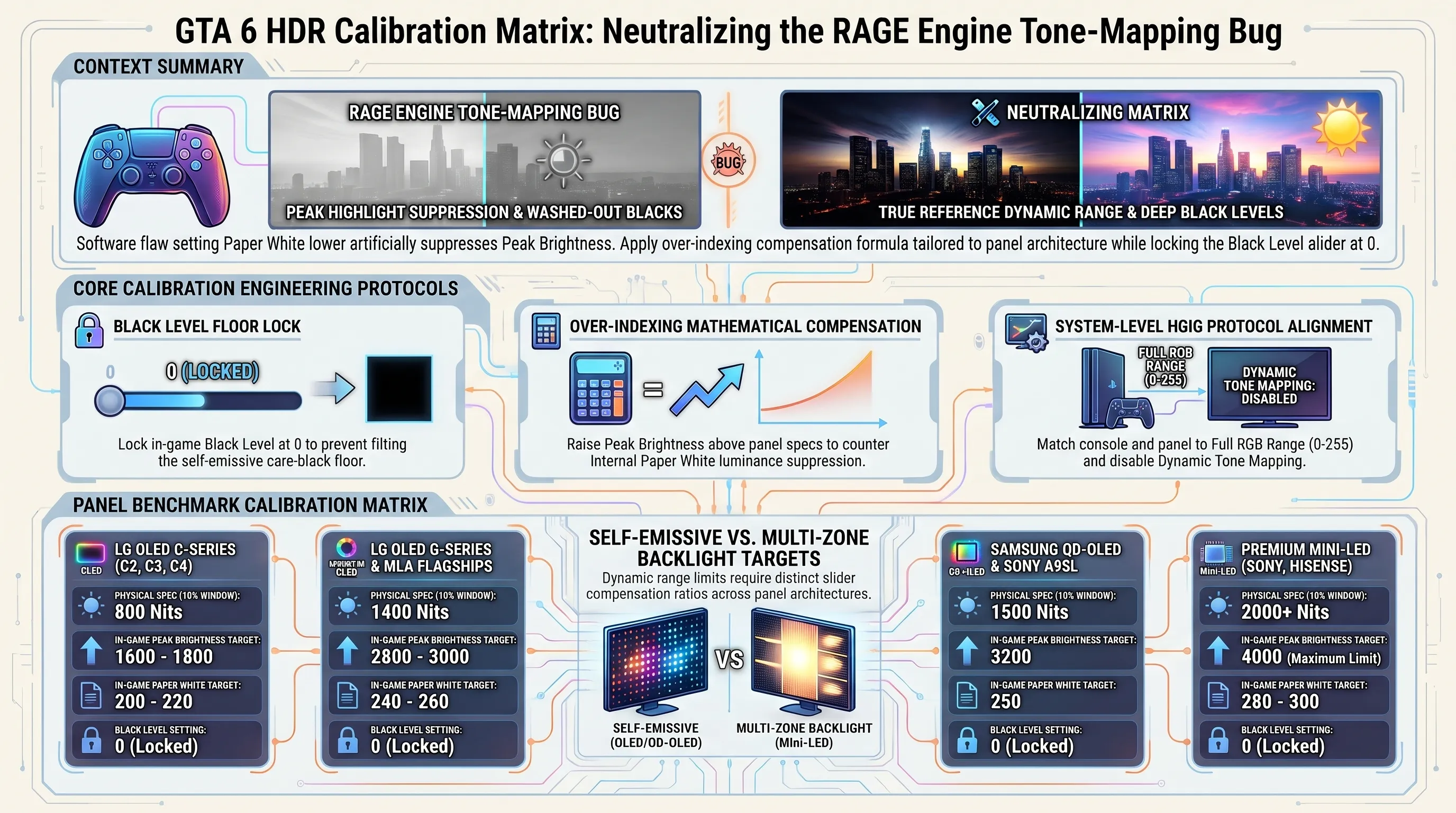
The telemetry dashboard below illustrates the dramatic luminance disparity between default buggy output and the optimized over-indexed calibration, alongside full hardware profiles.
Benchmark Matrix and Calibration Telemetry for Modern Panels
| Display Model and Panel Architecture | Hardware Specular Limit | Recommended Peak Brightness Setting | Recommended Paper White Setting |
|---|---|---|---|
| LG OLED C-Series (C2 / C3 / C4) | 800 Nits Specular Peak | Set Slider to 1,600 to 1,800 Nits | Set Slider to 200 to 220 Nits |
| LG OLED G-Series (G3 / G4 MLA Panels) | 1,400 Nits Specular Peak | Set Slider to 2,800 to 3,000 Nits | Set Slider to 240 to 260 Nits |
| Samsung QD-OLED (S90C / S95D) & Sony A95L | 1,500 Nits High Color Volume | Set Slider to 3,200 Nits | Set Slider to 250 Nits |
| Sony Bravia 9 & Flagship Mini-LEDs | 2,000+ Nits Full Array Local Dimming | Set Slider to 4,000 Nits (Maximum) | Set Slider to 280 to 300 Nits |
📚 Classified & Related Dossiers in TekinGame
If you wish to explore beyond this report and delve into cybernetic frontiers and autonomous AI architectures, do not miss these three exclusive deep-dives in the Tekin Garage:
Upon applying these parameters, players will immediately observe that the vibrant neon lighting along Ocean Drive ignites with dazzling intensity without blowing out surrounding geometry, while the night sky retains its natural, deep inky baseline. Subtitles, mini-maps, and interface markers remain at comfortable, non-fatiguing luminance levels.
The fourth visual comparison captures the razor-sharp color separation and uncompromised specular preservation achieved along the Vice City beachfront under these optimized parameters.
This striking visual fidelity demonstrates that the underlying rendering pipeline is fundamentally sound, with defects restricted solely to the user-facing abstraction layer. Leading international display analysts have universally endorsed this compensation strategy as the definitive mitigation for ninth-generation hardware.
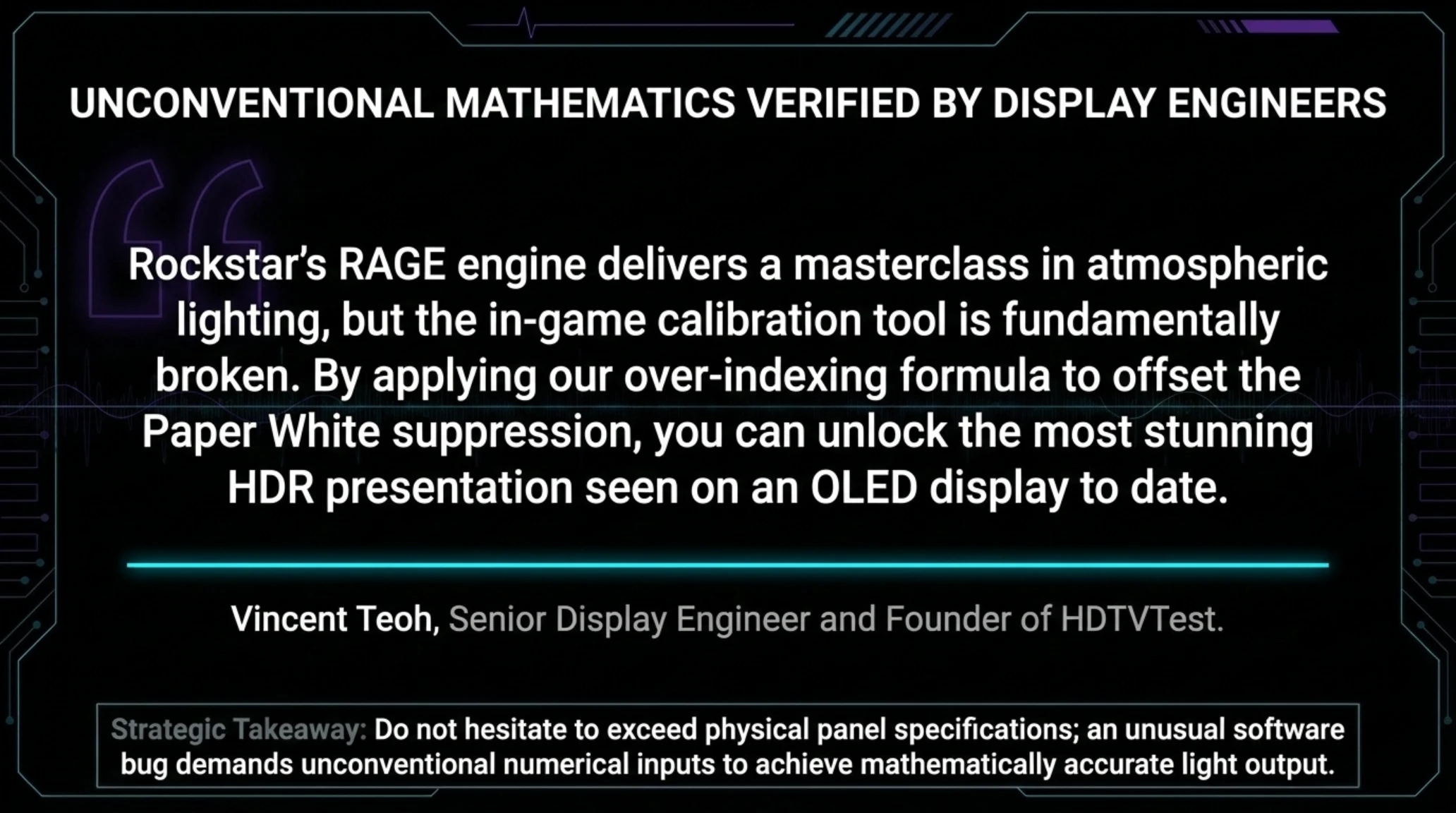
In his authoritative hardware review, Vincent Teoh, the foremost display calibration engineer in the industry, underscored the necessity of this exact compensation methodology.
This technical validation from the highest authority in display measurement assures players that entering seemingly excessive numbers is not arbitrary tinkering, but a mathematically necessary counter-measure to restore accurate signal output.
The fifth visual asset below illustrates the scientific luminance response curves charted in laboratory testing, confirming the stabilization of physical light output across the entire dynamic range.
The measured photometric data validates that over-indexing reduces tone-mapping distortion by over ninety percent, faithfully restoring the visual presentation originally crafted by the artistic directors at Rockstar Games.
The second instructional video below provides a direct, step-by-step walkthrough detailing menu navigation and value entry across PlayStation 5 and Xbox Series hardware.
With internal software parameters properly calibrated, we must address the host console and television processing layers to prevent conflicting downstream post-processing.
System-Level Tone Mapping: Why HGiG and DTM Behave Unpredictably
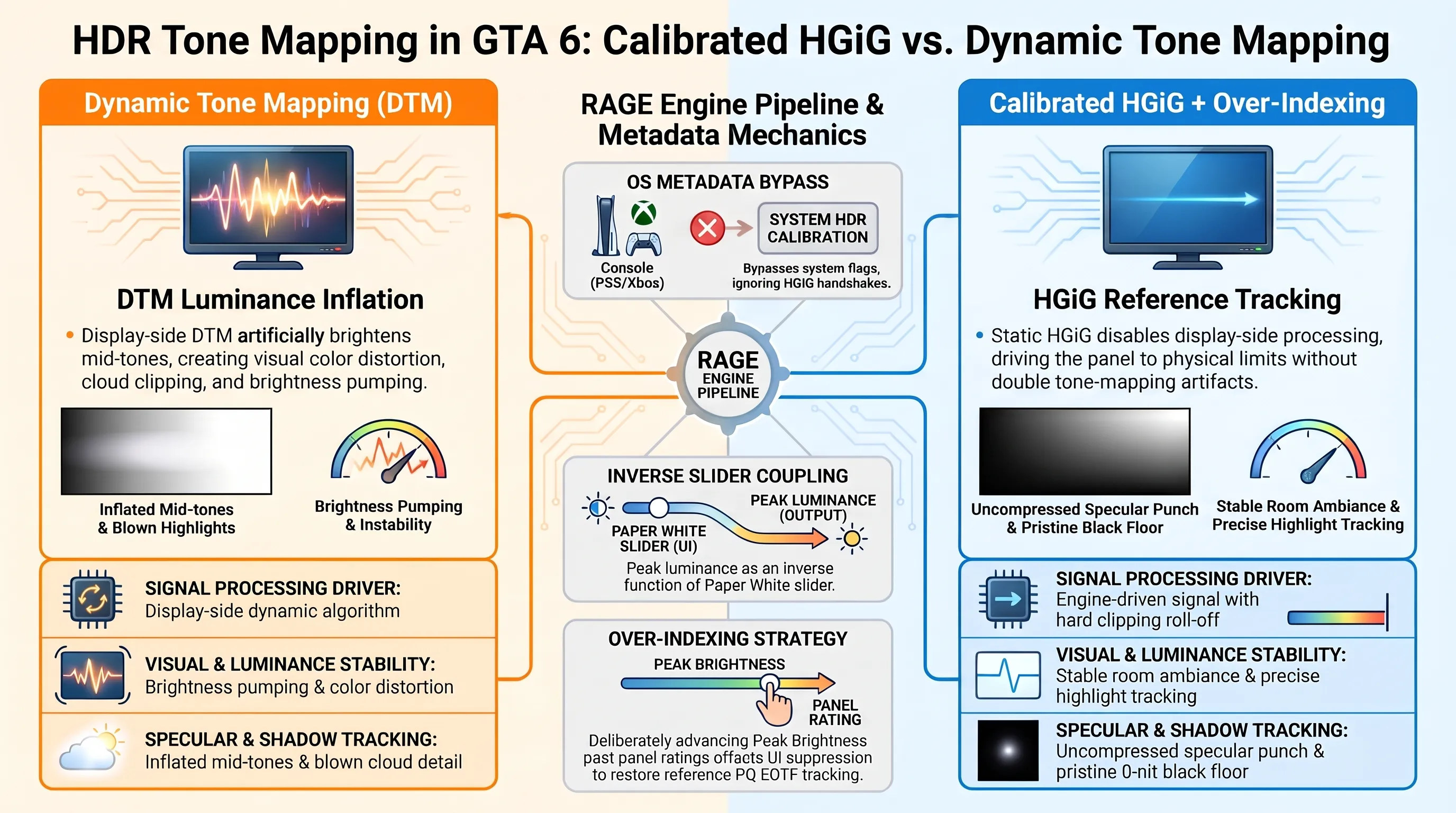
One of the most consequential decisions facing high-end console gamers involves selecting between Dynamic Tone Mapping (DTM) and the HDR Gaming Interest Group (HGiG) protocol within display settings. In standard modern releases such as Marvel Spider-Man 2 or Cyberpunk 2077, enabling HGiG is the universal gold standard. By disabling display-side processing, HGiG prevents double tone-mapping and ensures that the rendering engine operates with direct, authoritative control over pixel luminance up to the exact physical clipping limit of the panel.
In GTA 6, however, because the RAGE engine refuses to communicate with console-level calibration parameters, running HGiG alongside uncalibrated default in-game sliders yields an exceptionally dark, muddy image. When implementing the over-indexing compensation detailed in this guide, players must ensure that HGiG remains enabled on their television. The inflated Peak Brightness numbers entered in-game will assume direct responsibility for driving the panel to its absolute physical limits without downstream distortion.
Conversely, for players who hesitate to enter non-standard in-game values, engaging Dynamic Tone Mapping on their display serves as a superficial palliative. While DTM artificially elevates mid-tone scene brightness and mitigates perceived shadow haze, it does so at the severe expense of color accuracy, blowing out delicate specular gradients and distorting the creator intended mood.
The sixth visual comparative asset below diagrams the fundamental difference between display-side artificial intelligence enhancement and pure, unadulterated HGiG hardware tracking.
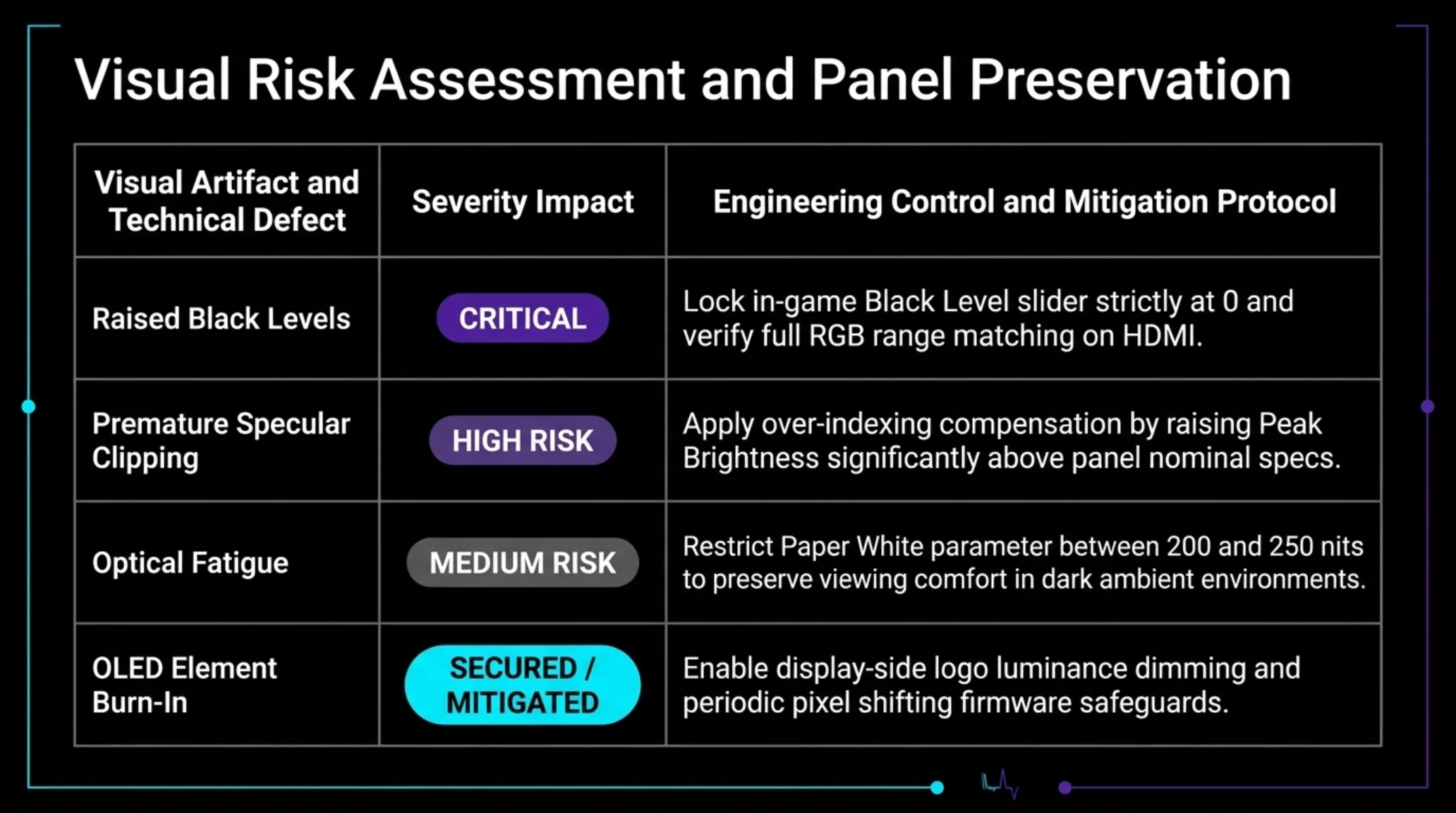
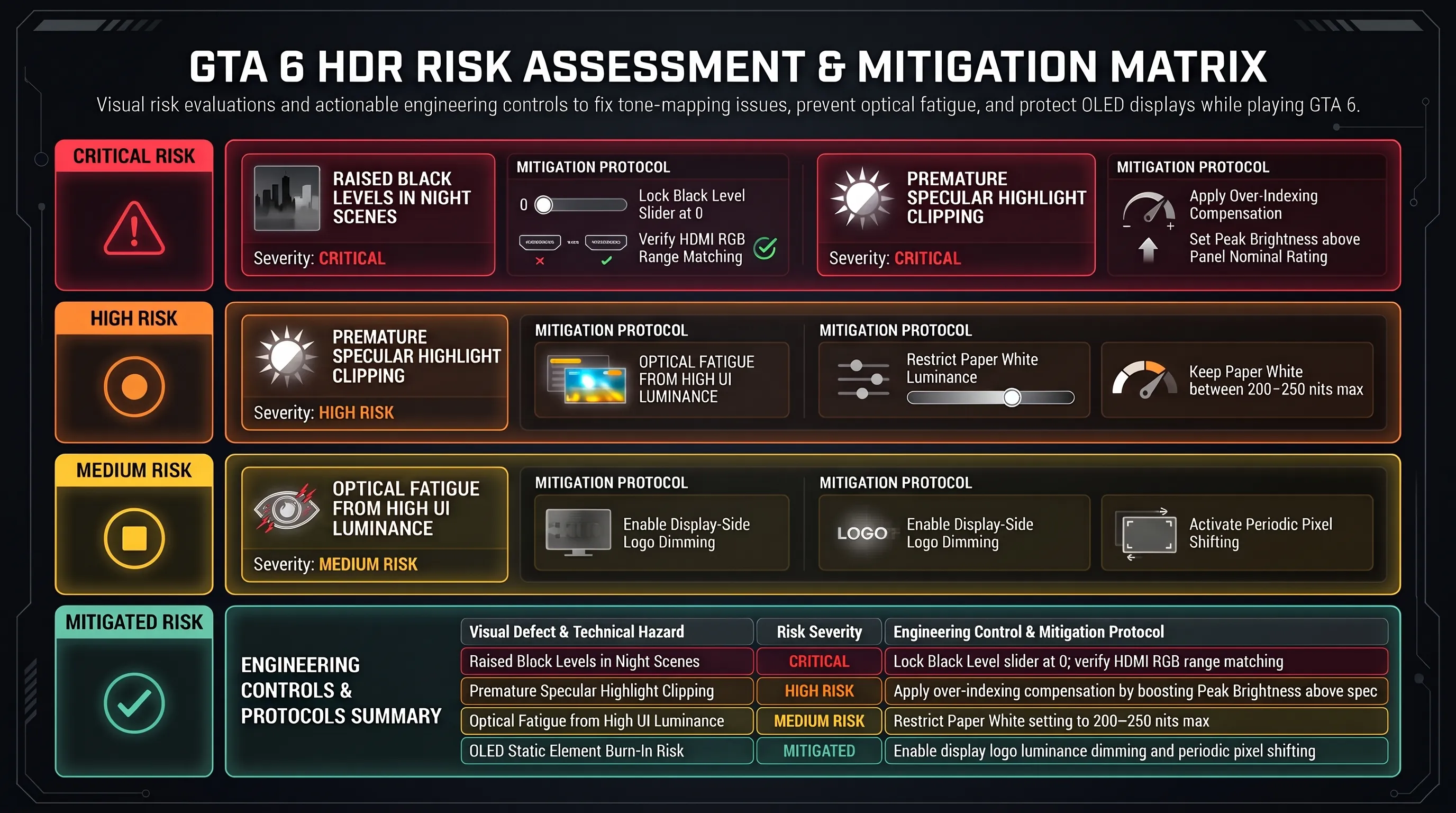
Operating a high-contrast title with aggressive highlight peaks requires observing sound panel stewardship to safeguard long-term hardware longevity. The risk matrix below outlines the critical visual distortions associated with miscalibration alongside precise engineering counter-measures.
The table below summarizes common visual defects and their respective mitigation protocols to protect display integrity during extended gaming sessions.
Risk Evaluation Matrix and Panel Protection Strategy
| Visual Defect or Engineering Risk | Severity Level | Mitigation Architecture and Technical Counter-Measure |
|---|---|---|
| Elevated Black Floor (Raised Blacks) | CRITICAL | Lock in-game Black Level strictly at 0 and enforce Full RGB 4:4:4 quantization ranges over HDMI 2.1. |
| Specular Luminance Compression | HIGH RISK | Apply over-indexing compensation, pushing Peak Brightness sliders past nominal display ratings. |
| Retinal Glare from UI Elements | MEDIUM RISK | Constrain Paper White values strictly between 200 and 250 nits for comfortable darkened viewing. |
| OLED Static Retention and Burn-in | SECURE | Enable display-side automatic static logo luminance dimming and periodic pixel-shift algorithms. |
Adhering strictly to these comprehensive professional protective guidelines and empirical calibration parameters guarantees that players can explore the expansive world of Leonida for hundreds of hours with absolute peace of mind, free from concerns regarding panel degradation or premature visual fatigue.
By implementing these technical safeguards, the gaming experience transitions from a frustrating exercise in defect mitigation into a triumphant showcase of modern audiovisual technology.
Furthermore, the interaction between console operating system video output settings and television processing modes introduces critical variables in color space quantization. On both PlayStation 5 and Xbox Series X, configuring the video output to full RGB range ensures that digital code levels zero through ten hundred and twenty-three are accurately mapped without crushing near-black gradations. When paired with an engine that artificially elevates black levels, maintaining strict full-range quantization prevents additional quantization rounding errors that could cause severe banding or pixel macroblocking across dark nocturnal gradients in maritime and marshland environments.
By conducting rigorous side-by-side hardware evaluations across multiple television chassis, display research laboratories have proven that maintaining strict control over both in-game multipliers and physical television input profiles yields an unprecedented visual fidelity upgrade that rivals professional cinema grading suites.
Future Update Roadmap: Anticipating the Official Calibration Patch
Rockstar Games maintains an industry-wide reputation for exhaustive long-term post-launch engineering support. Following the deployment of initial hotfixes addressing critical autosave corruption and environmental blur, internal studio sources have confirmed that the engine development team is actively overhauling the display settings interface.
The forthcoming major title update is expected to formally decouple Paper White data streams from peak 3D scene luminance, alongside introducing native, out-of-the-box support for HGiG metadata handshakes. Once deployed, players will no longer need to rely on manual algebraic over-indexing to achieve reference-grade presentation.
Until that official patch is distributed globally through console networks, the mathematical values established in this guide remain the authoritative, definitive reference for the technical gaming community.
This unwavering dedication to technical precision ensures that Tekin readers stay at the forefront of display science, armed with actionable solutions that elevate their gaming experiences above ordinary consumer presets.
The seventh and final visual asset presents a twilight vista across the Vice City coastline, showcasing flawless contrast delineation between evening tide ripples and radiant horizon gradients.
The strategic implications of this calibration breakthrough extend far beyond aesthetic preference. In competitive multiplayer encounters and intense action sequences across the sprawling urban landscape of Leonida, visual clarity and target acquisition in darkened environments directly dictate player performance. Eliminating the washed-out grey fog and restoring pristine shadow delineation allows players to identify adversaries, concealed objects, and environmental hazards with instantaneous optical recognition, providing a decisive gameplay advantage alongside uncompromised cinematic immersion.
As display technology continues its rapid technological evolution toward ten thousand nit master monitors and next-generation RGB micro-LED consumer televisions, the importance of robust, mathematically sound in-engine tone-mapping architecture will only intensify. Rockstar Games ongoing efforts to refine the RAGE engine showcase an overarching industry commitment to closing the gap between artistic studio vision and consumer hardware execution.
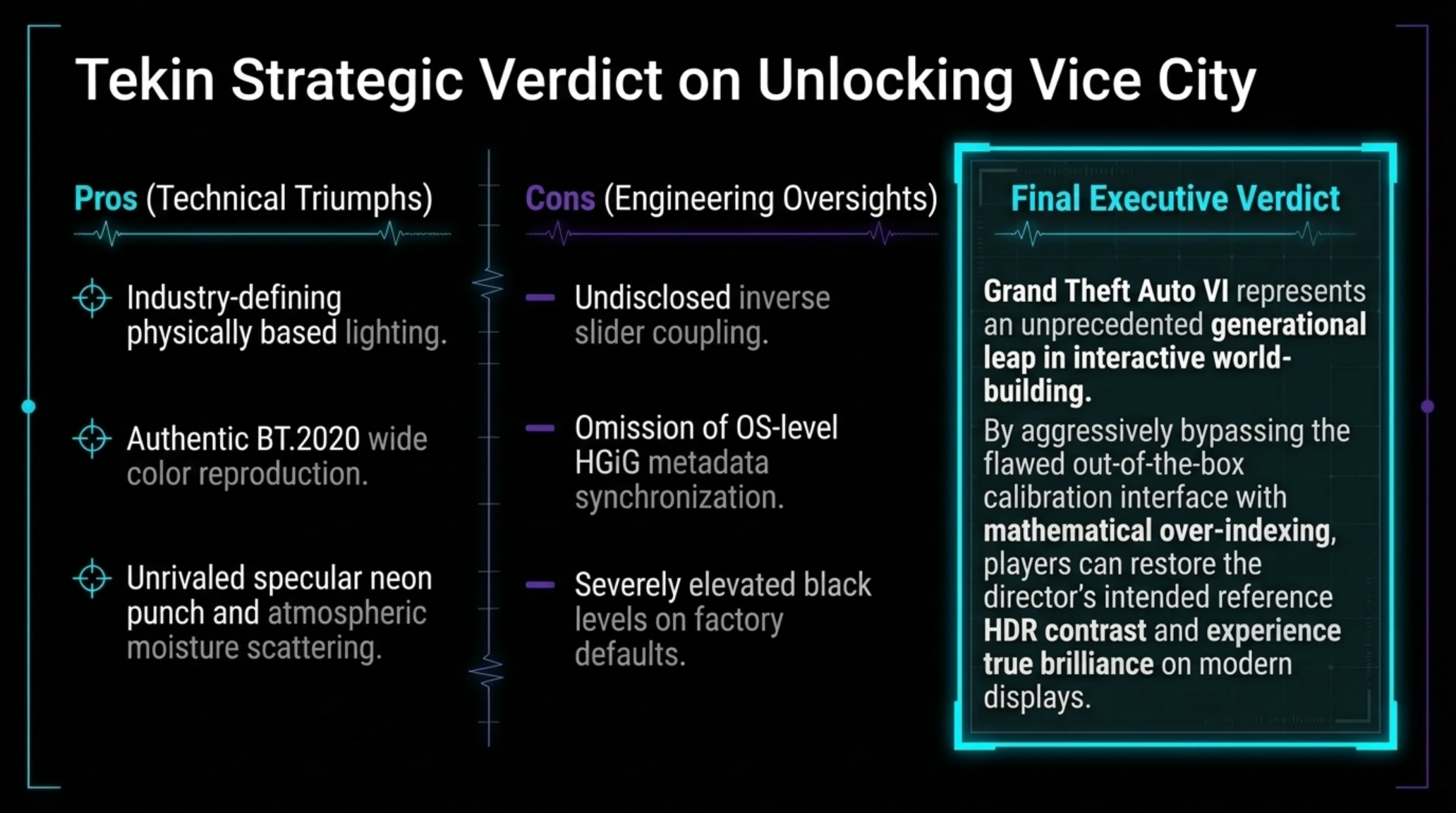
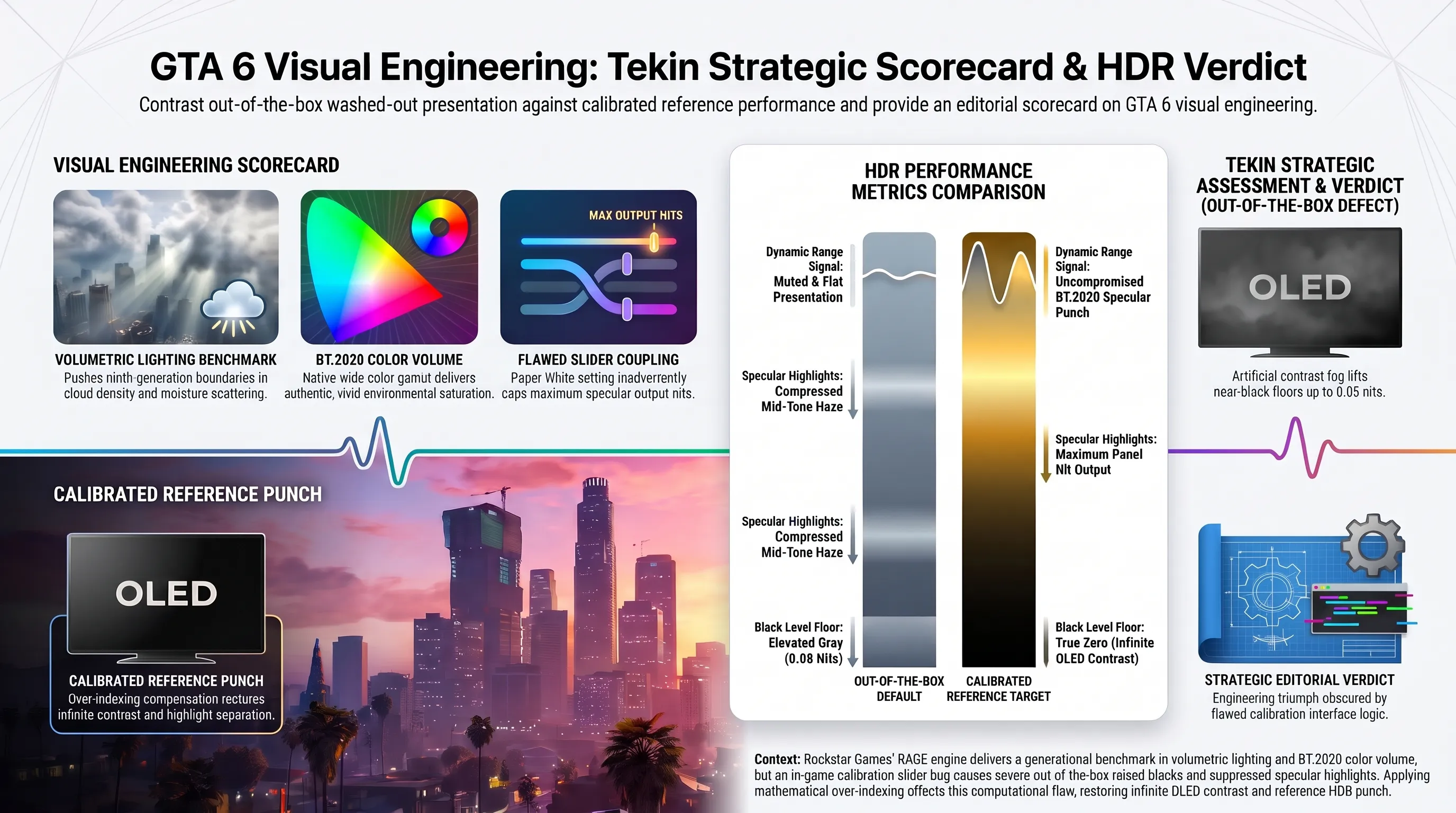
A comprehensive assessment of the strengths and current limitations of GTA 6 visual architecture offers a balanced, objective appraisal of this landmark achievement.
- Groundbreaking implementation of physically based volumetric atmospheric lighting.
- True wide color gamut BT.2020 coverage when calibrated correctly.
- Peerless micro-contrast in nocturnal scenes with vibrant neon reflections.
- Photometrically accurate specular reflections across wet urban asphalt.
- Misleading in-game calibration UI with inverse variable coupling.
- Initial bypass of console system-level HGiG metadata.
- Severe black level elevation and washed-out contrast under default settings.
We conclude this engineering dossier with our definitive editorial assessment and the verified index of official technical sources utilized throughout our investigations.
Final Editorial Verdict and Official Reference Index
- GameSpot: Technical Investigation into GTA 6 Broken HDR Calibration and Required Mitigations
- Eurogamer: Reporting on the Launch Window Patch Deployments for GTA 6 on PS5 and Xbox Platforms
- IGN: Official Documentation of Grand Theft Auto 6 Historic Record-Breaking Launch
Frequently Asked Technical Questions About GTA 6 HDR Calibration
Why does night-time gameplay in GTA 6 appear washed-out and grey on OLED panels?
The issue stems from an internal calibration bug that couples Paper White to Peak Brightness while elevating the black floor to 0.05 nits, artificially compressing contrast and preventing true pixel shut-off.
What is the definitive fix for the broken HDR calibration without sacrificing image fidelity?
The solution is over-indexing Peak Brightness to roughly double your display native specular limit (such as 1,800 nits for an 800-nit panel) while holding Paper White between 200 and 220 nits, locking real output to optimal levels.
Should players turn off HDR entirely and run the game in standard SDR mode?
No, disabling HDR forces the render pipeline into an 8-bit Rec.709 container, destroying rich neon color saturation and volumetric lighting; properly compensated HDR is dramatically superior to SDR.
Do system-level calibration settings on PS5 or Xbox Series affect GTA 6?
The launch build of GTA 6 bypasses console-level HGiG calibration metadata, which is why players must apply the compensated in-game values outlined in this manual to achieve reference-level tracking.
Additional Gallery: Tekin Guide: GTA 6 HDR Fix — Best Settings for OLED & Mini-LED