The Complete Guide to Online Media Tools in 2026: When AI Revolutionized Format Conversion
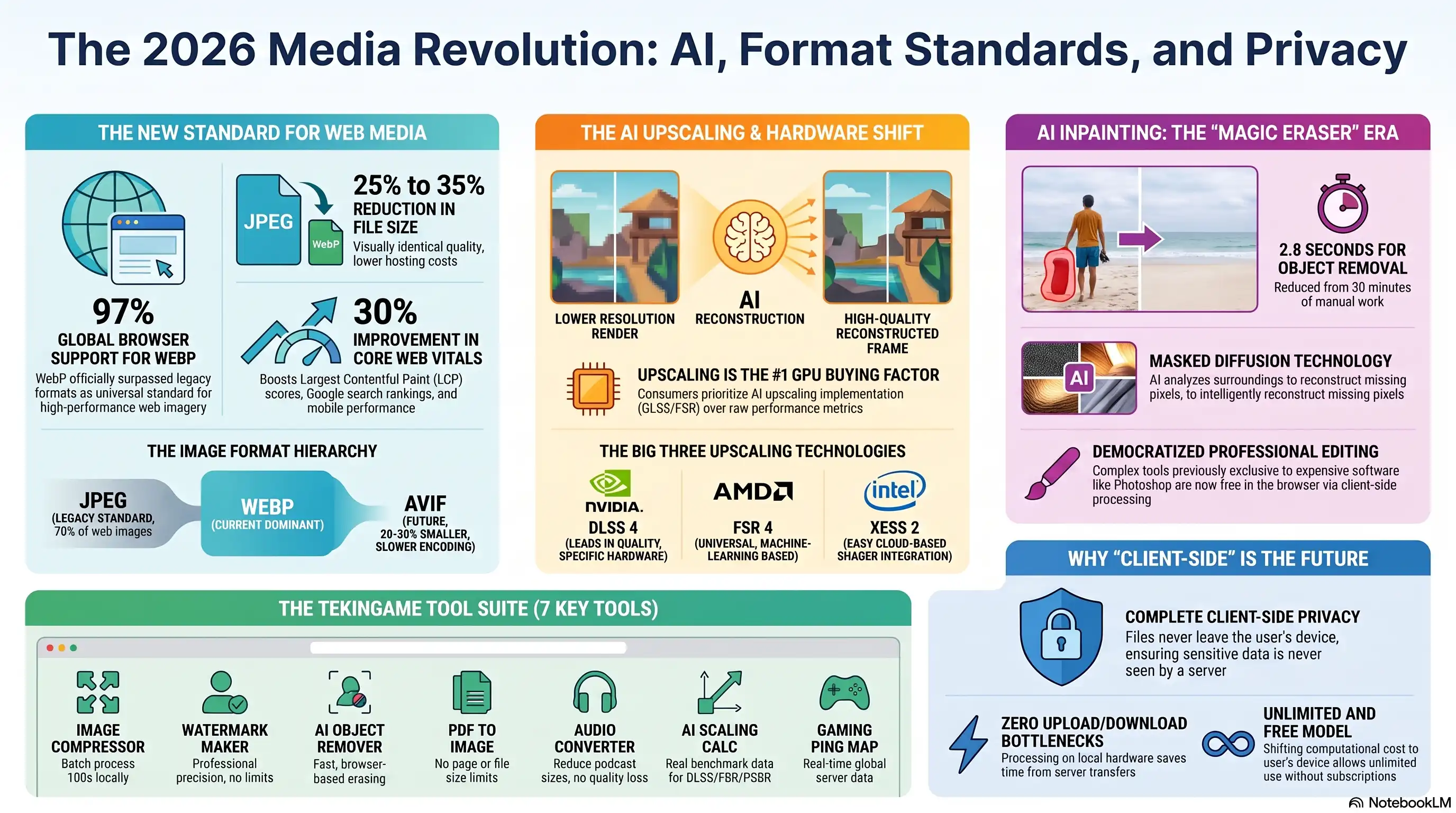
- 🎮Format Revolution- WebP with 25-35% size reduction became the web standard
- 🎧AI Upscaling Dominance- DLSS 4 and FSR 4 changed GPU buying decisions forever
- 🚀Smart Inpainting- Object removal went from hours to seconds with AI
- 🗡️Client-Side Processing- Complete browser-based processing without server uploads
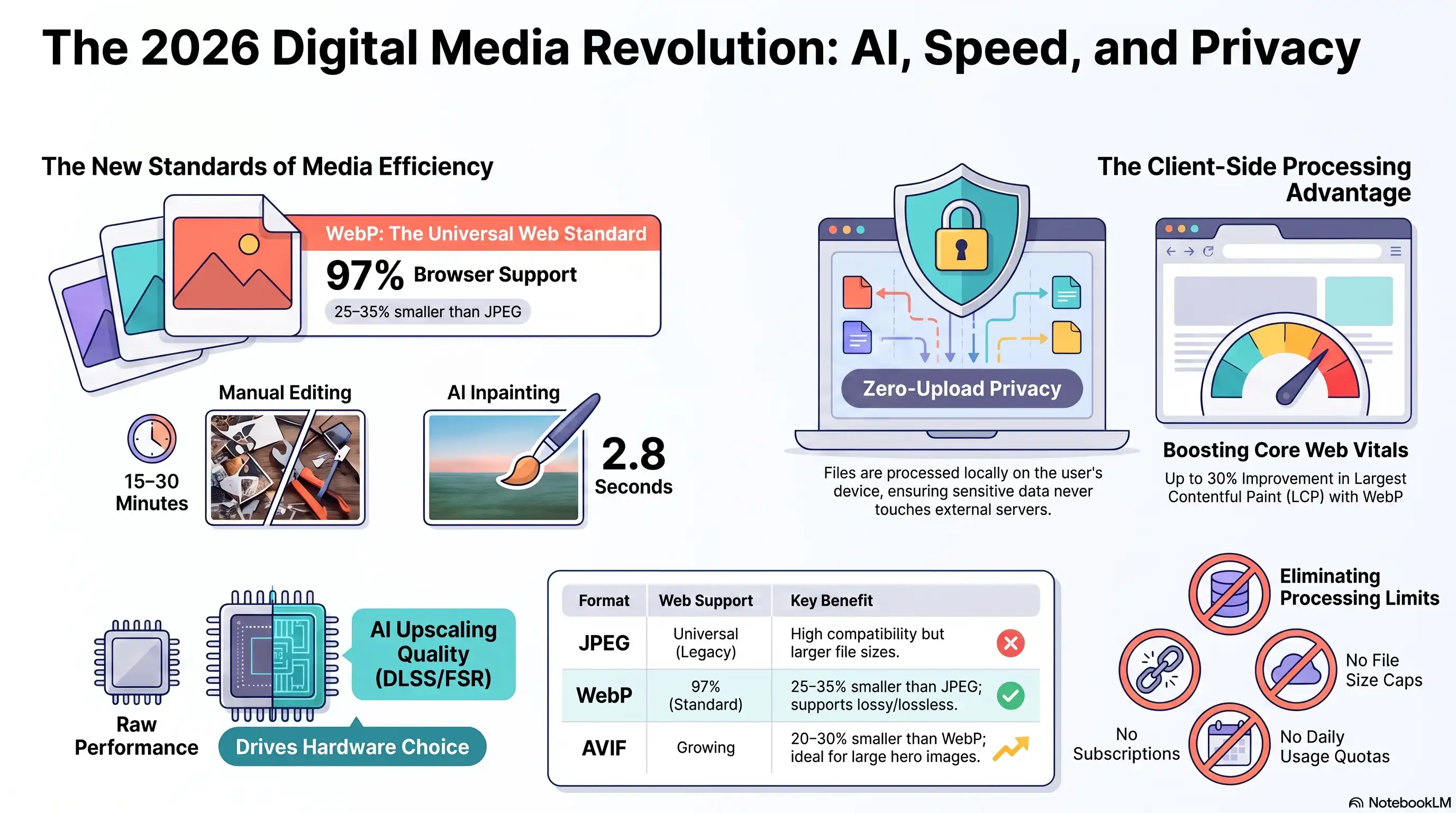
In early 2026, a quiet revolution swept through the digital media world. WebP, the image format Google had championed for years, finally hit 97% browser support and became the true web standard. But that was just the beginning of a transformation that would reshape how we think about media processing.
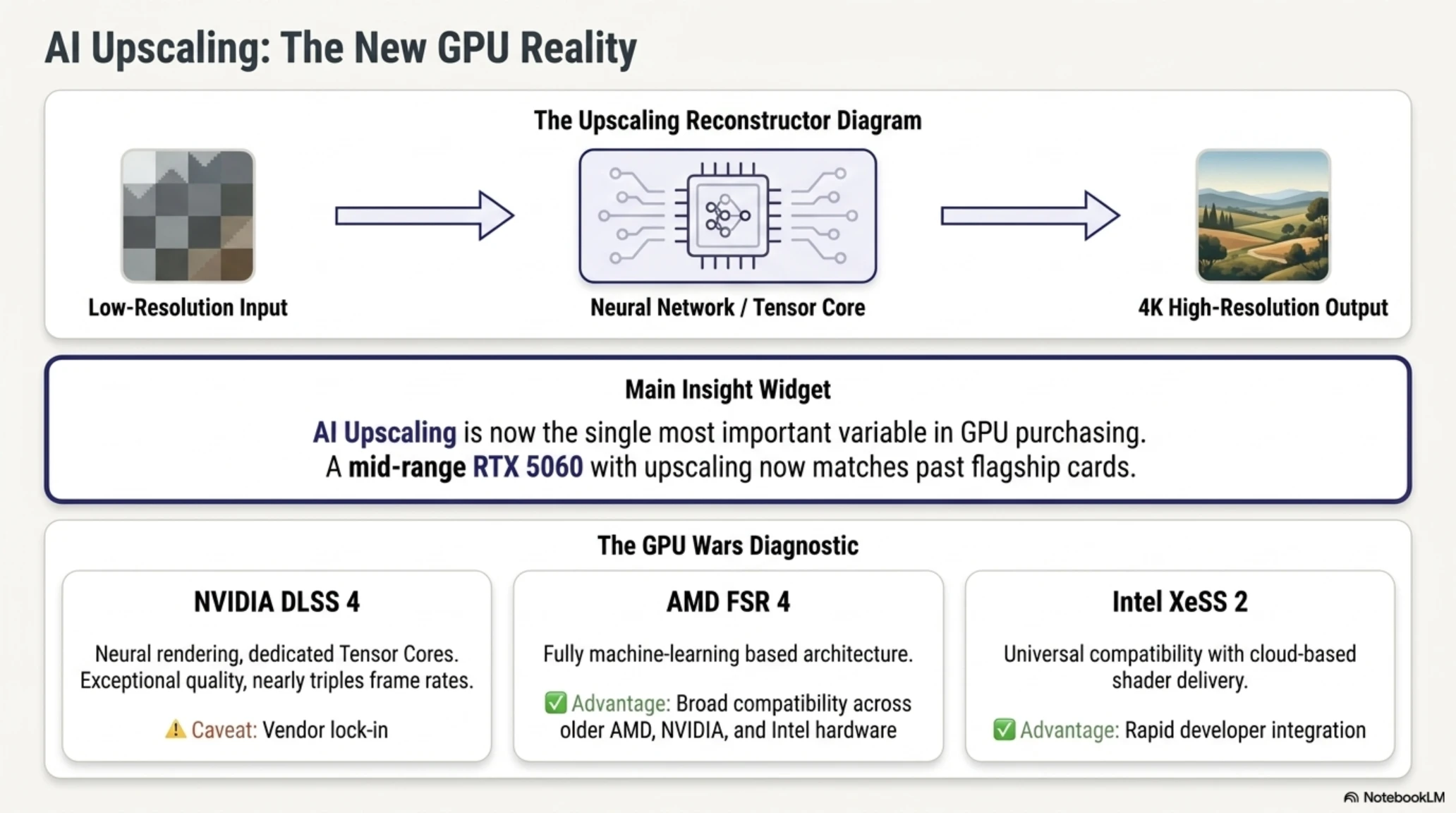
At the same time, AI upscaling technology evolved from a nice-to-have graphics feature into the single most important variable in GPU purchasing decisions. NVIDIA's DLSS 4, AMD's FSR 4, and Intel's XeSS 2 were locked in a battle that would determine the future of graphics rendering, with gamers and professionals alike making hardware choices based primarily on upscaling quality rather than raw performance metrics.
Behind all this noise, online tools for converting, compressing, and editing media files were undergoing their own revolution. AI technologies that previously existed only in expensive software like Photoshop were now available for free, processing everything directly in your browser with zero privacy concerns and maximum speed.
TekinGame decided to be part of this revolution. We built a suite of completely free online tools that process everything in your browser without ever touching our servers. No uploads, no privacy worries, no limitations, and no subscriptions. Just pure, fast, client-side processing powered by modern web technologies and artificial intelligence.
Why Image Formats Matter More Than Ever
Before we dive into the tools themselves, let's understand why you should care about different image formats at all. The answer boils down to three critical factors that affect every website, every content creator, and every business operating online: speed, quality, and cost.
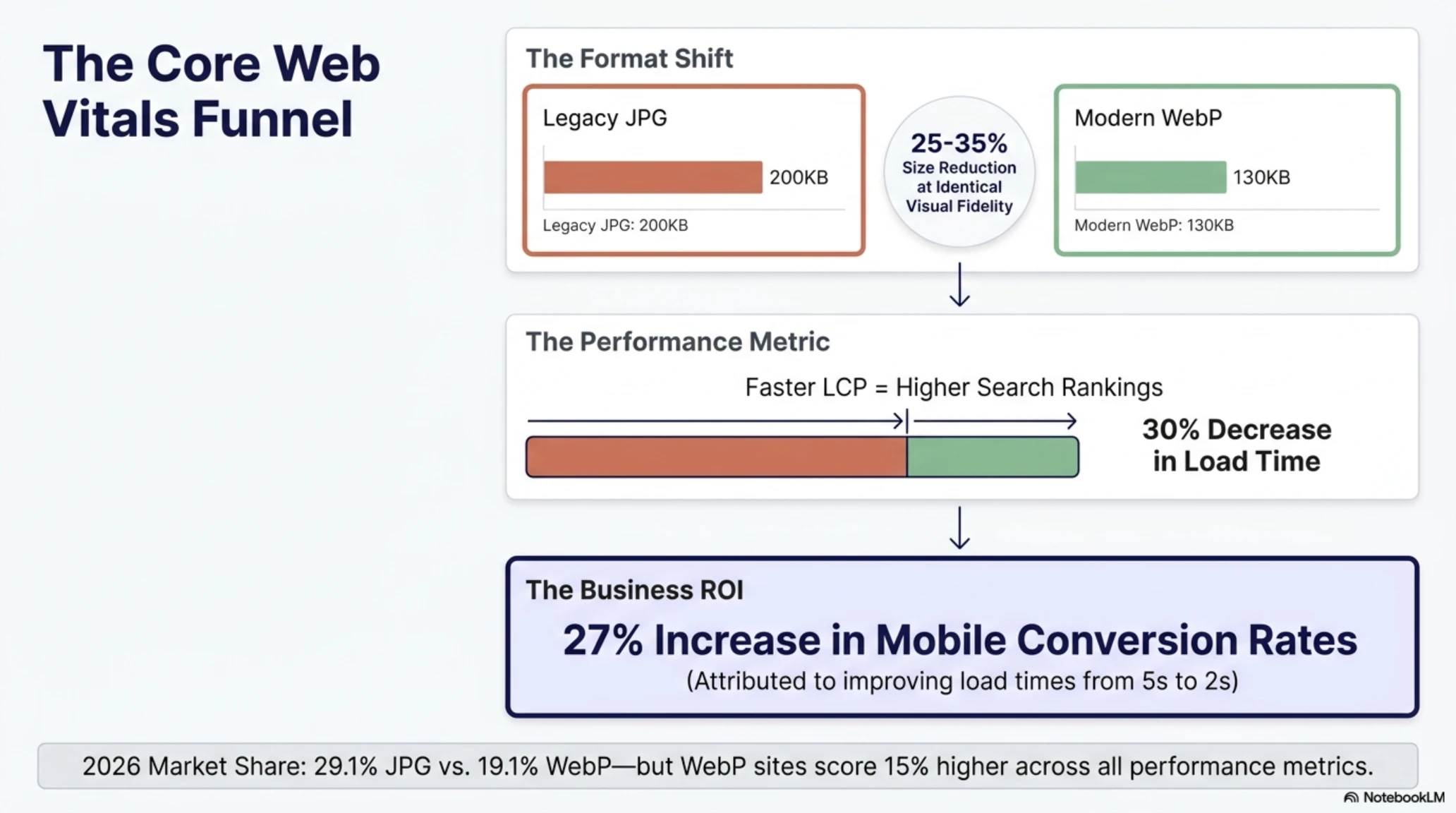
Consider this scenario: A typical JPEG image might be 200 kilobytes. The exact same image with visually identical quality in WebP format will be just 130-150 kilobytes. That's a 25 to 35 percent reduction in file size without any perceptible quality loss to the human eye.
Now scale that up. Imagine you run a website that gets 100,000 visitors daily, and each page displays 10 images. By switching from JPEG to WebP, you could save hundreds of gigabytes of bandwidth every month. This translates directly into lower hosting costs, faster page loads, better Core Web Vitals scores, and ultimately higher search rankings and conversion rates.
According to Core Web Vitals data from 2026, only 29.1% of web images are JPG, 22.5% are PNG, and 19.1% are WebP. But here's the interesting part: sites using WebP consistently show better performance metrics across the board, particularly in mobile environments where bandwidth is more constrained.
Image Format Comparison in 2026
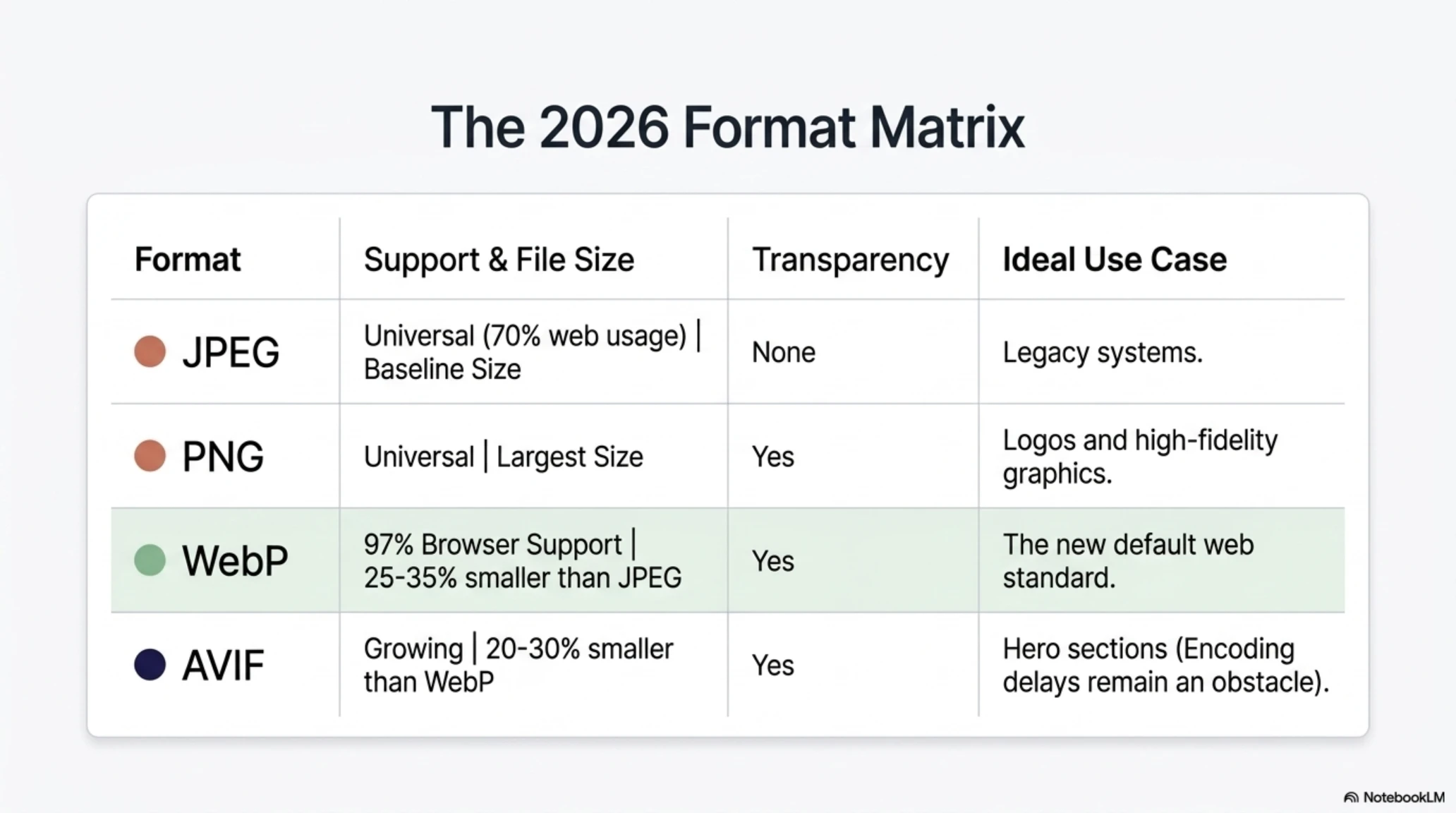
JPEG: The legacy standard that still powers approximately 70% of web images. Universal support but larger file sizes compared to modern alternatives.
PNG: High quality with transparency support, but significantly larger files. Best for logos, graphics, and images requiring transparency.
WebP: The new standard with 97% browser support. 25-35% smaller than JPEG at equivalent quality, with both lossy and lossless compression options.
AVIF: The newest format, 20-30% smaller than WebP but with slower encoding times. Ideal for large images and hero sections where the encoding delay is acceptable.
The AI Upscaling Revolution: From DLSS to FSR
Back in 2024, buying a graphics card was primarily about comparing raw FPS numbers in benchmark charts. By 2026, everything changed. AI upscaling technology became the most important purchasing consideration, fundamentally altering how gamers and professionals evaluate hardware.
AI upscaling allows a graphics card to render an image at a lower resolution, then use artificial intelligence to reconstruct it at a higher resolution with impressive quality retention. The result is dramatically better performance with acceptable visual quality, effectively allowing mid-range hardware to deliver high-end results.
According to a Newegg report from early 2026, two years ago AI upscaling was a feature that gamers appreciated but rarely discussed. Today it has become the most important variable in GPU purchase decisions, with buyers choosing cards based primarily on upscaling quality and implementation rather than traditional metrics like teraflops or memory bandwidth.
DLSS 4 vs FSR 4 vs XeSS 2: The Great Battle
NVIDIA currently leads with DLSS 4, which uses Neural Rendering powered by dedicated Tensor Cores in RTX cards. The image quality is exceptional, with frame generation technology that can nearly triple frame rates in supported games. However, it only works on NVIDIA hardware, creating vendor lock-in that some users find concerning.
AMD, after years of using spatial and temporal approaches that lagged behind DLSS in quality, finally pivoted to a fully machine learning-based architecture with FSR 4. The quality is now comparable to DLSS in most scenarios, and it works across a much wider range of hardware including older AMD cards, NVIDIA cards, and even Intel integrated graphics.
Intel entered the fight with XeSS 2, which offers universal compatibility and features cloud-based shader delivery that allows developers to easily integrate it into their games. While not quite matching DLSS 4 in absolute quality, its ease of implementation means we're seeing it appear in more games faster than competing technologies.
The practical impact of this technology evolution cannot be overstated. A gamer with a mid-range RTX 5060 using DLSS Quality can achieve performance comparable to a previous-generation high-end card costing twice as much. For content creators, this means 4K and 8K video editing workflows that were previously impossible on consumer hardware are now accessible.
AI Upscaling Performance Calculator
TekinGame built a free tool specifically to help you calculate the performance improvement you can expect from AI upscaling technologies. Whether you're considering upgrading your GPU or just want to understand what your current hardware can achieve, this calculator provides real-world data.
The tool uses actual benchmark data from PSSR, DLSS, and FSR implementations across dozens of popular games, showing you exactly how many frames per second you can expect at different quality settings and resolutions.
It even factors in your specific CPU to identify potential bottlenecks, helping you make informed decisions about whether an upgrade is worth the investment.
Inpainting Technology: AI-Powered Object Removal
Another major revolution in 2026 was the democratization of inpainting technology. This technique allows AI to remove unwanted objects, text, or people from images and intelligently reconstruct the missing pixels based on surrounding context.
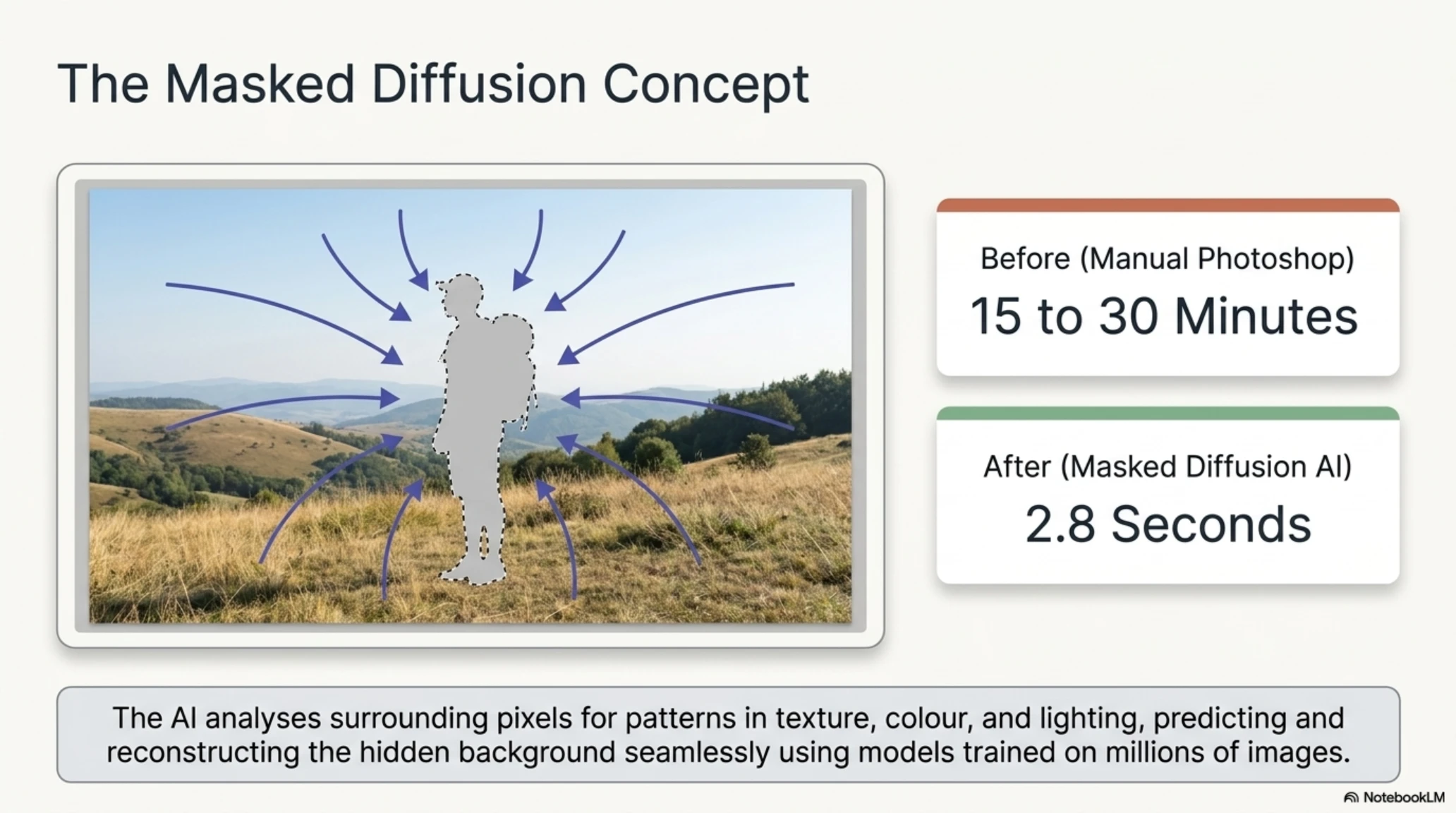
According to WeShop AI's technical documentation, traditional manual removal in Photoshop could take anywhere from 15 to 30 minutes even for an experienced editor, depending on the complexity of the background. Modern AI magic eraser technology based on masked diffusion inpainting has reduced this to an average of 2.8 seconds with results that often exceed manual editing quality.
How does this technology work? When you select an unwanted element in an image, the AI analyzes the pixels surrounding that region, looking for patterns in texture, color, lighting, and structure. Then, based on patterns learned from millions of training images, it predicts what should be behind that object and reconstructs the area using masked diffusion techniques that blend seamlessly with the original image.
The best implementations in 2026 can handle remarkably complex scenarios, from water reflections and patterned fabrics to architectural elements and natural textures. Adobe Firefly integrated into Photoshop, Google Magic Eraser on Pixel phones, and Samsung Object Eraser all leverage variations of this technology, but they require expensive software subscriptions or specific hardware.
What makes TekinGame's implementation unique is that it runs entirely client-side in your browser, meaning your images never leave your device while still delivering professional-quality results comparable to these enterprise solutions.
Introducing TekinGame's 7 Free Online Media Tools
Now that we've set the stage with the broader technological context, let's examine the specific tools that TekinGame has built to put this power in your hands. All of these tools share two critical characteristics: they're completely free with no limitations, and they process everything locally in your browser without any server uploads.
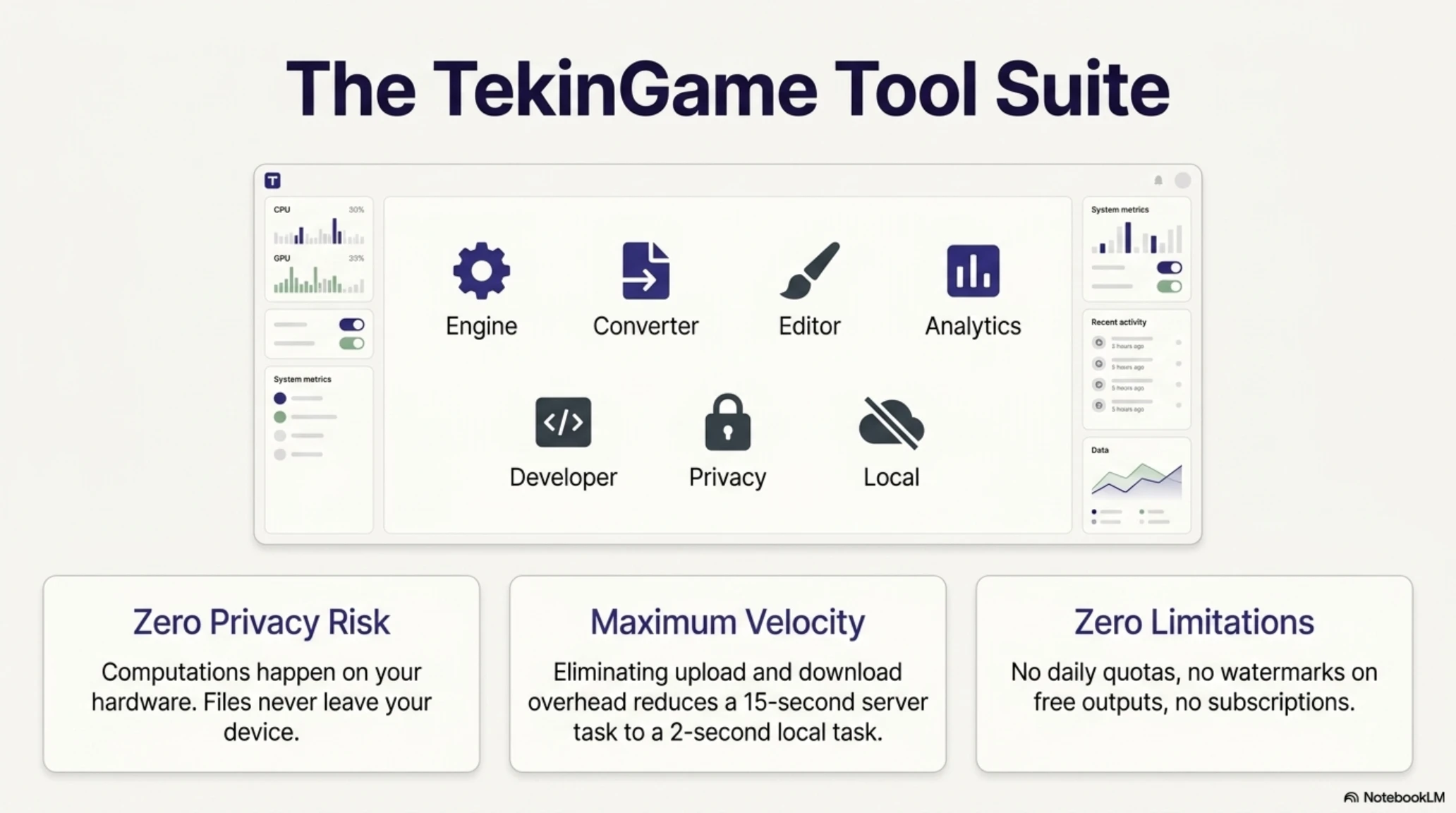
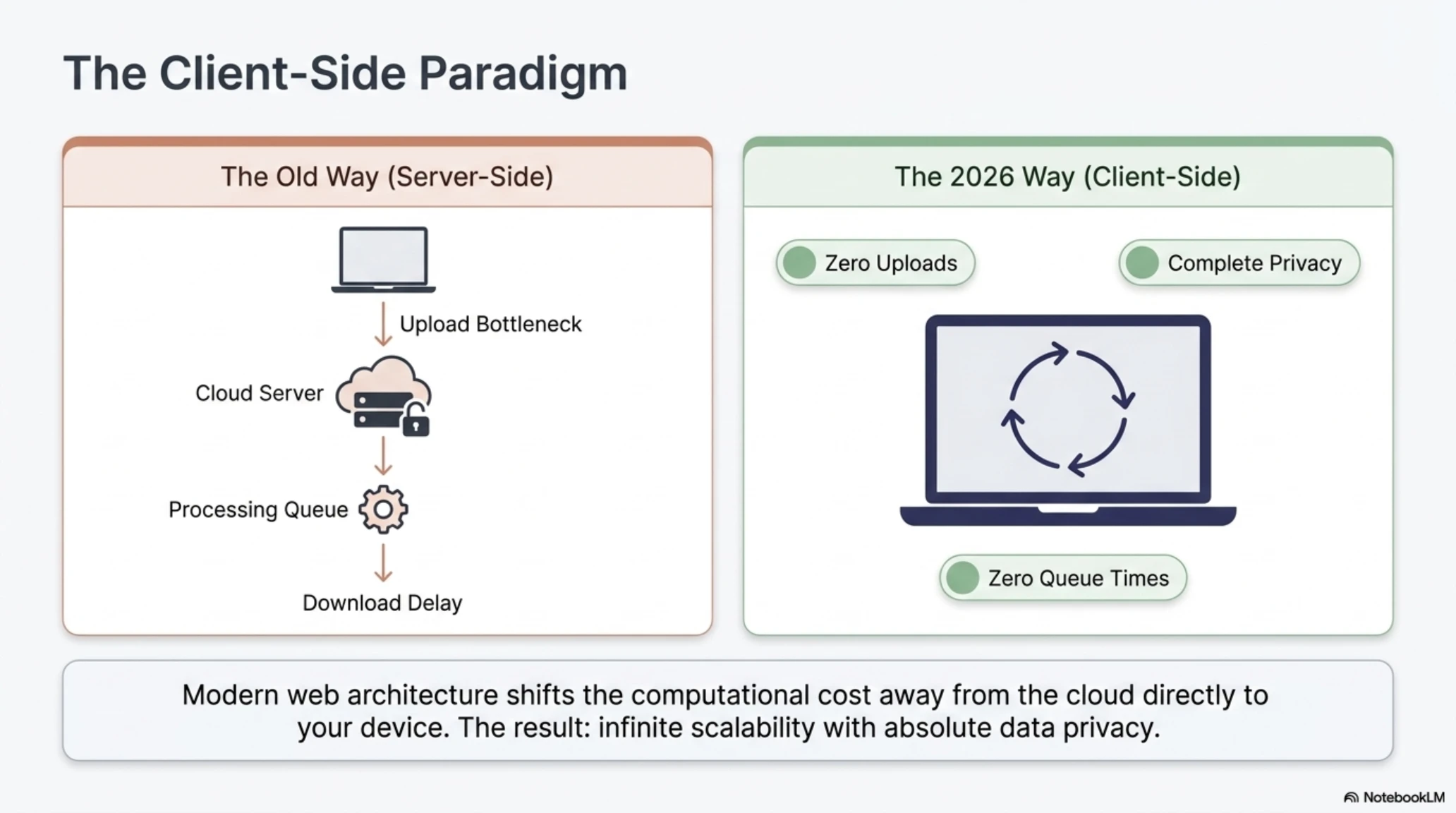
This client-side processing model means your files never leave your device. All computations happen on your own hardware, ensuring complete privacy protection and maximum speed since there's no upload or download time involved.
1. Image Compressor and Converter
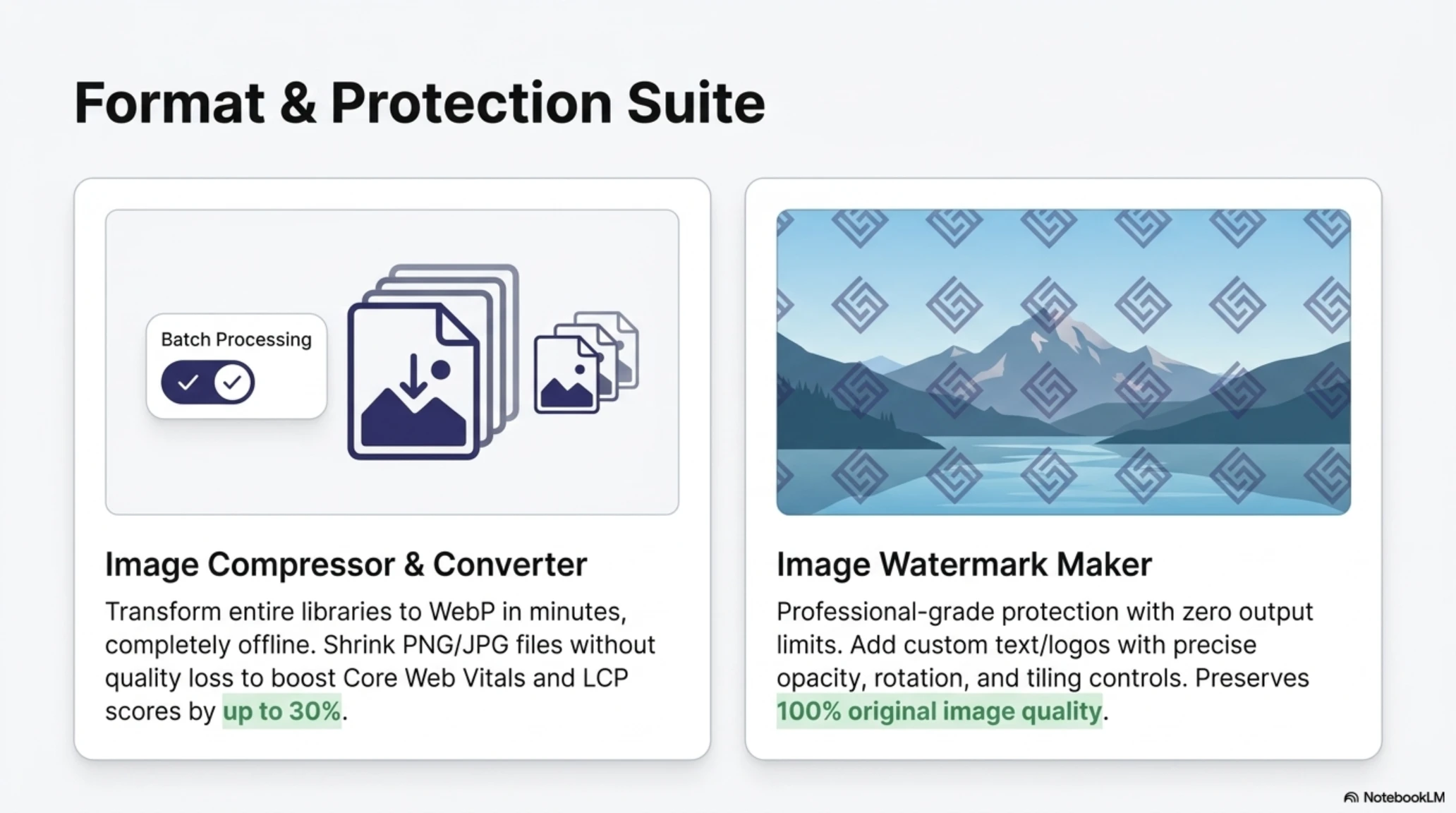
Our flagship tool and the most popular among our users, the image compressor and converter allows you to optimize and convert images between formats with professional results. The tool supports batch processing, meaning you can handle hundreds of images simultaneously without tedious one-at-a-time workflows.
Key capabilities include compressing PNG and JPG images without quality loss using advanced algorithms that identify and eliminate redundant data while preserving visual fidelity. You can convert images to WebP format in bulk, transforming your entire image library in minutes rather than hours. The tool also handles conversion to JPEG with customizable quality settings, giving you precise control over the size-quality tradeoff.
Everything happens offline directly in your browser, meaning you can process sensitive images like medical scans, legal documents, or confidential business materials without any privacy concerns about server uploads.
Why do you need this tool specifically? Consider a practical example: You run an e-commerce website with 100 product images, each around 400 kilobytes in their original JPEG format. By converting them to WebP, you can reduce each image to approximately 260 kilobytes without any visible quality loss.
That 14 megabyte reduction across your entire site directly improves page load speed, which Google's Core Web Vitals measurements will reflect positively. Faster load times mean better search rankings, lower bounce rates, and ultimately higher conversion rates. Studies consistently show that every second of load time improvement can increase conversion rates by 7-10%.
Technical Deep Dive: Optimizing for Core Web Vitals
Google has used Core Web Vitals as a ranking factor since 2021, with increasing weight given to these metrics over time. One of the most critical metrics is LCP or Largest Contentful Paint, which measures how long it takes for the largest visible element (usually an image) to render.
By switching from JPEG to WebP, you can improve LCP by up to 30%, which directly translates to better search rankings. The Core Web Vitals Technology Report for 2026 shows that sites using WebP score an average of 15% better across all metrics compared to sites using only legacy formats.
Additionally, modern CDNs like Cloudflare and Fastly now offer automatic WebP conversion, but doing it at the source gives you better control and avoids CDN processing overhead. TekinGame's tool lets you create the optimized versions locally, then upload only the final optimized files to your hosting.
2. Image Watermark Maker
For photographers, designers, and content creators, watermarking is an essential tool for protecting intellectual property while still sharing work online. Our watermark tool provides professional-grade functionality completely free and unlimited.
You can add custom text or logo watermarks with precise control over opacity to find the perfect balance between visibility and unobtrusiveness. The tool offers size and rotation controls down to single-degree precision, and you can position watermarks anywhere on the image or even tile them across the entire image for maximum protection.
Many online watermarking services either reduce image quality during processing, limit you to a certain number of watermarks per day, or add their own watermarks to free outputs. Our tool has none of these limitations. It preserves the original image quality perfectly and allows unlimited processing, all while keeping your images completely private through client-side processing.
For professional photographers managing large portfolios, the batch processing capability means you can watermark hundreds of images at once with consistent positioning and styling, something that would take hours in traditional editing software.
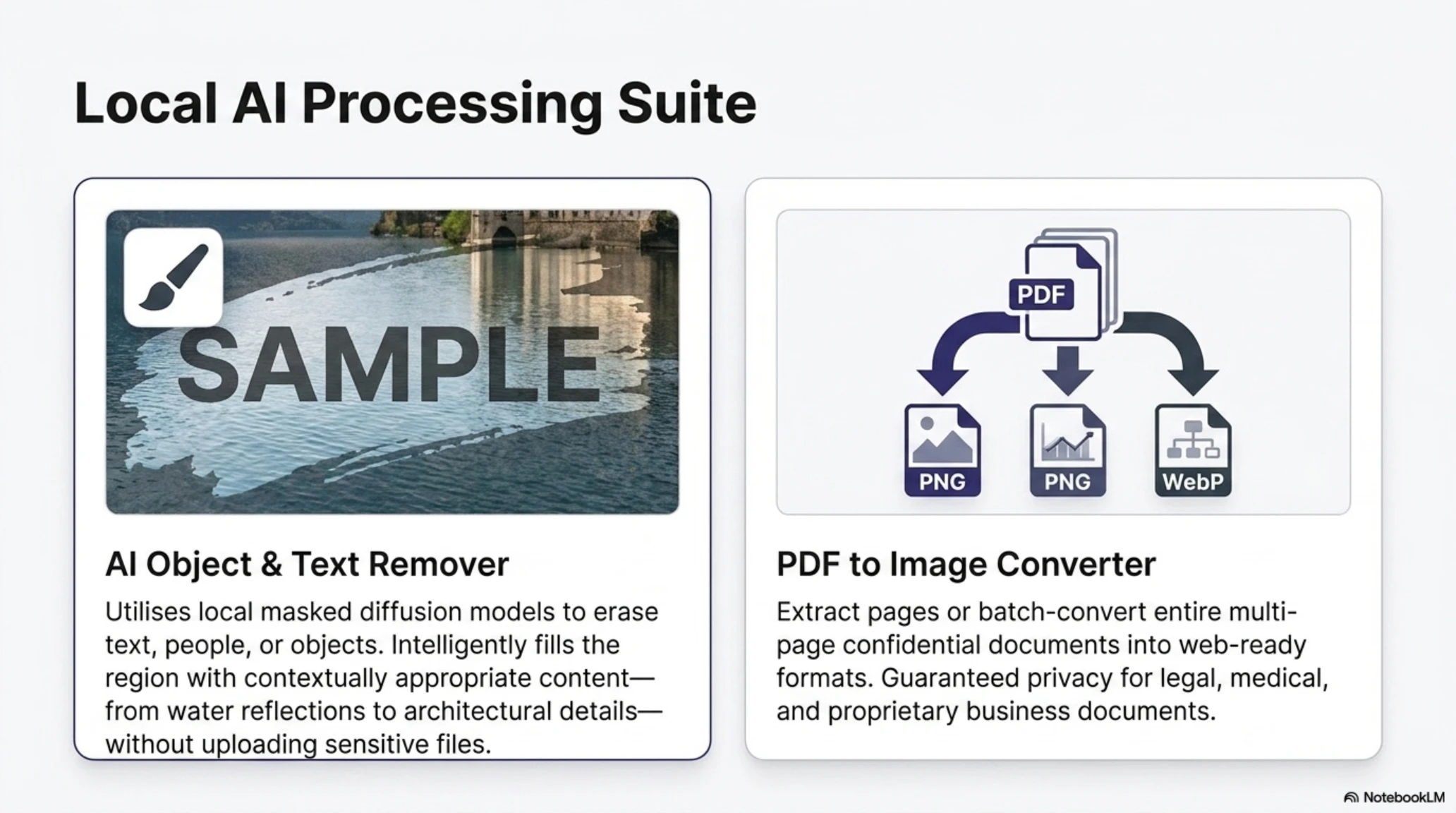
3. AI Object and Text Remover
This is perhaps our most technologically impressive tool, leveraging the latest inpainting technology we discussed earlier to remove unwanted elements from images with AI-powered reconstruction.
The tool allows you to remove unwanted objects from photos by simply painting over them with an intelligent brush tool. You can erase text, logos, or watermarks that appear on images you own but in formats you cannot edit. You can remove unwanted people from backgrounds in group photos or tourist shots. The AI analyzes the surrounding area and intelligently fills in the removed region with contextually appropriate content.
The results are typically seamless and natural-looking, even on complex textures like water reflections, patterned clothing, or architectural details. The technology uses masked diffusion models similar to those in Adobe Firefly or Google Magic Eraser, but runs entirely in your browser without requiring expensive subscriptions or specific hardware.
Real-world applications are numerous. Real estate photographers can remove cars or trash from property photos. Portrait photographers can eliminate blemishes or unwanted background elements. Historians and archivists can remove damage or stains from scanned historical photographs. The possibilities are limited only by your needs.
4. PDF to Image Converter
Sometimes you need to convert PDF pages into images, whether for sharing on social media, including in presentations, or creating visual documentation. Our PDF to Image converter makes this process trivially simple.
You can convert PDF pages to high-quality WebP or PNG images with customizable resolution settings to balance quality and file size. The tool handles both individual page conversion and bulk conversion of multi-page documents. Everything processes locally in your browser, so even sensitive documents remain completely private. There are no page limits or file size restrictions.
This tool is particularly valuable for students, teachers, and professionals who work with large amounts of documentation. Convert lecture slides to share snippets on social media. Extract diagrams from technical manuals for inclusion in reports. Create image galleries from PDF portfolios. The applications are endless.
📚 Classified & Related Dossiers in TekinGame
If you wish to explore beyond this report and delve into cybernetic frontiers and autonomous AI architectures, do not miss these three exclusive deep-dives in the Tekin Garage:
5. Audio Converter and Compressor
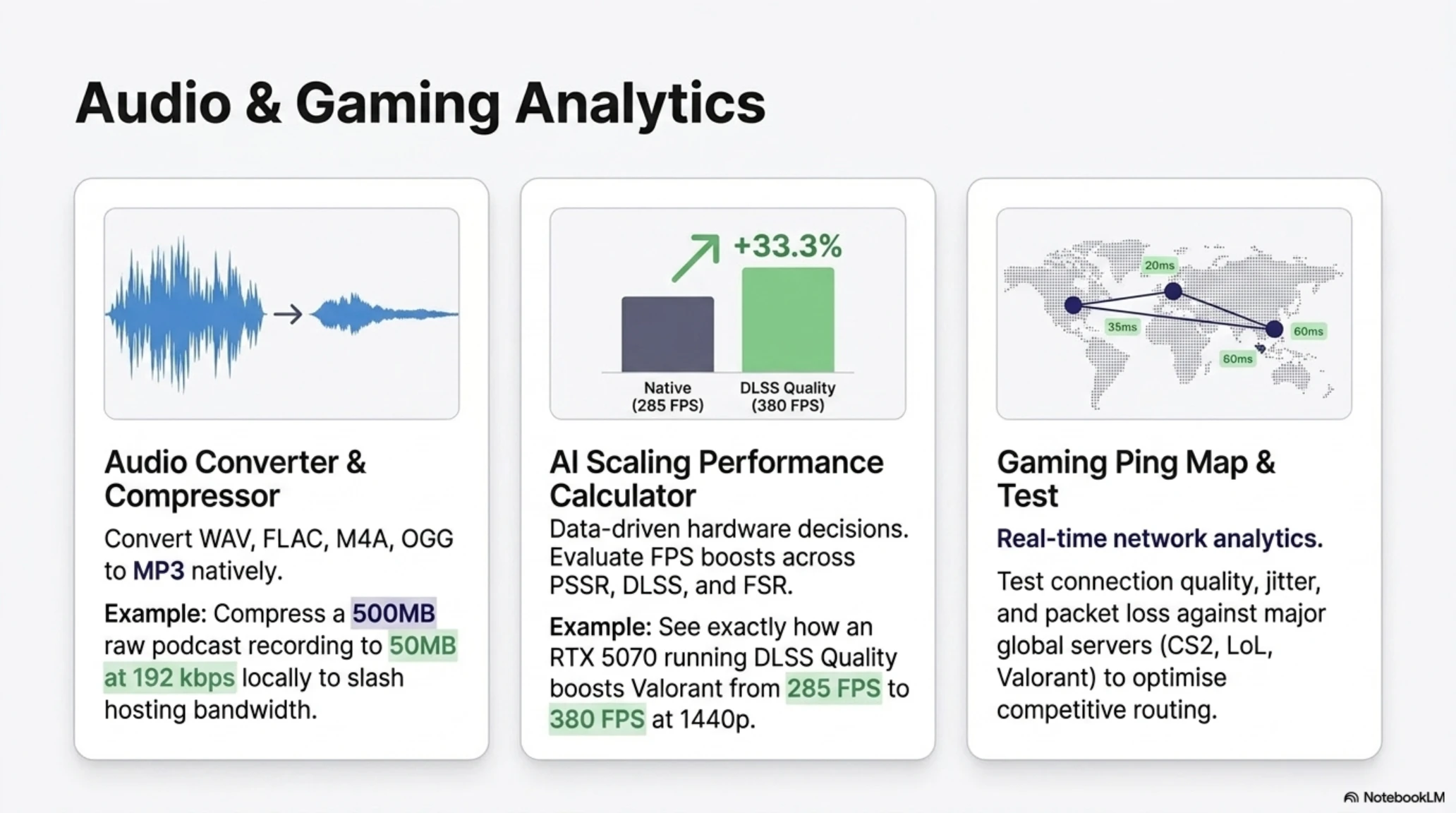
Our audio tool allows you to convert between different audio formats and compress audio files for faster loading and reduced storage requirements. The tool supports conversion between WAV, MP3, M4A, FLAC, and OGG formats with full control over quality and bitrate settings.
You can compress podcast audio files to reduce hosting costs without noticeable quality degradation. Everything happens offline in your browser with no upload delays or privacy concerns. The tool uses high-quality encoding libraries that preserve audio fidelity even at lower bitrates.
For podcasters, musicians, and anyone working with audio files regularly, this tool eliminates the need for expensive audio editing software just to perform simple format conversions or compression tasks.
6. AI Scaling Performance Calculator
This is one of our most unique tools, specifically designed for gamers and professionals trying to make informed hardware purchasing decisions in the age of AI upscaling. If you want to know how much performance improvement you can expect from buying a new graphics card, this tool provides data-driven answers.
The calculator evaluates frame-rate boost in games when using AI upscaling technologies like PlayStation 5 Pro's PSSR, NVIDIA's DLSS, and AMD's FSR. It uses real benchmark data from dozens of popular games and shows you exactly what to expect in terms of performance gains.
You can see how many additional FPS you'll get with DLSS Quality versus DLSS Performance modes. You can understand what impact FSR Balanced has on image quality compared to native resolution. You can determine whether upgrading to a PS5 Pro for PSSR is worth the investment for your specific gaming preferences. You can compare DLSS 4, FSR 4, and XeSS 2 side-by-side across your favorite games.
This tool has become increasingly important as GPU prices have climbed and the performance differences between generations have narrowed. Making an informed decision about spending $700 on a new graphics card requires understanding not just the raw specifications but the real-world performance you'll actually experience in the games you play.
7. Gaming Ping Map and Test
Our final tool is designed specifically for online gamers who need to understand their network quality and connection to gaming servers worldwide. The tool tests your connection and displays real-time network quality to major gaming server locations across the globe.
You can see which servers give you the best ping, identify servers with packet loss or jitter issues, and determine whether your ISP is suitable for competitive online gaming. The tool tests connections to servers from major games including League of Legends, Valorant, Counter-Strike 2, Fortnite, and many others.
For competitive gamers where every millisecond counts, this tool provides the data needed to optimize their setup and choose the best server regions for their location and ISP routing.
Why Client-Side Processing is Revolutionary
One of the most critical features of TekinGame's tools is that everything happens in your browser. But what does this actually mean, and why should you care about the technical implementation details? The answer lies in three fundamental advantages that client-side processing provides over traditional server-based tools.
Complete Privacy Protection
When your files never leave your device, nobody else can access them. Period. This is critically important for private photos, confidential documents, sensitive work files, medical images, legal documents, or any content you wouldn't want potentially exposed through a data breach or misused for AI training.
Many online services retain your uploaded files for some period of time, ostensibly for caching or performance optimization. Some even explicitly state in their terms of service that they may use uploaded files to improve their algorithms or train machine learning models. With client-side processing, these concerns vanish entirely because the service never sees your files in the first place.
Consider the practical implications. A lawyer can compress confidential case documents without worrying about violating client confidentiality. A doctor can convert medical imaging files without HIPAA concerns. A business owner can process proprietary product images without intellectual property risks. An individual can edit personal photos without adding them to some company's database.
Superior Speed
Upload and download times consume significant portions of the total processing time for traditional online services, especially for large files or slow connections. When everything is local, speed depends only on your device's processing power, which for modern computers is substantial.
For example, compressing a 5 megabyte image on a typical online service might take 10-15 seconds total: 3 seconds uploading, 2 seconds processing on their servers, 3 seconds downloading the result, plus whatever queue time exists if their servers are busy. On our tool, the same operation takes 2-3 seconds total, with no upload or download overhead and no queue delays.
Scale this across dozens or hundreds of files in a batch operation, and the time savings become dramatic. What might take half an hour on a traditional service can be done in minutes with client-side processing.
No Limitations or Restrictions
Many online services impose daily or monthly processing limits to manage their server costs and encourage paid subscriptions. Some add watermarks to free outputs. Others limit file sizes or resolution. Some require account registration and start tracking your usage across sessions.
TekinGame's tools have none of these limitations because there are no server costs to manage. You can process hundreds of files every day, completely free, forever. There are no watermarks on outputs. There are no file size limits beyond what your browser and device can handle. There's no account registration or usage tracking.
This unlimited model is sustainable precisely because client-side processing shifts the computational cost from our servers to your device, which you've already paid for and which sits idle most of the time anyway.
Comparing TekinGame to Alternatives
With dozens of image compression and conversion services available online, you might wonder why you should specifically choose TekinGame's tools. Let's examine the alternatives honestly and see where they fall short.
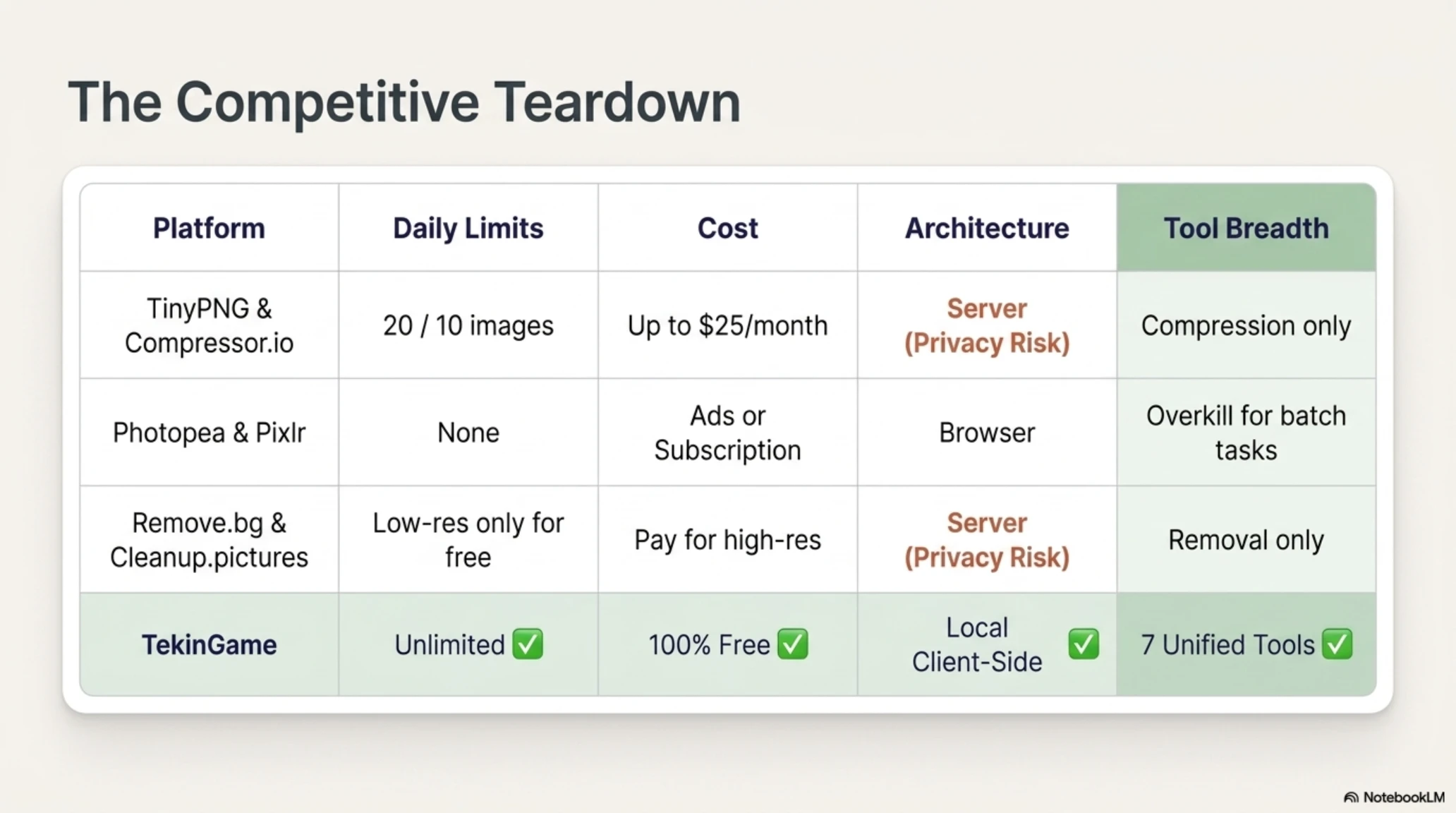
TinyPNG and Compressor.io
These are two of the most popular image compression services on the web, with millions of users. However, both have significant limitations that become apparent with regular use.
TinyPNG limits free users to 20 images per day and restricts individual files to 5 megabytes. While this might be sufficient for casual users, anyone managing a website or working professionally quickly hits these limits. Their paid plan starts at $25 per month for 500 images, which adds up for heavy users. Additionally, the service requires uploading images to their servers, raising privacy concerns for sensitive content.
Compressor.io similarly uploads files to their servers and limits free users to 10 images at a time. While they offer higher quality compression algorithms, the paid plans are expensive for regular users, and the privacy implications of server-side processing remain.
Both services focus exclusively on compression and don't offer the wider range of tools that TekinGame provides in a single convenient location. If you need watermarking, object removal, and format conversion in addition to compression, you'd need to use multiple different services.
Photopea and Pixlr
These are powerful online image editors that attempt to replicate desktop software like Photoshop in a browser environment. For complex editing tasks, they're excellent. However, for simple operations like format conversion or batch compression, using these tools is like using a sledgehammer to crack a nut.
Photopea has a complex interface that intimidates casual users and requires a significant learning curve even for simple tasks. Pixlr's free version includes intrusive advertisements that interrupt workflows and make the experience unpleasant. Both services are overkill when all you need is quick format conversion or compression.
TekinGame's tools are purpose-built for specific tasks with simple, intuitive interfaces that anyone can use immediately without tutorials or learning curves. No advertisements, no complexity, no distractions.
Remove.bg and Cleanup.pictures
These services specialize in AI-powered image manipulation, particularly background removal and object deletion. They're good at what they do, but again have significant limitations.
Remove.bg focuses exclusively on background removal and doesn't allow arbitrary object deletion like TekinGame's tool does. Their free plan limits you to low-resolution outputs, requiring a subscription for full-resolution images. All processing happens on their servers, meaning you're uploading potentially sensitive images.
Cleanup.pictures offers object removal similar to our tool but limits free users in resolution and number of operations. Their machine learning models run on their servers, requiring uploads and creating the same privacy concerns as other server-based services.
TekinGame's AI Object Remover works entirely locally, doesn't reduce resolution, and allows you to remove any object rather than being limited to specific use cases like background removal. The unlimited free usage means you can iterate and experiment without worrying about hitting quotas.
Real-World Use Cases
Let's explore several concrete scenarios where these tools provide tangible value, moving beyond abstract features to practical applications that solve real problems.
E-Commerce Website Optimization
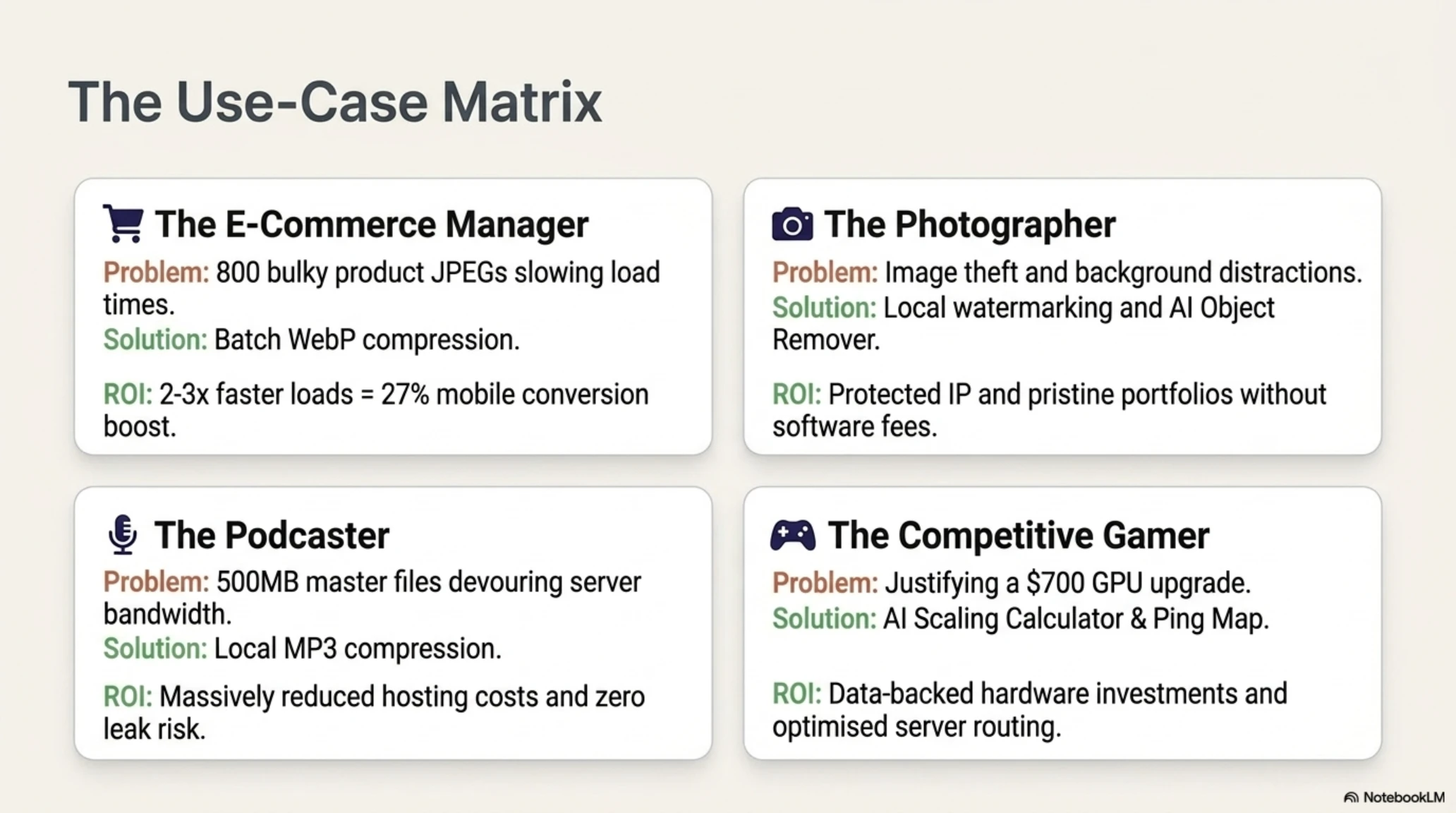
You run an online store with 200 products, each with 4 images. That's 800 images total that need optimization for fast page loads and good search rankings. Each original image is approximately 400 kilobytes in JPEG format.
Using TekinGame's Image Compressor, you can convert all 800 images to WebP format, reducing each to about 260 kilobytes without any visible quality loss. The results are dramatic: page load speeds improve by 2-3 times on average, particularly on mobile devices with slower connections. Reduced bandwidth consumption lowers your hosting costs, which can be significant if you're on a traffic-metered plan. Better Core Web Vitals scores lead to improved Google rankings, driving more organic traffic. Faster page loads increase conversion rates because impatient users don't bounce before images finish loading.
A 2025 study by Google found that improving load time from 5 seconds to 2 seconds increased mobile conversion rates by an average of 27%. For an e-commerce site doing $100,000 in monthly revenue, that translates to $27,000 in additional monthly revenue just from image optimization.
Professional Photographer Portfolio
You're a professional photographer building an online portfolio to attract clients. You need high-quality images to showcase your work, but also fast load times so potential clients don't get impatient. You need watermarks on all images to prevent theft, which is rampant in the photography community. You need the ability to remove unwanted elements from some images, like exit signs or trash cans that weren't visible through the viewfinder.
With TekinGame's suite of tools, you can accomplish all of this without expensive software subscriptions. Compress and convert your portfolio images to WebP for optimal web display. Add consistent watermarks to all images to discourage theft while maintaining your professional brand. Use the AI Object Remover to clean up those unavoidable background distractions that appear in otherwise perfect shots.
The client-side processing means you're not uploading your professional work to third-party servers where it might be used for AI training or accidentally exposed through security breaches. Your intellectual property stays completely under your control.
Podcast or Musician Audio Management
You run a podcast and release a new episode every week. Your original WAV recordings are each about 500 megabytes, which is impractical for distribution and would cost a fortune in hosting bandwidth if served directly to listeners.
Using TekinGame's Audio Converter, you can convert these to MP3 at 192 kbps quality, which reduces the file size to approximately 50 megabytes without any perceptible quality loss on typical listening devices. For a podcaster releasing weekly episodes, this represents gigabytes of bandwidth savings every month, which directly reduces hosting costs.
The ability to process locally without uploading means you can handle sensitive or pre-release content without worrying about leaks or unauthorized access. Musicians can safely convert master recordings for distribution without those files ever leaving their possession until the official release.
Professional Gamer Hardware Decisions
You're a professional gamer considering upgrading your graphics card to maintain competitive performance. You're looking at the RTX 5070, but at $700 you want to be sure the investment is worthwhile. You need to understand how much real-world performance improvement you'll get specifically in the games you play competitively.
Using TekinGame's AI Scaling Performance Calculator, you can see that in Valorant at 1440p, the RTX 5070 with DLSS Quality will give you 380 FPS compared to 285 FPS native, a 33% improvement that keeps you well above the 240Hz refresh rate of your monitor. In Counter-Strike 2, you'll see similar improvements that maintain triple-digit frame rates even during intensive combat scenarios.
This data-driven approach helps you make an informed decision about whether the upgrade is worth $700 or whether you should wait another generation. For professional gamers where hardware is a business expense, being able to justify purchases with concrete performance data is invaluable.
The Future of Online Media Tools
The online media tools industry is evolving rapidly, driven by advances in web technologies, artificial intelligence, and changing user expectations around privacy and performance. Let's examine the trends we can expect to see in the coming years.
Deeper AI Integration
Current AI capabilities like upscaling and inpainting are just the beginning. In the near future, we'll see AI that can dramatically enhance old and low-resolution images, reconstructing detail that was never captured in the original. Generative AI will be able to create missing parts of images entirely, like extending a cropped photo or filling in damaged areas of historical photographs. Style transfer will allow applying the artistic style of one image to another, creating unique artistic effects. Real-time video processing directly in the browser will enable effects and enhancements that currently require expensive desktop software and powerful hardware.
These capabilities will be powered by increasingly efficient neural network architectures that can run on consumer hardware, making professional-grade AI tools accessible to everyone through simple browser interfaces.
Newer, More Efficient Formats
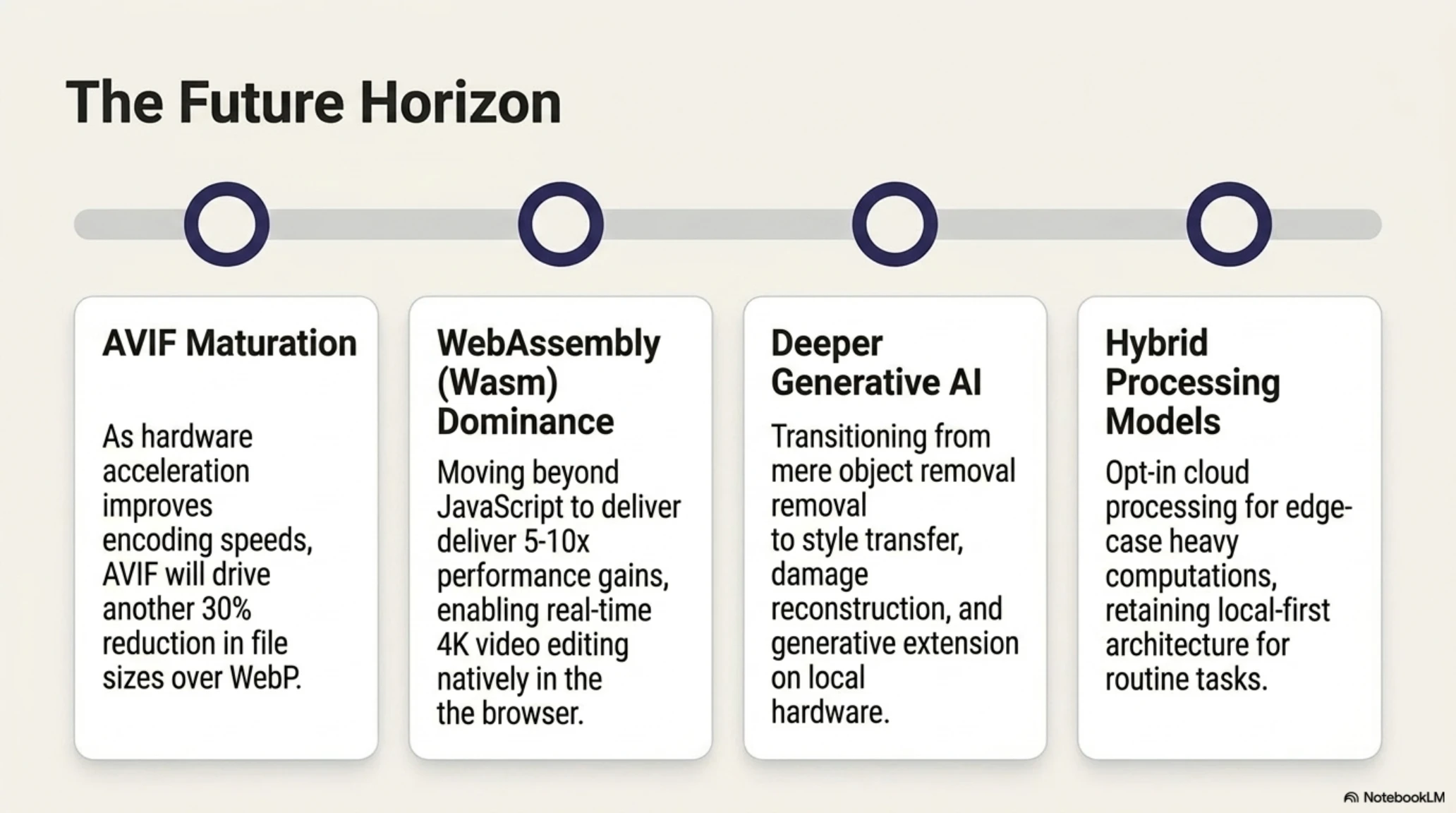
WebP is now the standard, but AVIF is coming fast. AVIF can be 20-30% smaller than WebP at equivalent quality, which will drive further adoption as browser support continues improving and encoding speeds increase.
The main obstacle for AVIF currently is encoding speed. While WebP can encode an image in 1-2 seconds, AVIF might take 5-8 seconds for the same image. However, as algorithms improve and hardware acceleration becomes more common, these encoding times will decrease to acceptable levels for real-time use.
We'll also likely see new formats specifically designed for AI-assisted rendering, where the image file contains both a low-resolution version and AI hints that allow client-side reconstruction of higher resolution detail with minimal bandwidth cost.
WebAssembly and Better Performance
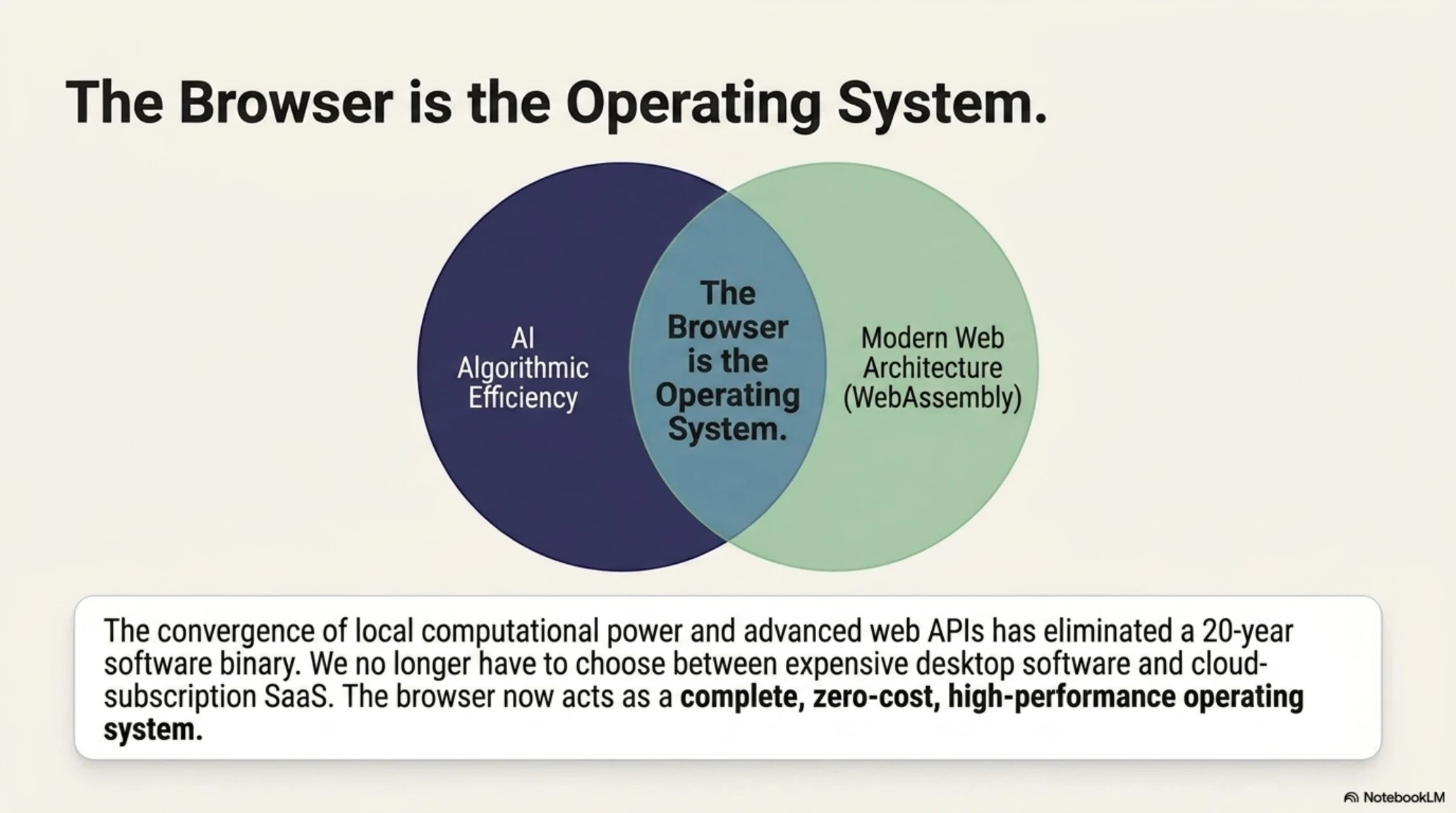
Many current browser-based tools use JavaScript for processing, which is fast but not optimal. WebAssembly (Wasm) can provide 5-10 times better performance for computationally intensive tasks like image processing, video encoding, and AI inference.
In the future, we'll see tools that leverage Wasm to process 4K video in real-time directly in the browser, apply complex AI effects without noticeable delay, and handle massive batch operations on thousands of files without breaking a sweat.
Combined with advances in browser APIs for accessing GPU acceleration, WebAssembly will enable browser-based tools that rival or exceed desktop software in performance while maintaining the convenience and cross-platform compatibility of web applications.
Hybrid Cloud and Local Processing
An interesting future model is hybrid processing: lightweight operations happen locally for speed and privacy, but for computationally intensive tasks you can optionally use cloud processing for faster results on complex jobs.
This gives users the best of both worlds: privacy and speed of local processing for routine tasks, and cloud power for edge cases that would take too long locally. The key is making cloud processing fully optional rather than mandatory, so users with privacy concerns or slow connections can still accomplish everything locally if they choose to wait a bit longer.
Key Takeaways
- WebP reached 97% browser support in 2026 and can reduce image sizes by 25-35% without quality loss, making it the new web standard
- AI upscaling technologies like DLSS 4, FSR 4, and XeSS 2 evolved from side features to the most important factor in GPU purchasing decisions
- AI-powered inpainting technology reduced object removal time from 15-30 minutes of manual work to an average of 2.8 seconds with better results
- Client-side processing means complete browser-based operation, providing total privacy protection, faster performance, and no usage limitations
- TekinGame's toolkit includes Image Compressor, Watermark Maker, AI Object Remover, PDF Converter, Audio Converter, AI Scaling Calculator, and Gaming Ping Map
- Unlike competitors like TinyPNG and Remove.bg, TekinGame tools have no daily limits, no file size restrictions, and no subscription requirements
- Using WebP instead of JPEG can improve LCP (Largest Contentful Paint) by up to 30%, directly improving Google search rankings
- The future of media tools includes deeper AI integration, AVIF format adoption, WebAssembly performance improvements, and hybrid cloud-local processing models
Conclusion
The year 2026 marks a turning point in the history of digital media tools. WebP achieved true web standard status with 97% browser support, fundamentally changing how we think about image optimization. AI upscaling transformed from a side feature into the most important factor in graphics card purchasing decisions, democratizing high-performance gaming and professional rendering. Inpainting technology reduced object removal from hours of painstaking work to seconds of AI-powered magic.
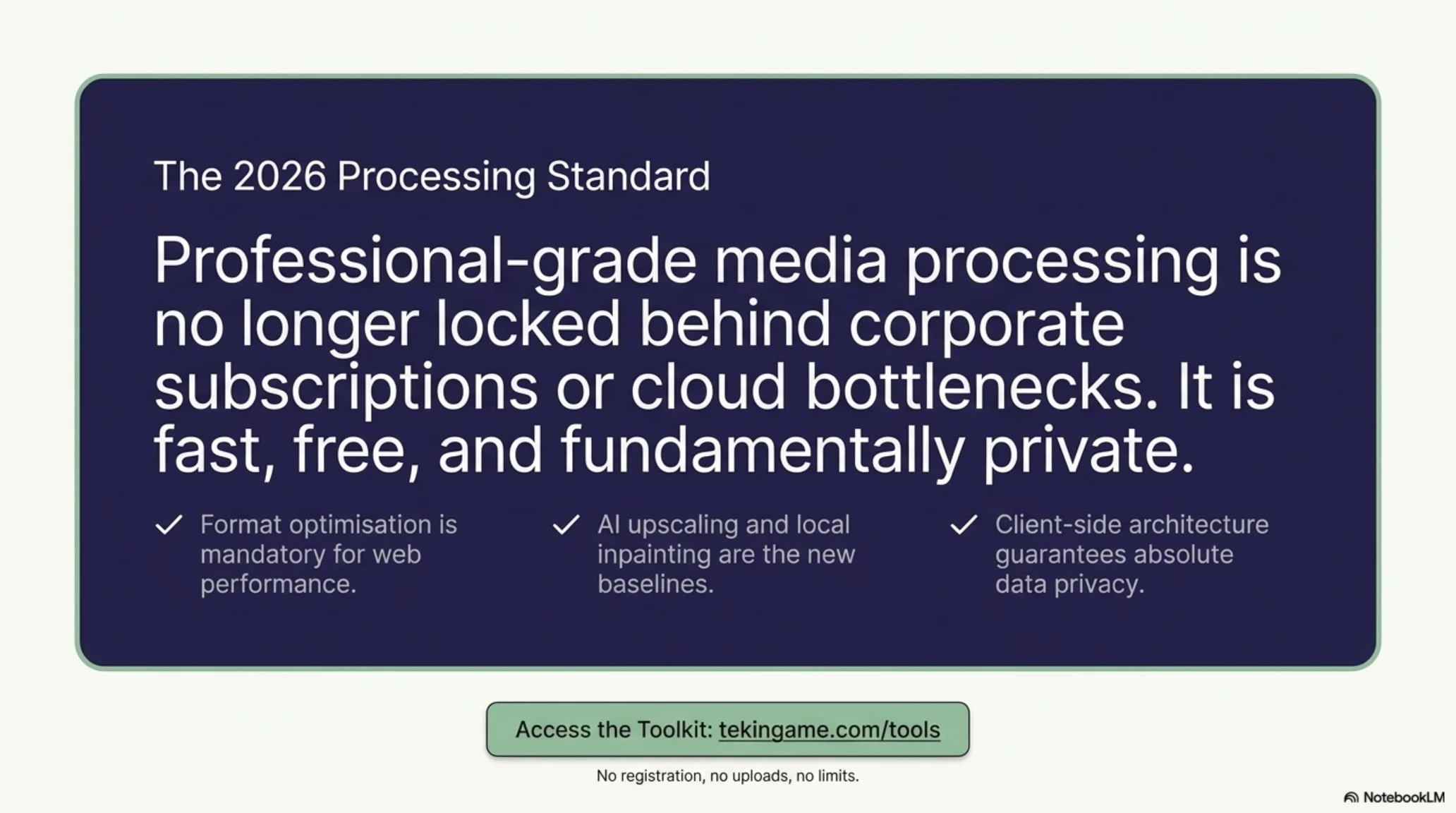
But more importantly than any single technological advancement, the power of these technologies is no longer locked away in expensive software from large corporations. With the emergence of client-side processing and free online tools like those TekinGame provides, anyone with a web browser can access professional-grade capabilities without subscriptions, without limitations, and without compromising their privacy.
Whether you're a web developer optimizing site performance, a photographer protecting your work, a podcaster managing audio files, or a gamer making informed hardware decisions, TekinGame's tools were built specifically to serve your needs without the compromises and restrictions that plague traditional online services.
All of these tools are completely free, unlimited, and designed to preserve your privacy through local processing. To get started, simply visit the TekinGame tools page and select the tool you need. No registration required, no credit card needed, no strings attached.
The future of media tools is bright. With deeper AI integration, more efficient formats like AVIF gaining traction, and technologies like WebAssembly enabling desktop-class performance in the browser, we're on the cusp of an even bigger revolution. TekinGame is committed to staying at the forefront of this revolution, continually adding new capabilities and improving existing tools based on user feedback and technological advances.
As the web platform continues evolving and browser capabilities expand, the distinction between desktop software and web applications will continue blurring until it disappears entirely. TekinGame's mission is to ensure that as this transition happens, powerful media processing tools remain free, accessible, and respectful of user privacy for everyone rather than becoming yet another subscription service extracting monthly fees from users.
We invite you to explore our tools, provide feedback on what works and what could be improved, and share them with others who might benefit from free, privacy-respecting alternatives to traditional online services. Together we can build a web where powerful capabilities are available to everyone, not just those who can afford expensive subscriptions or are willing to sacrifice their privacy to faceless corporations.
Frequently Asked Questions
Are TekinGame's tools really completely free?
Yes, absolutely free with zero limitations. You can process hundreds of files every day without registration, payment, or subscriptions. Because all tools run directly in your browser, we don't have heavy server costs, allowing us to keep the service entirely free.
Is client-side processing really secure?
Yes, completely secure. When processing happens in your browser, your files never leave your device and are never uploaded to our servers. This means nobody, not even TekinGame, can access your private photos or confidential documents.
Is WebP better than AVIF?
In 2026, WebP has 97% browser support and is recommended for most general use cases. AVIF can be 20-30% smaller than WebP at equivalent quality, but its encoding is slower. AVIF is better suited for large images and hero sections where extra compression is highly valuable.
What's the difference between DLSS 4, FSR 4, and XeSS 2?
DLSS 4 from NVIDIA uses Neural Rendering with Tensor Cores and provides the best image quality but only works on RTX cards. AMD's FSR 4 is now fully machine-learning-based with broad hardware compatibility. Intel's XeSS 2 offers universal compatibility and is highly optimized for developers.
How does inpainting technology work for object removal?
When you select an element for removal, the AI analyzes the surrounding pixels for patterns in texture, color, and lighting. Based on patterns learned from millions of images, it predicts what should be behind the object and reconstructs the area seamlessly.
Why should I use TekinGame instead of TinyPNG or Remove.bg?
TinyPNG limits free users to 20 images per day and 5MB per file. Remove.bg uploads files to their servers and limits free users to low-resolution outputs. TekinGame has no such limits, processes everything locally so resolution isn't reduced, and protects your privacy.
Does the Audio Converter reduce sound quality?
Converting between lossless formats like WAV to FLAC involves no quality loss. When converting to lossy formats like MP3, using appropriate bitrates (192-320 kbps) makes the quality reduction imperceptible to most listeners on standard equipment.
Additional Gallery: The Complete Guide to Online Media Tools in 2026: When AI Revolutionized Format Conversion