Strategic Key Takeaways
- Crossplay relies heavily on publisher ecosystem integration and underlying server infrastructure architecture.
- A healthy network configuration, specifically achieving an Open NAT Type, is critical for seamless lobby connections.
- Account linking across Epic, Activision, or EA is often mandatory for persistent cross-platform progression.
Understanding Crossplay Architecture
Crossplay fundamentally redefines modern multiplayer ecosystems by breaking down traditional hardware silos. It bridges PlayStation 5, Xbox Series X/S, and PC players into unified matchmaking pools. However, functionality depends heavily on publisher policies and engine capabilities.
Network infrastructure also plays a massive role in delivering low-latency synchronization across disparate operating systems. Developers must balance input methods, typically reconciling keyboard-and-mouse precision with gamepad assistance.
Account Linkage and Ecosystem Integration
Most modern multi-platform titles require a centralized publisher profile to track friends and stats. You will frequently need to link your console profile to an Epic Games, Activision, or EA account.
Navigate to the official publisher portal via a web browser to complete authentication securely. Once linked, your universal friend ID allows you to invite squadmates regardless of their hardware choice.
Network Optimization and NAT Configuration
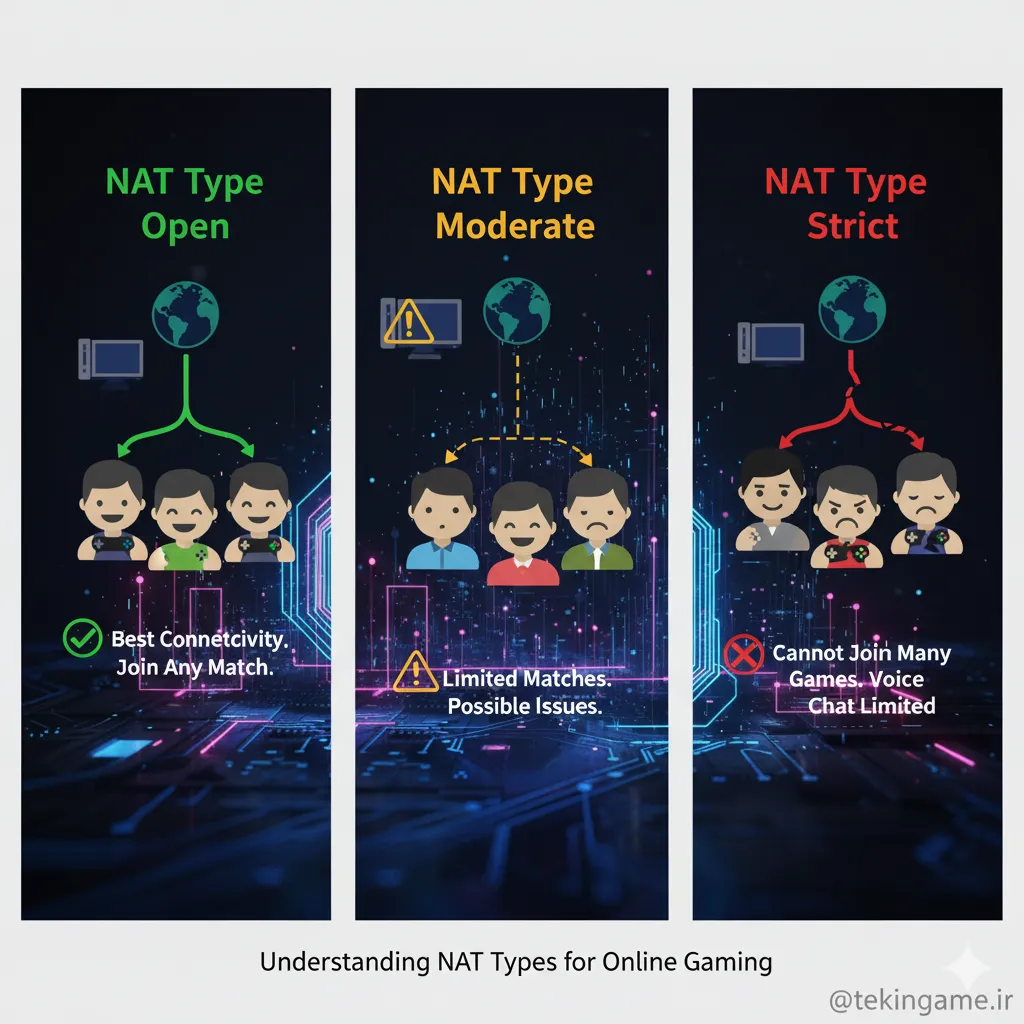
Your local network environment directly impacts crossplay stability and matchmaking queue times. Network Address Translation (NAT) types determine how easily your console or PC communicates with remote servers.
- NAT Type Open / Type 1 represents the ideal scenario for unrestricted connectivity and rapid matchmaking.
- NAT Type Moderate / Type 2 is acceptable but may occasionally restrict direct peer-to-peer connections.
- NAT Type Strict / Type 3 severely limits multiplayer functionality and often blocks cross-network sessions entirely.
Enabling UPnP on your router dynamically manages port allocation for incoming game traffic. If connection issues persist, manual Port Forwarding based on platform specifications becomes necessary.
Party Management and Privacy Protocols

Communicating across different hardware ecosystems requires utilizing in-game voice chat solutions. Discord integration on modern consoles simplifies cross-platform party audio significantly without third-party workarounds.
Review your account privacy settings to manage friend requests and incoming direct messages. Robust parental controls and text filters ensure a secure environment for younger participants.
Technical Specifications & Performance Breakdown
| Dimension | Status | Assessment |
|---|---|---|
| Engine Architecture | DirectX 12 / Vulkan Optimized | High-FPS stability across desktop and portable hardware |
| Spatial Audio | Multi-channel 3D Directional | Accurate positioning vital for tactical awareness |
| Player Capacity | Co-Op / Multi-Squad Ready | Optimized network replication and synchronization |
- Drastically shortens matchmaking queues across all active titles
- Unifies friend lists regardless of hardware platform
- Enhances overall player retention and community longevity
- Complex troubleshooting required for strict NAT environments
- Potential input balance debates between controllers and mouse-keyboard
- Varying implementation quality depending on the game engine
📚 Classified & Related Dossiers in TekinGame
If you wish to explore beyond this report and delve into cybernetic frontiers and autonomous AI architectures, do not miss these three exclusive deep-dives in the Tekin Garage:
Final Verdict & Authoritative Sources
Frequently Asked Questions
How do I check my NAT type on console?
On PlayStation 5, navigate to Settings, Network, and Connection Status. On Xbox, go to General, Network Settings, and look under Current Network Status to find your exact NAT classification.
Can I disable crossplay if I only want to match with same-platform users?
Yes, many titles include a dedicated toggle within the in-game privacy or gameplay settings menu, though doing so may significantly increase matchmaking wait times.
Why are cross-platform invites failing despite linked accounts?
This usually stems from strict NAT restrictions, outdated game versions, or privacy settings blocking external network communication. Verify that all party members run the latest patch.
Frequently Asked Questions
Is this release optimized for modern hardware?
Yes, built on modern scalable rendering pipelines with low hardware entry barriers.
Does it support full cross-platform cooperative play?
Yes, seamless squad matchmaking is fully supported.