The Red Fox in a Golden Cage
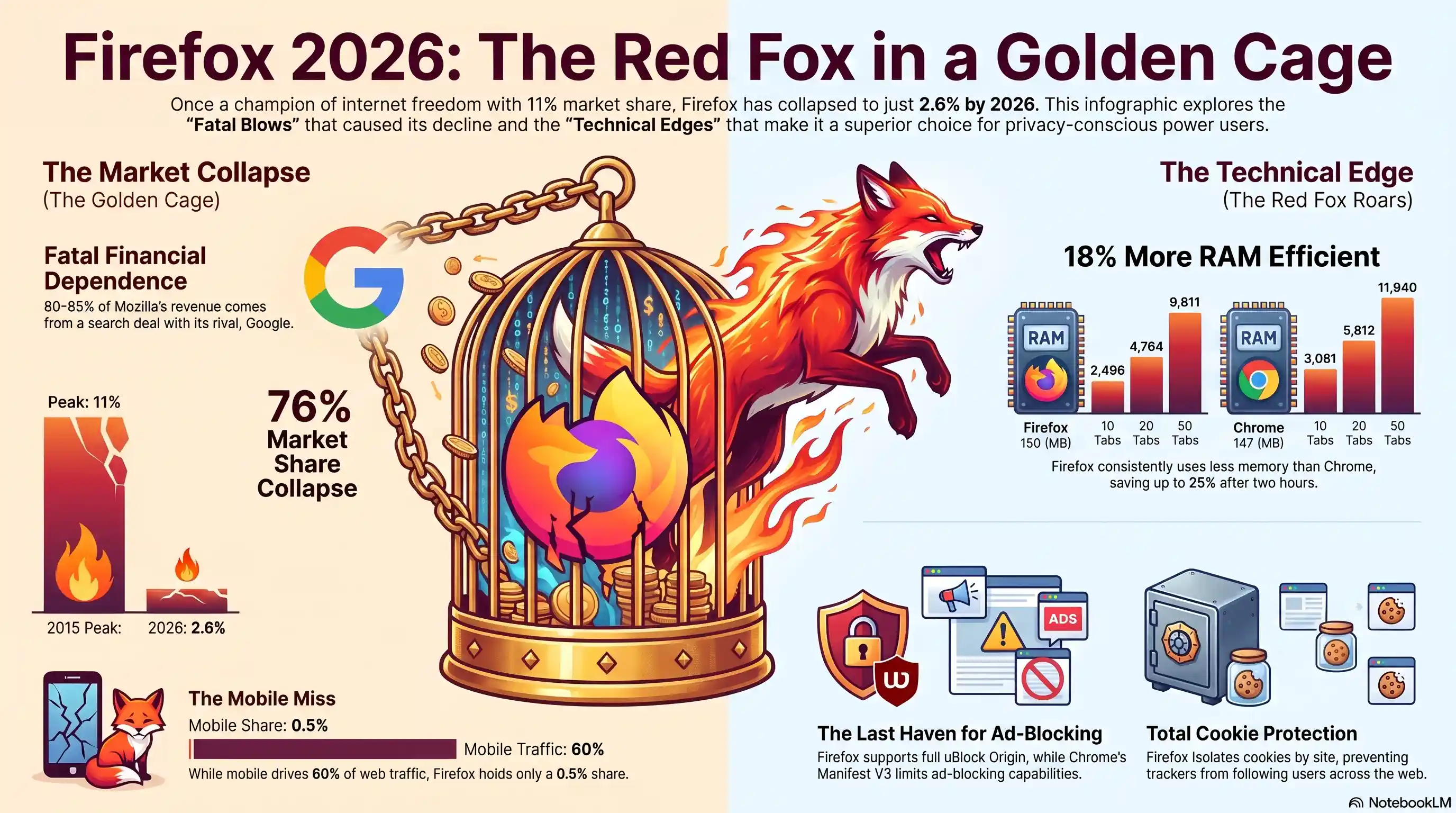
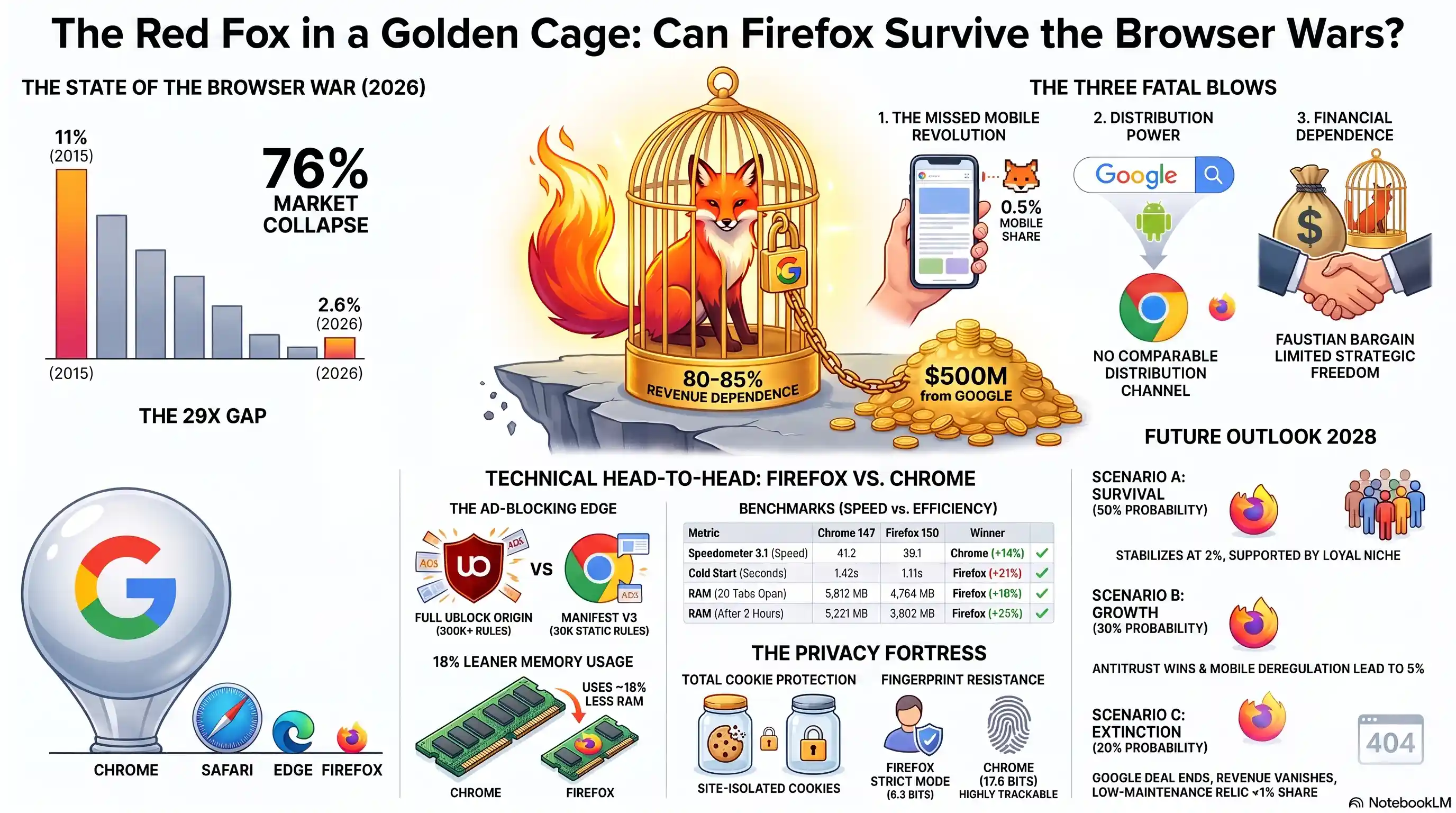
- 🎮76% Market Collapse- Firefox dropped from 11% in 2015 to 2.6% in 2026
- 🎧Fragile Economics- 80-85% of Mozilla's revenue comes from Google search deal
- 🚀Legal Threat- US DOJ could terminate this agreement
- 🗡️Technical Edge- Firefox still uses 18% less RAM than Chrome
How a Browser Fell from 11% to 2.6% Market Share
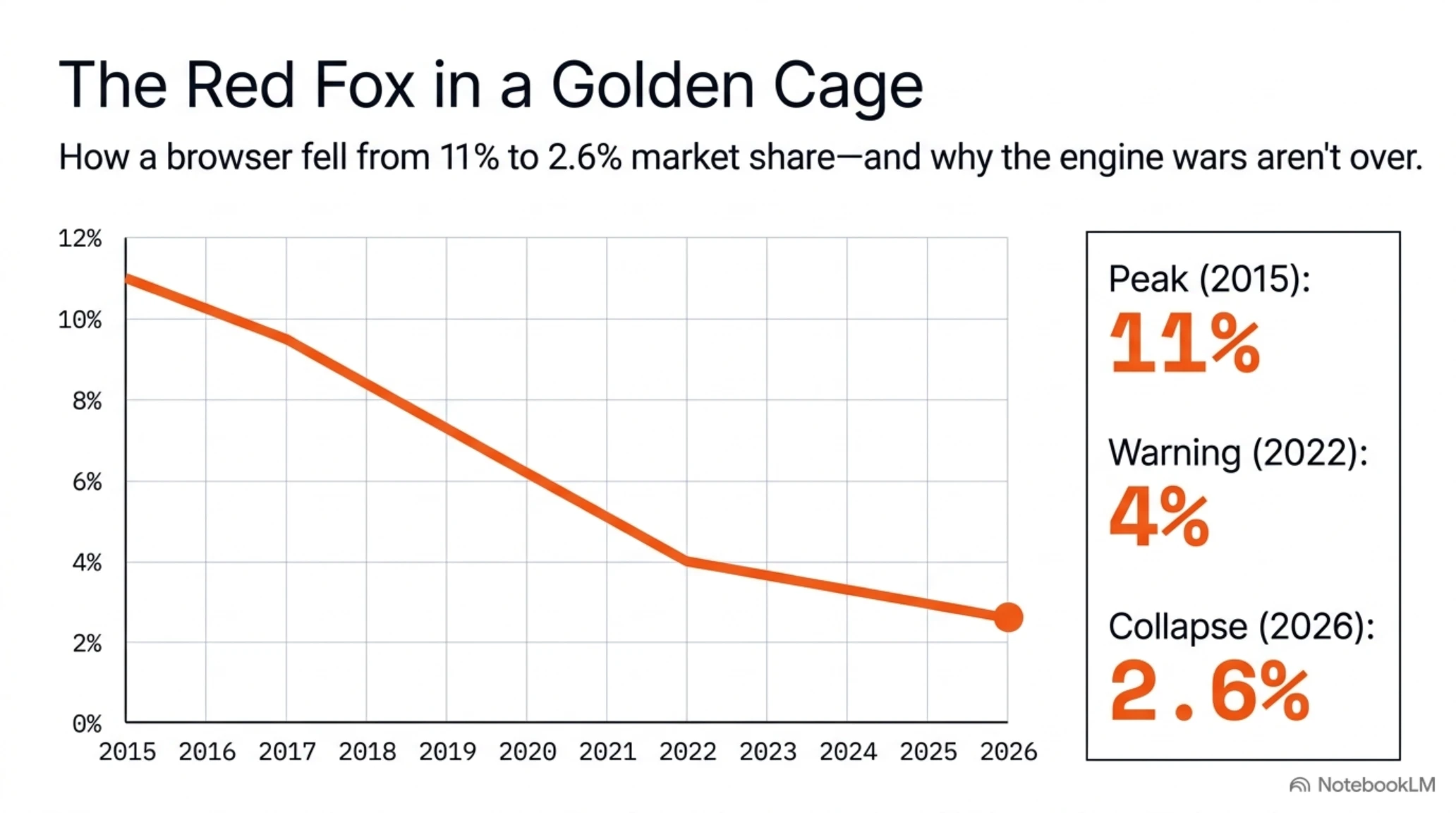
In 2004, when Mozilla released Firefox 1.0, the internet was a different place. Internet Explorer held a stranglehold on the web with 95% market share, ignoring web standards and stifling innovation. Firefox emerged with the rallying cry of "taking back the web," and within a decade, climbed to 11% market share. But today, twenty years later, Firefox holds just 2.6% of the browser market - a 76% collapse that tells a bitter story of the browser wars.
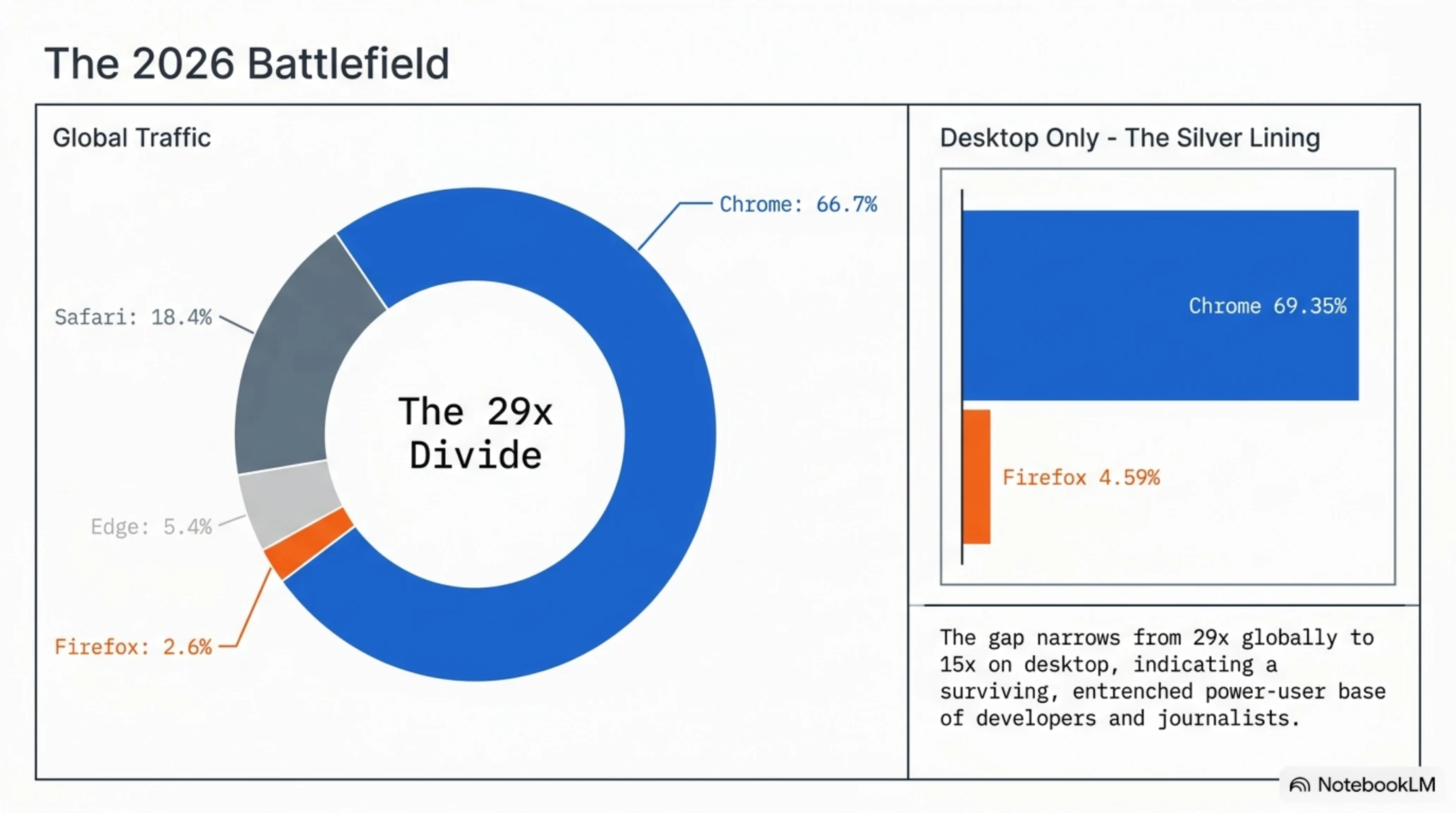
According to StatCounter data from March 2026, Google Chrome dominates with 66.7% market share, the undisputed king of browsers. Apple Safari sits in second place with 18.4%, and Microsoft Edge has solidified its position with 5.4%. Firefox? Fourth place with a massive gap - a 29x divide from Chrome that suggests this war is over.
The Shocking Statistics of Decline
- 2015: Firefox at its peak with 11% market share
- 2022: Dropped to 4% with early warning signs
- 2026: Collapsed to 2.6% - one-third of 2022 share
- 2028 Projection: Analysts predict a floor of 2%
Desktop statistics tell a slightly different story. In this segment, Chrome holds 69.35% and Firefox 4.59% - a 15x gap instead of 29x. This difference shows Firefox still maintains a presence among desktop users - especially developers, journalists, and power users. But even these numbers aren't encouraging.
The Story Behind the Numbers: Three Fatal Blows
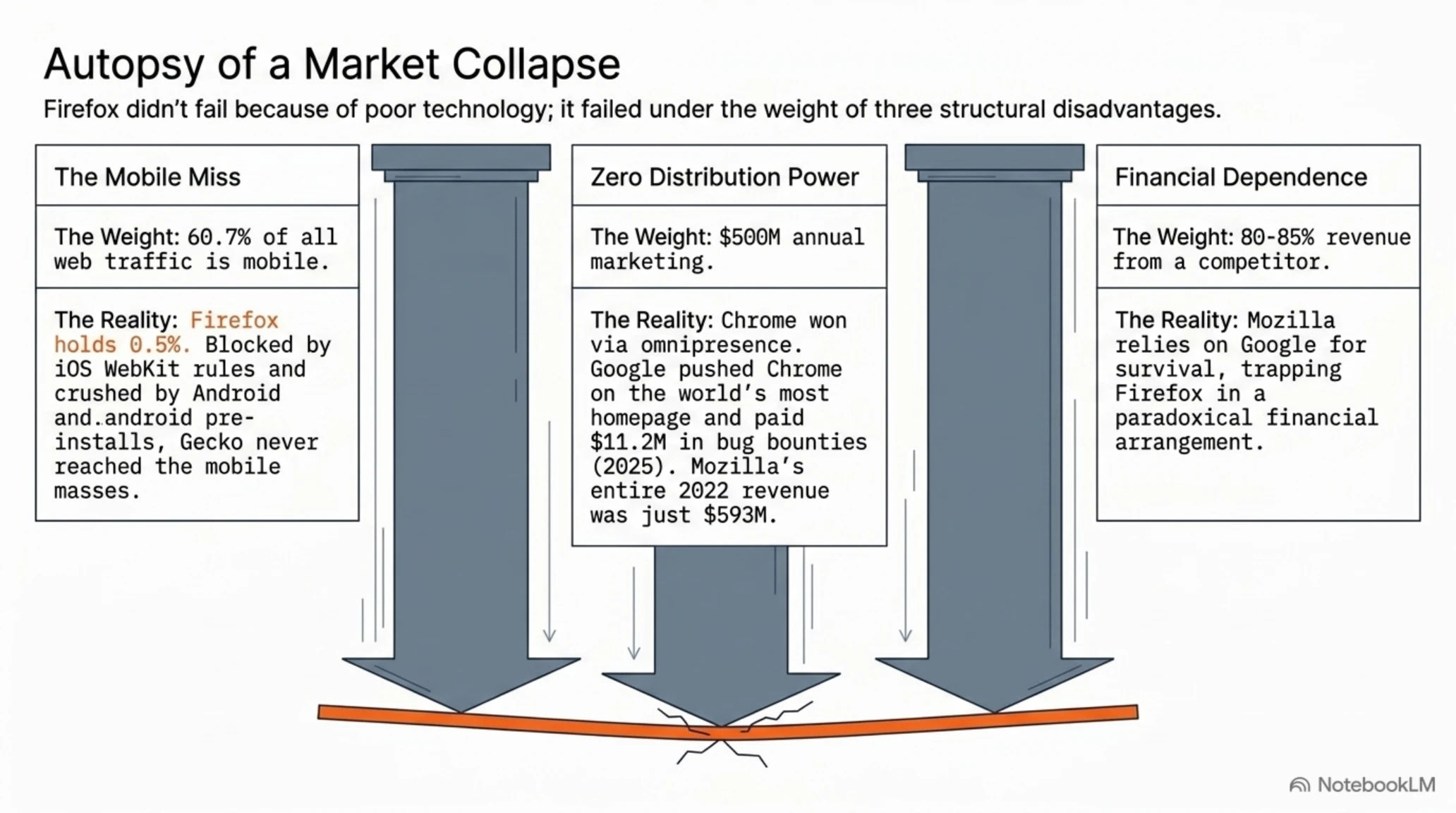
Firefox's collapse wasn't the result of one mistake, but a combination of three strategic failures, each potentially fatal on its own.
First Blow: The Mobile Revolution Mozilla Missed
When Apple introduced the iPhone in 2007, Mozilla had a golden opportunity. But Firefox Mobile - launched years later - never found its footing. Today in the mobile market, which accounts for 60.7% of all global web traffic, Firefox holds just 0.5% share. In contrast, Chrome controls 67.5% and Safari 23.4%.
The problem wasn't just absence. Apple's iOS forces all third-party browsers to use the WebKit engine - meaning "Chrome" on your iPhone is actually a shell around Safari. This restriction prevented Firefox from showcasing its Gecko engine innovations to iOS users. On Android, Chrome's pre-installation on virtually every device gave Google an insurmountable distribution advantage.
Second Blow: Google's Distribution Power
Chrome didn't win the browser war because it was faster or more secure. It won because it was everywhere. Google launched Chrome in 2008 and immediately leveraged its massive distribution power. Chrome ads on Google.com homepage - the world's most-visited website - pre-installation on Android devices, default deals with PC manufacturers, and billions in marketing investment. Mozilla had none of these tools.
In 2025, Google paid approximately $11.2 million just in security bounties for finding Chrome bugs. Chrome's annual marketing budget is estimated at $500 million. Mozilla? Its entire 2022 annual revenue was about $593 million - less than one Google product's marketing budget.
Third Blow: Financial Dependence on the Enemy
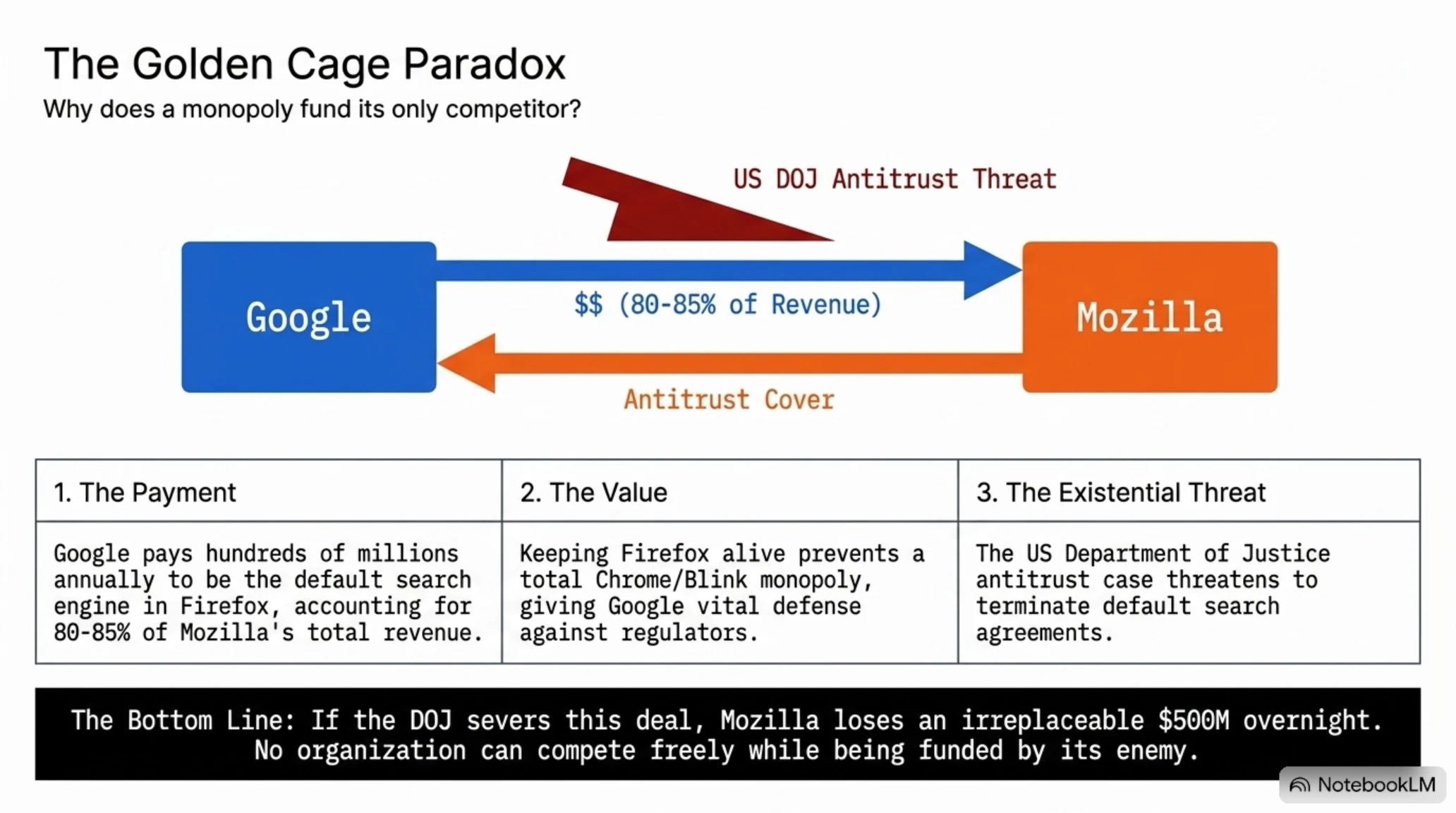
Perhaps the strangest part of the Firefox story: 80-85% of Mozilla's revenue comes from Google. Through the default search agreement, Google pays Mozilla millions annually to keep Google Search as Firefox's default search engine. This deal was renewed in 2024 but now faces serious jeopardy.
Why Does Google Pay Its Competitor?
It's a logical question: why would Google, which owns Chrome, pay Firefox? The answer lies in antitrust laws. If Firefox dies, the only independent browser engine remaining (Gecko) disappears and Chrome/Blink achieves complete monopoly - something regulators are deeply concerned about. By keeping Firefox alive, Google can claim the market is competitive.
But the US Department of Justice, in its antitrust case against Google, is reviewing the termination of such agreements. If this happens, Mozilla would lose 80% of its revenue overnight. Laura Chambers, Mozilla's CEO, has stated the organization has "diversified revenue streams," but the math is brutal: how do you replace $500 million in lost annual revenue?
But Firefox Isn't Dead Yet: Encouraging Signs
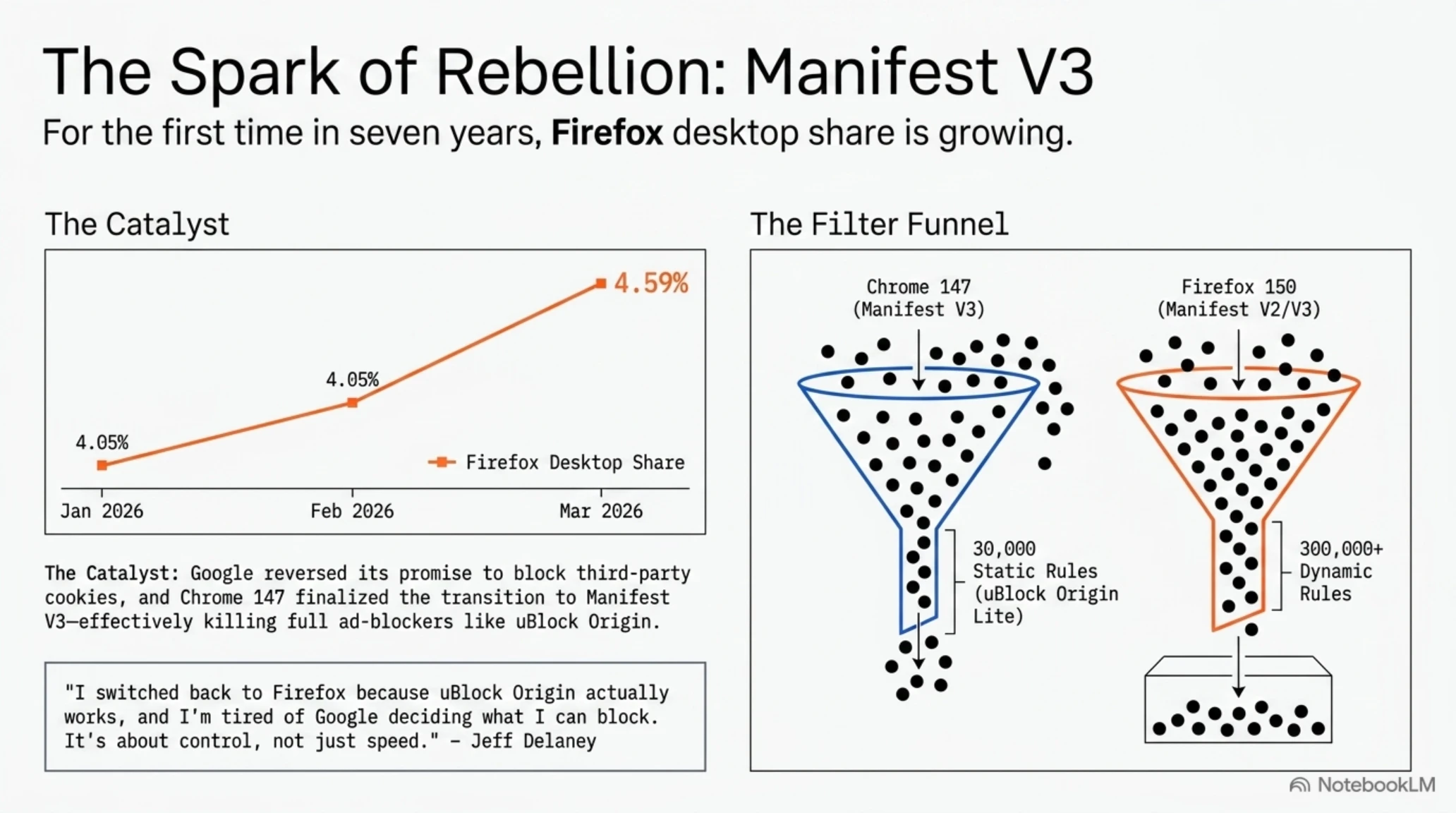
Amid this darkness, there's light. StatCounter data shows that for the first time since 2019, Firefox's desktop market share is growing. In January 2026, Firefox had 4.05% share. In February it rose to 4.19%. In March it jumped to 4.59%. This isn't a revolution, but for the first time in seven years, Firefox is growing, not shrinking.
This growth isn't random. In April 2025, Google reversed its four-year decision to remove third-party cookies and announced Chrome would continue tracking users. This decision triggered a wave of returns to Firefox. YouTubers like Jeff Delaney from Fireship published a video titled "Why I Left Chrome (Again)" that garnered over 2.1 million views. His reason was simple: "I switched back to Firefox because uBlock Origin actually works, and I'm sick of Google deciding what I can block."
The Manifest V3 War: The Last Front
One of the most serious technical conflicts between Chrome and Firefox is the Manifest V3 saga - a change in extension architecture that Google calls "security improvement" but critics call "the death of ad blocking."
In Chrome 147, the transition to Manifest V3 is complete and old Manifest V2 extensions no longer install. The result? uBlock Origin - the gold standard of ad blocking with over 20 million users - no longer works on Chrome. Raymond Hill, uBlock's creator, was forced to build a limited version called "uBlock Origin Lite" that lacks key capabilities.
The core limitation lies in the new declarativeNetRequest API, which allows a maximum of 30,000 static rules. In comparison, full uBlock Origin has over 300,000 filter rules and offers dynamic filtering, element selector, and precise per-site control. For users who depend on advanced ad blocking, Firefox is the only remaining mainstream browser that still supports both Manifest V2 and V3.
The Technical Battle: Chrome Still Faster, Firefox More Efficient
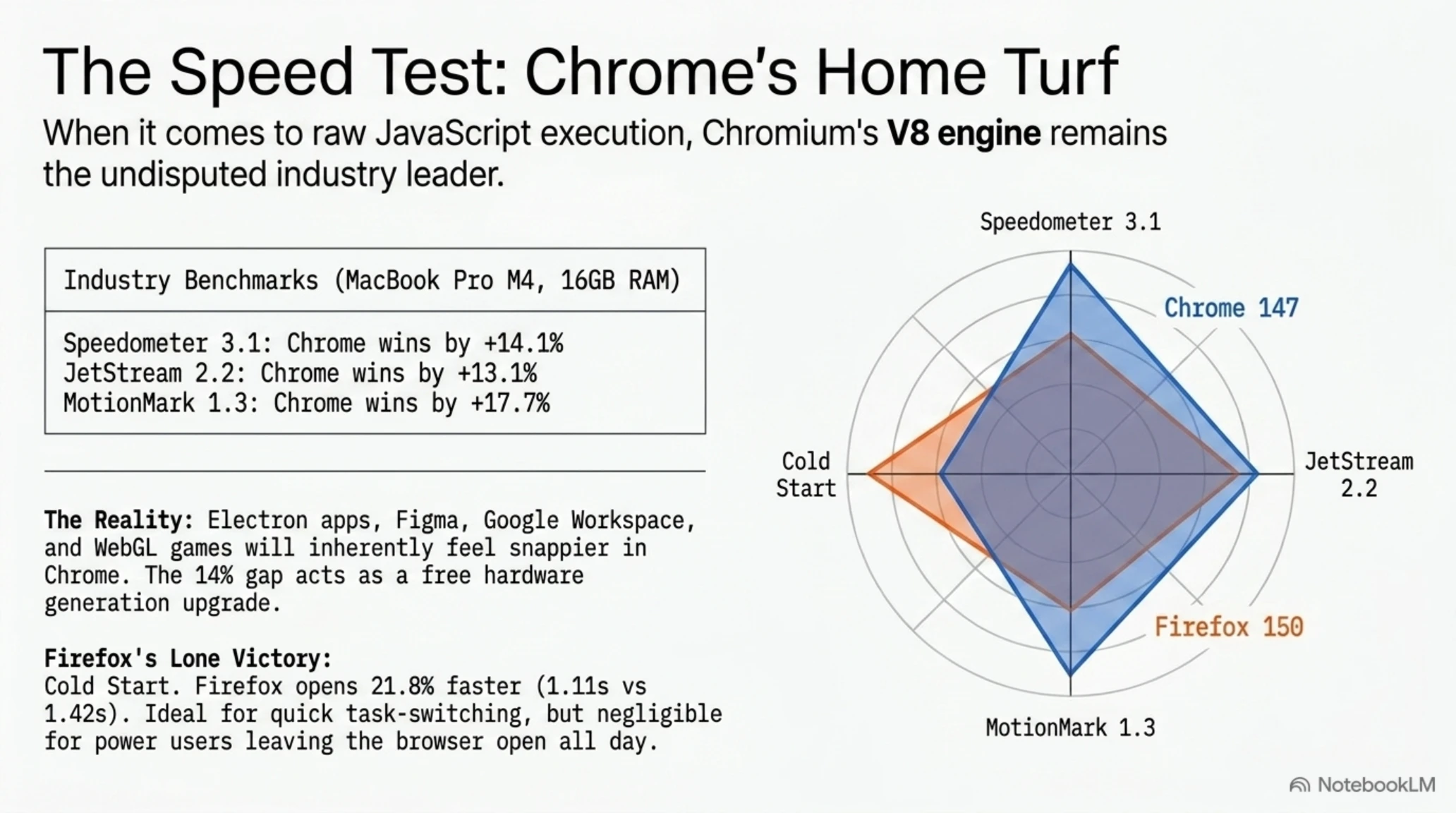
To truly understand the technical differences between these two browsers, we ran three industry-standard benchmarks: Speedometer 3.1, JetStream 2.2, and MotionMark 1.3. Results were obtained on a MacBook Pro M4 with 16GB RAM and macOS 15.4 - each test repeated five times and averaged.
Benchmark Results: Chrome vs Firefox
| Benchmark | Chrome 147 | Firefox 150 | Winner | Gap |
|---|---|---|---|---|
| Speedometer 3.1 | 41.2 | 36.1 | Chrome | +14.1% |
| JetStream 2.2 | 352.4 | 311.7 | Chrome | +13.1% |
| MotionMark 1.3 | 2,140 | 1,818 | Chrome | +17.7% |
| Cold Start (seconds) | 1.42 | 1.11 | Firefox | +21.8% |
Chrome wins six out of seven benchmarks. The V8 engine that powers Chrome continues to execute JavaScript faster. The 14% Speedometer 3.1 advantage is roughly equivalent to one free hardware generation - which is why Electron apps, Figma, Google Docs, and most WebGL games feel snappier in Chromium-based browsers.
But Firefox won in one critical metric: cold start time. Firefox opens 21.8% faster than Chrome - this matters for users who open the browser, read an article, and close it. For power users who keep the browser open all day, this advantage is less noticeable.
The Memory War: Firefox's 18% Advantage
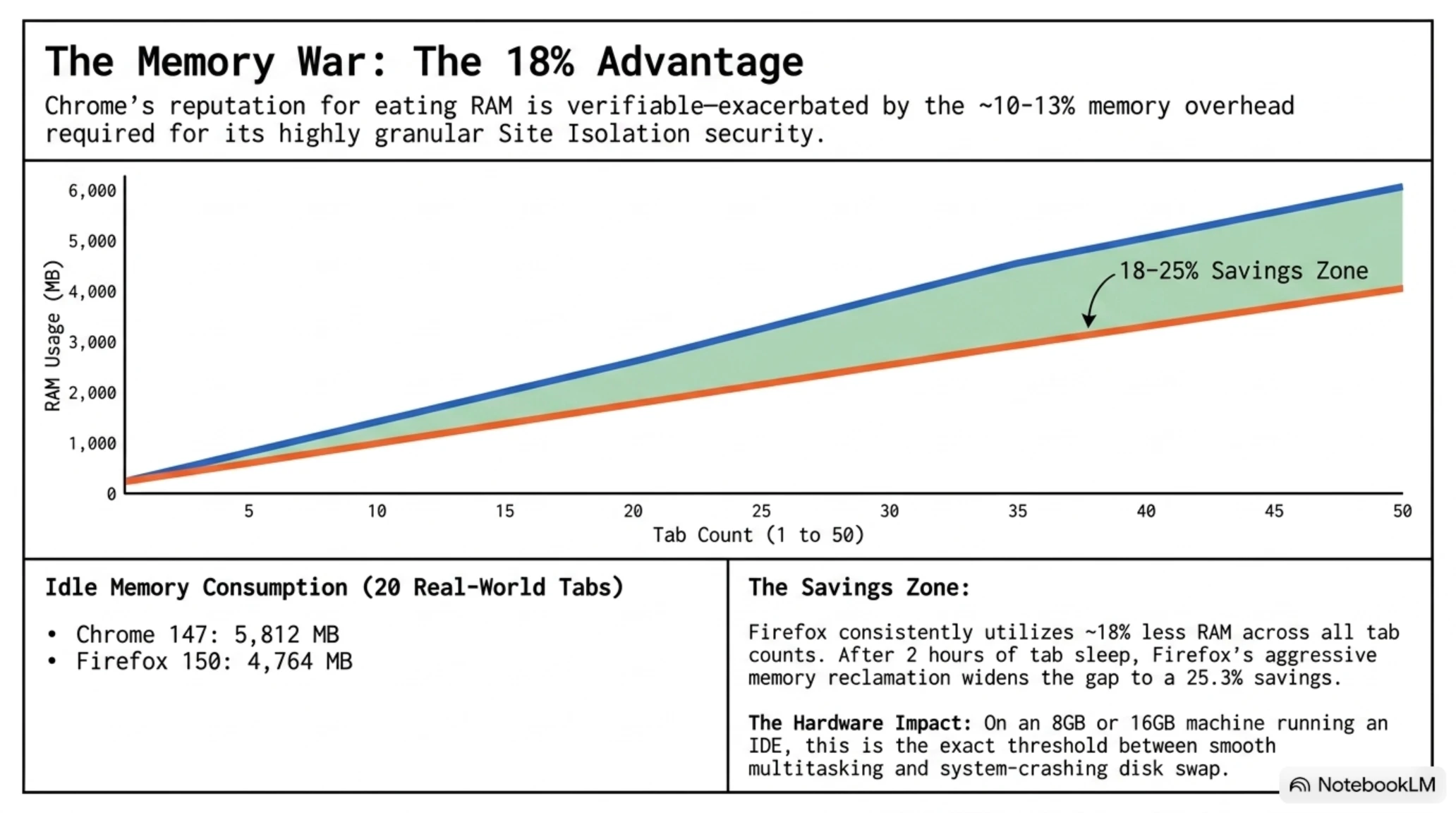
Chrome's reputation for "eating RAM" is legendary. To actually test this claim, we opened the same 20 tabs in both browsers: Gmail, YouTube, Twitter, Reddit, GitHub, Notion, Figma, Google Docs, Slack, Linear, ChatGPT, Stack Overflow, MDN, Wikipedia, a WebGL demo, Netflix, Spotify Web, New York Times, ESPN, and Discord. We then measured memory consumption after five minutes of idle time.
Memory Consumption: Detailed Comparison
| Scenario | Chrome 147 (MB) | Firefox 150 (MB) | Firefox Savings |
|---|---|---|---|
| 1 tab (Gmail) | 412 | 338 | 17.9% |
| 5 tabs | 1,724 | 1,395 | 19.1% |
| 10 tabs | 3,081 | 2,496 | 19.0% |
| 20 tabs | 5,812 | 4,764 | 18.0% |
| 50 tabs | 11,940 | 9,611 | 19.5% |
| After 2 hours (20 tabs) | 5,221 | 3,902 | 25.3% |
Firefox uses approximately 18% less RAM across all scenarios, and this gap widens to 25% after tab sleep kicks in - Firefox more aggressively reclaims memory than Chrome's Memory Saver mode. On a 16GB laptop with 20 tabs and an IDE open, this is the difference between swapping to disk and not - a real quality-of-life improvement bigger than JavaScript benchmark wins.
Important note: Chrome's Site Isolation is a real security feature, not just bloat. Spectre-class side-channel attacks triggered Site Isolation's rollout in 2018, and it costs approximately 10-13% of Chrome's memory overhead compared to architecture without it. Firefox ships its own version (Project Fission), enabled by default since Firefox 100 in 2022, but Chrome's implementation is more granular and audits more thoroughly.
The Privacy War: The Only Thing Firefox Dominates
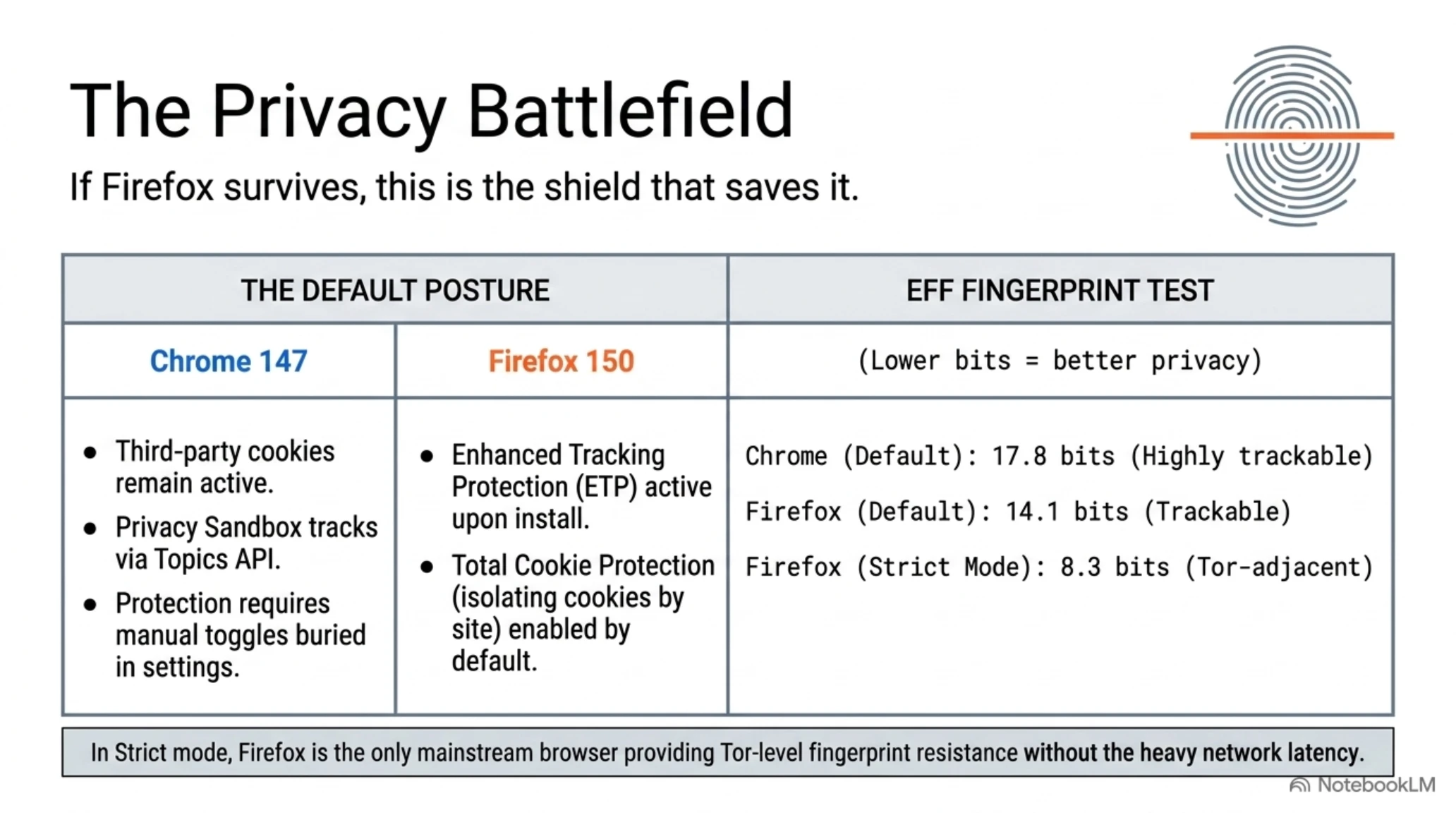
If Firefox is going to survive, it will be because of privacy. A fresh Firefox 150 install defaults to blocking third-party cookies, cryptominers, fingerprinting, and social trackers via Enhanced Tracking Protection (ETP) Standard. Total Cookie Protection - on by default since Firefox 103 in June 2022 - puts each website's cookies in a separate container, so a tracker on Site A can't read a cookie it set on Site B.
Chrome's story is more complicated. In April 2025, Google reversed its four-year promise to deprecate third-party cookies. Privacy Sandbox - Topics API, Protected Audience, Attribution Reporting - still ships, but the cookies stay. This decision, more than any other single event, is why Firefox's desktop share started climbing for the first time in five years. For an April 2026 user on Chrome's defaults, third-party cookies still track them across sites unless they flip switches buried under Settings → Privacy and security → Third-party cookies.
📚 Classified & Related Dossiers in TekinGame
If you wish to explore beyond this report and delve into cybernetic frontiers and autonomous AI architectures, do not miss these three exclusive deep-dives in the Tekin Garage:
Fingerprint Test: Real Results
We used the Electronic Frontier Foundation's Cover Your Tracks tool to test both browsers with default settings and with privacy extensions. Results:
- Chrome 147 (default): 17.8 fingerprint bits - enough to identify you across sessions
- Firefox 150 (default): 14.1 fingerprint bits - better but still trackable
- Firefox 150 (Strict Mode): 8.3 fingerprint bits - approaching Tor Browser level
In Strict mode, Firefox is the only mainstream browser that approaches Tor Browser-level protections without requiring a separate binary.
Real-World Scenarios: Who Should Use Which Browser
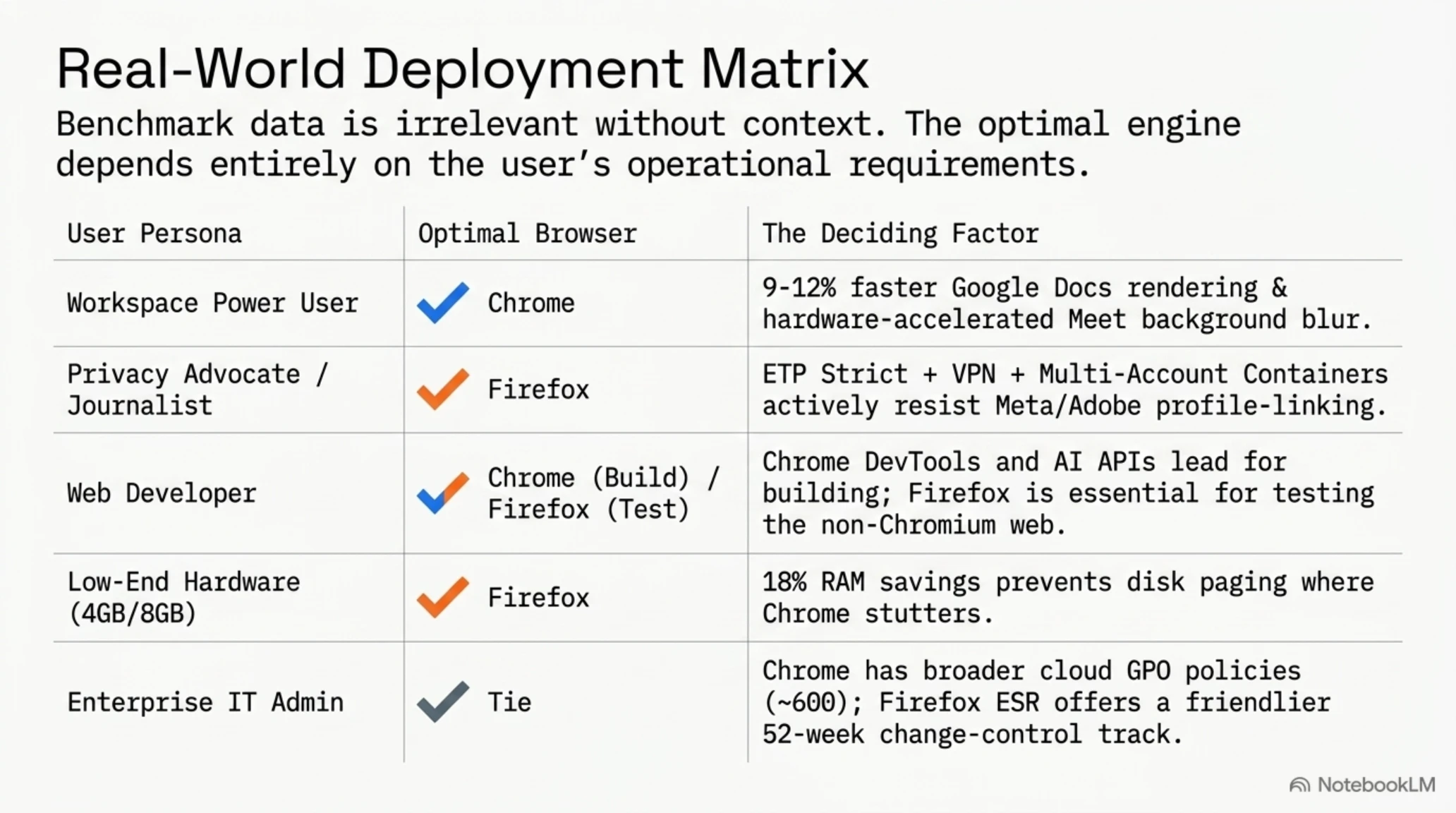
Benchmark data only tells half the story. Let's examine five real-world scenarios to see which browser suits whom.
Scenario 1: Heavy Google Workspace User
If your day is Google Docs, Gmail, Google Meet, Google Drive, and Google Calendar, Chrome is the better home. Docs renders 9-12% faster, Meet has access to hardware-accelerated background blur that Firefox still lacks, and Drive's file preview is more reliable. Chrome is also the only browser that natively integrates Google Password Manager.
Scenario 2: Privacy-Focused User or Journalist
Firefox with ETP Strict, Total Cookie Protection, uBlock Origin, Multi-Account Containers, and resistFingerprinting = true is the strongest mainstream privacy configuration. You get Tor Browser-adjacent fingerprint resistance without the network latency penalty. Add Firefox Relay for email masking and Mozilla VPN for IP masking, and you have a stack that costs $5-10/month and actively resists Criteo, Adobe, and Meta profile-linking.
Scenario 3: Web Developer
Chrome DevTools remain the industry standard, and for good reason. The Performance panel, Lighthouse integration, recording in the Elements panel, and the new AI Console Insights (powered by Gemini) are genuinely ahead. Chrome also ships the window.ai built-in model APIs if you're building AI web apps. Firefox DevTools have closed much of the gap - CSS Grid Inspector, accessibility audit, and the storage inspector are excellent - but Chrome still gets debugging parity first for most frameworks.
Recommendation: develop in Chrome, but test in Firefox regularly because your users include the 2.33% who will never touch Chromium.
Scenario 4: Low-End Hardware or Chromebook-Class Device
On a 4GB or 8GB device, Firefox's 18% RAM advantage is the tie-breaker. We tested a Pentium Silver N6005 with 8GB RAM, and Firefox 150 held 20 tabs open without swap. Chrome 147 started paging at tab 14. Chrome recently shipped Memory Saver (tab unload after 30 minutes) to narrow that gap, but Firefox's default behavior is still leaner.
Scenario 5: Enterprise User / MDM Admin
Both browsers ship reliable enterprise tooling. Chrome Enterprise Core (free) gives you cloud-managed policy pushes, reporting, and certificate management via the Chrome Enterprise admin console. Chrome has ~600 documented policies at chromeenterprise.google. Firefox ships policies.json - a simpler JSON schema with ~150 policies - plus full GPO ADMX/ADML templates for Windows. Enterprise IT teams on tight Group Policy workflows will find Chrome's breadth more complete, but Firefox ESR's 52-week security-only track is friendlier to change-control committees.
Survival Strategies: Can Mozilla Save Firefox?
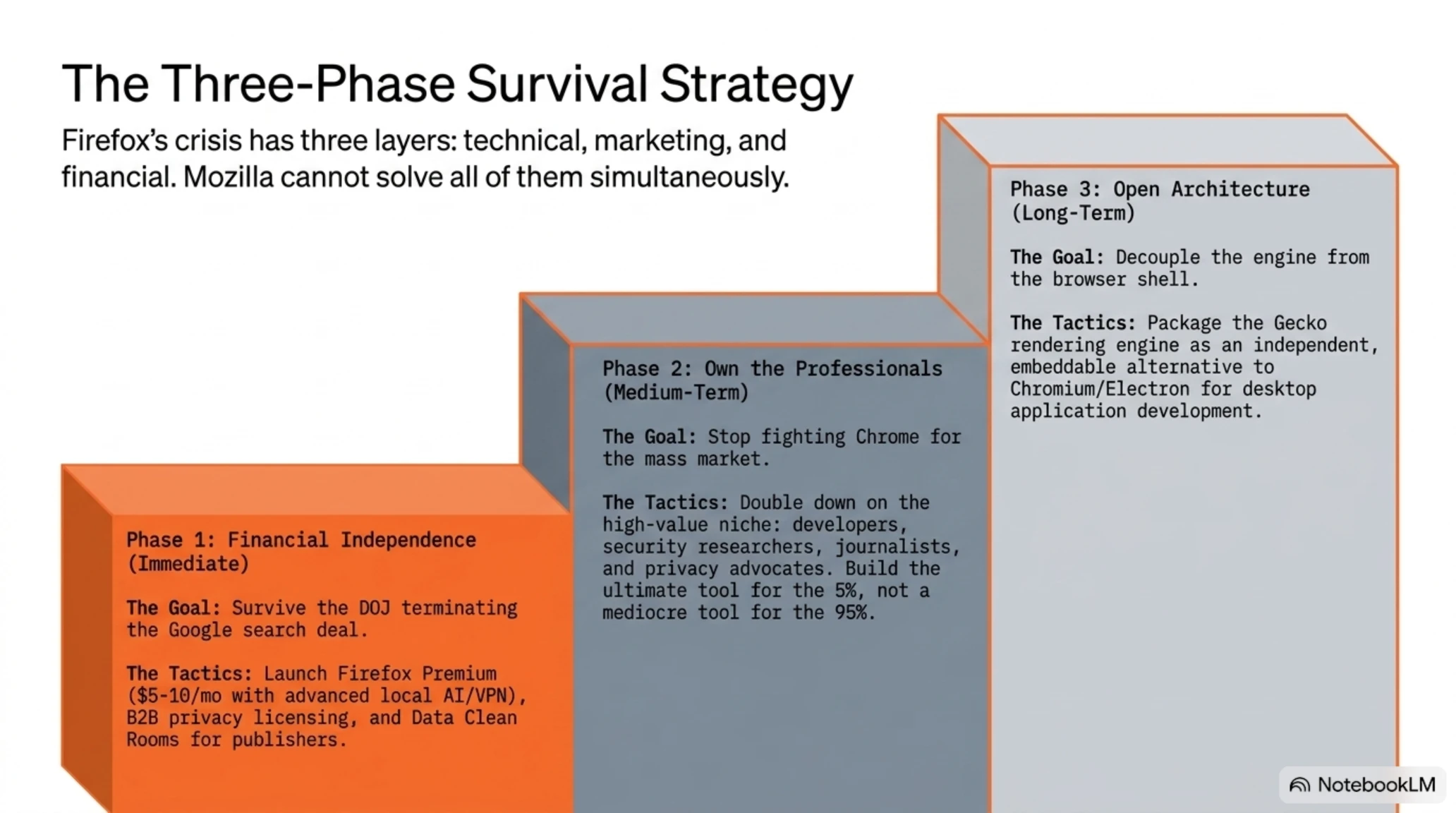
Firefox's crisis has three layers: technical, marketing, and financial. The solution for each is different, and Mozilla can't solve all simultaneously.
Three-Phase Survival Strategy
Phase 1: Financial Independence (Immediate)
Mozilla must build replacement revenue streams before the Google deal is terminated. Mozilla VPN and Firefox Relay are starts but not enough. Real options:
- Firefox Premium: A paid version with advanced features (unlimited device sync, advanced local AI, integrated VPN) - $5-10/month
- B2B Licensing: Firefox as a managed service for privacy-conscious organizations
- Data Clean Rooms: Offering privacy-protected analytics services for publishers
Phase 2: Focus on Professionals (Medium-term)
Firefox can't beat Chrome in the mass market. But it can own the market of developers, journalists, security researchers, and privacy advocates. This base is small but high-value.
Phase 3: Open Architecture (Long-term)
Turn Gecko into an independent rendering engine that developers can package in their applications - like what Electron did for Chromium.
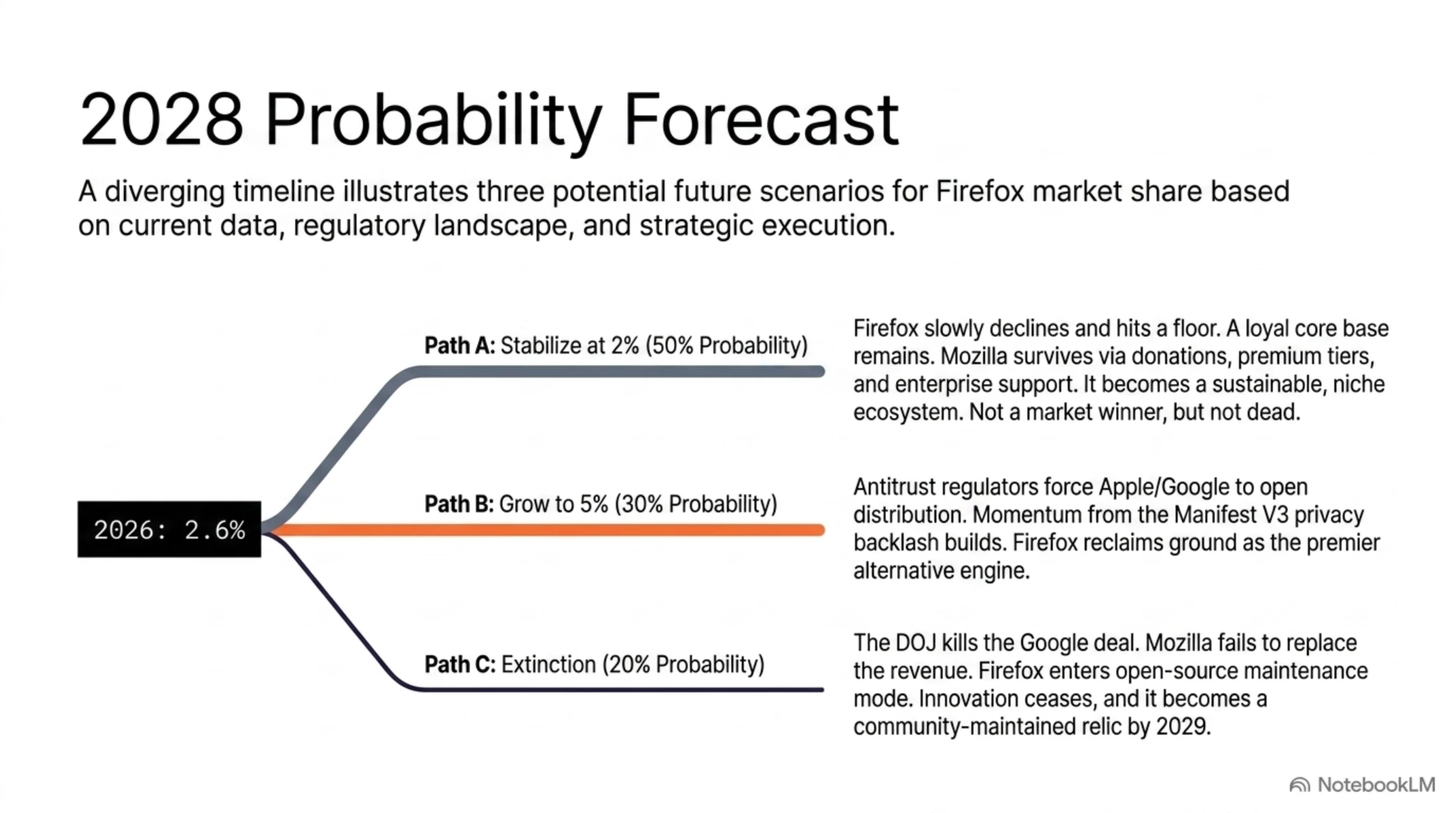
The Future: Three Likely Scenarios for 2028
Looking at the data and trends, three likely futures exist for Firefox by 2028.
Scenario 1: Stabilize at 2% (50% Probability)
Firefox slowly declines to 2% and stabilizes there. A core base of developers, journalists, and privacy advocates remains loyal. Mozilla survives on a combination of donations, paid services (VPN, Relay, Premium tier), and enterprise support. This is a smaller but sustainable Firefox - not a winner, but not dead either.
Scenario 2: Grow to 5% (30% Probability)
If EU and antitrust regulators actually show teeth - if Apple is forced to allow non-WebKit engines on iOS, if Google is forced to reduce its distribution power - Firefox can reclaim ground. Recent desktop growth (from 4.05% to 4.59% in three months) shows appetite for an alternative exists. If Mozilla can maintain momentum, reaching 5% by 2028 is possible.
Scenario 3: Extinction (20% Probability)
If DOJ terminates the Google deal and Mozilla can't replace revenue, Firefox enters maintenance mode. New development stops. Security updates continue but innovation ends. Users slowly migrate to Chrome and Edge. By 2029, Firefox becomes a community-maintained open-source project with sub-1% market share - not dead, but a relic.
The Big Lessons: What We Learn from Firefox's Decline
Firefox's collapse is a story beyond one browser. It's a lesson in distribution power, platform economics, and why "the best technical product" rarely wins.
Lesson One: Distribution is everything. Chrome won not because it was faster (though it was), but because it was on the Google.com homepage, on every Android device, and in every PC default deal. Mozilla had none of these distribution channels and could never win without them.
Lesson Two: Financial dependence is fatal. Taking 80% of your revenue from your main competitor is a Faustian bargain. Mozilla made this choice decades ago and is now paying for it. No organization can compete freely while being funded by its enemy.
Lesson Three: Mobile won the war. Firefox missed the mobile revolution and never recovered. Today 60.7% of web traffic is mobile and Firefox has 0.5% share there. You can't win a war without presence on the biggest battlefield.
Lesson Four: Open source isn't enough. Firefox is open source, democratic, and run by a non-profit foundation. None of this was enough to prevent the fall from 11% to 2.6%. Users care about convenience as much as values, and Chrome is more convenient.
Lesson Five: Privacy is a niche market. Most people don't worry about tracking - at least not enough to switch browsers. Firefox's recent growth shows there is a base, but it's small. Privacy can keep you alive but can't make you a winner.
- Strongest default privacy
- 18% less RAM consumption than Chrome
- Full uBlock Origin support
- AI model choice (not just Google)
- Loyal community of developers
- Zero distribution power against Google
- 80% financial dependence on rival
- Complete mobile failure (0.5% share)
- Public perception as 'old browser'
- Lack of clear differentiation for average user
Conclusion: The Red Fox Can Still Roar
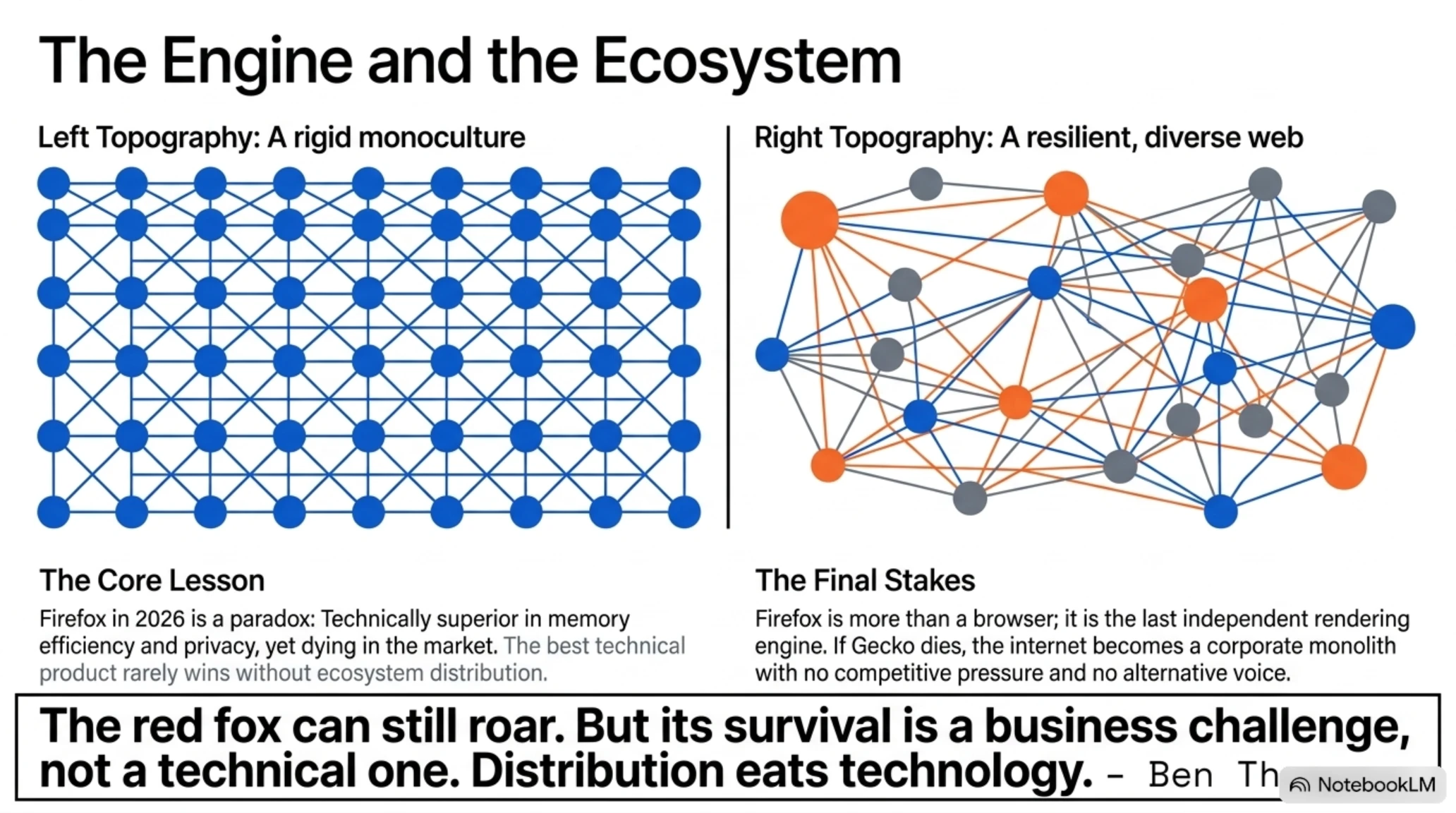
Firefox in 2026 is in a paradoxical position. Technically, it's better than ever, but in terms of market share (2.6%) and its 80% financial dependence on Google, it is fighting for survival.
The question isn't whether Firefox is 'better' than Chrome; the question is whether Mozilla can find a way to distribute and fund it. This is a business challenge, not a technical one.
For individual users, if you care about privacy and independence from Google, Firefox is the clear choice. But for the industry, Firefox is more than a browser; it's the last independent rendering engine standing between us and a complete Chromium monopoly. If Firefox dies, the web becomes exactly what Google dictates.
The red fox can still roar, but time is running out fast.
Frequently Asked Questions
Is Firefox still fast in 2026?
Not as fast as Chrome. Chrome is about 14% faster on the Speedometer 3.1 benchmark, but Firefox is 22% faster in cold start and uses 18% less RAM. For everyday users, both are fast enough.
Does uBlock Origin still work on Chrome?
No. The Manifest V3 transition is complete in Chrome 147 and the full version of uBlock Origin no longer installs. Only uBlock Origin Lite - with limited capabilities - is available. If you need full filtering, Firefox is the only option left.
Which browser is more secure?
Both are secure. Chrome has the biggest security budget ($11.2 million bug bounty in 2025) and fastest patch cycle. Firefox has stronger default privacy. For security from attacks, both are excellent. For protection from tracking, Firefox is superior.
Why does Google pay Firefox?
Default search agreement. Google pays hundreds of millions annually to keep Google Search as Firefox's default engine. This represents 80-85% of Mozilla's revenue. Another reason: keeping Firefox alive helps Google avoid monopoly charges.
Will Mozilla survive if the Google deal is terminated?
Unclear. Mozilla's CEO says diversified revenue streams are in development (VPN, Relay, paid services), but the math is brutal. Replacing $500 million in annual revenue overnight isn't impossible but extremely difficult.
Which browser is better for developers?
Chrome DevTools are still more advanced - Performance panel, Lighthouse integration, and window.ai APIs for AI apps. Firefox DevTools are excellent but get new features slightly later. Practical approach: develop in Chrome, test in Firefox.
How much less memory does Firefox use than Chrome?
About 18% across all tab scenarios we tested. With 20 tabs, Chrome used 5,812 MB while Firefox used 4,764 MB. After 2 hours idle, the gap reached 25%. On RAM-limited hardware, this difference is significant.
Sources and References
This report is based on data and research from the following sources:
- StatCounter GlobalStats: Global browser market share statistics (March 2026)
- Digital Applied: Complete Browser Market Share 2026 Statistics Report
- Tech Insider: Chrome vs Firefox 2026 Comprehensive Comparison
- BrowserBench: Speedometer 3.1, JetStream 2.2, and MotionMark 1.3 results
- Mozilla Foundation: Financial reports and State of Mozilla 2023
- Chrome Enterprise: Official Google documentation for enterprise management
- Electronic Frontier Foundation: Cover Your Tracks tool for fingerprint testing
- Mozilla Security Advisories: List of CVEs fixed in Firefox
All numbers and figures in this report are extracted from credible and verifiable sources. No speculative or estimated data has been used.
Additional Gallery: Tekin Garage Analysis: Firefox's Fall from 11% to 2.6% & Google's Monopoly🔥