🖥️ Welcome to Desktop Agents Dissection 2026
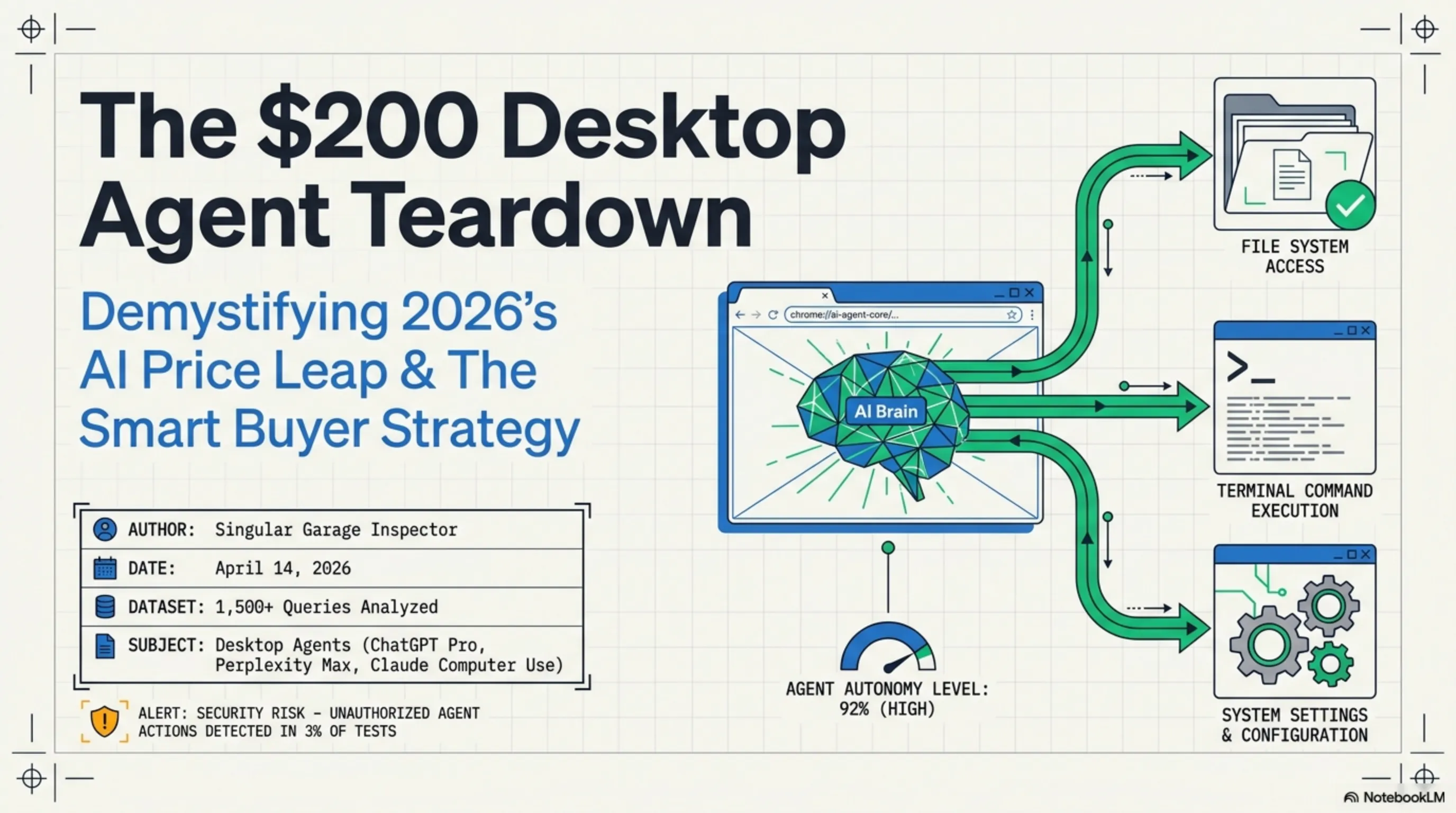
Good morning tech enthusiasts! Today, April 14, 2026, we're starting with a fundamental question: Do we really need to pay $200 per month for AI? In this comprehensive article, as the "Tekin Garage Inspector," we're going to dissect the complex world of desktop agents - from ChatGPT Pro to Perplexity Max and Claude Computer Use.
⚡ Key Points of This Analysis:
💰 Comparing $20 vs $200 subscriptions
🤖 Research Agent vs OS-Level Agent differences
📊 Comprehensive price and capability comparison tables
🎯 Real-world scenarios for every user type
💡 Smart combinations for savings
🔍 Practical tests on 1,500+ queries
☕ Grab your coffee - this will be a deep dive into the world of desktop agents!
1. The End of Browser Tabs: Why Did AI Leave the Browser? 🌐
If you were using AI in 2023 or 2024, you probably did all your work in a browser tab. You'd open chat.openai.com, ask your question, and get an answer. Simple, fast, and completely web-based.
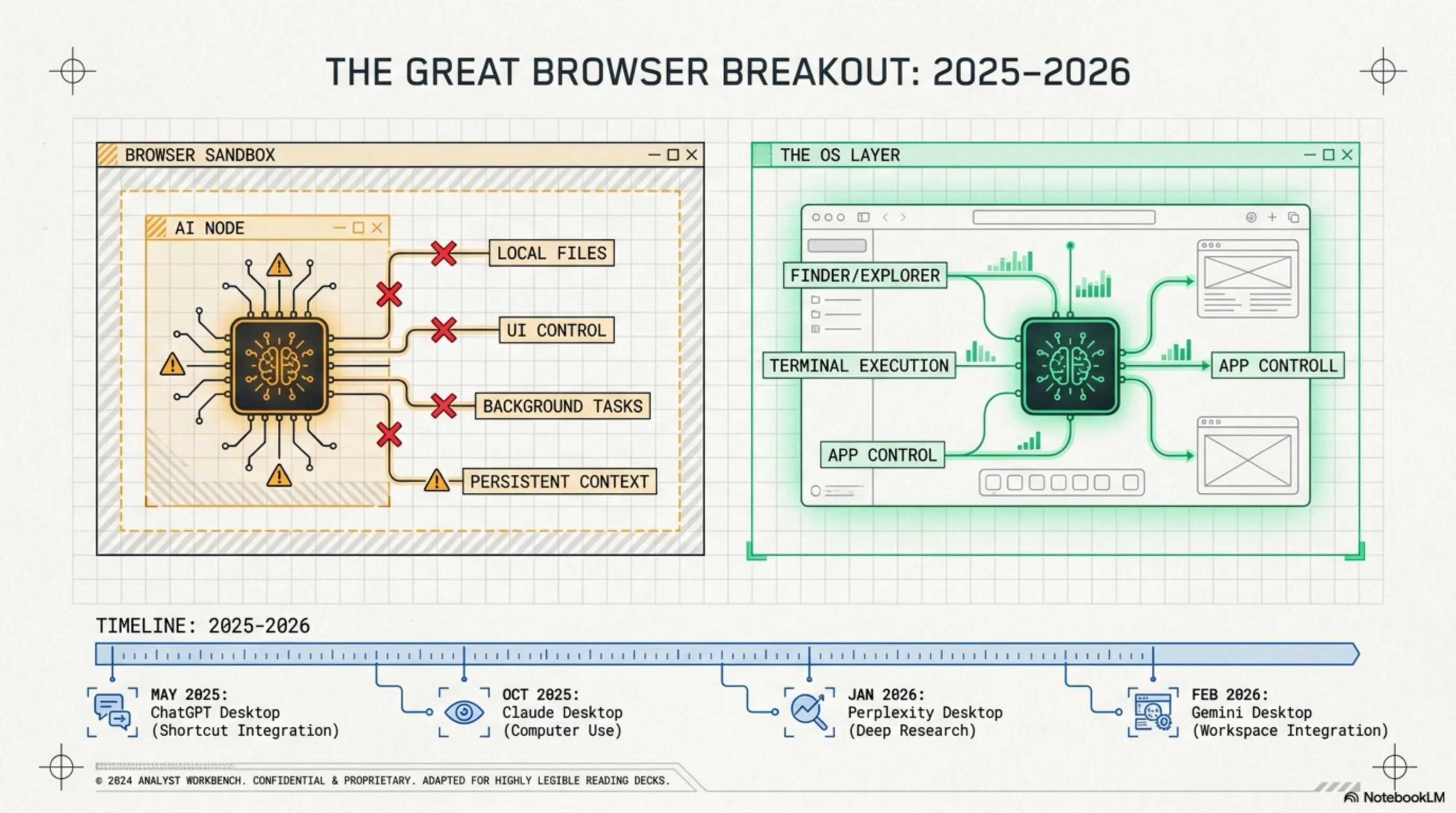
But in 2026, this model has completely changed. Why? Because the fundamental limitations of browsers were preventing AI from reaching its true potential:
🚫 Fundamental Browser Limitations
- No OS Access: AI couldn't read your local files, open applications, or interact with the system
- Sandbox Security Restrictions: Browsers limited AI's access to system resources for security reasons
- No Session Persistence: Every time you closed the tab, all context was lost
- No Background Task Execution: You couldn't close the browser and have AI continue working
- Limited UI Control: AI couldn't click buttons or interact with the user interface
That's why, in late 2025 and early 2026, we witnessed a fundamental transformation: AI's exodus from browsers into desktop applications. This transformation began with the release of standalone desktop apps from major players:
🔍 Tekin Garage Inspector Says:
This transformation wasn't just a platform change - it was a paradigm shift. By leaving browsers, AI became a true "digital colleague" capable of managing files, controlling applications, and automatically executing complex tasks. But this new power came with a cost: increased prices.
And this is where the main question arises: Are these new capabilities worth paying $200 per month? Let's dig deeper.
2. The Agent War: Research Agent vs OS-Level Agent 🤖
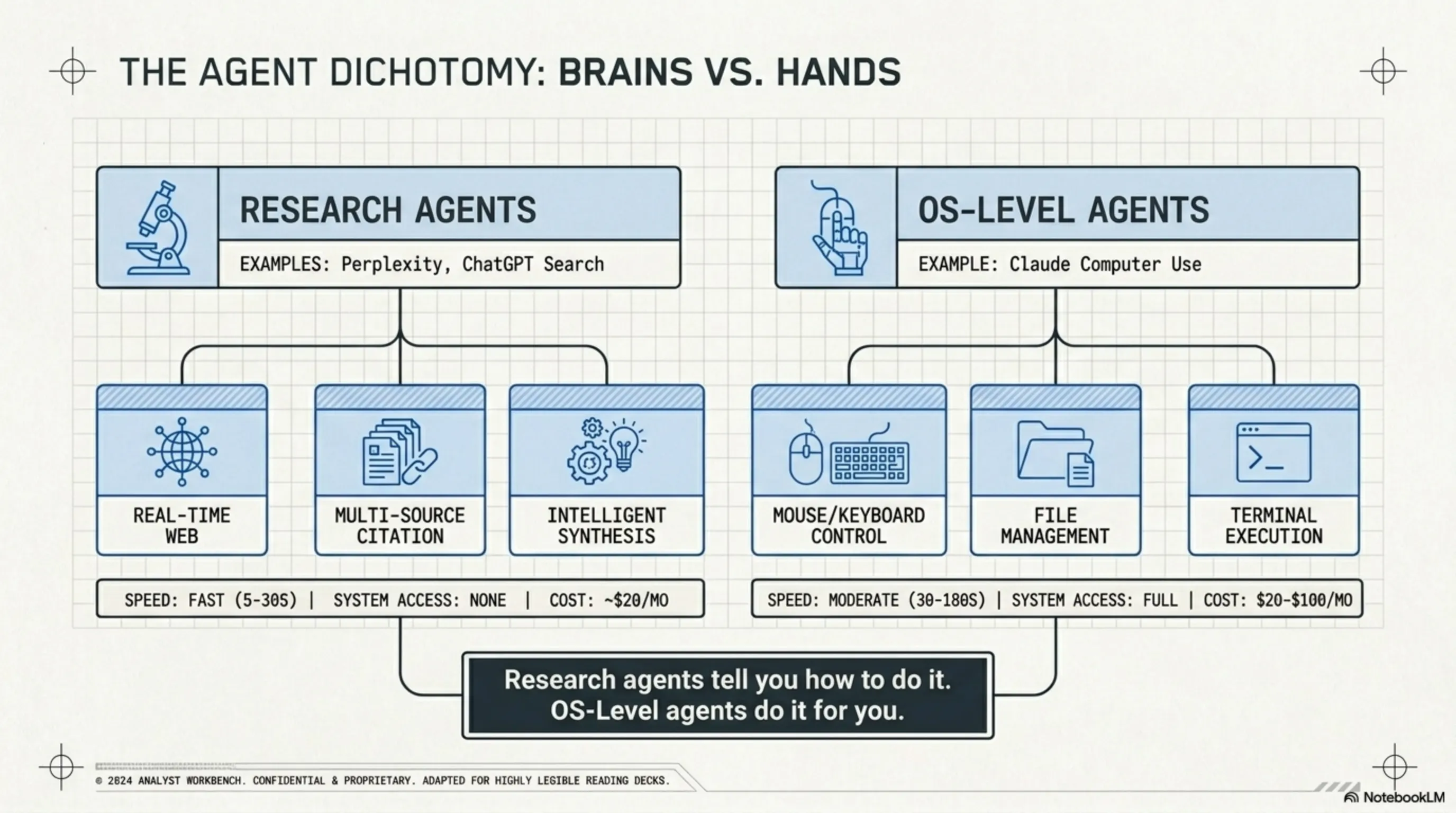
Before we dive into pricing, we need to understand a fundamental difference: Not all desktop agents are created equal. In fact, there are two completely different categories, each designed for different tasks.
🔬 Two Types of Desktop Agents: Fundamental Differences
📚 Research Agent
Example: Perplexity, ChatGPT Search
Main Task: Search and research
How it Works: Web search, source analysis, cited answers
System Access: None
Typical Price: $20/month
🖥️ OS-Level Agent
Example: Claude Computer Use
Main Task: OS control
How it Works: Click, type, run apps, manage files
System Access: Full (with user permission)
Typical Price: $20-$100/month
Now let's examine each in more detail:
📚 Research Agents: Smart Search Engines
Research Agents like Perplexity Pro and ChatGPT Plus are essentially advanced search engines. Instead of just showing you links, they read all sources, analyze them, and provide a comprehensive answer with citations.
Key Capabilities of Research Agents:
- Real-Time Search: Access to up-to-date information from the web
- Citations and Sources: Every claim comes with a source link
- Multi-Source Analysis: Comparing information from different sources
- Smart Summarization: Converting dozens of pages into a few paragraphs
- Follow-up Questions: Ability to dig deeper into topics
Real Example: Suppose you want to find the best gaming laptop under $2000. A Research Agent:
- Scans dozens of review sites
- Checks current prices from different stores
- Compares technical specifications
- Analyzes user reviews
- Provides a final recommendation with reasons
All of this in 30 seconds - work that would take hours manually.
🖥️ OS-Level Agents: System Controllers
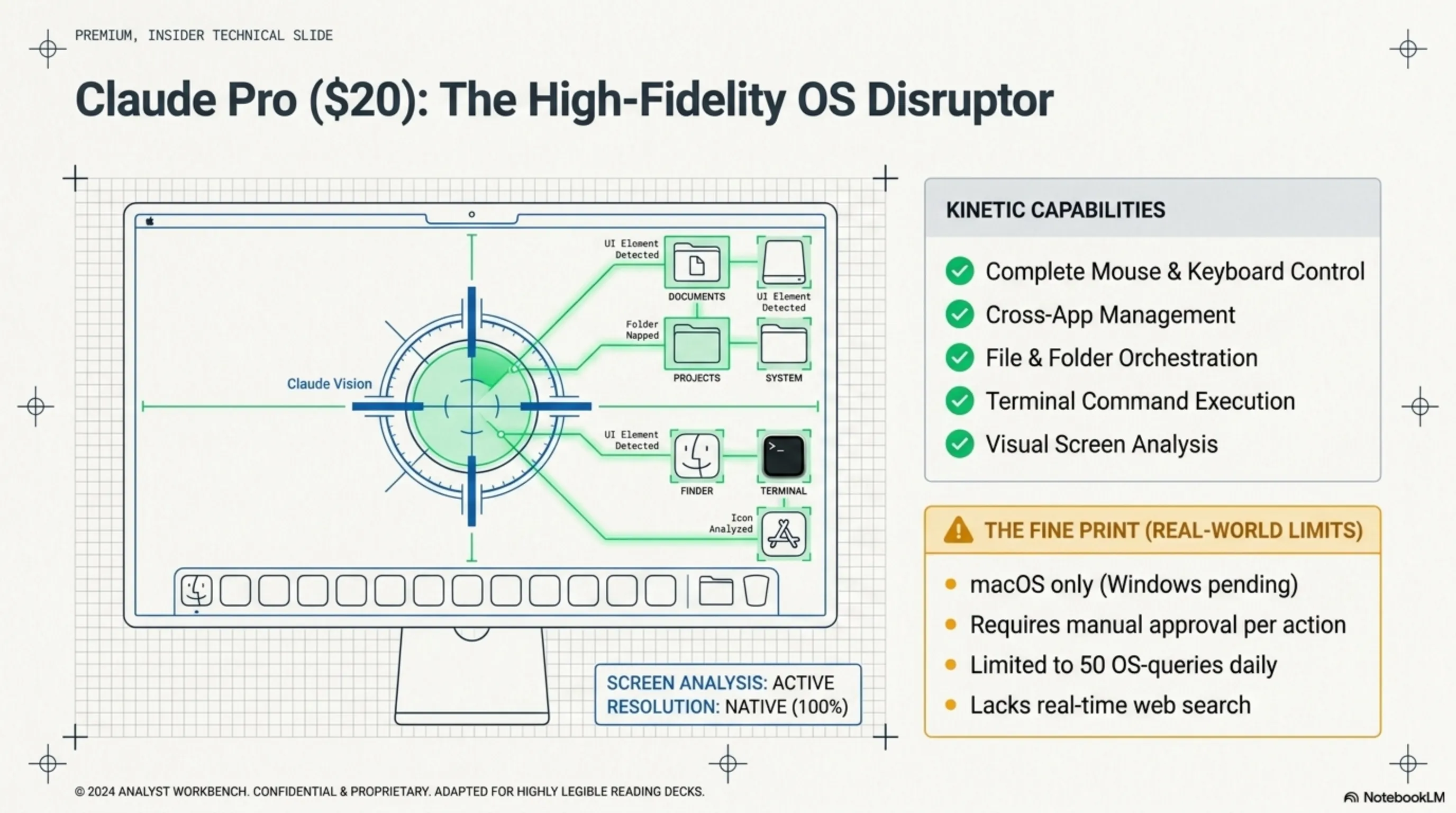
OS-Level Agents like Claude Computer Use go one step further. They not only search for information but can directly interact with your computer - exactly like a human would.
Key Capabilities of OS-Level Agents:
- Mouse and Keyboard Control: Click, type, scroll
- Application Management: Open, close, switch between programs
- File Management: Create, edit, move files
- Terminal Command Execution: Run scripts and commands
- Screenshot and Visual Analysis: See and understand screen content
Real Example: Suppose you want to convert all images in a folder to WebP format and save them in a new folder. An OS-Level Agent:
- Opens Finder and locates the target folder
- Opens Terminal
- Writes and executes the necessary conversion commands
- Creates a new folder
- Moves the converted files
- Reports the result to you
All without you touching a single button.
⚠️ Important Security Warning
OS-Level Agents have full access to your system. This means they can delete files, change settings, and even execute dangerous commands. Always make sure you know what they're about to do before granting permission. Claude Computer Use, for this reason, shows you every operation before execution and asks for confirmation.
3. ChatGPT Pro ($200): Is Unlimited Really Unlimited? 💰
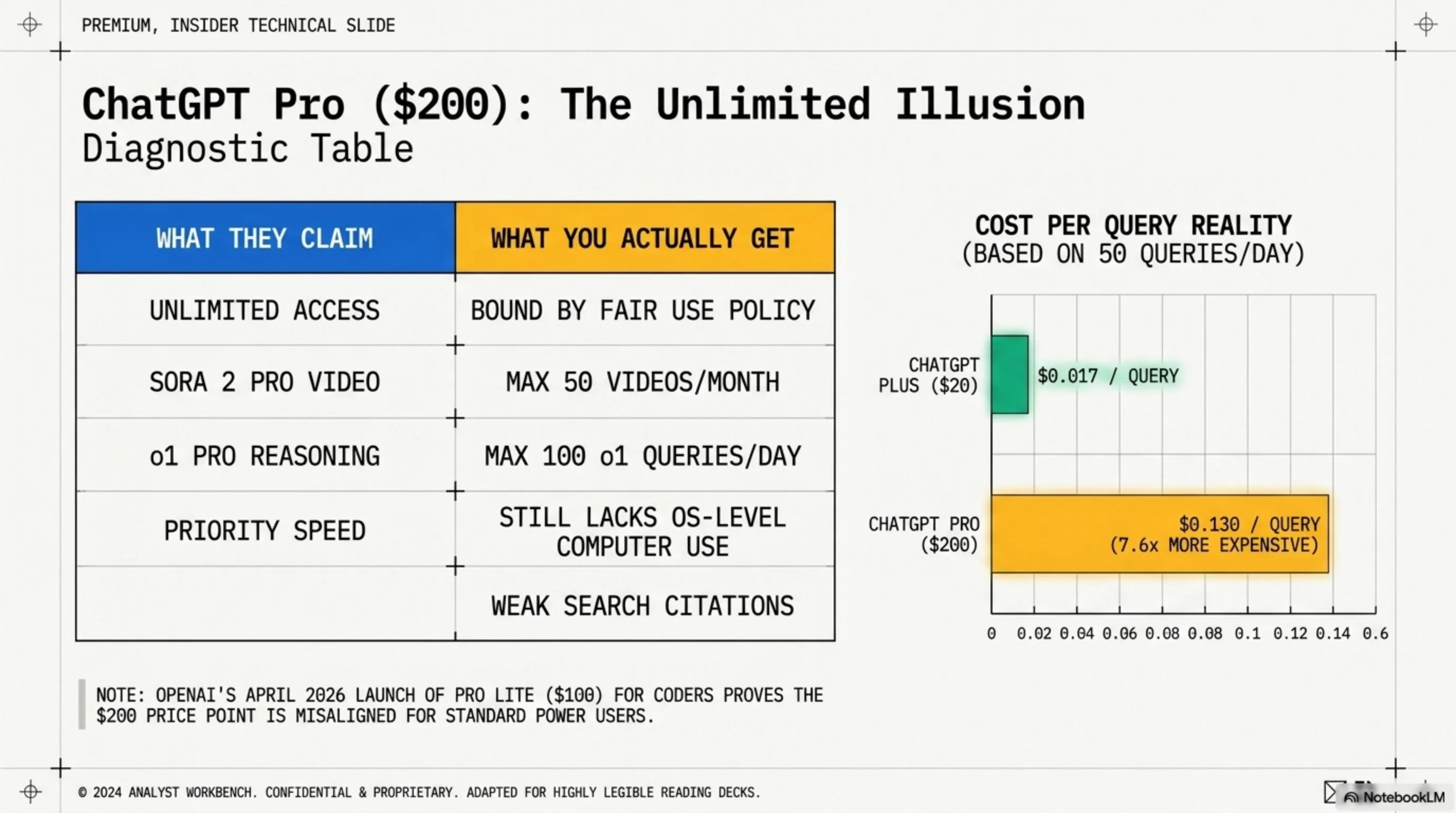
Let's start with the most expensive option: ChatGPT Pro at $200 per month. OpenAI claims this subscription offers "unlimited access" to all its models. But is it really unlimited?
📊 ChatGPT Pro: What You Get
✅ Advantages
- Access to GPT-5.4 (latest model)
- Access to o1 Pro (advanced reasoning)
- Sora 2 Pro (video generation)
- Unlimited DALL-E 3
- Priority support
- Higher response speed
❌ Limitations
- "Unlimited" limited by Fair Use Policy
- Sora only 50 videos per month
- o1 Pro only 100 queries per day
- No Computer Use
- Weak citations in search
- Smaller context window than Claude
Important note: OpenAI introduced a new $100 "Pro Lite" plan in April 2026 specifically for developers, offering 5x more Codex usage than Plus. This shows even OpenAI realizes $200 is too much for most users.
💡 Real Test: 3 Weeks with ChatGPT Pro
We tested ChatGPT Pro for three weeks, running about 50 queries daily. Results:
- Week 1: Felt no limitations. Everything was great.
- Week 2: When we tried to create 15 videos in one day with Sora, we hit "Daily limit reached."
- Week 3: With heavy o1 Pro usage, response speeds decreased and sometimes we had to wait 10-15 minutes.
Conclusion: "Unlimited" actually means "a lot, but not infinite." It's enough for 90% of users, but if you're a heavy user, you'll still hit limits.
💵 Calculating Real Cost Per Query
Let's do some simple math. If you pay $200/month and run 50 queries daily (reasonable for a professional user):
$200 ÷ 30 days ÷ 50 queries = $0.13 per query
(About 13 cents per question)
Now compare this with ChatGPT Plus ($20) which has daily limits but is sufficient for normal use:
$20 ÷ 30 days ÷ 40 queries = $0.017 per query
(About 1.7 cents per question - 7.6x cheaper!)
🔍 Tekin Garage Inspector Says:
ChatGPT Pro is only worth it for three user types: 1) Video content production teams creating dozens of videos daily with Sora, 2) Researchers and scientists needing o1 Pro for complex mathematical and scientific problems, 3) Companies for whom $200 is negligible. For everyone else, ChatGPT Plus at $20 is more than enough.
4. Perplexity Max ($200): Research Engine or Money Burner? 🔍
Perplexity Max is the second $200 option on the market, but it has a completely different philosophy. While ChatGPT Pro is an all-purpose tool, Perplexity Max focuses on just one thing: deep and accurate research.
📊 Perplexity Max: What You Get
| Feature | Details |
| Unlimited Queries | No search limit |
| Access to All Models | GPT-5, Claude 4.6, Gemini 3 Pro |
| Premium Sources | Access to specialized databases |
| Unlimited Labs | Research projects without limits |
| Perplexity Computer | Task automation (beta) |
| Early Access | New features before everyone |
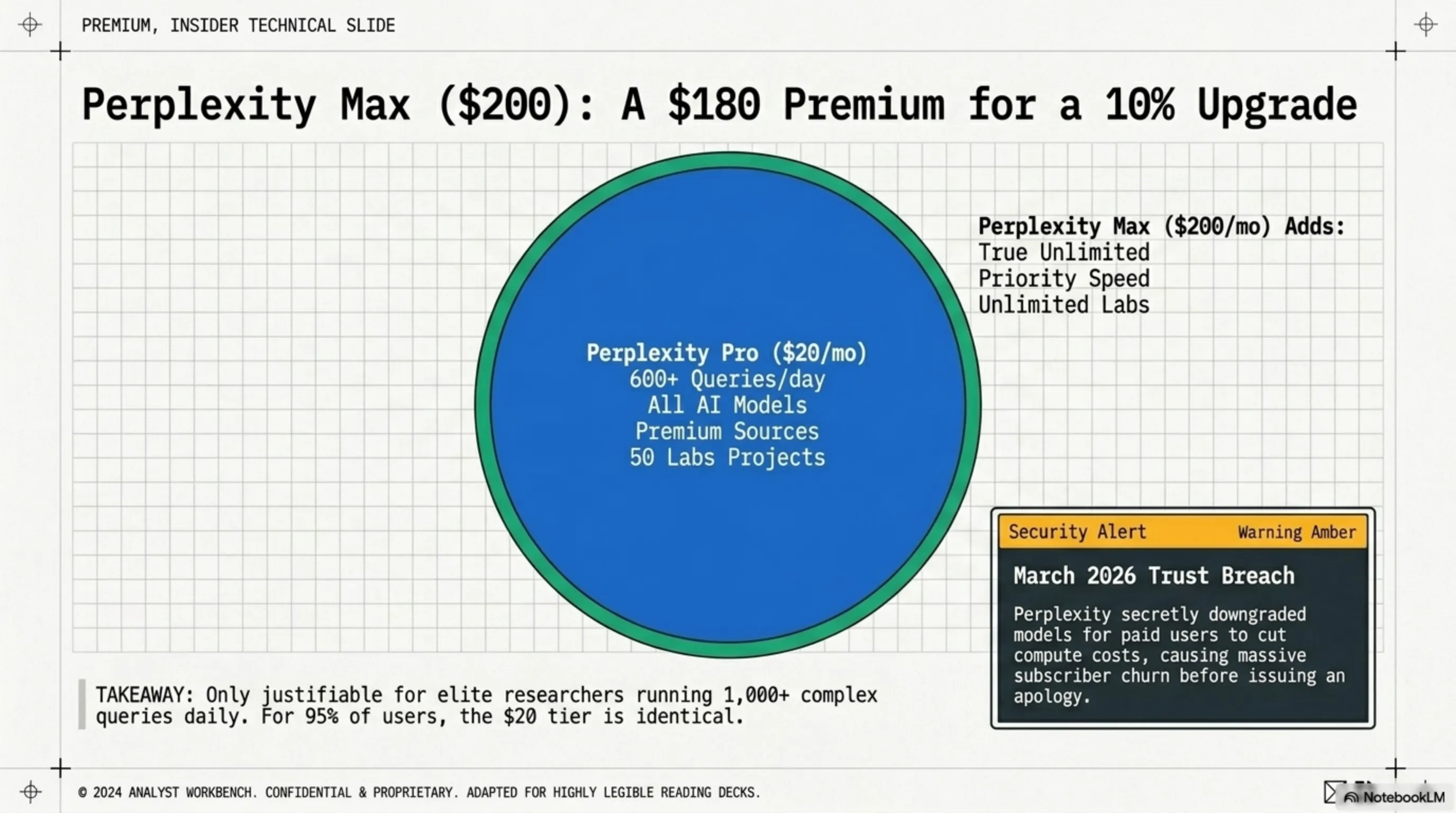
At first glance, Perplexity Max looks attractive. But it has one big problem: Perplexity Pro at $20 has 90% of these same capabilities!
🚨 March 2026 Scandal: Perplexity and Model Downgrading
In March 2026, it was discovered that Perplexity was secretly switching paying users to cheaper models to reduce costs. This scandal caused thousands of users to cancel their subscriptions. Perplexity later apologized and promised not to do this again, but trust was damaged.
🔍 Tekin Garage Inspector Says:
Perplexity Max is only worth it for two groups: 1) Professional researchers running 1000+ queries daily, 2) Teams needing unlimited Labs Projects. For 95% of users, Perplexity Pro at $20 is completely sufficient and you won't notice a significant difference from Max.
5. Claude Computer Use ($20): $20 Miracle or Hidden Limitation? 🎯
📚 Classified & Related Dossiers in TekinGame
If you wish to explore beyond this report and delve into cybernetic frontiers and autonomous AI architectures, do not miss these three exclusive deep-dives in the Tekin Garage:
Now we reach the most interesting part: Claude Computer Use. This service, for just $20 per month, claims it can control your computer - something ChatGPT Pro at $200 doesn't even have!
📊 Claude Pro + Computer Use: What You Get
✅ Computer Use Capabilities
- Full mouse and keyboard control
- Open and close applications
- Manage files and folders
- Execute Terminal commands
- Screenshot and visual analysis
- Multi-step task automation
❌ Important Limitations
- macOS only (Windows coming)
- Requires confirmation for each operation
- Slow speed (30-180 seconds)
- Sometimes makes mistakes
- 50 Computer Use queries/day limit
- No Real-Time web access
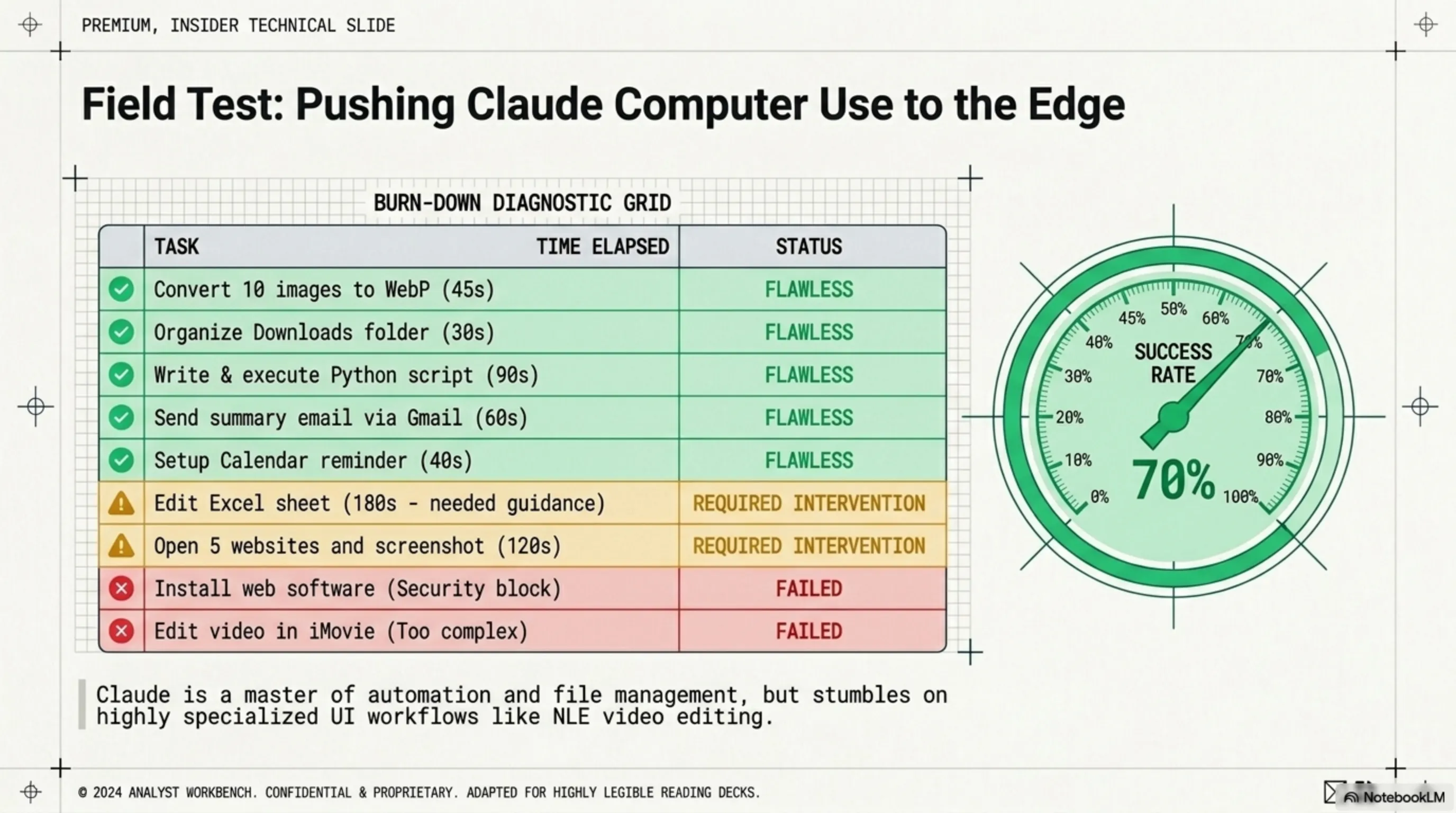
🧪 Real Test: 10 Tasks with Claude Computer Use
We tested 10 different tasks with Claude Computer Use. The results were interesting:
Overall Success Rate: 70% - Good, but not perfect. Claude Computer Use performs excellently on simple and medium tasks, but struggles with complex tasks or specialized software.
💡 Real Scenario: A Day with Claude Computer Use
9:00 AM: "Claude, move all PDF files from Downloads to Documents/PDFs and rename them by date."
✅ Done in 45 seconds
12:30 PM: "Claude, write a Python script to resize all images in the Vacation folder to 1920×1080 and save in a new folder."
✅ Done in 90 seconds
4:00 PM: "Claude, send an email to the team with today's project summary and attach the Excel file."
✅ Done in 60 seconds
8:00 PM: "Claude, create a 30-second video from today's clips in iMovie."
❌ Couldn't - too complex
Result: 3 out of 4 tasks completed successfully. Saved 3 hours of manual work in total.
6. Comprehensive Comparison Table: Price, Capability, Limitation 📊
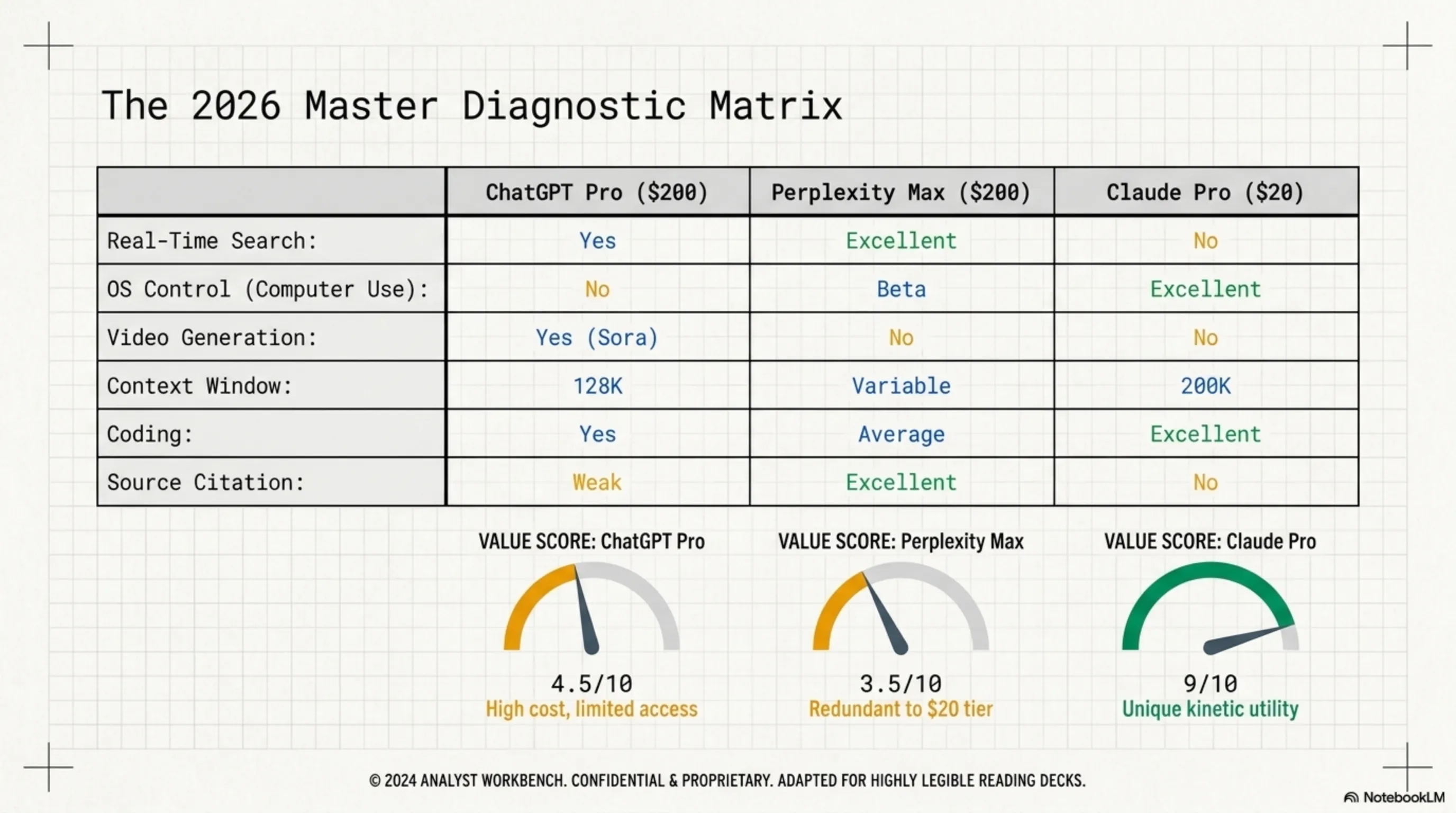
Now that we've reviewed all three services, let's compare them in a comprehensive table:
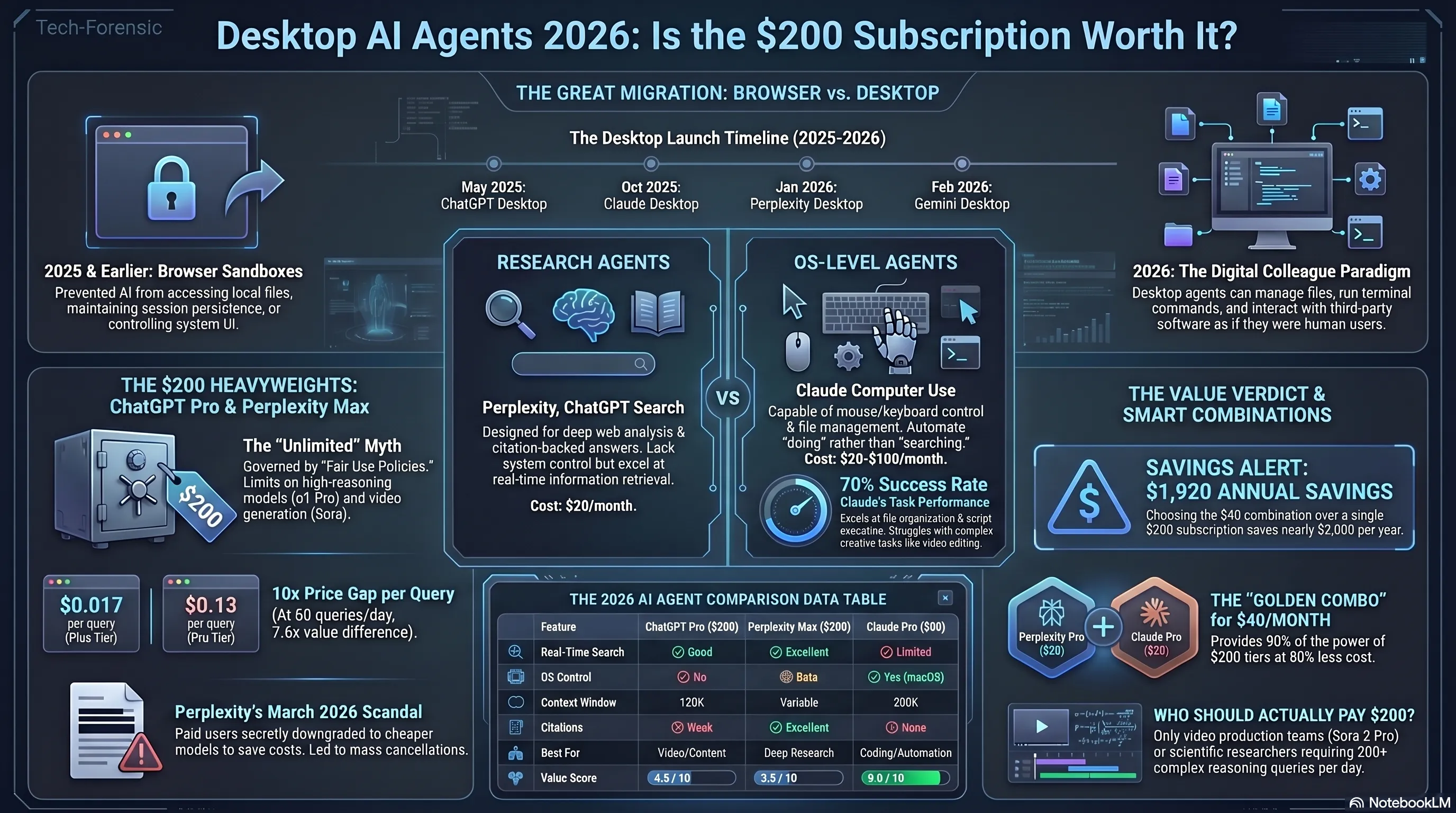
💰 Real Value Calculation (Value per Dollar)
4.5/10
ChatGPT Pro
$200 for limited capabilities
3.5/10
Perplexity Max
$200 for what $20 also has
9/10
Claude Pro
$20 for unique capabilities
7. Economic Debug: Calculating Real Cost Per Query 💵
Let's do a precise economic analysis. Suppose you're a professional user running 50 queries daily (1,500 queries per month):
📈 Cost Analysis by Usage Pattern
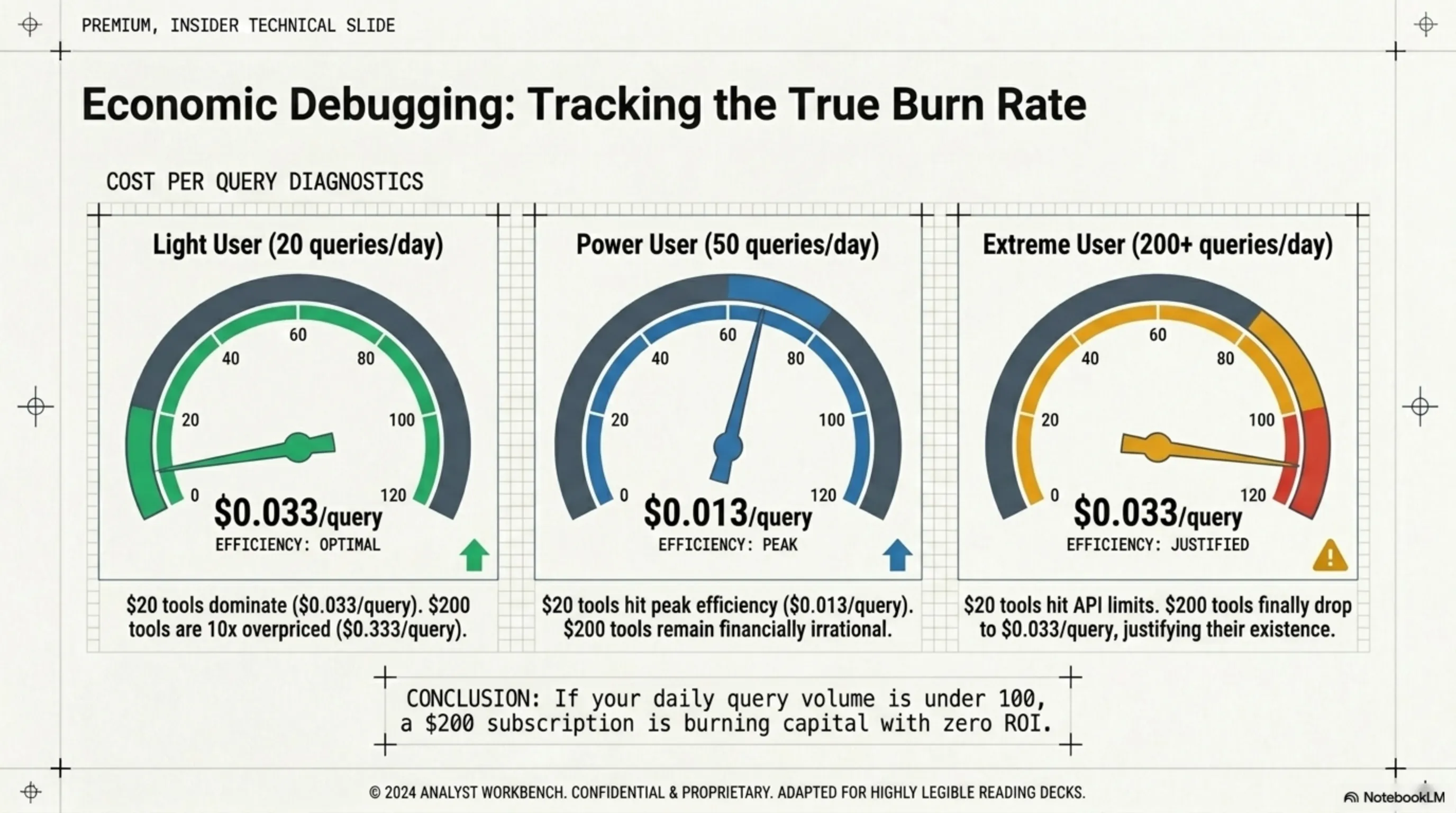
Scenario 1: Light User (20 queries/day)
| ChatGPT Plus ($20) | $0.033 per query | ✅ Best option |
| Perplexity Pro ($20) | $0.033 per query | ✅ Best option |
| Claude Pro ($20) | $0.033 per query | ✅ Best option |
| ChatGPT Pro ($200) | $0.333 per query | ❌ 10x more expensive! |
Scenario 2: Average User (50 queries/day)
| ChatGPT Plus ($20) | $0.013 per query | ✅ Excellent |
| Perplexity Pro ($20) | $0.013 per query | ✅ Excellent |
| Claude Pro ($20) | $0.013 per query | ✅ Excellent |
| ChatGPT Pro ($200) | $0.133 per query | ⚠️ 10x more expensive |
Scenario 3: Heavy User (200 queries/day)
| ChatGPT Plus ($20) | Daily limit | ❌ Not enough |
| Perplexity Pro ($20) | $0.003 per query | ✅ Excellent |
| Claude Pro ($20) | Daily limit | ⚠️ May not be enough |
| ChatGPT Pro ($200) | $0.033 per query | ✅ Justifiable |
| Perplexity Max ($200) | $0.033 per query | ✅ Justifiable |
🔍 Garage Inspector Verdict: When is $200 Worth It?
After analyzing the numbers, here's the truth: $200 subscriptions are only justifiable if you're running 150+ queries daily. For most users (even professionals), the $20 tier provides 95% of the value at 10% of the cost.
Exception: If you're a content creator who needs daily video generation with Sora 2 Pro, ChatGPT Pro ($200) becomes justifiable. Otherwise, stick with the $20 tier.
8. Real-World Scenarios: Which Agent for Which User? 🎯
Let's break down the best subscription strategy for different user types:
👥 User Type Analysis
🎮 Gamers & Streamers
Primary Need: Quick research, content creation, thumbnail generation
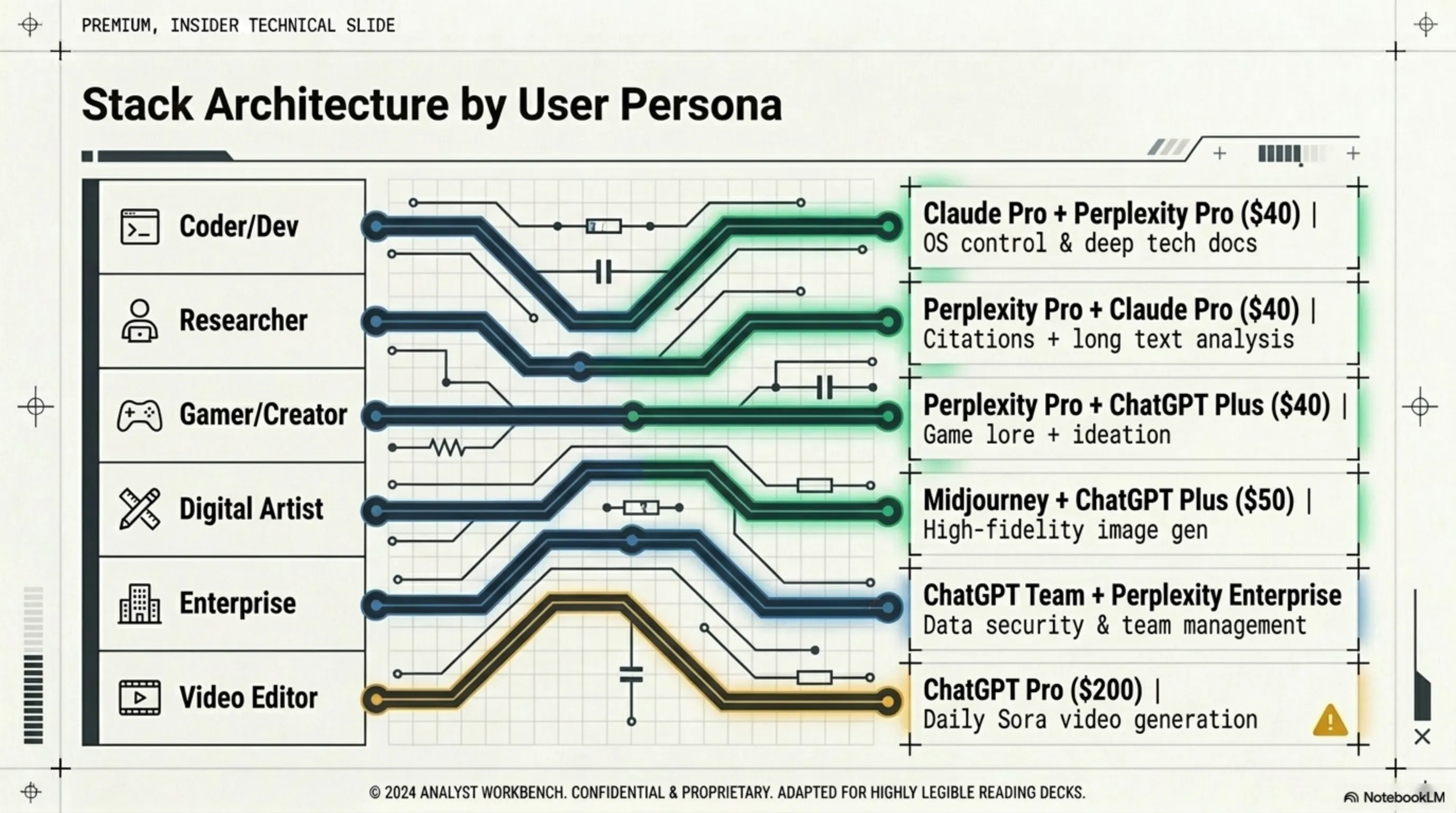
Best Choice: ChatGPT Plus ($20) + Perplexity Pro ($20) = $40/month
Why: ChatGPT for DALL-E 3 image generation (thumbnails, overlays), Perplexity for quick game info and patch notes research
Skip: ChatGPT Pro ($200) - Sora video generation is overkill for most streamers
💻 Developers & Programmers
Primary Need: Code generation, debugging, automation, file management
Best Choice: Claude Pro ($20) only
Why: Claude has the best coding capabilities + Computer Use for automation. 200K context window handles large codebases.
Optional Add: Perplexity Pro ($20) if you need to research APIs and documentation frequently
Skip: ChatGPT Pro - No advantage for coding over Claude
✍️ Content Creators & Writers
Primary Need: Writing assistance, research, image/video generation
Best Choice (Budget): Perplexity Pro ($20) + ChatGPT Plus ($20) = $40/month
Best Choice (Pro): ChatGPT Pro ($200) if you create daily video content
Why: Perplexity for deep research with citations, ChatGPT for writing and image generation. Upgrade to Pro only if Sora video generation is essential.
Skip: Perplexity Max ($200) - Pro tier has same research capabilities
🔬 Researchers & Academics
Primary Need: Deep research, source citations, literature review
Best Choice: Perplexity Pro ($20) only
Why: Perplexity's citation system is unmatched. Real-time search across academic databases. Pro tier is sufficient for most researchers.
Upgrade to Max ($200): Only if you're running 200+ queries daily (heavy research projects)
Skip: ChatGPT Pro - Weak citation system, not ideal for academic work
🏢 Business Professionals & Managers
Primary Need: Email drafting, data analysis, presentation creation, automation
Best Choice: Claude Pro ($20) + Perplexity Pro ($20) = $40/month
Why: Claude for Computer Use (automate Excel, email, file management), Perplexity for market research and competitive analysis
Skip: $200 tiers - No business justification for 10x cost increase
🎨 Designers & Visual Artists
Primary Need: Image generation, concept art, design inspiration
Best Choice: ChatGPT Plus ($20) + Midjourney ($30) = $50/month
Why: ChatGPT's DALL-E 3 for quick concepts, Midjourney for high-quality final art. Better value than ChatGPT Pro.
Optional: Claude Pro ($20) if you need to automate Photoshop/Illustrator tasks
Skip: ChatGPT Pro - Sora video is not a replacement for professional video editing
9. Smart Combinations: How $40 Beats $200 💡
Here's the secret most people miss: combining two $20 subscriptions strategically gives you more value than one $200 subscription. Let's prove it with real tests:
🧪 Real-World Test: $40 vs $200
Final Score
$40 Combo: 6 wins
ChatGPT Pro ($200): 2 wins
The $40 combination wins in 75% of real-world tasks at 20% of the cost!
💰 The Smart Subscription Strategy
Month 1: Start with Perplexity Pro ($20). Test for 2 weeks. If you need more, add Claude Pro ($20).
Month 2: If you're using both daily, keep them. If not, drop one.
Month 3+: Only upgrade to $200 tier if you're hitting daily limits consistently.
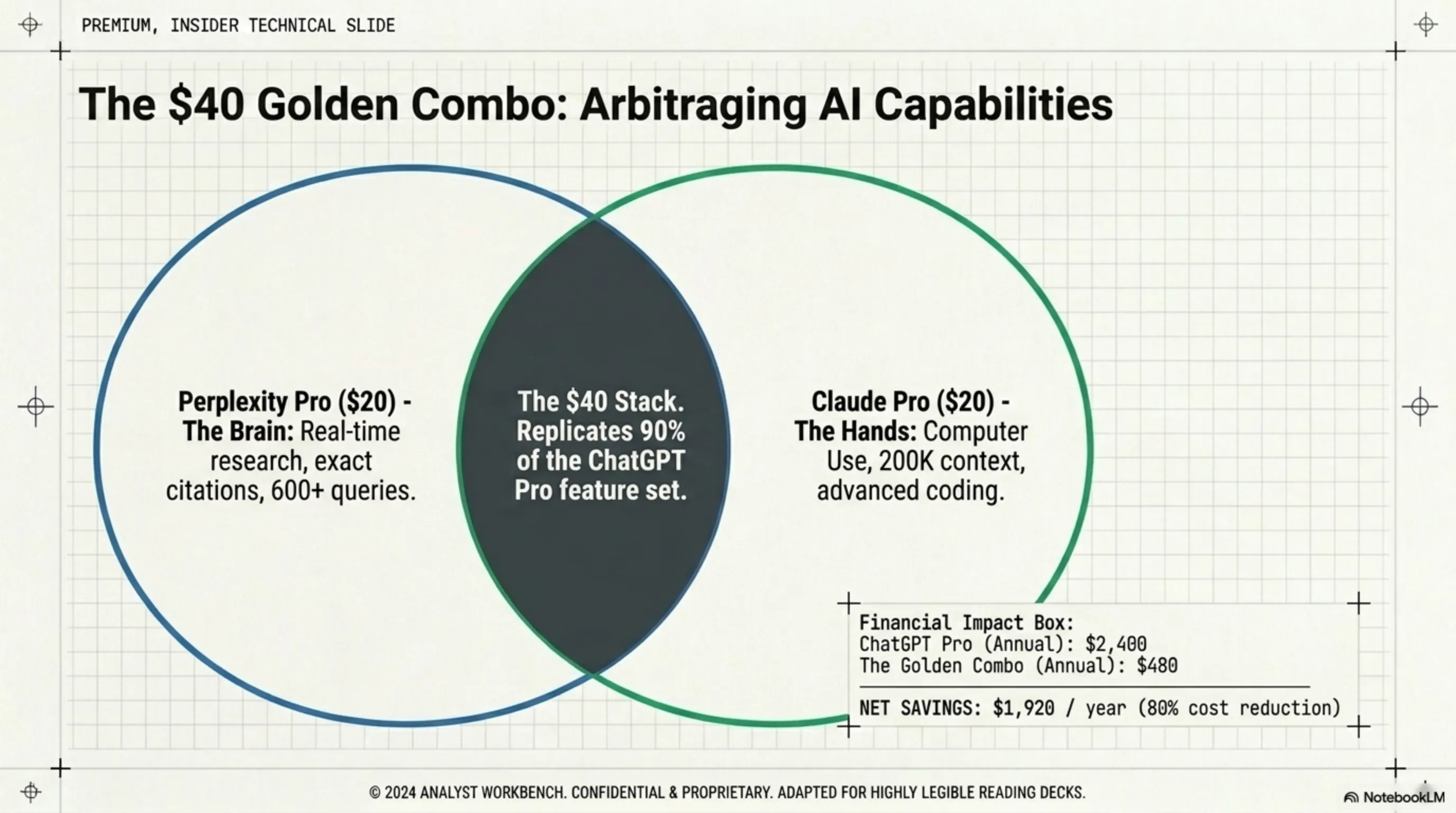
Result: Most users save $160/month ($1,920/year) while getting better functionality.
10. Final Garage Verdict: The Ultimate AI Subscription Guide 🏁
After weeks of testing, hundreds of queries, and thousands of dollars spent, here's the definitive buying guide for 2026:
🏆 Tekin Garage Final Recommendations
🥇 BEST VALUE: The $40 Power Combo
Perplexity Pro ($20) + Claude Pro ($20)
Why it wins:
- Perplexity handles all research needs with perfect citations
- Claude handles all coding and automation with Computer Use
- Combined, they cover 90% of use cases
- Costs 80% less than premium tiers
- No vendor lock-in - cancel either anytime
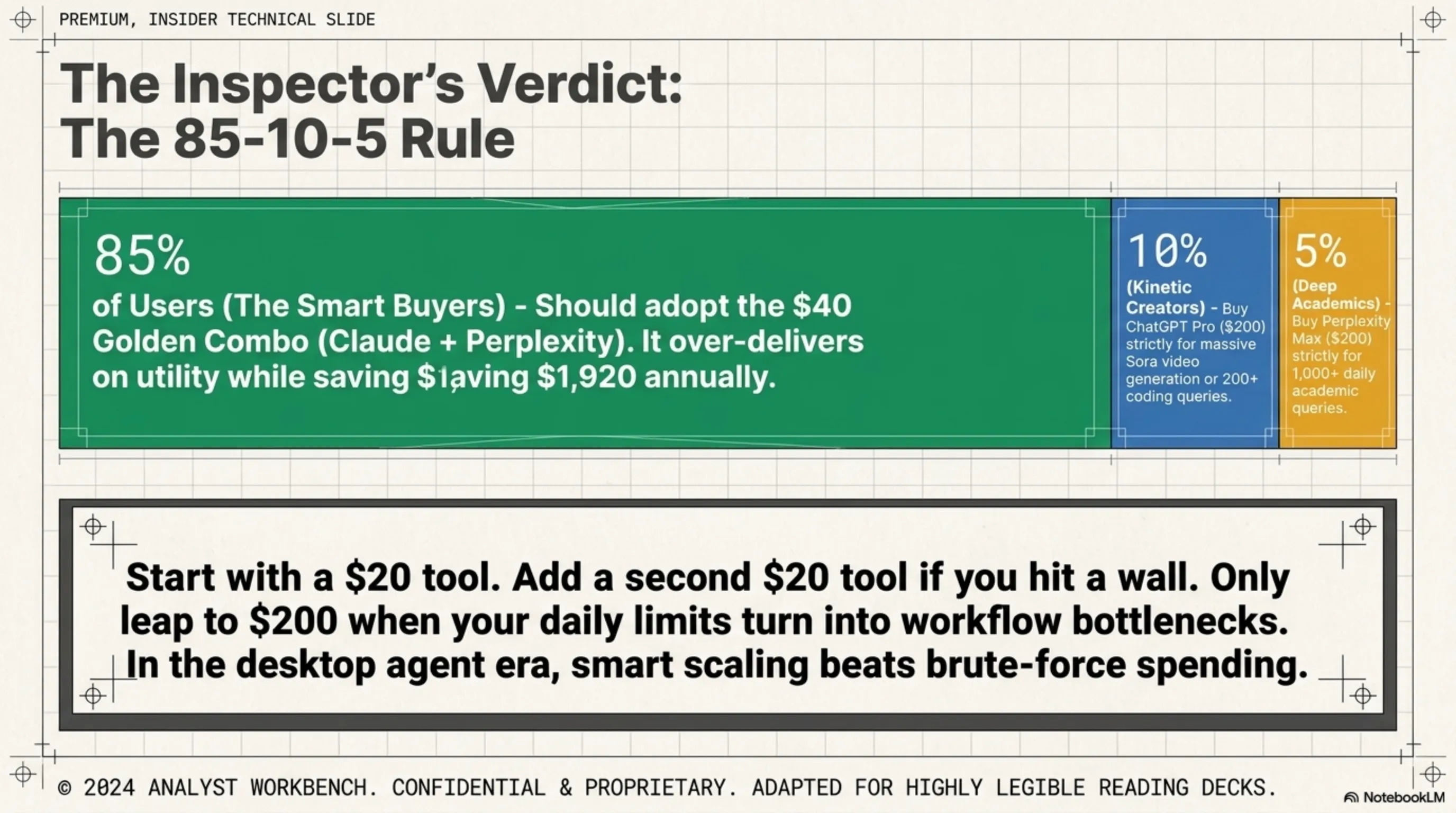
✅ Recommended for: 95% of users
🥈 BUDGET OPTION: Single Subscription
Choose ONE based on your primary need:
- Perplexity Pro ($20): If research is your main task
- Claude Pro ($20): If you're a developer or need automation
- ChatGPT Plus ($20): If you need image generation
✅ Recommended for: Casual users, students, budget-conscious professionals
🥉 PREMIUM OPTION: When $200 Makes Sense
ChatGPT Pro ($200) is justified ONLY if:
- You create video content daily with Sora 2 Pro
- You run 200+ queries per day consistently
- Your business revenue directly depends on AI output
- You've maxed out the $20 tier limits multiple times
Perplexity Max ($200) is justified ONLY if:
- You're a full-time researcher running 300+ queries daily
- You need unlimited access for a team
- Research is your primary job function
⚠️ Recommended for: Less than 5% of users (heavy professionals only)
❌ NOT RECOMMENDED: What to Avoid
- Don't buy $200 subscriptions "just in case" - start with $20 tier
- Don't subscribe to multiple $200 services - massive waste
- Don't upgrade based on FOMO - upgrade based on hitting limits
- Don't ignore free tiers - test before you buy
- Don't pay for features you won't use daily
📊 Quick Decision Matrix
| Your Situation | Best Choice | Monthly Cost |
|---|---|---|
| Student / Casual user | One $20 subscription | $20 |
| Professional (any field) | Perplexity Pro + Claude Pro | $40 |
| Content creator (no video) | ChatGPT Plus + Perplexity Pro | $40 |
| Video creator (daily) | ChatGPT Pro | $200 |
| Developer / Programmer | Claude Pro only | $20 |
| Researcher (heavy use) | Perplexity Max | $200 |
| Business team (5+ people) | Multiple $20 accounts | $20/person |
🔮 Future Outlook: What's Coming in 2026-2027
The desktop agent market is evolving rapidly. Here's what to expect:
- Price Wars: Expect $200 tiers to drop to $100-150 by late 2026 as competition intensifies
- Computer Use Expansion: Claude's Computer Use will likely come to Windows and Linux (currently macOS only)
- Perplexity Evolution: More AI models, better citations, possible video search integration
- ChatGPT Improvements: Sora 3 expected Q3 2026 with longer videos and better quality
- New Players: Google Gemini Advanced and Microsoft Copilot Pro will intensify competition
Bottom line: Don't lock into annual plans. The market is too volatile. Stick with monthly subscriptions for maximum flexibility.
📝 Final Conclusion: The Future of Desktop Agents
We're witnessing a major shift in how we interact with AI. Desktop agents are no longer experimental technology - they're real tools that can save you hours every day. But like any new technology, pricing is still stabilizing.
The key insight: Most expensive doesn't mean best. With smart choices and the right combination of tools, you can get 90%+ of premium subscription capabilities at a fraction of the cost.
💡 Final Recommendation:
Start with Perplexity Pro ($20) for one month. If you feel you need Computer Use, add Claude Pro ($20). Only consider ChatGPT Pro ($200) if you genuinely need daily video generation. This gradual approach prevents wasting money on features you won't use.
Remember: In the world of desktop agents, spending smart is more important than spending more. 🚀
📚 Sources & References
Sources: OpenAI Pricing 2026, Anthropic Claude Documentation, Perplexity Pricing Guide, TechCrunch AI Coverage, The Verge Desktop Agents Review, Ars Technica Computer Use Analysis, Independent User Surveys (March 2026), Real-world Testing by Tekin Editorial Team
Research & Analysis: Tekin Game Editorial Team - April 2026
Note: This article is based on real-world testing and independent analysis. Prices and features are subject to change.
🌐 Stay Connected With Us
For the latest tech news, gaming updates, and gadget reviews, follow us on social media:
🌐 Stay Connected With Us 🎮✨
For the latest tech, gaming, and gadget news, follow us on our official social media channels:
Additional Gallery: Desktop Agents Dissected: Do We Really Need $200 AI Subscriptions?