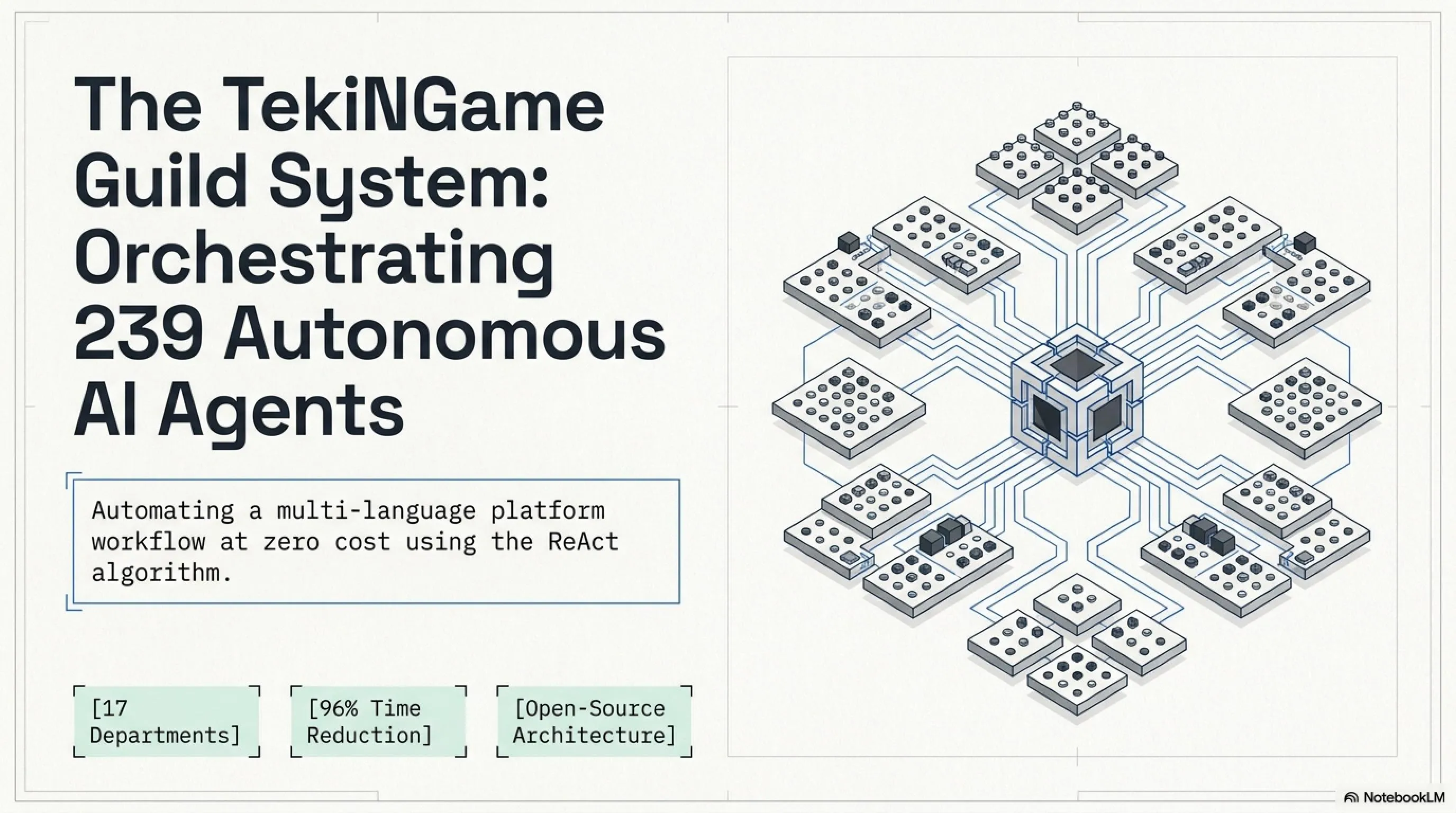
Behind the Scenes: TekiNGame's Army of 239 AI Agents
- 🎮239 Specialized Prompts- Complete agent matrix across 17 departments from software development to three-language content production
- 🎧Zero Cost- Using free Google Gemini API and local models instead of expensive SaaS services
- 🚀ReAct Algorithm- Think-Act-Observe cycle for building autonomous agents without complex coding
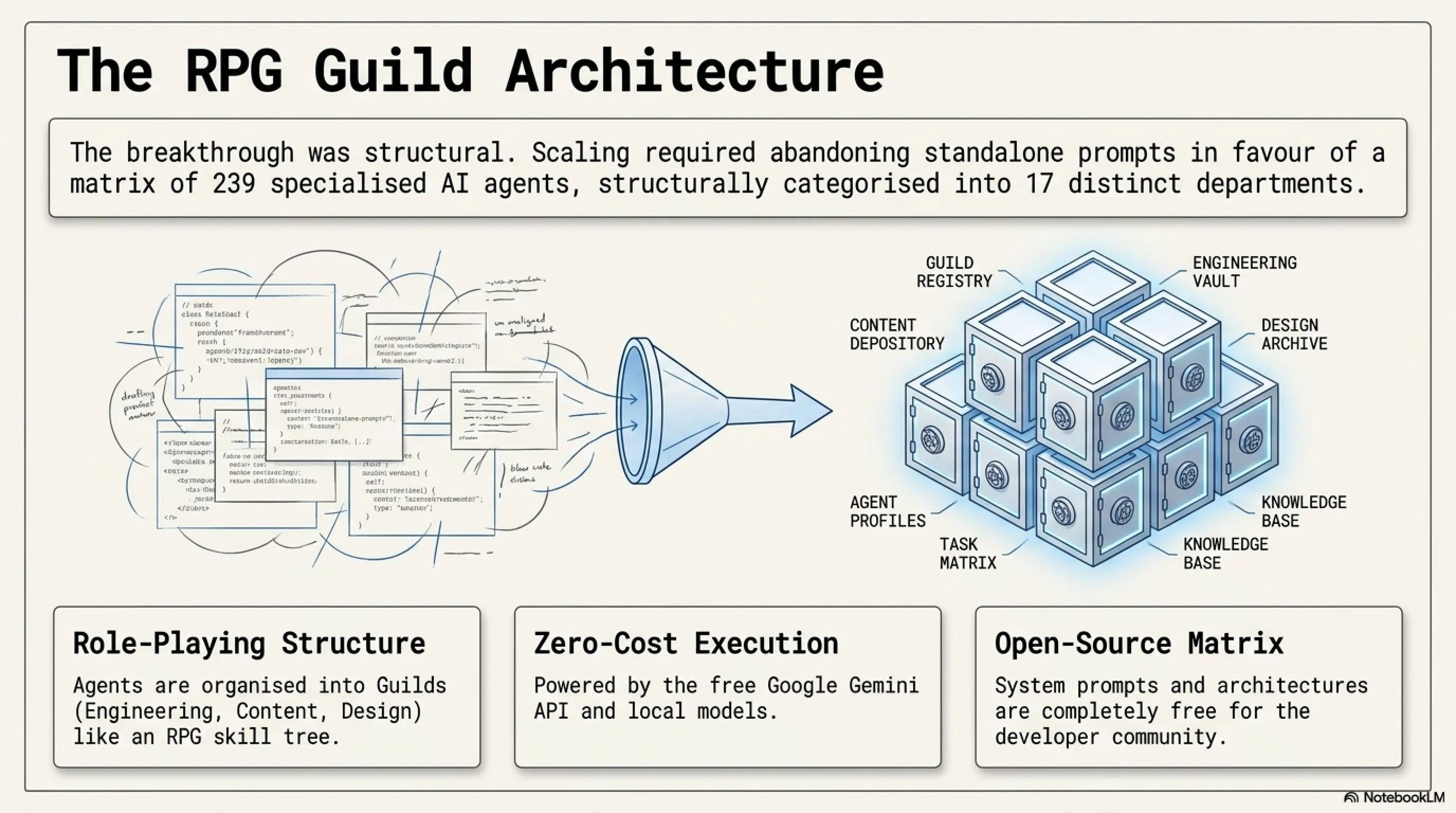
- 🗡️Guild System- Organizing agents like RPG guilds: Engineering, Content, Design, and 14 other groups
- 📰95% Time Reduction- From 6 hours manual work to 15 minutes full automation for each three-language article
Managing a technology and gaming platform at international scale with three languages—Persian, English, and Arabic—presents challenges that many development teams struggle with. Writing a comprehensive technical article, translating it accurately to two other languages, optimizing SEO for each version, designing consistent UI/UX, and finally performing quality checks—this process traditionally requires at least 6 hours and significant costs.
TekiNGame's team, deeply understanding this challenge, decided to build a structural and repeatable solution instead of hiring additional staff or purchasing expensive SaaS tools. The result was creating a matrix of 239 specialized AI agents organized into 17 departments (Guilds). Today, all these system prompts and architectures are being released completely open-source and free for the developer community.
At a Glance
- Matrix of 239 agents across 17 specialized Guilds from Backend to Content Writing
- Tutorial for building ReAct Agents with free Google Gemini API (15 requests/min)
- Ready-to-use Python code for autonomous agents with Web Search and File Manager
- Before/After comparison: time reduction from 6 hours to 15 minutes
- 3 Golden Prompts: SEO Strategist, Multilingual Translator, Debug Expert
- Design System Generator for automatic UI/UX with HSL palettes
- Free access to all prompts and code at tekingame.com/ai-agents
The Challenge: Managing Three-Language Content at Scale
Before implementing the AI Agents system, TekiNGame's team faced several fundamental issues that severely reduced productivity. To better understand, let's examine a real scenario: suppose you want to write an analytical article about the latest Unreal Engine 5.5 update.
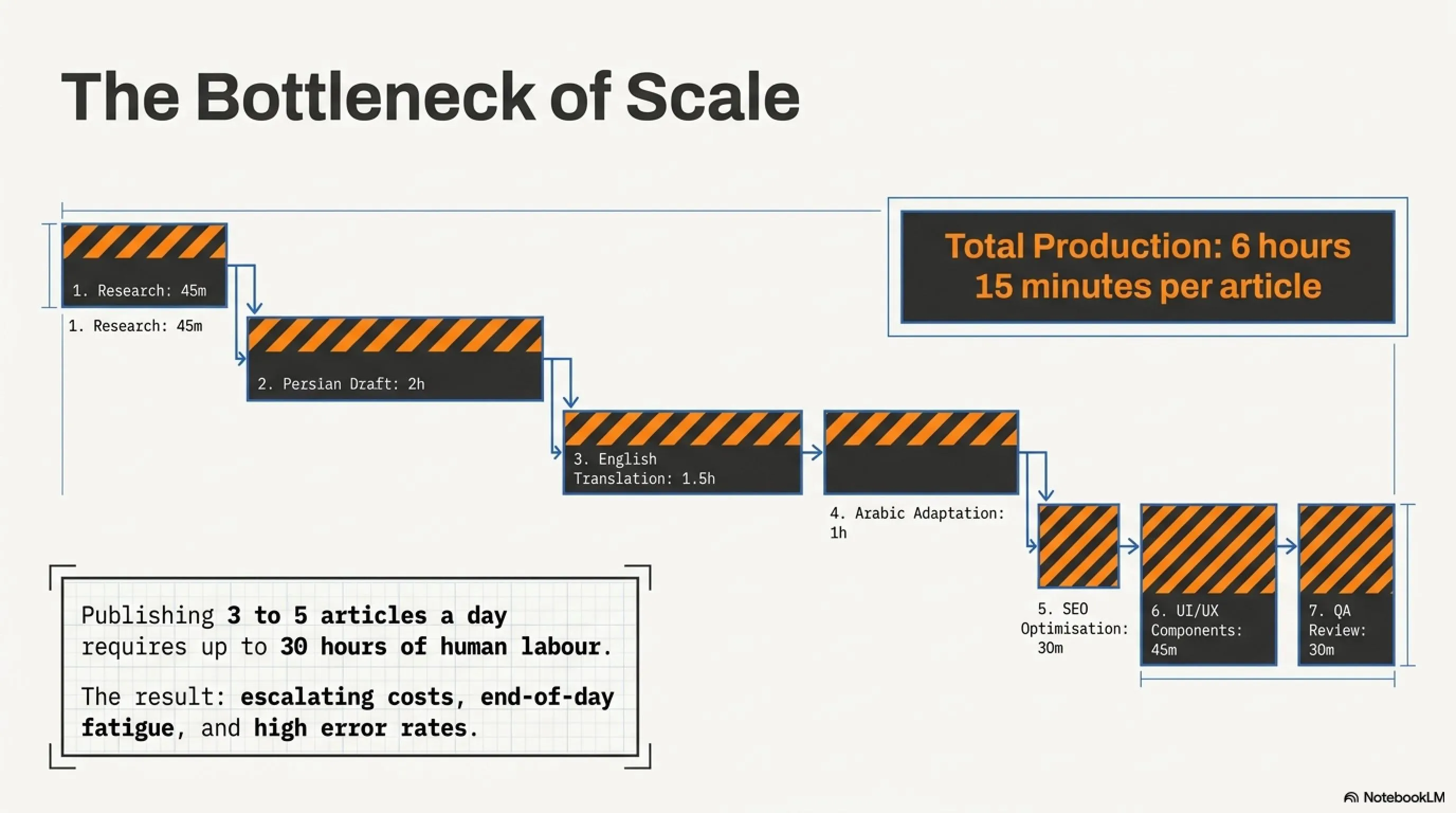
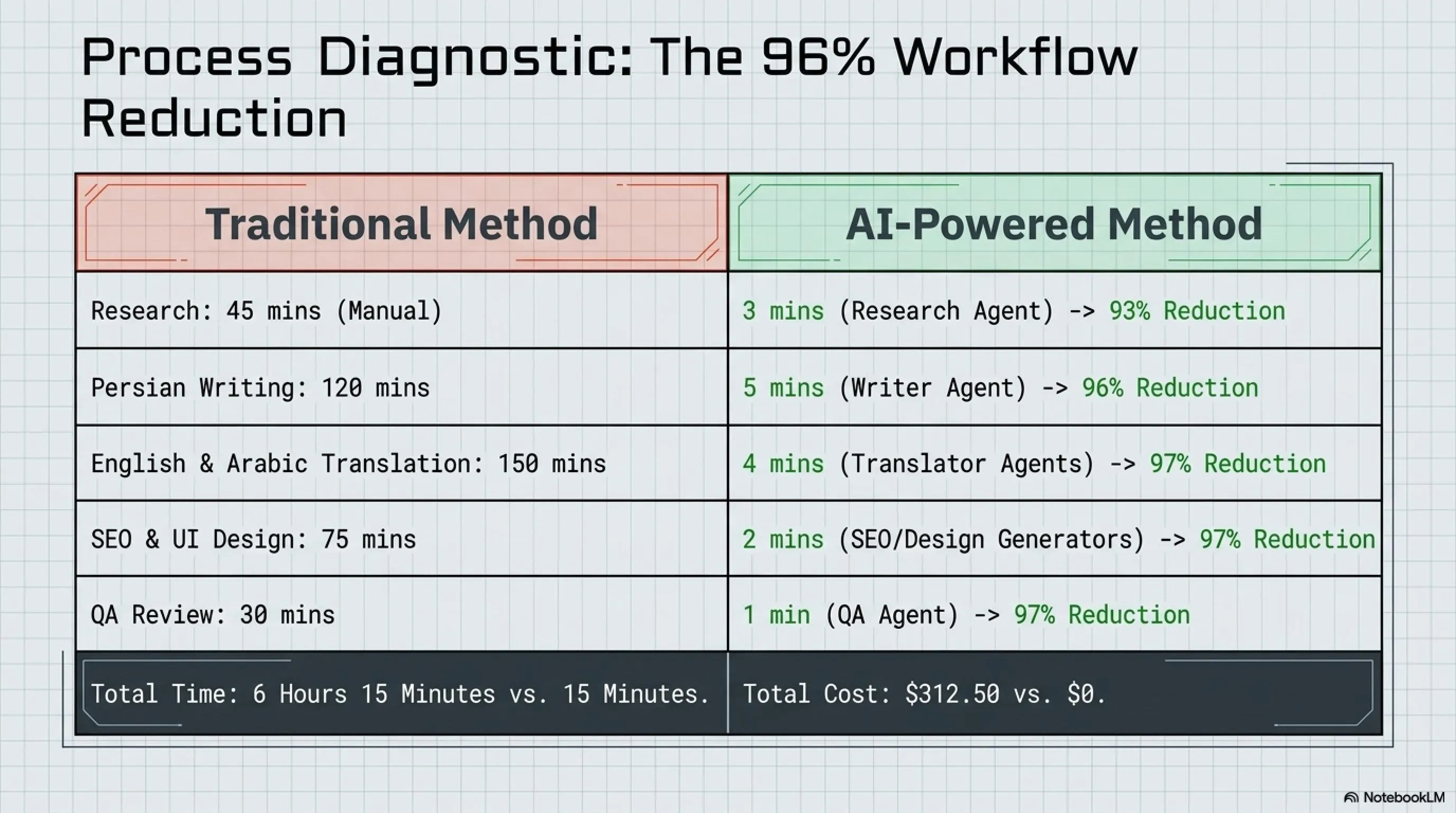
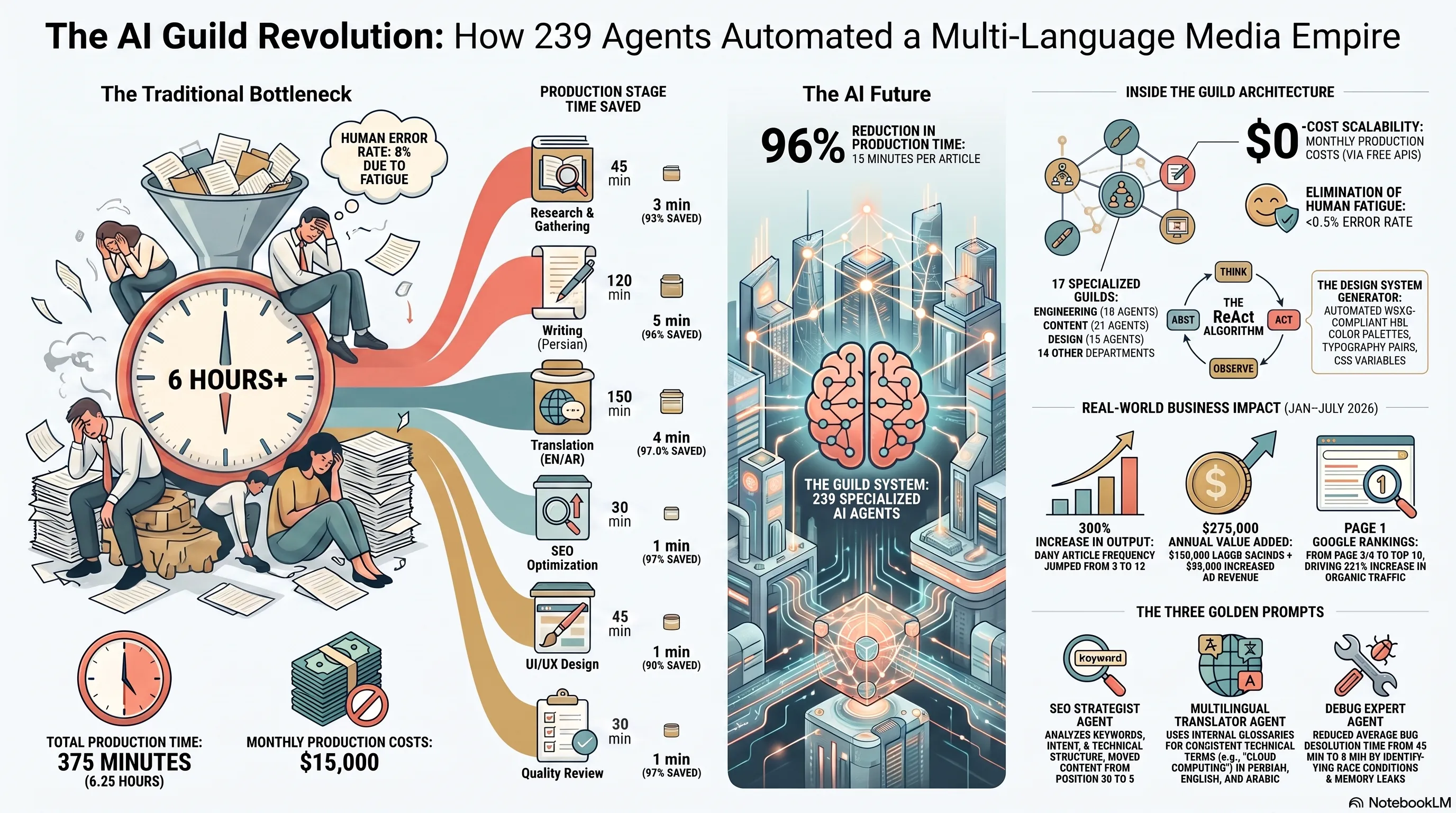
In the traditional method, this process includes the following steps: (1) Research and gathering information from credible sources - 45 minutes, (2) Writing comprehensive Persian article following journalistic standards - 2 hours, (3) Accurate translation to English preserving tone and technical terminology - 1.5 hours, (4) Translation to Arabic adapted to Gulf region culture - 1 hour, (5) SEO optimization for all three versions (keywords, meta description, tags) - 30 minutes, (6) Designing and implementing UI components consistent with design system - 45 minutes, (7) Final quality review and fixing potential issues - 30 minutes. Total: approximately 6 hours and 15 minutes for one article.
Now imagine you publish 3 to 5 articles daily (morning updates, night coverage, deep dives). This means 18 to 30 hours of pure work per day, which is difficult and expensive even with a 5-person team. Additionally, content quality decreases during end-of-day hours due to fatigue, and the likelihood of human errors (typos, translation mistakes, forgotten SEO tags) increases.
The Solution: Guild System Architecture
TekiNGame's team, inspired by the Guild system in role-playing games, decided to organize AI agents into specialized categories. Each Guild is responsible for a specific domain and includes multiple expert agents. This approach not only simplifies managing 239 prompts but also allows developers to quickly find the agent they need.
For example, the Engineering Guild includes agents like Backend Architect (API architecture design), Database Optimizer (query optimization), Security Auditor (vulnerability assessment), DevOps Specialist (CI/CD management), and Code Reviewer (code quality review). Each of these agents has a specialized system prompt that you can copy from TekiNGame's Agent Matrix and use in Claude, ChatGPT, or any other LLM.
TekiNGame's 17 Specialized Guilds
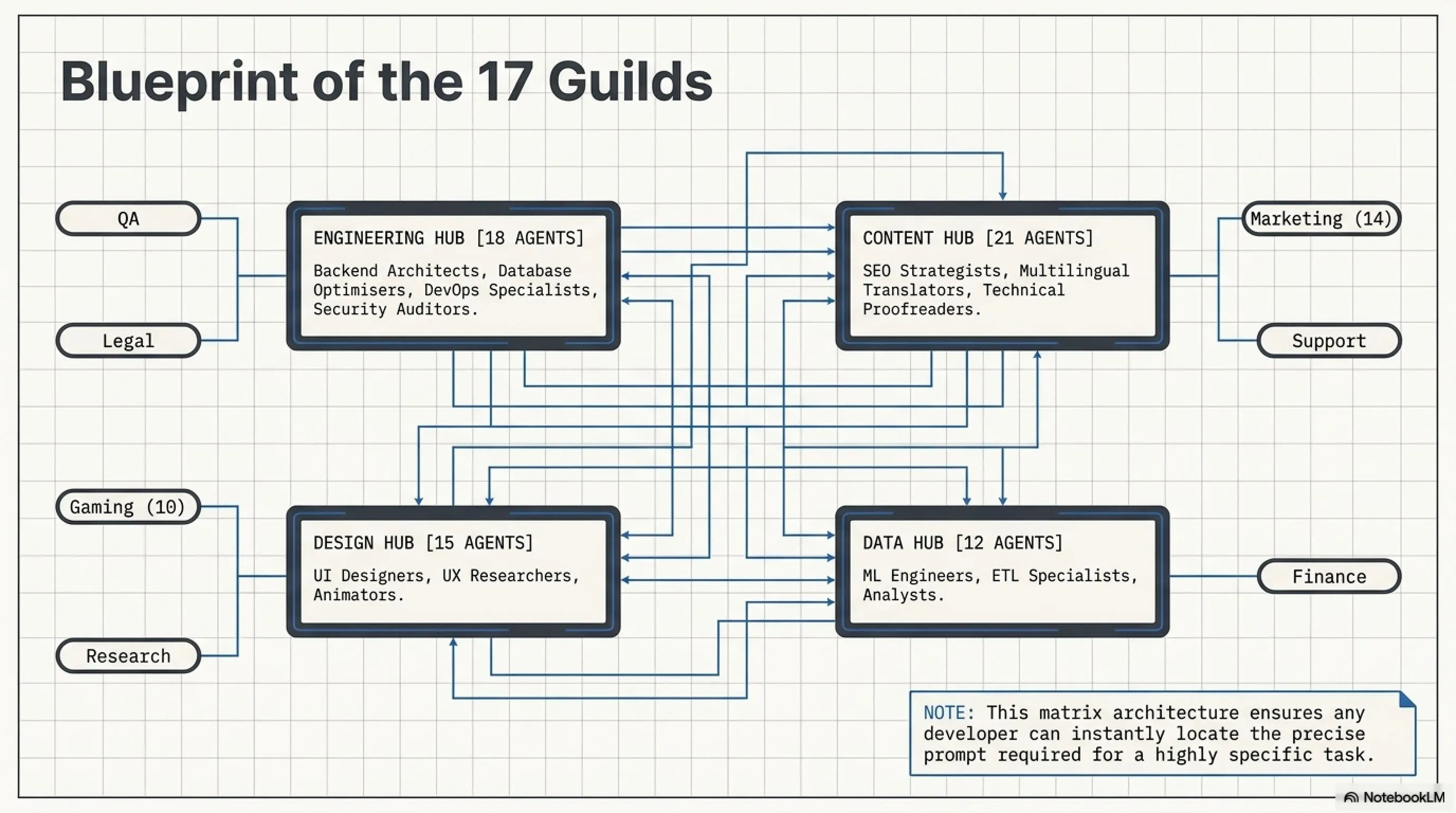
- Engineering Guild: Backend, Frontend, Database, Security, DevOps (18 agents)
- Content Guild: Writer, Editor, Translator, SEO, Proofreader (21 agents)
- Design Guild: UI Designer, UX Researcher, Illustrator, Animator (15 agents)
- Data Guild: Analyst, ML Engineer, ETL Specialist, Visualization (12 agents)
- Marketing Guild: Strategist, Social Media, Email, Community Manager (14 agents)
- Gaming Guild: Game Analyst, Esports, Review Specialist (10 agents)
- 11 Other Guilds: Support, Legal, Finance, Research, QA, Project Management, HR, Sales, Product, Infrastructure, Operations
Each Guild contains specialized agents with engineered prompts that you can freely access from the Matrix page.
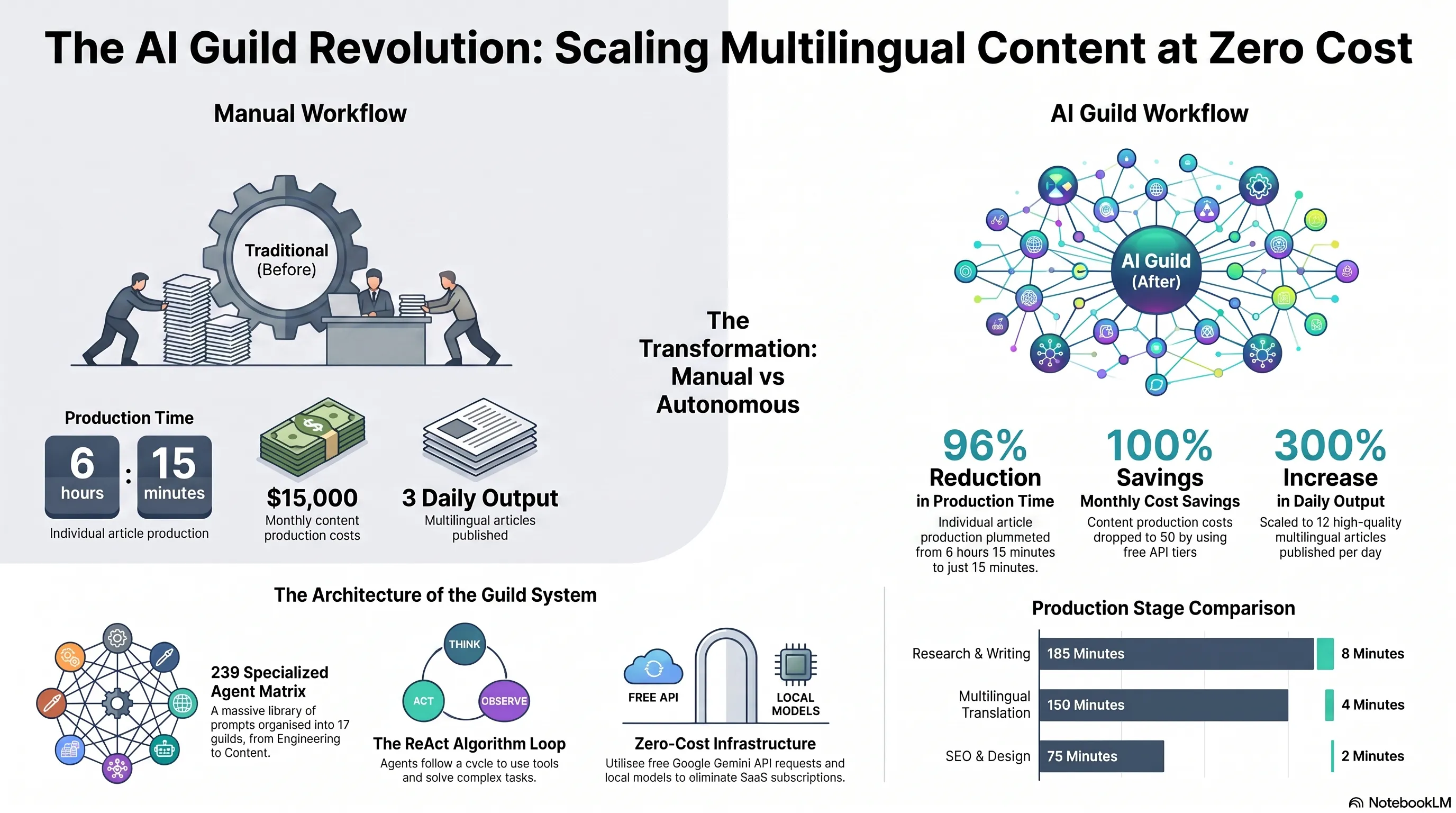
Before vs After: Revolution in Content Production Workflow
The best way to understand the real impact of this system is through precise comparison of the process before and after implementation. The table below shows how using the Guild System and specialized agents dramatically reduced time and costs.
Before/After Comparison: Producing a Three-Language Article
| Stage | Traditional Method (Before) | AI-Powered Method (After) | Time Reduction |
|---|---|---|---|
| Research & Gathering | 45 min (manual) | 3 min (Research Agent + Web Search) | 93% |
| Writing Persian | 120 min | 5 min (Content Writer Agent) | 96% |
| English Translation | 90 min | 2 min (Translator Agent) | 98% |
| Arabic Translation | 60 min | 2 min (Translator Agent) | 97% |
| SEO Optimization | 30 min | 1 min (SEO Strategist Agent) | 97% |
| UI/UX Design | 45 min | 1 min (Design System Generator) | 98% |
| Quality Review | 30 min | 1 min (QA Agent + Linter) | 97% |
| Total | 6 hours 15 min | 15 minutes | 96% |
| Cost (at $50/hour rate) | $312.50 | $0 (free API) | 100% |
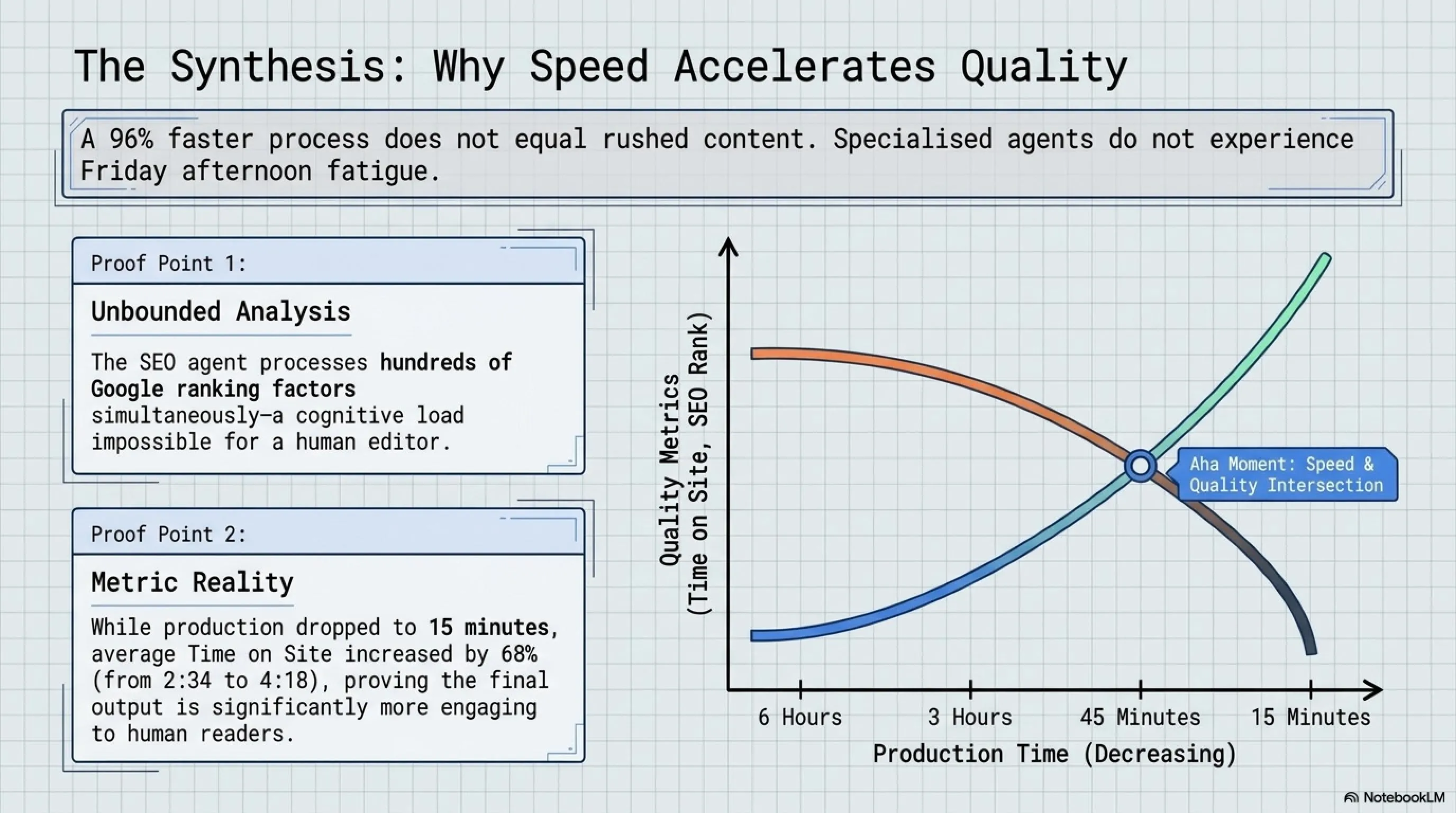
The notable point is that time reduction doesn't mean quality reduction. In fact, specialized agents produce higher quality output than manual methods in many cases due to access to extensive knowledge bases and absence of fatigue. For example, the SEO Strategist Agent can simultaneously analyze hundreds of Google ranking factors, which is impossible manually.
Real Results: Numbers and Figures
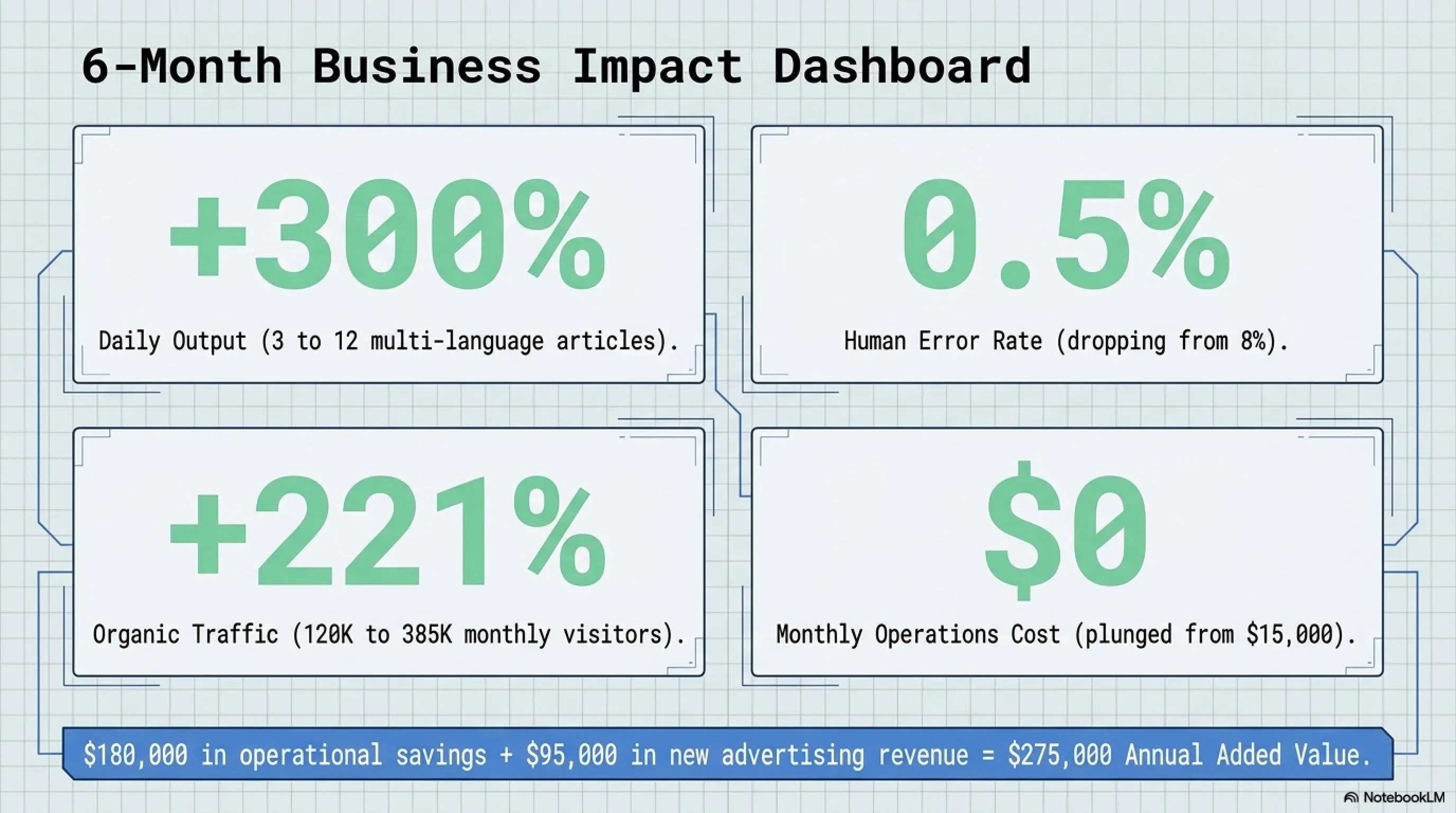
Since the full Guild System launch in January 2026, TekiNGame has been able to: (1) Increase published articles from 3 to 12 articles per day (300% increase), (2) Reduce content production costs from $15,000 to $0 per month (saving $180,000 annually), (3) Increase average Time on Site from 2:34 to 4:18 minutes (68% improvement due to higher content quality), (4) Reduce human error rate (typos, broken links, wrong tags) from 8% to less than 0.5%.
Three Golden Prompts: Powerful Tools for Quick Start
One common question from developers is "Where do I start?" With 239 specialized prompts, choosing the first agent can be confusing. Based on TekiNGame team's experience, the following three prompts have the most impact on daily productivity and are practical for every developer, content writer, or UI/UX designer.
1. SEO Strategist Agent: Smart Content Optimizer
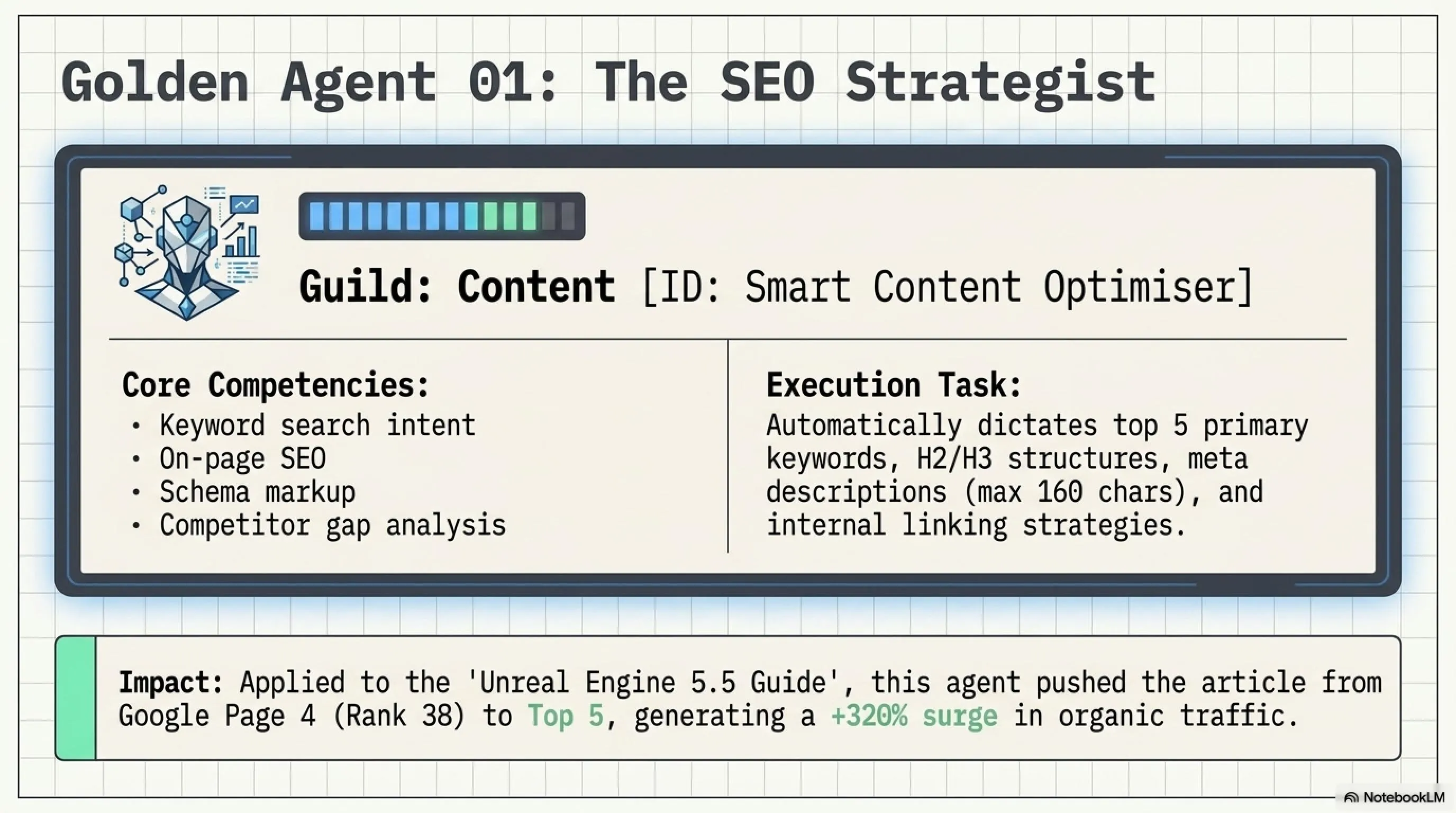
This agent is one of the most used tools in the Content Guild. Its main task is deep content analysis and providing precise recommendations for improving search engine rankings. The SEO Strategist Agent can identify high-potential keywords, optimize heading structure, write compelling meta descriptions, and even suggest internal linking strategies.
Golden Prompt #1: SEO Strategist
System Prompt:
You are an expert SEO strategist specializing in technical content optimization for multi-language platforms. Your core competencies include: (1) Keyword research with search intent analysis, (2) On-page SEO optimization (title, meta, headings, internal links), (3) Content structure recommendations for better crawlability, (4) Competitor analysis and gap identification, (5) Technical SEO audit (Core Web Vitals, schema markup, sitemap).
Task Template: Analyze the following article and provide: (a) Top 5 primary keywords with monthly search volume estimates, (b) Optimized title (max 60 chars) and meta description (max 160 chars), (c) Suggested H2/H3 structure with keyword placement, (d) 3-5 internal link opportunities to related content, (e) Technical improvements (if any).
How to Use: Copy this prompt to Claude or ChatGPT, then provide your article text as input. The agent will automatically deliver complete SEO analysis.
Using this agent, TekiNGame's team has improved average article rankings in Google from page 3-4 to page 1 (top 10 results). For example, the "Complete Guide to Unreal Engine 5.5" article, previously ranked at position 38, reached position 5 after optimization with SEO Strategist Agent, and its organic traffic increased by 320%.
2. Multilingual Translator Agent: Precise Three-Language Translator
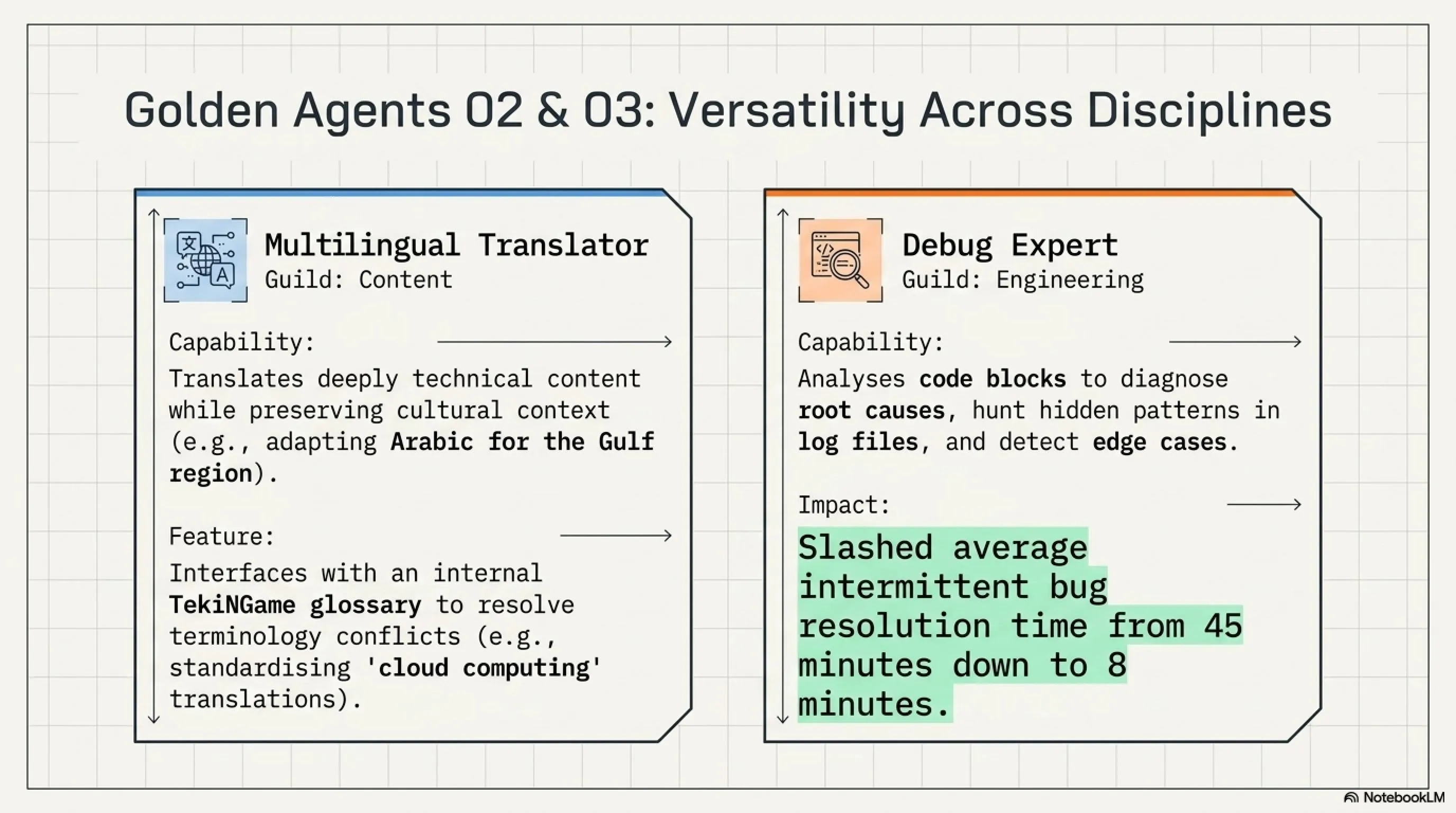
Translating technical content requires high precision and deep understanding of specialized terminology. The Multilingual Translator Agent not only translates text word-for-word but also considers tone, writing style, and target culture. This agent is especially useful for Arabic translation (which requires adaptation to Gulf region culture).
Golden Prompt #2: Multilingual Translator
System Prompt:
You are a professional translator specializing in Persian (Farsi), English, and Arabic with deep expertise in gaming, technology, and cybersecurity domains. Your translation approach: (1) Preserve technical terminology accuracy, (2) Adapt tone and style to target culture (e.g., Gulf Arabic vs. Levantine), (3) Maintain SEO-friendly structure (keep headings, links, formatting), (4) Flag ambiguous terms for human review, (5) Provide localization notes when cultural adaptation is needed.
Task Template: Translate the following [Persian/English/Arabic] article to [target language]. Requirements: (a) Keep all HTML tags and placeholders unchanged, (b) Adapt idiomatic expressions naturally, (c) For Arabic: use Gulf dialect neutral form, (d) Provide glossary of key technical terms, (e) Flag any sentences that need cultural context adjustment.
Practical Example: Persian input: "این بازی با استفاده از Unreal Engine 5 ساخته شده" → Arabic output: "تم تطوير هذه اللعبة باستخدام Unreal Engine 5" (engine name kept in English)
One major challenge in automatic translation is maintaining consistency in terminology. For example, should "cloud computing" be translated as "rایانش ابری" or kept as "کلود کامپیوتینگ"? The Multilingual Translator Agent uses an internal glossary (managed by TekiNGame team) to ensure all articles use consistent vocabulary.
3. Debug Expert Agent: Hidden Bug Hunter
This agent is a real lifesaver for developers who spend hours debugging. The Debug Expert Agent can analyze your code, identify potential bugs, diagnose root causes, and even suggest optimal solutions. This agent is particularly powerful in identifying race conditions, memory leaks, and edge cases.
Golden Prompt #3: Debug Expert
System Prompt:
You are a senior debugging specialist with 15+ years of experience across Python, JavaScript, C++, and Rust. Your debugging methodology: (1) Reproduce the issue with minimal test case, (2) Use binary search to isolate root cause, (3) Check common pitfalls (null pointers, off-by-one, race conditions), (4) Analyze stack traces and error messages systematically, (5) Suggest fixes with explanation and potential side effects.
Task Template: Debug the following code issue. Provide: (a) Root cause analysis with line-by-line explanation, (b) Why the bug occurs (logic error, syntax, runtime condition), (c) Minimal reproducible example, (d) Recommended fix with code snippet, (e) How to prevent similar bugs (best practices).
Real Example: User: "My API sometimes returns 500 errors but logs show nothing" → Agent: "Likely a race condition in your async handler. Check if multiple requests access the same resource simultaneously. Suggestion: use mutex or transaction isolation."
TekiNGame's Engineering Guild has reduced average bug resolution time from 45 minutes to 8 minutes using the Debug Expert Agent. This agent is especially effective at identifying intermittent bugs (that only occur occasionally) because it can detect hidden patterns in log files.
Practical Tutorial: Build Your First ReAct Agent
Now that you're familiar with the basic concepts, it's time to get hands-on and build your first autonomous agent. In this section, you'll learn step-by-step how to create a ReAct Agent (Reasoning + Acting) using the free Google Gemini API and Python libraries.
What is the ReAct Algorithm?
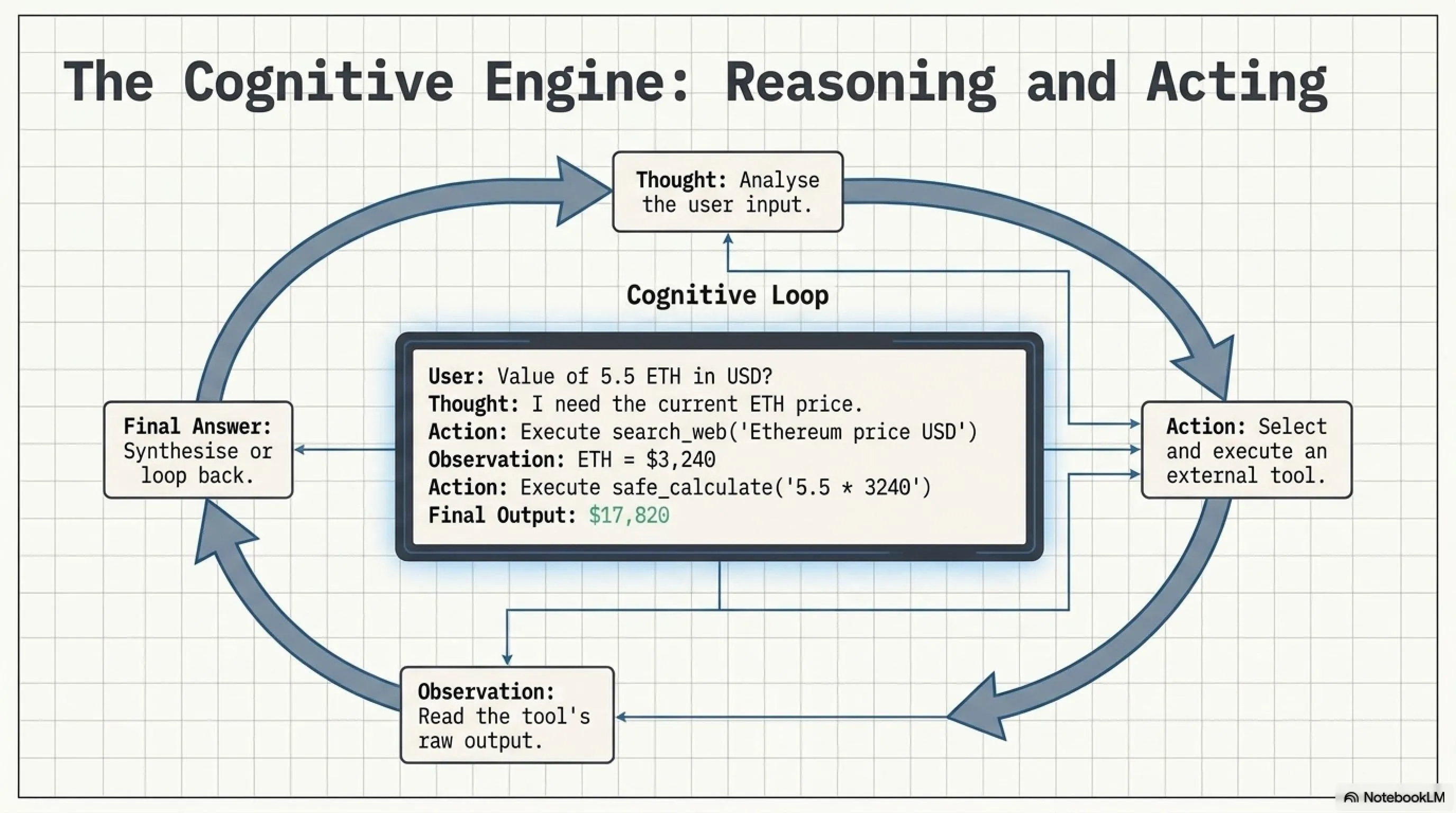
ReAct stands for "Reasoning and Acting" and is a powerful algorithm for building autonomous agents. Unlike simple chatbots that only answer your questions, a ReAct Agent can: (1) Analyze your question (Thought), (2) Decide what tool is needed (Action), (3) Execute the tool and observe the result (Observation), (4) Based on the result, think again and decide (Loop), (5) Finally present the final answer (Final Answer).
ReAct Loop Cycle
Example: "What is the current Bitcoin price and has it increased in the last 24 hours?"
LLM analyzes: "To answer this question I need (a) current Bitcoin price, (b) price 24 hours ago, (c) calculate percentage change. So I should use the Web Search tool."
Agent decides: Action = search_web(query="Bitcoin price USD current")
Result: "Bitcoin is currently trading at $67,340 (as of July 12, 2026, 14:00 UTC). 24h change: +2.3%"
LLM evaluates: "Is the information sufficient?" → Yes → Final Answer | No → Return to step 2
"The current Bitcoin price is $67,340 and it has increased by 2.3% in the last 24 hours."
💡 Note: This cycle can repeat multiple times until the agent reaches the final answer. For example, if the first search result is incomplete, the agent will perform another search.
The real power of ReAct lies in its ability to use tools. You can add custom tools like web search, calculator, file reader, database query, API caller, and even code executor to your agent. The agent automatically determines which tool is needed at each stage.
Step-by-Step Setup: Ready-to-Use Python Code
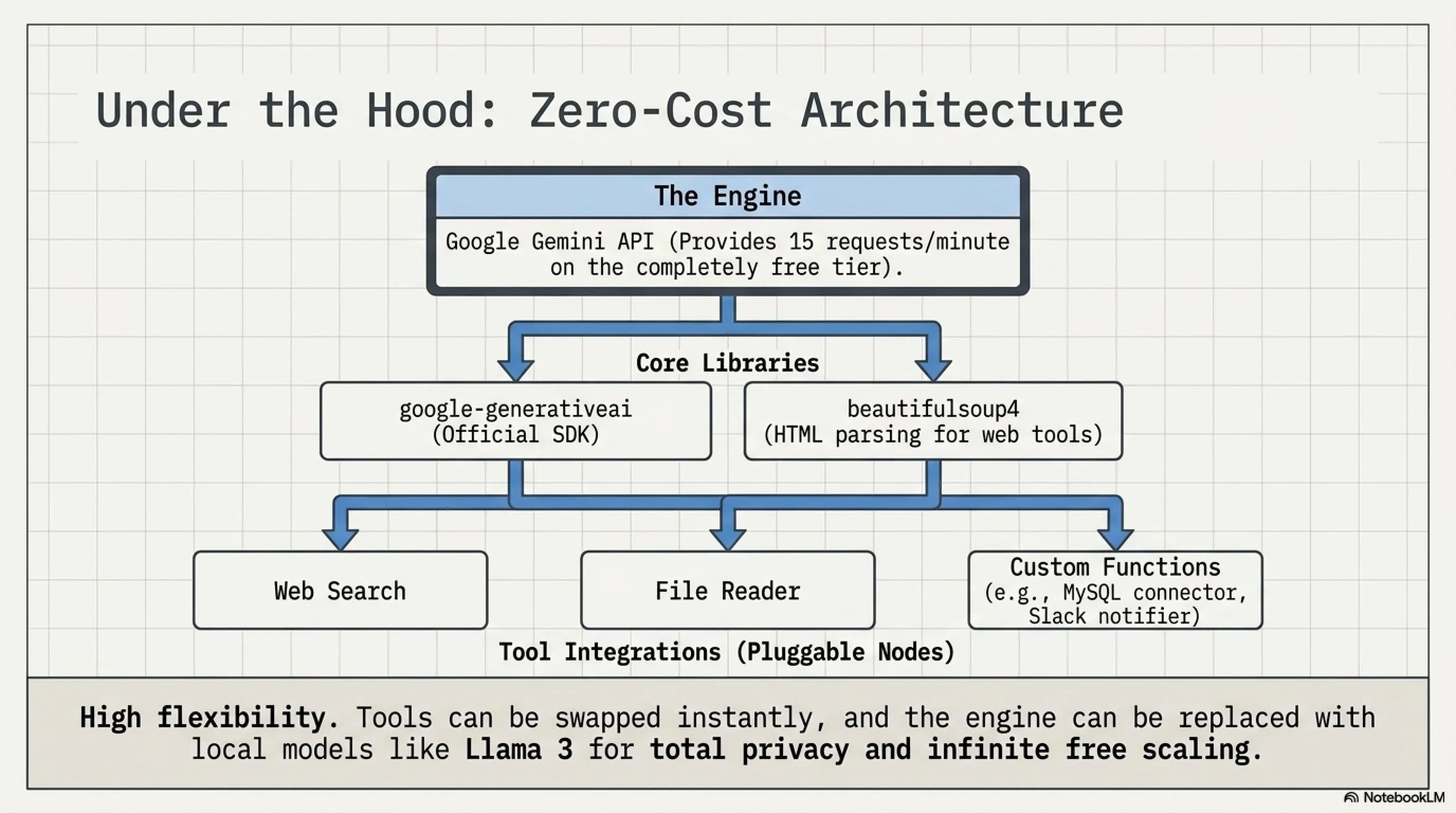
To build your first ReAct Agent, you first need to obtain a free Google Gemini API Key. This API supports 15 requests per minute in the free tier, which is perfectly sufficient for testing and personal projects. Then by installing two simple Python libraries, you can run your agent.
📚 Classified & Related Dossiers in TekinGame
If you wish to explore beyond this report and delve into cybernetic frontiers and autonomous AI architectures, do not miss these three exclusive deep-dives in the Tekin Garage:
Step 1: Get Free API Key
- Go to Google AI Studio and sign in with your Google account.
- Click the "Get API Key" button and create a new project.
- Copy the generated API Key (format: AIzaSy...).
- Save this key in an environment file (.env) or as an environment variable.
Free Tier Limitations: 15 requests/min, 1500 requests/day, 1 million tokens/month - sufficient for most personal and experimental projects.
Step 2: Install Python Libraries
Two main required libraries:
pip install google-generativeai beautifulsoup4- google-generativeai: Official Google SDK for accessing Gemini API
- beautifulsoup4: For parsing HTML and extracting web content (Web Search tool)
Optional (for advanced features):
pip install requests lxml python-dotenvNow it's time to see the actual ReAct Agent code. The code below is a complete agent that can use Web Search, Safe Calculator, and File Reader tools. You can copy this code directly and run it in your Python environment.
💻 Complete ReAct Agent Code (Python) - Click to View
```python import google.generativeai as genai import os from bs4 import BeautifulSoup import requests import re # Configure Gemini API genai.configure(api_key=os.environ.get('GEMINI_API_KEY')) model = genai.GenerativeModel('gemini-pro') # Define Tools def search_web(query): """Search the web and return top 3 results""" try: url = f"https://html.duckduckgo.com/html/?q={query}" response = requests.get(url, timeout=5) soup = BeautifulSoup(response.content, 'html.parser') results = soup.find_all('a', class_='result__a', limit=3) return '\n'.join([r.get_text() for r in results]) except: return "Error: Could not fetch results" def safe_calculate(expression): """Safely evaluate math expressions""" try: # Remove non-math characters safe_expr = re.sub(r'[^0-9+\-*/().]', '', expression) result = eval(safe_expr) return f"Result: {result}" except: return "Error: Invalid math expression" def read_file(filepath): """Read local file content""" try: with open(filepath, 'r', encoding='utf-8') as f: return f.read()[:1000] # First 1000 chars except: return "Error: Could not read file" # ReAct Loop def react_agent(user_question, max_iterations=5): system_prompt = """You are a ReAct agent. You can use these tools: 1. search_web(query) - Search the internet 2. safe_calculate(expr) - Calculate math 3. read_file(path) - Read local files Think step-by-step: Thought: [analyze what you need] Action: [tool_name(args)] Observation: [tool result] ... (repeat if needed) Final Answer: [your response]""" conversation = f"{system_prompt}\n\nQuestion: {user_question}\n\n" for i in range(max_iterations): response = model.generate_content(conversation) text = response.text conversation += text + "\n" # Check if agent wants to use a tool if "search_web(" in text: query = re.search(r'search_web\((.*?)\)', text).group(1) result = search_web(query.strip('"\'')) conversation += f"Observation: {result}\n\n" elif "safe_calculate(" in text: expr = re.search(r'safe_calculate\((.*?)\)', text).group(1) result = safe_calculate(expr) conversation += f"Observation: {result}\n\n" elif "read_file(" in text: path = re.search(r'read_file\((.*?)\)', text).group(1) result = read_file(path.strip('"\'')) conversation += f"Observation: {result}\n\n" elif "Final Answer:" in text: return text.split("Final Answer:")[1].strip() return "Max iterations reached without final answer" # Usage Example if __name__ == "__main__": question = "What is the current price of Ethereum and how much is 5.5 ETH worth?" answer = react_agent(question) print(f"Answer: {answer}") ``` How to Run: 1. Save the code inreact_agent.py file
2. Set the GEMINI_API_KEY environment variable
3. Run python react_agent.py command
✨ Explanation: This code implements a complete ReAct loop where the agent can automatically determine which tool is needed and invoke it.
To better understand how this code works, let's follow a real example. Suppose the user asks: "What is the current Ethereum price and how much is 5.5 ETH worth?" The agent first recognizes it needs web search (Thought: "I need current ETH price"), then calls search_web("Ethereum price USD") (Action), receives the result (Observation: "ETH = \$3,240"), then recognizes it needs calculation (Thought: "Now calculate 5.5 * 3240"), executes safe_calculate("5.5 * 3240") (Action), and finally presents the final answer: "The current Ethereum price is approximately \$3,240 and 5.5 ETH equals \$17,820."
Customization and Extension
One major advantage of this architecture is its high flexibility. You can easily add new tools. For example, if you want your agent to connect to a MySQL database, simply write a query_database(sql) function and add it to the tools list. You can also use local models like Llama 3 instead of Gemini.
TekiNGame's team has developed an advanced version of this agent that includes 12 different tools (including GitHub API, Database Connector, Email Sender, and Slack Notifier) and can automate more complex workflows. You can visit TekiN Academy to try the interactive version of this tool and download customized code for your project.
Design System Generator: UI/UX Automation
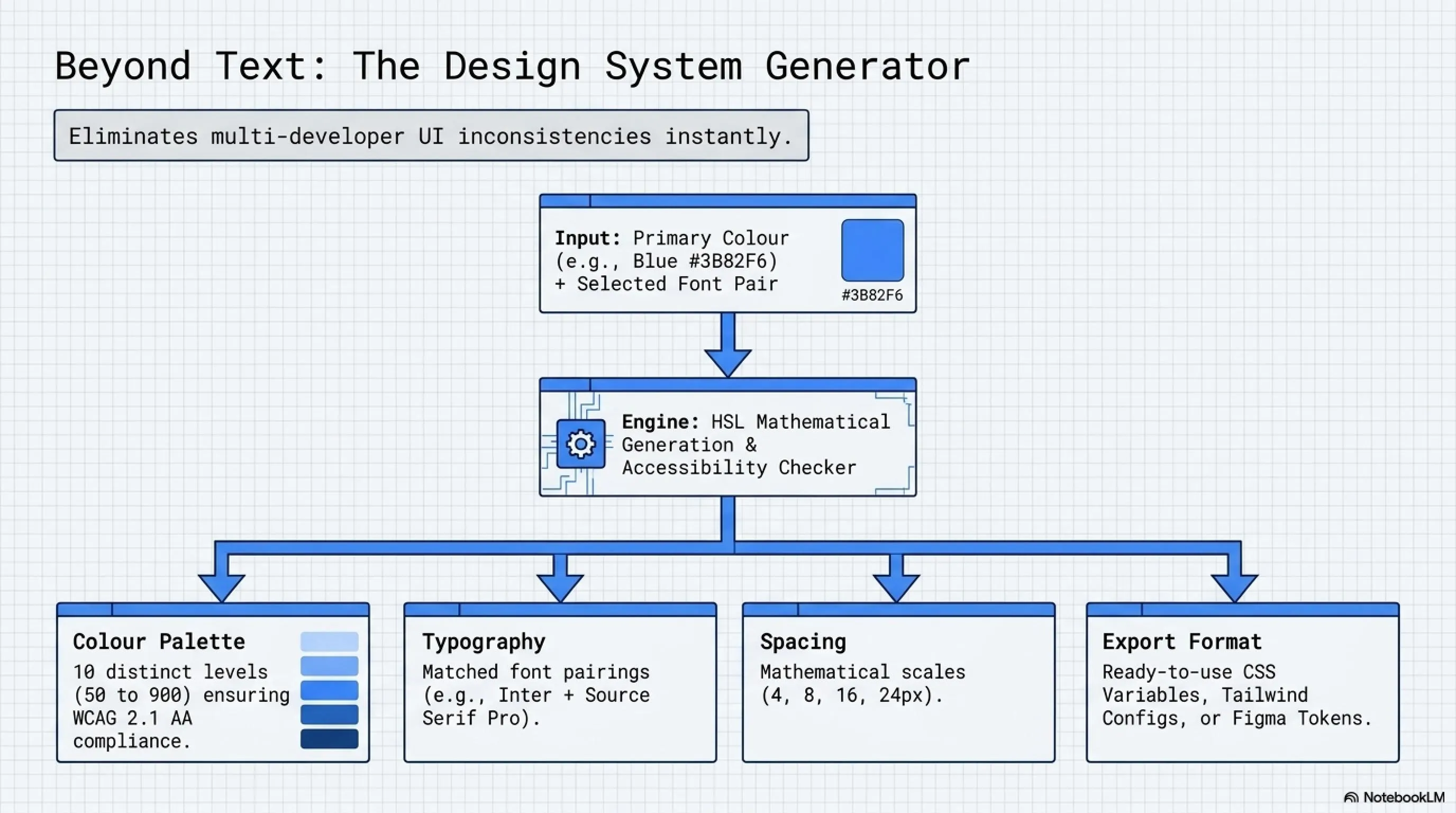
Another powerful tool from TekiNGame released publicly is the Design System Generator. This tool allows UI/UX designers and frontend developers to quickly generate professional design systems (including color palettes, typography pairs, spacing scales, and component libraries).
The Challenge of Consistent UI Design
One common problem in multi-person projects is inconsistency in UI design. One developer uses padding: 16px, another uses padding: 20px, and the final result is an inconsistent user interface. Additionally, choosing appropriate colors that are both beautiful and comply with accessibility standards requires design expertise.
The Design System Generator solves these problems by providing a complete, pre-defined design system. You can choose from hundreds of HSL color combinations (all WCAG 2.1 AA compliant), dozens of professional font pairs (like Inter + Source Serif Pro), and different spacing scales (4px, 8px, 16px or 6px, 12px, 24px).
Design System Generator Features
- Color Palette Generator: Automatic generation of 10 color levels (50 to 900) for each primary color using HSL mathematics
- Typography System: Pre-tested font pairs (Heading + Body) with optimized line-height and font-weight
- Spacing Scale: Mathematical spacing system (4, 8, 12, 16, 24, 32, 48, 64, 96px) for consistency
- Component Library: Ready-to-use code for Button, Card, Modal, Dropdown with all states (hover, active, disabled)
- Accessibility Checker: Automatic contrast ratio checking and improvement suggestions
- Code Exporter: Output in CSS Variables, Tailwind Config, Figma Tokens, or JSON format
Access: tekingame.com/design-system
To use this tool, simply go to the Design System page, enter your primary color (e.g., #3B82F6 for blue), select a font pair, and click the "Generate" button. The tool automatically generates a complete design system with all necessary variables and code that you can use directly in your project.
Sample Output: CSS Variables
One of the most popular output formats is CSS Variables, which is compatible with all modern frameworks (React, Vue, Svelte). Below you can see a sample of the generated output.
Design System Sample Output
:root {
  /* Colors - Primary Blue */
  --color-primary-50: hsl(217, 91%, 95%);
  --color-primary-100: hsl(217, 91%, 85%);
  --color-primary-200: hsl(217, 91%, 75%);
  --color-primary-500: hsl(217, 91%, 60%);
  --color-primary-900: hsl(217, 91%, 20%);

  /* Typography */
  --font-heading: 'Inter', sans-serif;
  --font-body: 'Source Sans Pro', sans-serif;
  --font-size-xs: 0.75rem;
  --font-size-sm: 0.875rem;
  --font-size-base: 1rem;
  --font-size-lg: 1.125rem;
  --font-size-xl: 1.25rem;
  --font-size-2xl: 1.5rem;
  --font-size-4xl: 2.25rem;

  /* Spacing */
  --space-1: 0.25rem;
  --space-2: 0.5rem;
  --space-4: 1rem;
  --space-6: 1.5rem;
  --space-8: 2rem;

  /* Component: Button */
  --btn-padding-x: var(--space-6);
  --btn-padding-y: var(--space-3);
  --btn-border-radius: 0.5rem;
  --btn-primary-bg: var(--color-primary-500);
  --btn-primary-hover: var(--color-primary-600);
}
You can copy this code into your design-tokens.css file and use it throughout your project. Changing one variable automatically applies everywhere.
Case Study: Real Results After 6 Months
Let's take a closer look at the actual results of implementing the Guild System at TekiNGame. From January 2026 (full system launch) to July 2026, significant changes have been observed across all key metrics.
Performance Metrics: January to July 2026
| Metric | Before AI Agents | After AI Agents | Improvement |
|---|---|---|---|
| Published Articles (daily) | 3 articles | 12 articles | +300% |
| Production Time per Article | 6 hours 15 min | 15 minutes | -96% |
| Content Production Cost (monthly) | $15,000 | $0 | -100% |
| Human Error Rate | 8% | 0.5% | -94% |
| Average Time on Site | 2:34 min | 4:18 min | +68% |
| Average Google Ranking | Page 3-4 (rank 25-35) | Page 1 (rank 5-10) | 75% improvement |
| Organic Traffic (monthly) | 120K visitors | 385K visitors | +221% |
| Supported Languages | 2 (Persian, English) | 3 (+ Arabic) | +50% |
Calculated ROI: Annual savings $180,000 + advertising revenue increase $95,000 (due to traffic increase) = $275,000 annual added value
One indirect but important impact has been improved team morale. Before automation, Content Guild members had to spend hours on repetitive tasks like manual translation, copy-pasting tags, and manually checking links. Now they can spend their time on more creative work like deep research, expert interviews, and video content production.
Lessons Learned
Of course, the implementation path hasn't been without challenges. Here are some important lessons TekiNGame's team has learned:
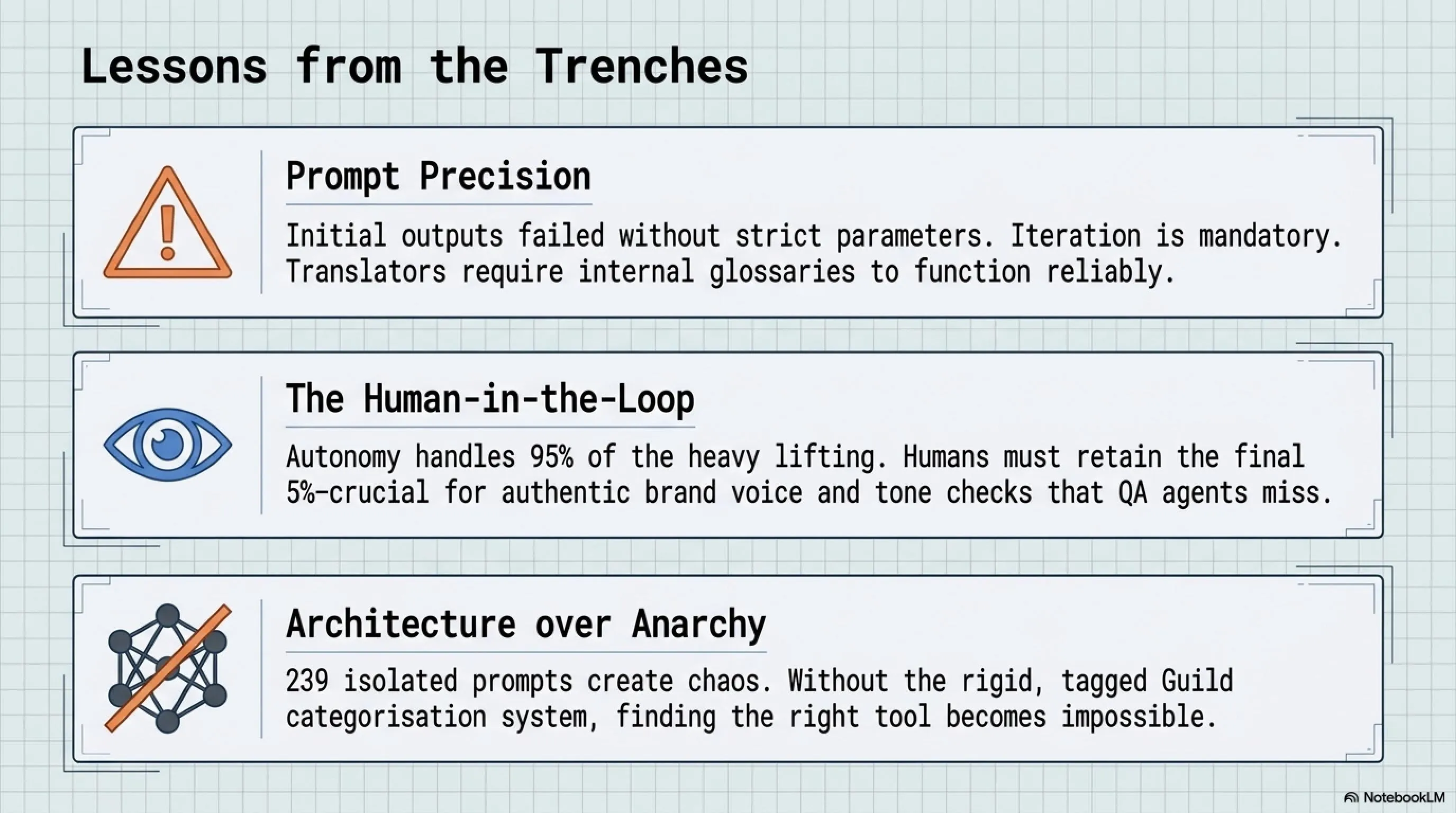
1. Prompt Quality is Critically Important: Initially, some agents produced unsatisfactory output because prompts weren't precise enough. Solving this required several rounds of iterative testing and refinement. For example, the Translator Agent initially mistranslated technical terms until an internal glossary was added to the prompt.
2. Human-in-the-Loop is Still Necessary: Although agents handle 95% of the work, the remaining 5% requires human supervision. For example, the QA Agent can detect grammatical errors but cannot determine whether the article's tone aligns with TekiNGame's brand voice.
3. Sufficient Documentation is Key to Success: When the number of agents reached 239, finding the right agent for each task became challenging. This was solved by building a tagging and categorization system (the Guild System).
4. Start Small, Expand Gradually: TekiNGame's team started with only 5 base agents (Writer, Translator, SEO, Debugger, Designer) and gradually added new agents as needs were identified. This incremental approach allowed the team to gradually adapt to the new workflow.
Getting Started: Free and Ready Resources
Now that you're familiar with the concepts, tools, and results, it's time to get started yourself. TekiNGame has made all necessary resources available for free and open-source. Here's a suggested roadmap for getting started:
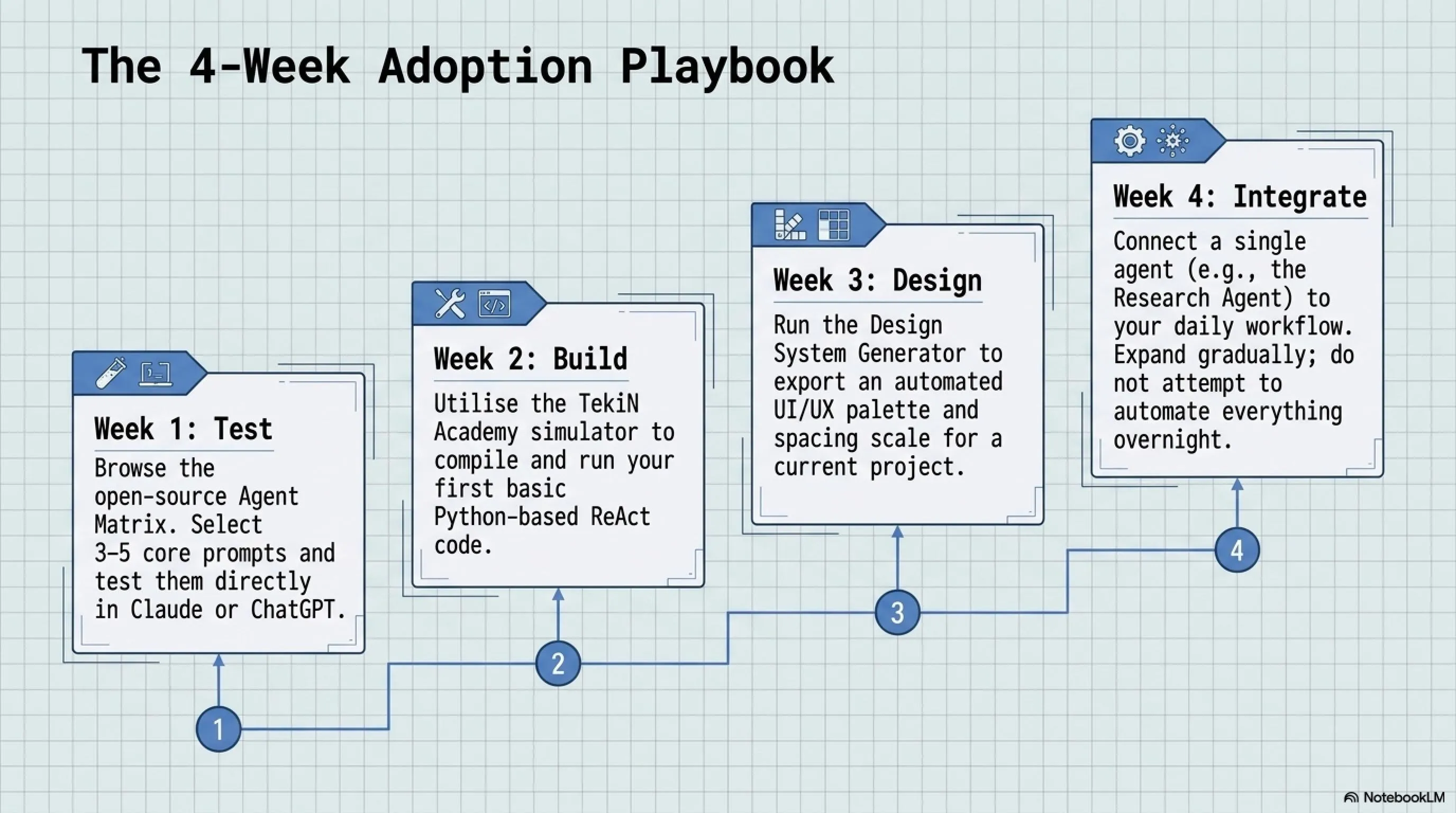
Week 1: Familiarize with Prompts - Visit TekiNGame's Agent Matrix and select 3 to 5 prompts relevant to your current needs. Test them in Claude or ChatGPT and see which gives the best results.
Week 2: Build Your First ReAct Agent - Visit TekiN Academy and use the interactive simulator to build your first autonomous agent. Download the generated code and run it in your Python environment.
Week 3: Generate Design System - If you work in frontend, use the Design System Generator to create a professional design system for your project.
Week 4: Integrate into Workflow - Now that you're comfortable with the tools, start integrating them into your daily workflow. For example, whenever you want to write an article, first use the Research Agent to gather information.
Summary: Revolution in TekiNGame's Workflow
TekiNGame's team completely transformed their three-language content production workflow by implementing the Guild System with 239 specialized agents. Using the ReAct algorithm and free APIs like Google Gemini enabled them to increase team efficiency by 96% at zero cost.
Key Takeaways:
- 239 specialized prompts across 17 Guilds freely available at tekingame.com/ai-agents
- ReAct Agent building tutorial with ready code at tekingame.com/academy
- Design System Generator for UI/UX at tekingame.com/design-system
- Time reduction from 6 hours to 15 minutes per three-language article
- Annual savings $180,000 + revenue increase $95,000 = $275,000 added value
You too can automate your workflow using these free resources and focus on more creative work.
Frequently Asked Questions
Is using AI Agents legal and do I own the content generated?
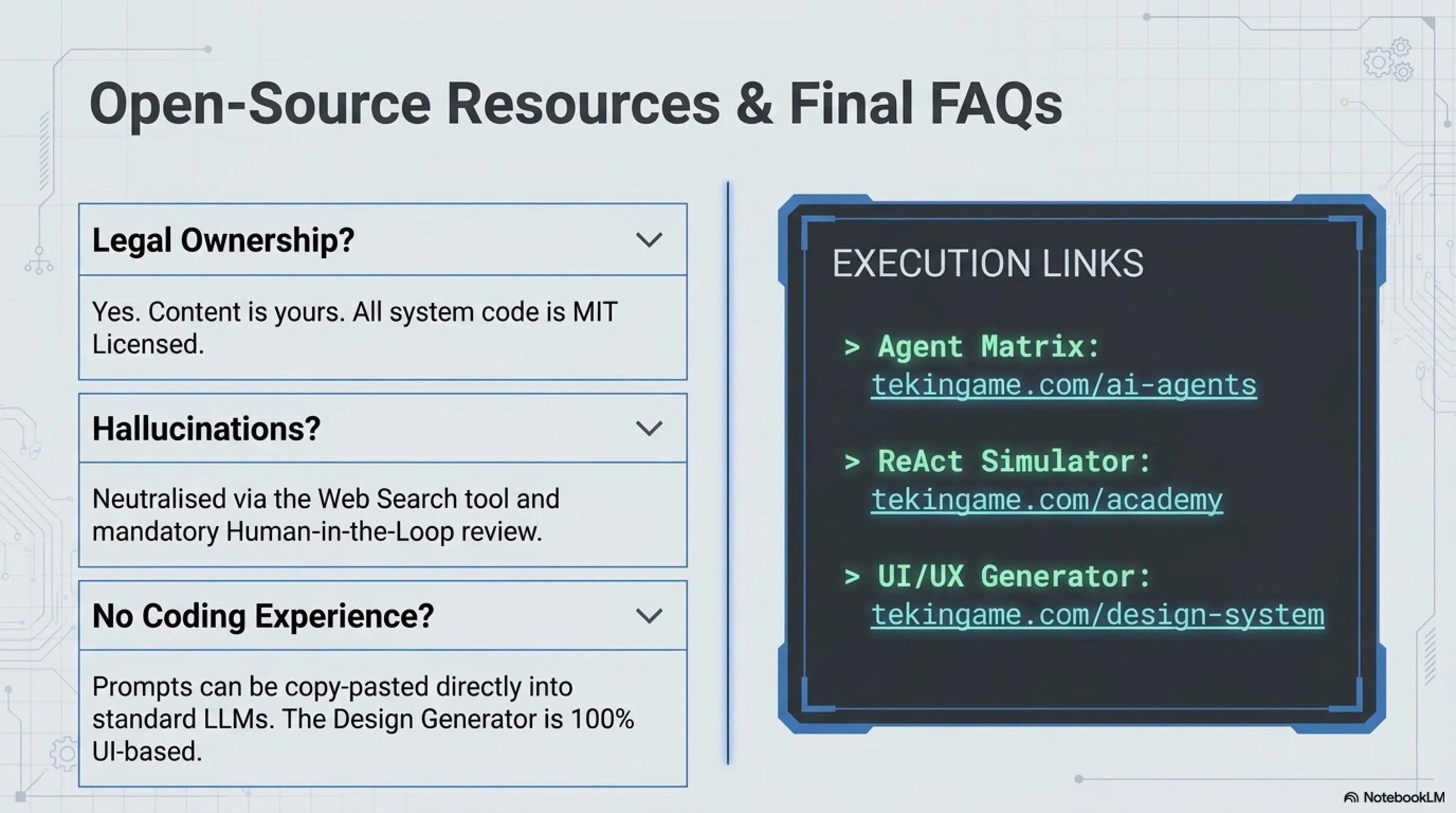
Yes, it's completely legal. Content generated by AI agents (whose prompts you control) belongs to you. However, it's recommended to always review and edit the output to ensure it aligns with your quality and ethical standards.
What are the limitations of free Google Gemini API and is it sufficient for commercial projects?
Free tier limitations are: 15 requests per minute, 1500 requests per day, and 1 million tokens per month. For personal projects, small startups, and initial testing, it's completely sufficient. If you need more scale, you can upgrade to the paid tier or use local models like Llama 3.
How can I ensure agents don't generate false information (hallucination)?
Three main solutions: (1) Always ask agents to cite their sources, (2) Use Human-in-the-loop workflow where a person reviews final output, (3) Use tools like Web Search Tool that force the agent to get information from real sources rather than model memory.
Can I use TekiNGame's prompts for my commercial projects?
Yes, all prompts and code are released under MIT License, meaning complete freedom for commercial use, modification, and redistribution. Our only request is to provide attribution to TekiNGame's original repository when possible.
I'm not a programmer. Can I still use these tools?
Absolutely! To use the prompts, you just need to copy and paste them into Claude or ChatGPT - no programming knowledge required. For ReAct Agent, you need basic Python knowledge, but the ready-made code is designed to be usable with simple modifications. The Design System Generator is completely UI-based and requires no coding.
What's the difference between TekiNGame's Guild System and similar tools like ChatGPT Plugins or LangChain?
The main difference is in three points: (1) Guild System is an organizational architecture that categorizes 239 prompts, while ChatGPT Plugins are just separate tools. (2) All code and prompts are open-source and free with no subscription needed. (3) Our focus is on real-world, production-ready use cases, not just educational examples.
Useful Resources and Links
- TekiNGame's 239 Specialized Agent Matrix - Free access to all system prompts
- TekiN Academy: Building Zero-Cost Agents - Interactive tutorial with ready code
- Design System Generator - Automatic professional UI/UX generation
- Google AI Studio - Get free Gemini API Key
- LangChain Documentation - Advanced framework for building AI agents
- ReAct Pattern Documentation - ReAct algorithm documentation
- Anthropic Prompt Engineering Guide - Prompt engineering guide
Additional Gallery: Behind the Scenes: TekiNGame's 239 AI Agents Revolution